ProRealCode Studio is on its way. As soon as it is published, this button will take you straight to its Chrome Web Store page.
Chapter 25 · Part VI — Reference
Every key Studio answers to.
Most keys work with the cursor in the editor. A few work anywhere on the platform page, and a few inside one window. On a Mac, ⌘ replaces Ctrl wherever the Mac column says so.
In the editor
Keys
Mac
Does
Ctrl + Enter
⌘ + Enter
Run: the code goes onto the chart.
Ctrl + S
⌘ + S
Save. A code never saved asks for a name first.
Ctrl + /
⌘ + /
Turn the line, or the selected lines, into a // comment, or back.
Ctrl + Shift + /
⌘ + Shift + /
Wrap the selection in a /* */ comment, or unwrap it.
Shift + Alt + A
The same /* */ comment.
Shift + Alt + F
Format document: re-indent the whole code from its blocks.
Tab · Shift + Tab
same
Indent or un-indent the line, or every selected line.
Enter
same
New line at the same indentation, one level more after IF, FOR, WHILE, FUNCTION.
Alt + 1 … 9
With two charts or more: that chart becomes the target of “Run” (chapter 04).
Ctrl + C · Ctrl + X
⌘ + C · ⌘ + X
Copy or cut, as usual. The clipboard also receives the line //@ProRealCodeScript@version=…@ on top (chapter 23).
In the editor · Where to find them again
The editor writes its keys next to its commands.
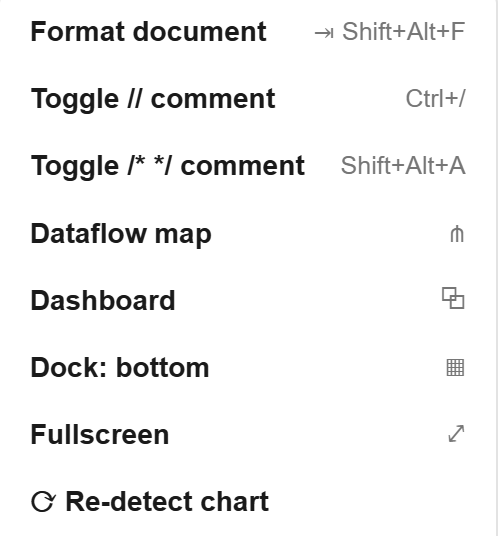
The ⋯ menu writes three of these keys next to their command.
The status bar keeps the three most used ones in view.
The Mac column: ⌘ is read where the code accepts it. The shortcuts with Alt depend on the character the key produces, which Option changes on a Mac: not tested on a Mac for this guide.
With the mouse
Drag a row of “Codes on the chart” onto another chart, Alt held at release
Copies the code there instead of moving it. The drop zone reads “hold Alt to copy”.
Double-click the editor's title
Closes the editor, like “Close”.
On the platform page
Keys that work wherever you are on the page.
These keys do nothing while you are typing in a field, the editor included: click on the chart first.
Keys
Mac
Does
Alt + P
Show or hide the editor. The way back in when the ƒ launcher is switched off.
Alt + I
Open or close “Codes on the chart” (chapter 12).
Ctrl + Shift + D
Control + Shift + D
Next price render style: Classic flat, Isometric, Depth-by-volume, Gradient, Heat (chapter 14). Chrome's own use of these keys is cancelled on this page.
Bar replay
The replay strip. Its step and play buttons have the three keys below as tooltips.
Keys
Mac
Does, while a replay is on
Shift + ←
same
One bar back.
Shift + →
same
One bar forward.
Shift + ↓
same
Play, or pause.
Inside a window
Esc closes. Enter confirms.
Keys
Where, and what they do
Esc
Closes the window in front: Preferences, Codes, Variables, Templates, Codes on the chart, ⚙ Settings, Optimize, Share privately…
Enter · Esc
In Studio's own questions (a name to save under, a confirmation): OK, or Cancel.
Enter
In the search box of the prorealcode.com library, in the Codes window: search now.
The flow map, “How this code works”
The map's own hint says it: “Scroll to move · Ctrl+scroll to zoom · drag to pan · click a card to trace it” (chapter 10).
←→↑↓
Move the map. With Shift, four times further.
+ · − · 0
Zoom in, zoom out, back to the starting view.
F · Shift + F
Fit the whole map in the window · fit the card you selected and what it depends on.
Wheel · Ctrl + wheel
Move · zoom. ⌘ + wheel on a Mac. Shift + wheel moves sideways.
Double-click a card
Centre the map on it.
Esc
Undo one thing at a time: the side panel, the search, the focus, the selection, then the map closes.
The dashboard
Alt + arrow keys
With a card's header selected (Tab to it): move the card one place earlier or later (chapter 21).
The information collected on this form is stored in a computer file by ProRealCode to create and access your ProRealCode profile. This data is kept in a secure database for the duration of the member's membership. They will be kept as long as you use our services and will be automatically deleted after 3 years of inactivity. Your personal data is used to create your private profile on ProRealCode. This data is maintained by SAS ProRealCode, 407 rue Freycinet, 59151 Arleux, France. If you subscribe to our newsletters, your email address is provided to our service provider "MailChimp" located in the United States, with whom we have signed a confidentiality agreement. This company is also compliant with the EU/Swiss Privacy Shield, and the GDPR.
For any request for correction or deletion concerning your data, you can directly contact the ProRealCode team by email at privacy@prorealcode.com
If you would like to lodge a complaint regarding the use of your personal data, you can contact your data protection supervisory authority.
Get Assistance
Assistance Type
Your Need
Proposed Solutions
Do you like cookies? 🍪 We use cookies to ensure you get the best experience on our website.
(Learn more)