






Not on the Chrome Web Store yet
ProRealCode Studio is on its way. As soon as it is published, this button will take you straight to its Chrome Web Store page.
Install Studio once, then open it from any chart.
ProRealCode Studio lives inside the ProRealTime web platform. You add it to your browser once; after that, every time you open the platform, it waits at the bottom of the chart.
- 01Install the extension
- 02Open the platform
- 03Use the side bar button
- 04Open, collapse, close
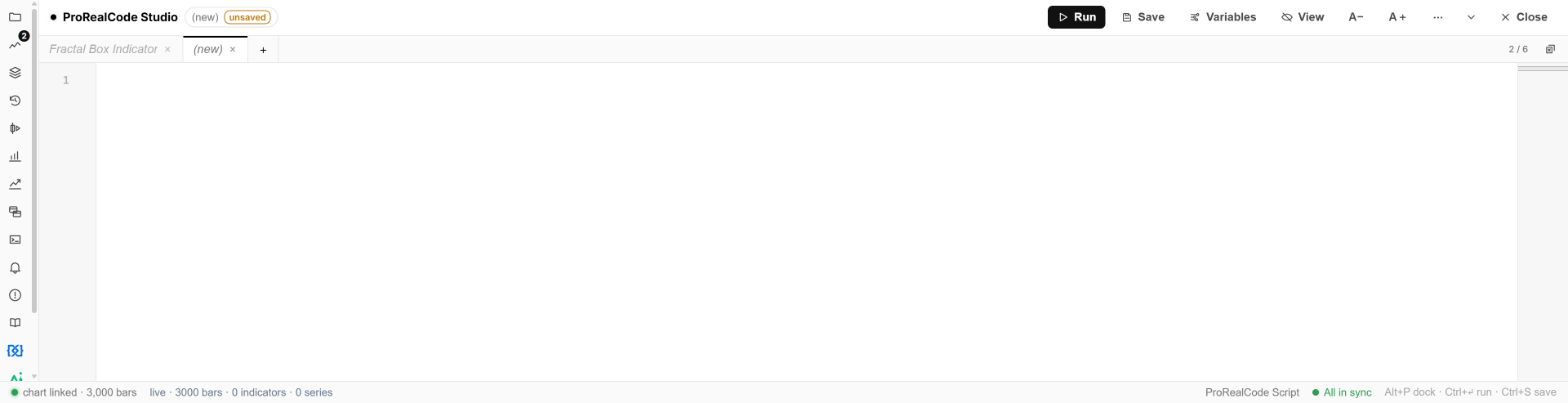
Add ProRealCode Studio to your browser.
Studio installs from the Chrome Web Store, under the name “ProRealCode Studio for ProRealTime” store link to come.
- Open the ProRealCode Studio page on the Chrome Web Store.The page shows “ProRealCode Studio for ProRealTime” and an “Add to Chrome” button.
- Click “Add to Chrome”, then confirm with “Add extension”.Studio joins your browser's extensions.
- If a ProRealTime tab is already open, reload it with F5.Studio only reaches pages opened after it was installed.

- No toolbar icon. Studio shows itself inside the platform page, not next to the address bar.
- prorealtime.com only. It runs on no other site.
- Notifications. It may show desktop notifications, for the alerts of your codes (chapter 16).
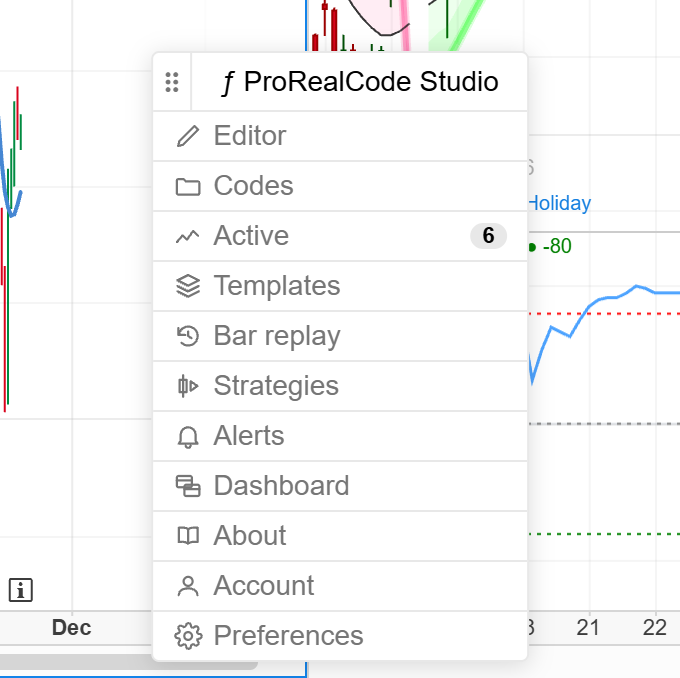
Open a chart: the ƒ launcher waits at the bottom.
 1
2
3
- Open the ProRealTime web platform and log in as usual.Studio starts with the page, editor closed.
- Open an instrument chart.The ƒ launcher sits at the bottom centre of the window.
- Click “ƒ ProRealCode Studio”.The editor opens under the chart.
- The grip ⠿. Drag it to move the launcher anywhere in the window.
- “ƒ ProRealCode Studio” opens the editor.
- The count. How many of your codes are on the chart now.
What each row opens
| Row | Opens | Chapter |
|---|---|---|
| Editor · Codes | The editor · your codes, the examples, the prorealcode.com library | 03 · 07 |
| Active | “Codes on the chart”: what is applied and drawing right now | 12 |
| Templates · Bar replay | Saved sets of codes · the chart replayed bar by bar | 13 · 15 |
| Strategies · Alerts | Backtest results and running strategies · alerts of your codes | 18 · 16 |
| Dashboard | The windows you build | 21 |
| About · Account | Version, help and what's new · your prorealcode.com account | 27 · 05 |
| Preferences | Editor, theme, colours, and which rows this launcher shows | 24 |
The same menu, from the platform's right-hand bar.
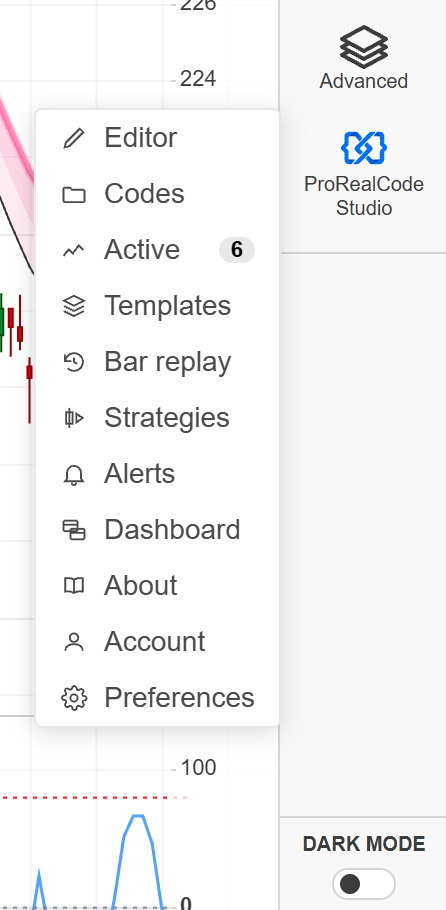
Studio adds its own button to the platform's right-hand bar, under the platform's buttons. It opens the launcher's rows as a menu pinned beside it.
- Click “ProRealCode Studio” in the right-hand bar.The menu opens to the left of the button.
- Click a row, “Editor” for instance.The editor opens and the menu closes.
- To close the menu without choosing, click anywhere else, or the button again.Nothing else changes.
Choose what you keep on screen
| Setting | What it does |
|---|---|
| Launcher rows | Untick a row to hide it from the launcher and from the button's menu. “Preferences” always stays: it is how the rows come back. |
| Show the ƒ launcher | On by default. Off, the chart stays clear and the side bar button is your way in. |
| Clicking the button | “Open the menu beside it” (default), or “Show / hide ProRealCode Studio”: one click opens or closes the editor. |
Open it, fold it, close it. Your codes stay on the chart.

Open the editor
- Click “ƒ ProRealCode Studio” on the launcher, or its “Editor” row.The editor opens, cursor in the code.
- Or choose “Editor” in the side bar button's menu.Same result.
- Or press Alt + P after a click on the chart.The editor opens; the same keys close it.
Put it away
- Click the down arrow to collapse it.A thin bar stays at the bottom: the name, “Codes on the chart” with its count, ⋯, the arrow and “Close”. Click the arrow again to bring the editor back.
- Click “Close”, or double-click the title “ProRealCode Studio”.The editor disappears; the launcher is back.
Closing the editor stops nothing. Your codes stay on the chart and keep computing; only the editor goes away. It reopens where you left it: under the chart the first time, then in whichever of its three places you chose last (chapter 03).
Installed once, one click from every chart.
Studio is in your browser. Each time you open a ProRealTime chart, the ƒ launcher is there, and on recent platforms a “ProRealCode Studio” button too. Both lead to the same places: the editor, your codes, and the windows of the following chapters.
| Keys | Does |
|---|---|
| Alt + P | Show / hide the editor |
| Alt + I | Codes on the chart |
I see no launcher under my chart.
Reload the platform tab with F5: Studio only reaches pages opened after it was installed. Check the address ends in prorealtime.com. If “Show the ƒ launcher” is off, use the side bar button.
There is no Studio icon next to the address bar.
That is normal. Studio has no toolbar icon; it only appears inside the platform page.
Do I need a prorealcode.com account?
It is optional, and recommended. Without one, Studio keeps your codes in this browser only. With your prorealcode.com account connected, they are saved and follow you to your other browsers (chapter 05).
I closed the editor. Are my indicators gone?
No. “Close” only hides the editor. What is on the chart stays there; “Active” on the launcher counts it.
Can I move the launcher?
Yes, drag it by its grip ⠿. It stays inside the window.
Chapter 02 · Your first indicator