






Not on the Chrome Web Store yet
ProRealCode Studio is on its way. As soon as it is published, this button will take you straight to its Chrome Web Store page.
Your code watches the chart. Studio tells you when.
Add one line to an indicator and it raises an alert the moment its condition comes true: a popup on the chart, a beep if you ask for one, a desktop notification if you switch them on. This chapter writes that line, then sets how each alert reaches you.
- 01Write an alert
- 02Open the Alerts window
- 03Choose how it reaches you
- 04Mute, snooze, look back
Four ways an alert can reach you
| Output | When |
|---|---|
| Popup on the chart | Every time an alert fires, unless you muted or snoozed that indicator. |
| Beep | Only when the alert line asks for sound. |
| Desktop notification | Off until you switch it on in the Alerts window. Then it shows even when another window is in front. |
| Data for a webhook | When the alert line carries a block of values. That is chapter 17. |
One line inside the condition, and the code can call you.
42IF macdVal CROSSES OVER sig THEN43 alert("MACD", "crossed up at #close#, histogram #hist#", onceperbar, 1)44ENDIF45IF macdVal CROSSES UNDER sig THEN46 alert("MACD", "crossed down at #close#, histogram #hist#", onceperbar, 1)47ENDIF
| Argument | In the example | What it does |
|---|---|---|
| Title | "MACD" | The heading of the popup and of the notification. Optional: without it, the heading is the indicator's name. |
| Message | "crossed up at #close#…" | The text. Anything between two # is computed and inserted, so #close# becomes the price. Write it as one text in quotes: joining texts with + is refused. |
| Frequency | onceperbar | How often the line may fire. Optional: onceperbar when you leave it out. |
| Sound | 1 | 1 beeps, 0 stays silent. Optional: silent when you leave it out. |
The three frequencies
freqall | At every price update of the live bar. |
onceperbar | Once per bar at most. |
onceperbarclose | Once, when the bar closes. |
- Open the example “4 · Oscillator, histogram, alert”, or type the line into your own code.The header shows the “Studio Only” chip:
alert()is a ProRealCode Script addition (chapter 06). - Click “Run”.The indicator draws in its own panel. Nothing fires yet.
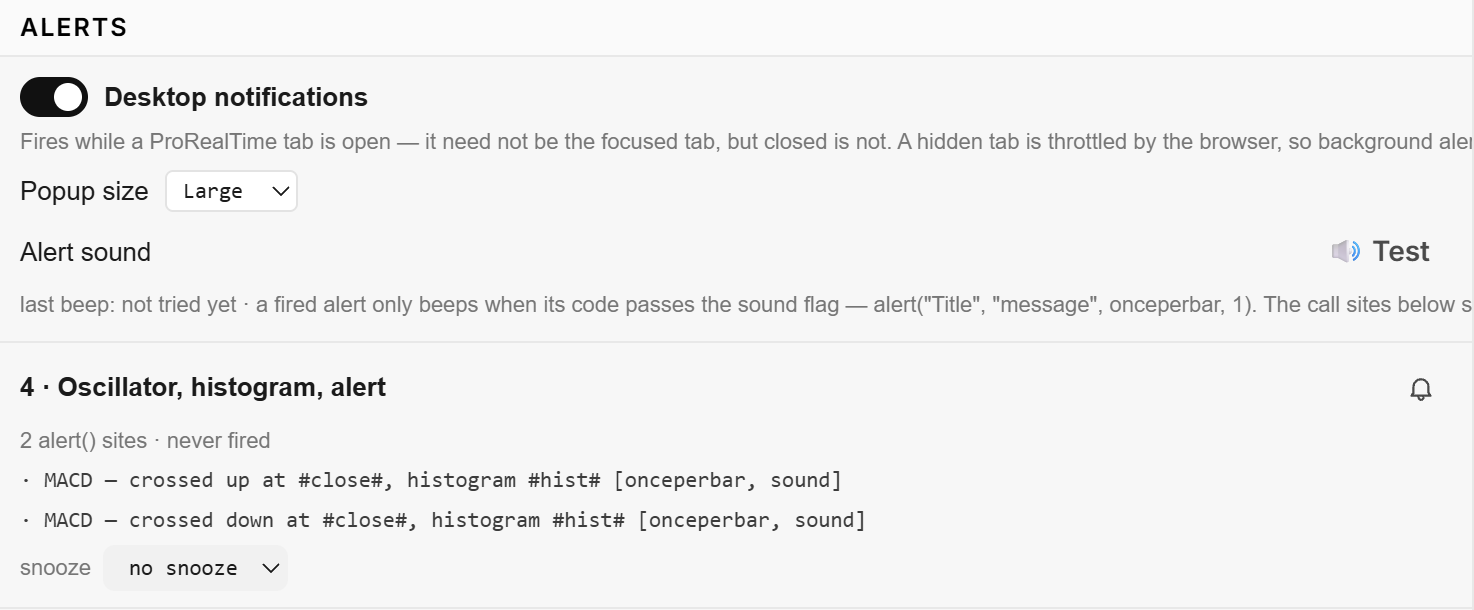
The bell lists every alert on the chart before any of them fires.
 1
2
3
4
5
6
- “Desktop notifications”. System notifications, off at first (task 3).
- “Popup size”. Small, Medium or Large for the popups on the chart. Medium at first.
- “Test” plays the alert beep now, so you know your speakers work.
- Your indicator, with how many alert lines it holds and when one last fired: “never fired” until the first.
- The bell of the indicator. One click mutes it (task 4).
- One row per alert line: title, message, then frequency and “sound” in brackets. Click it to open the code at that line.
- Click the bell on the rail, on the left edge of the editor. The “Alerts” row of the ƒ launcher does the same.The window opens beside the editor. A number on the bell counts the alerts fired since you last opened it.
- Find your indicator in the list.“No armed alerts”: no code on the chart holds an
alert()line yet.
A popup by default. A beep and a notification if you ask.

crossed up at 1.0852, histogram 0.0004
| Output | What to know |
|---|---|
| Popup | Top right of the page: the title after a bell, the message under it. It leaves after 6 seconds; click it to close it sooner. |
| Beep | Only for an alert line whose sound is 1. If you hear nothing, click “Test”: the line under it reports what the last beep did. |
| Desktop notification | The alert's title and message. Silent unless the alert has sound. At most one every 2 seconds and 8 a minute: the others still pop up on the chart and still go into the list. |
- In the Alerts window, switch on “Desktop notifications”.The next alert also appears as a notification of your system.
- When one has fired, read the line under the switch.“last notification delivered at …”: all is well. “suppressed” or “⚠ notification failed”: your system held it back. Check its notification settings, “Do not disturb” first.
onceperbarclose can skip bars.Silence one indicator for an hour. It still keeps a record.
Muting and snoozing stop the noise, not the alert. A silenced indicator still fires, and every alert it raises still goes into the list at the bottom of the window.
| In the Alerts window | What it does |
|---|---|
| The indicator's bell | One click mutes the indicator: the bell is crossed out and the row turns pale. No popup, no beep, no notification until you click it again. |
| “snooze” | 15 min, 1 hour or 8 hours of the same silence, ending on its own. The row reads “snoozed until” and the time. Reloading the page does not end it; “cancel snooze” does. |
| “Fired this session” | Every alert that fired, newest first: the time, the title, the message, the indicator and its bar. A screen after the title means a desktop notification went out, a speaker that it had sound. The last 60 are kept until you close or reload the tab; “Clear” empties the list. |
| “Hidden indicators” | Indicators with alert lines that you hid on the chart. A hidden indicator is not computed, so its alerts cannot fire, and the bars it misses stay missed. The eye at the end of the row shows it again. |
- To mute an indicator, click the bell at the end of its row.The row turns pale. Click again to hear it.
- To snooze it, pick a duration in “snooze”.The row reads “snoozed until” and the time it ends.
- To see what fired, scroll down to “Fired this session”.“Nothing has fired yet.” until the first alert.
Write the line, open the bell, choose the noise.
An alert() line inside a condition is all a code needs. The Alerts window lists those lines as soon as the code runs, and decides how loud each indicator may be.
Three limits hold everywhere: alerts fire on live prices only, the ProRealTime tab must stay open, and desktop notifications wait for you to switch them on.
| Default | Value |
|---|---|
| Frequency | onceperbar |
| Sound | off |
| Notifications | off |
| Popup size | Medium |
I clicked “Run” and no alert fired. Is it broken?
No. “Run” computes the past bars, and alerts never fire on the past. Wait for a new price on the live bar, with the market open.
The popup shows, but I hear nothing.
The alert line needs 1 as its sound argument. Then click “Test” in the Alerts window: if the test is silent too, check your system's volume.
My notification came a minute late.
The ProRealTime tab was behind another one, and the browser slows such tabs down. Keep it visible when the timing matters.
Can I get alerts with ProRealTime closed?
No. Alerts are computed in the open tab. A minimised window is fine; a closed tab is not.
The bell carries a number. What is it?
The alerts fired since you last opened the window. Opening it clears the number.
Chapter 17 · Sending signals to a webhook