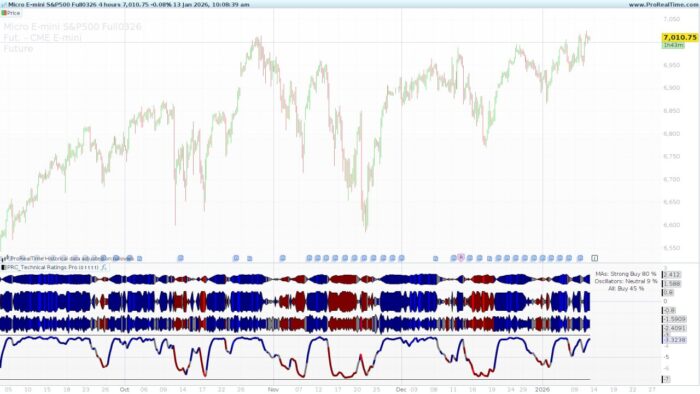
In technical analysis, relying on a single indicator can often lead to false signals or “market noise.” The most robust trading decisions usually come from a consensus, a situation where multiple independent tools point in the same direction.
The Technical Ratings Pro is a high-level analytical tool designed to provide this consensus automatically. It aggregates 27 different technical conditions into a single, easy-to-read interface, giving you a real-time “score” of the market bias.
How It Works: The Internal Logic
The indicator is divided into two major technical categories that analyze price from different perspectives:
1. The Moving Averages Category (15 Conditions)
This section determines the trend by comparing the current closing price to various averages and cloud structures. It includes:
-
Simple Moving Averages (SMA): Periods 10, 20, 30, 50, 100, and 200.
-
Exponential Moving Averages (EMA): Periods 10, 20, 30, 50, 100, and 200.
-
Hull Moving Average: A 9-period Hull MA for fast trend detection.
-
Volume Weighted Moving Average (VWMA): A 20-period average adjusted for trading volume.
-
Ichimoku Cloud: Analyzes the relationship between Lead Line 1, Lead Line 2, and the Base Line.
2. The Oscillators Category (11 Conditions)
This section looks for momentum shifts and overbought/oversold conditions. It aggregates:
-
Relative Strength Index (RSI): Standard 14-period analysis.
-
Stochastic & Stochastic RSI: Traditional and RSI-based momentum.
-
ADX: Filters for trend strength and direction (DI+/DI-).
-
MACD: Evaluates the relationship between the MACD line and the signal line.
-
Other Tools: Includes Commodity Channel Index (CCI), Awesome Oscillator, Momentum, Williams %R, Bull/Bear Power, and the Ultimate Oscillator.
Visual Breakdown
The indicator provides a rich visual experience directly on your price chart:
-
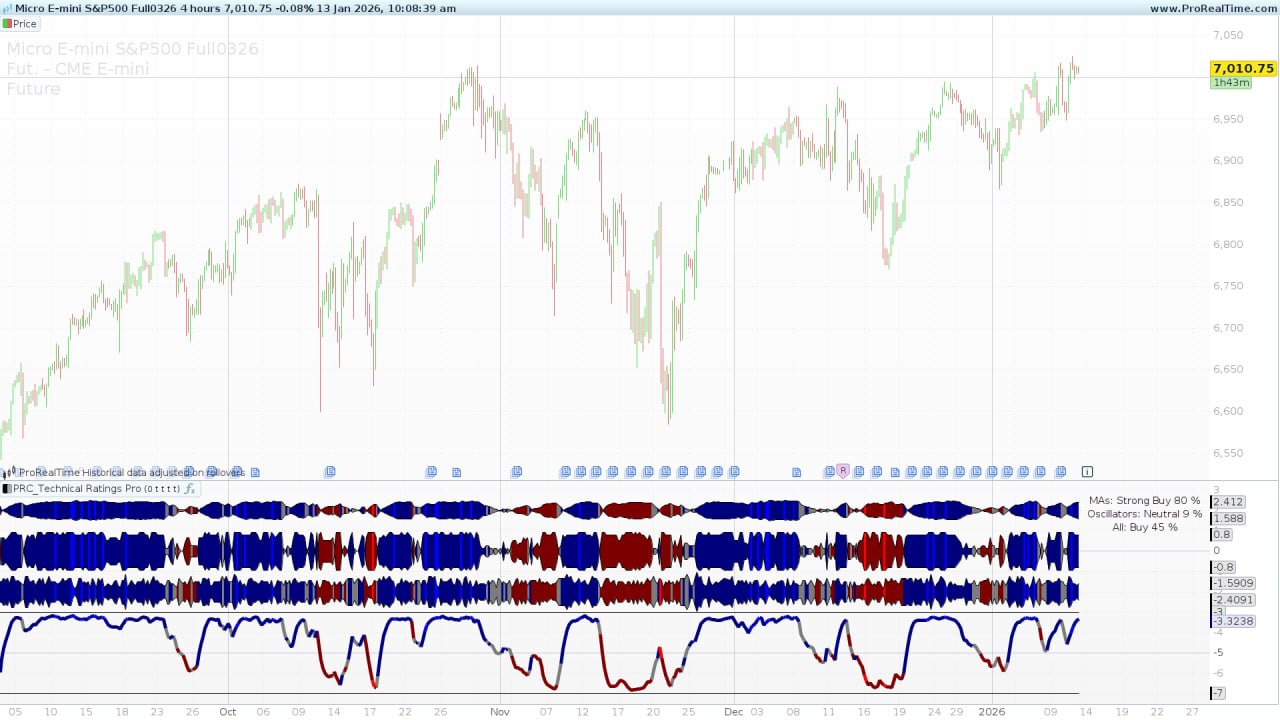
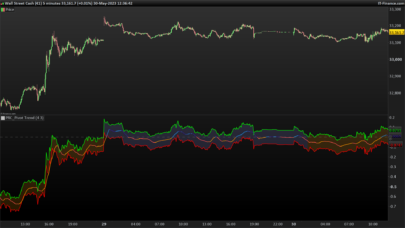
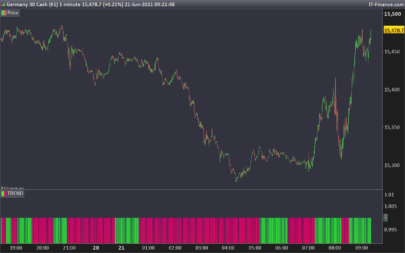
Real-Time Dashboard: A text summary appears in the top-right corner using the
ANCHORcommand. It displays the specific percentage rating for MAs, Oscillators, and the total combined score. -
Pump Waves: Using the
COLORBETWEENinstruction, the indicator draws dynamic “waves” representing the intensity of the bias.-
Blue/Green: Indicates a Bullish bias (Buy/Strong Buy).
-
Red: Indicates a Bearish bias (Sell/Strong Sell).
-
Grey: Indicates a Neutral market.
-
-
Trend Line: A smoothed dynamic line at the bottom represents the overall trajectory of the Moving Average consensus.
Configuration and Inputs
You can customize the indicator’s behavior through the variable interface without modifying the code:
| Variable | Default Value | Description |
| ratingSignal | 0 | 0 = All combined, 1 = Moving Averages only, 2 = Oscillators only. |
| showema | 1 (On) | Toggles the visibility of the Moving Average Pump Wave. |
| showosc | 1 (On) | Toggles the visibility of the Oscillator Pump Wave. |
| showtotal | 1 (On) | Toggles the visibility of the Total Rating Pump Wave. |
| showtrend | 1 (On) | Toggles the visibility of the dynamic MA Trend Line. |
ProBuilder Code
|
1 2 3 4 5 6 7 8 9 10 11 12 13 14 15 16 17 18 19 20 21 22 23 24 25 26 27 28 29 30 31 32 33 34 35 36 37 38 39 40 41 42 43 44 45 46 47 48 49 50 51 52 53 54 55 56 57 58 59 60 61 62 63 64 65 66 67 68 69 70 71 72 73 74 75 76 77 78 79 80 81 82 83 84 85 86 87 88 89 90 91 92 93 94 95 96 97 98 99 100 101 102 103 104 105 106 107 108 109 110 111 112 113 114 115 116 117 118 119 120 121 122 123 124 125 126 127 128 129 130 131 132 133 134 135 136 137 138 139 140 141 142 143 144 145 146 147 148 149 150 151 152 153 154 155 156 157 158 159 160 161 162 163 164 165 166 167 168 169 170 171 172 173 174 175 176 177 178 179 180 181 182 183 184 185 186 187 188 189 190 191 192 193 194 195 196 197 198 199 200 201 202 203 204 205 206 207 208 209 210 211 212 213 214 215 216 217 218 219 220 221 222 223 224 225 226 227 228 229 230 231 232 233 234 235 236 237 238 239 240 241 242 243 244 245 246 247 248 249 250 251 252 253 254 255 256 257 258 259 260 261 262 263 264 265 266 267 268 269 270 271 272 273 274 275 276 277 278 279 280 281 282 283 284 285 286 287 288 289 290 291 292 293 294 295 296 297 298 299 300 301 302 303 304 305 306 307 308 309 310 311 312 313 314 315 316 317 318 319 320 321 322 323 324 325 326 327 328 329 330 331 332 333 334 335 336 337 338 339 340 341 342 343 344 345 346 347 348 349 350 351 352 353 354 355 356 357 358 359 360 361 362 363 364 365 366 367 368 369 370 371 372 373 374 375 376 377 378 379 380 381 382 383 384 385 386 387 388 389 390 391 392 393 394 395 396 397 398 399 400 401 402 403 404 405 406 407 408 409 410 411 412 413 414 415 416 417 418 419 420 421 422 423 424 425 426 427 428 429 430 431 432 433 434 435 436 437 438 439 440 441 442 443 444 445 446 447 448 449 450 451 452 453 454 455 456 457 458 459 460 461 462 463 464 465 466 467 468 469 470 471 472 473 474 475 476 477 478 479 480 481 482 483 484 485 486 487 488 489 490 491 492 493 494 495 496 497 498 499 500 501 502 503 504 505 506 507 508 509 510 511 512 513 514 515 516 517 518 519 520 521 522 523 524 525 526 527 528 529 530 531 532 533 534 535 536 537 538 539 540 541 542 543 544 545 546 547 548 549 550 551 552 553 554 555 556 557 558 559 560 561 562 563 564 565 566 567 568 569 570 571 572 573 574 575 576 577 578 579 580 581 582 583 584 585 586 587 588 589 590 591 592 593 594 595 596 597 598 599 600 601 602 603 604 605 606 607 608 609 610 611 612 613 614 615 616 617 618 619 620 621 622 623 624 625 626 627 628 629 630 631 632 633 634 635 636 637 638 639 640 641 642 643 644 645 646 647 648 649 650 651 652 653 654 655 656 657 658 659 660 661 662 663 664 665 666 667 668 669 670 671 672 673 674 675 676 677 678 679 680 681 682 683 684 685 686 687 688 689 |
//----------------------------------------------------------// //PRC_Technical Ratings Pro (by veryfid) //version = 0 //07.05.24 //Iván González @ www.prorealcode.com //Sharing ProRealTime knowledge //----------------------------------------------------------// //-----Inputs-----------------------------------------------// defparam DRAWONLASTBARONLY = true ratingSignal=0//0=All 1=MAs 2=Oscillators showema=1//Show MA Pump Wave? showosc=1//Show Oscillator Pump Wave? showtotal=1//Show Total Rating Pump Wave? showtrend=1//Show MA Trend Line? //----------------------------------------------------------// //-----Moving Averages--------------------------------------// sma10=average[10,0](close) sma20=average[20,0](close) sma30=average[30,0](close) sma50=average[50,0](close) sma100=average[100,0](close) sma200=average[200,0](close) ema10=average[10,1](close) ema20=average[20,1](close) ema30=average[30,1](close) ema50=average[50,1](close) ema100=average[100,1](close) ema200=average[200,1](close) hullMA9=hullaverage[9](close) vwma=VolumeAdjustedAverage[20](close) //----------------------------------------------------------// //-----Ichimoku Cloud---------------------------------------// donchian9 = (highest[9](high)+lowest[9](low))/2 donchian26 = (highest[26](high)+lowest[26](low))/2 donchian52 = (highest[52](high)+lowest[52](low))/2 conversionLine=donchian9 baseLine=donchian26 leadLine1=(conversionLine+baseLine)/2 leadLine2=donchian52 //----------------------------------------------------------// //-----RSI--------------------------------------------------// myrsi = rsi[14](close) //----------------------------------------------------------// //-----Stochastic-------------------------------------------// lengthStoch=14 smoothKStoch = 3 smoothDStoch = 3 kStoch=Stochastic[lengthStoch,smoothKStoch](close) Dstoch=Stochasticd[lengthStoch,smoothKStoch,smoothDStoch](close) //----------------------------------------------------------// //-----CCI--------------------------------------------------// mycci = cci[20](close) //----------------------------------------------------------// //-----ADX--------------------------------------------------// adxvalue = ADX[14] adxPlus = DIplus[14](close) adxMinus = DIminus[14](close) //----------------------------------------------------------// //-----awesome Oscilator------------------------------------// hl2 = (high+low)/2 ao = average[5](hl2)-average[34](hl2) //----------------------------------------------------------// //-----Momentum---------------------------------------------// mom = momentum[10](close) //----------------------------------------------------------// //-----MACD-------------------------------------------------// macdMACD = MACDline[12,26,9](close) signalMACD = MACDSignal[12,26,9](close) //----------------------------------------------------------// //-----Stochastic RSI---------------------------------------// lengthStoch = 14 //Stochastic period smoothK = 3 //Smooth signal of stochastic RSI smoothD = 3 //Smooth signal of smoothed stochastic RSI MinRSI = lowest[lengthStoch](myrsi) MaxRSI = highest[lengthStoch](myrsi) StochRSI = (myRSI-MinRSI) / (MaxRSI-MinRSI) StochRSIK = average[smoothK](stochrsi)*100 StochRSID = average[smoothD](StochRSIK) //----------------------------------------------------------// //-----Ultimate Oscillator----------------------------------// if close[1]<low then tl=close[1] else tl=low endif //uo(ShortLen, MiddlLen, LongLen)(7,14,28) value1=summation[7](tr) value2=summation[14](tr) value3=summation[28](tr) value4=summation[7](close-tl) value5=summation[14](close-tl) value6=summation[28](close-tl) if value1<>0 and value2<>0 and value3<>0 then var0=28/7 var1=28/14 value7=(value4/value1)*var0 value8=(value5/value2)*var1 value9=value6/value3 uo=(value7+value8+value9)/(var0+var1+1)*100 endif //----------------------------------------------------------// //-----Williams Percent Range-------------------------------// wr = Williams[14](close) //----------------------------------------------------------// //-----Bull & Bear Power------------------------------------// BullPower = high - average[13,1](close) BearPower = low - average[13,1](close) //----------------------------------------------------------// priceavg=average[50,1](close) downtrend=close<priceavg uptrend=close>priceavg //----------------------------------------------------------// //-----Rating MA Calculation--------------------------------// //---SMA10 if barindex < 10 then calcRatingSMA10=undefined else if sma10=close then calcRatingSMA10=0 elsif sma10<close then calcRatingSMA10=1 elsif sma10>close then calcRatingSMA10=-1 endif calcSMA10=1 endif //---SMA20 if barindex < 20 then calcRatingSMA20=undefined else if sma20=close then calcRatingSMA20=0 elsif sma20<close then calcRatingSMA20=1 elsif sma20>close then calcRatingSMA20=-1 endif calcSMA20=1 endif //---SMA30 if barindex < 30 then calcRatingSMA30=undefined else if SMA30=close then calcRatingSMA30=0 elsif SMA30<close then calcRatingSMA30=1 elsif SMA30>close then calcRatingSMA30=-1 endif calcSMA30=1 endif //---SMA50 if barindex < 50 then calcRatingSMA50=undefined else if SMA50=close then calcRatingSMA50=0 elsif SMA50<close then calcRatingSMA50=1 elsif SMA50>close then calcRatingSMA50=-1 endif calcSMA50=1 endif //---SMA100 if barindex < 100 then calcRatingSMA100=undefined else if SMA100=close then calcRatingSMA100=0 elsif SMA100<close then calcRatingSMA100=1 elsif SMA100>close then calcRatingSMA100=-1 endif calcSMA100=1 endif //---SMA200 if barindex < 200 then calcRatingSMA200=undefined else if SMA200=close then calcRatingSMA200=0 elsif SMA200<close then calcRatingSMA200=1 elsif SMA200>close then calcRatingSMA200=-1 endif calcSMA200=1 endif //---EMA10 if barindex < 10 then calcRatingEMA10=undefined else if EMA10=close then calcRatingEMA10=0 elsif EMA10<close then calcRatingEMA10=1 elsif EMA10>close then calcRatingEMA10=-1 endif calcEMA10=1 endif //---EMA20 if barindex < 20 then calcRatingEMA20=undefined else if EMA20=close then calcRatingEMA20=0 elsif EMA20<close then calcRatingEMA20=1 elsif EMA20>close then calcRatingEMA20=-1 endif calcEMA20=1 endif //---EMA30 if barindex < 30 then calcRatingEMA30=undefined else if EMA30=close then calcRatingEMA30=0 elsif EMA30<close then calcRatingEMA30=1 elsif EMA30>close then calcRatingEMA30=-1 endif calcEMA30=1 endif //---EMA50 if barindex < 50 then calcRatingEMA50=undefined else if EMA50=close then calcRatingEMA50=0 elsif EMA50<close then calcRatingEMA50=1 elsif EMA50>close then calcRatingEMA50=-1 endif calcEMA50=1 endif //---EMA100 if barindex < 100 then calcRatingEMA100=undefined else if EMA100=close then calcRatingEMA100=0 elsif EMA100<close then calcRatingEMA100=1 elsif EMA100>close then calcRatingEMA100=-1 endif calcEMA100=1 endif //---EMA200 if barindex < 200 then calcRatingEMA200=undefined else if EMA200=close then calcRatingEMA200=0 elsif EMA200<close then calcRatingEMA200=1 elsif EMA200>close then calcRatingEMA200=-1 endif calcEMA200=1 endif //---hull9 if barindex < 9 then calcRatinghullMA9=undefined else if hullMA9=close then calcRatinghullMA9=0 elsif hullMA9<close then calcRatinghullMA9=1 elsif hullMA9>close then calcRatinghullMA9=-1 endif calchullMA9=1 endif //---VWMA if barindex < 20 then calcRatingVWMA=undefined else if VWMA=close then calcRatingVWMA=0 elsif VWMA<close then calcRatingVWMA=1 elsif VWMA>close then calcRatingVWMA=-1 endif calcVWMA=1 endif //---Ichimoku ma=leadLine1 > leadLine2 and close > leadLine1 and close < baseLine and close[1] < conversionLine and close > conversionLine src=leadLine2 > leadLine1 and close < leadLine2 and close > baseLine and close[1] > conversionLine and close < conversionLine if barindex < 52 then calcRatingichimoku=undefined else if ma=src then calcRatingichimoku=0 elsif ma<src then calcRatingichimoku=1 elsif ma>src then calcRatingichimoku=-1 endif calcichimoku=1 endif //---Rating calculation ratingMA=calcRatingSMA10+calcRatingSMA20+calcRatingSMA30+calcRatingSMA50+calcRatingSMA100+calcRatingSMA200+calcRatingEMA10+calcRatingEMA20+calcRatingEMA30+calcRatingEMA50+calcRatingEMA100+calcRatingEMA200+calcRatinghullMA9+calcRatingVWMA+calcRatingichimoku ratingMAC=calcSMA10+calcSMA20+calcSMA30+calcSMA50+calcSMA100+calcSMA200+calcEMA10+calcEMA20+calcEMA30+calcEMA50+calcEMA100+calcEMA200+calchullMA9+calcVWMA+calcichimoku if ratingMAC > 0 then rateMA = ratingMA/ratingMAC else rateMA = undefined endif //----------------------------------------------------------// //-----Rating Others----------------------------------------// //---RSI ratingRSI = myrsi maRSI = ratingRSI < 30 and ratingRSI[1] < ratingRSI srcRSI = ratingRSI > 70 and ratingRSI[1] > ratingRSI if barindex < 14 then calcRatingRSI=undefined else if maRSI=srcRSI then calcRatingRSI=0 elsif maRSI<srcRSI then calcRatingRSI=1 elsif maRSI>srcRSI then calcRatingRSI=-1 endif calcRSI=1 endif //---Stockastic maSto = kStoch < 20 and dStoch < 20 and kStoch > dStoch and kStoch[1] < dStoch[1] srcSto = kStoch > 80 and dStoch > 80 and kStoch < dStoch and kStoch[1] > dStoch[1] if barindex < 14 then calcRatingSto=undefined else if maSto=srcSto then calcRatingSto=0 elsif maSto<srcSto then calcRatingSto=1 elsif maSto>srcSto then calcRatingSto=-1 endif calcSto=1 endif //---CCI ratingCCI = myCCI maCCI = ratingCCI < -100 and ratingCCI[1]<ratingCCI srcCCI = ratingCCI > 100 and ratingCCI[1] > ratingCCI if barindex < 20 then calcRatingCCI=undefined else if maCCI=srcCCI then calcRatingCCI=0 elsif maCCI<srcCCI then calcRatingCCI=1 elsif maCCI>srcCCI then calcRatingCCI=-1 endif calcCCI=1 endif //---ADX maADX = adxValue > 20 and adxPlus[1] < adxMinus[1] and adxPlus > adxMinus srcADX = adxValue > 20 and adxPlus[1] > adxMinus[1] and adxPlus < adxMinus if barindex < 14 then calcRatingADX=undefined else if maADX=srcADX then calcRatingADX=0 elsif maADX<srcADX then calcRatingADX=1 elsif maADX>srcADX then calcRatingADX=-1 endif calcADX=1 endif //---AO maAO = ao crosses over 0 or (ao > 0 and ao[1] > 0 and ao > ao[1] and ao[2] > ao[1]) srcAO = ao crosses under 0 or (ao < 0 and ao[1] < 0 and ao < ao[1] and ao[2] < ao[1]) if barindex < 34 then calcRatingAO=undefined else if maAO=srcAO then calcRatingAO=0 elsif maAO<srcAO then calcRatingAO=1 elsif maAO>srcAO then calcRatingAO=-1 endif calcAO=1 endif //---MOM maMOM = Mom > Mom[1] srcMOM = Mom < Mom[1] if barindex < 10 then calcRatingMOM=undefined else if maMOM=srcMOM then calcRatingMOM=0 elsif maMOM<srcMOM then calcRatingMOM=1 elsif maMOM>srcMOM then calcRatingMOM=-1 endif calcMOM=1 endif //---MACD maMACD = macdMACD > signalMACD srcMACD = macdMACD < signalMACD if barindex < 26 then calcRatingMACD=undefined else if maMACD=srcMACD then calcRatingMACD=0 elsif maMACD<srcMACD then calcRatingMACD=1 elsif maMACD>srcMACD then calcRatingMACD=-1 endif calcMACD=1 endif //---Stoch RSI //ratingStoRSI = maStoRSI = DownTrend and StochRSIK < 20 and StochRSID < 20 and StochRSIK > StochRSID and StochRSIK[1] < StochRSID[1] srcStoRSI = UpTrend and StochRSIK > 80 and StochRSID > 80 and StochRSIK < StochRSID and StochRSIK[1] > StochRSID[1] if barindex < 20 then calcRatingStoRSI=undefined else if maStoRSI=srcStoRSI then calcRatingStoRSI=0 elsif maStoRSI<srcStoRSI then calcRatingStoRSI=1 elsif maStoRSI>srcStoRSI then calcRatingStoRSI=-1 endif calcStoRSI=1 endif //---WR maWR = WR < -80 and WR > WR[1] srcWR = WR > -20 and WR < WR[1] if barindex < 20 then calcRatingWR=undefined else if maWR=srcWR then calcRatingWR=0 elsif maWR<srcWR then calcRatingWR=1 elsif maWR>srcWR then calcRatingWR=-1 endif calcWR=1 endif //---BBpower maBBpower = UpTrend and BearPower < 0 and BearPower > BearPower[1] srcBBpower = DownTrend and BullPower > 0 and BullPower < BullPower[1] if barindex < 20 then calcRatingBBpower=undefined else if maBBpower=srcBBpower then calcRatingBBpower=0 elsif maBBpower<srcBBpower then calcRatingBBpower=1 elsif maBBpower>srcBBpower then calcRatingBBpower=-1 endif calcBBpower=1 endif //---UO maUO = UO > 70 srcUO = UO < 30 if barindex < 56 then calcRatingUO=undefined else if maUO=srcUO then calcRatingUO=0 elsif maUO<srcUO then calcRatingUO=1 elsif maUO>srcUO then calcRatingUO=-1 endif calcUO=1 endif //---Rating calculation ratingOtherC = calcUO+calcBBpower+calcWR+calcStoRSI+calcMACD+calcMOM+calcAO+calcADX+calcCCI+calcSto+calcRSI ratingOther = calcRatingUO+calcRatingBBpower+calcRatingWR+calcRatingStoRSI+calcRatingMACD+calcRatingMOM+calcRatingAO+calcRatingADX+calcRatingCCI+calcRatingSto+calcRatingRSI if ratingOtherC>0 then rateOther = ratingOther/ratingOtherC else rateOther = undefined endif //----------------------------------------------------------// //-----Rating Total-----------------------------------------// rateTotal = (rateMA+rateOther)/2 //----------------------------------------------------------// StrongBound = 0.5 WeakBound = 0.1 if ratingSignal=1 then tradeSignal = rateMA elsif ratingSignal=2 then tradeSignal = rateOther else tradeSignal = rateTotal endif //----------------------------------------------------------// //-----Gradient---------------------------------------------// poscond = tradeSignal > WeakBound negcond = tradeSignal < -WeakBound if poscond then posseries = tradeSignal else posseries = 0 endif if negcond then negseries = tradeSignal else negseries = 0 endif //count_rising(posseries) if posseries > 0 then vplot=posseries else vplot=-posseries endif if vplot=0 then poscount=0 elsif vplot>=vplot[1] then poscount=min(5,poscount+1) elsif vplot<vplot[1] then poscount=max(1,poscount-1) endif //count_rising(negseries) if negseries > 0 then vplot1=negseries else vplot1=-negseries endif if vplot1=0 then negcount=0 elsif vplot1>=vplot1[1] then negcount=min(5,negcount+1) elsif vplot1<vplot1[1] then negcount=max(1,negcount-1) endif //----------------------------------------------------------// myrate1=round(rateMA,2)*100 if -StrongBound > rateMA then drawtext("MAs: Strong Sell #myrate1#%",-200,-30)anchor(topright,xshift,yshift) r=255 g=0 b=0 elsif rateMA < -weakbound then drawtext("MAs: Sell #myrate1#%",-200,-30)anchor(topright,xshift,yshift) r=125 g=0 b=0 elsif rateMA > Strongbound then drawtext("MAs: Strong Buy #myrate1#%",-200,-30)anchor(topright,xshift,yshift) r=0 g=0 b=255 elsif rateMA > weakbound then drawtext("MAs: Buy #myrate1#%",-200,-30)anchor(topright,xshift,yshift) r=0 g=0 b=125 else drawtext("MAs: Neutral #myrate1#%",-200,-30)anchor(topright,xshift,yshift) r=124 g=124 b=124 endif myrate2=round(rateOther,2)*100 if -StrongBound > rateOther then drawtext("Oscillators: Strong Sell #myrate2#%",-200,-50)anchor(topright,xshift,yshift) r=255 g=0 b=0 elsif rateOther < -weakbound then drawtext("Oscillators: Sell #myrate2#%",-200,-50)anchor(topright,xshift,yshift) r=125 g=0 b=0 elsif rateOther > Strongbound then drawtext("Oscillators: Strong Buy #myrate2#%",-200,-50)anchor(topright,xshift,yshift) r=0 g=0 b=255 elsif rateOther > weakbound then drawtext("Oscillators: Buy #myrate2#%",-200,-50)anchor(topright,xshift,yshift) r=0 g=0 b=125 else drawtext("Oscillators: Neutral #myrate2#%",-200,-50)anchor(topright,xshift,yshift) r=124 g=124 b=124 endif myrate3=round(rateTotal,2)*100 if -StrongBound > rateTotal then drawtext("All: Strong Sell #myrate3#%",-200,-70)anchor(topright,xshift,yshift) r=255 g=0 b=0 elsif rateTotal < -weakbound then drawtext("All: Sell #myrate3#%",-200,-70)anchor(topright,xshift,yshift) r=125 g=0 b=0 elsif rateTotal > Strongbound then drawtext("All: Strong Buy #myrate3#%",-200,-70)anchor(topright,xshift,yshift) r=0 g=0 b=255 elsif rateTotal > weakbound then drawtext("All: Buy #myrate3#%",-200,-70)anchor(topright,xshift,yshift) r=0 g=0 b=125 else drawtext("All: Neutral #myrate3#%",-200,-70)anchor(topright,xshift,yshift) r=124 g=124 b=124 endif //----------------------------------------------------------// stradeSignal=average[6,1](tradeSignal) //----------------------------------------------------------// if showema then p1 = rateMA p2 = rateMA*(-1) COLORBETWEEN(p1,p2,r,g,b) else p1 = undefined p2 = undefined endif if showosc then p3 = rateOther-2.5 p4 = rateOther*(-1)-1.5 COLORBETWEEN(p3,p4,r,g,b) else p3 = undefined p4 = undefined endif if showtotal then p5 = stradeSignal + 2 p6 = stradeSignal*(-1) + 2 COLORBETWEEN(p5,p6,r,g,b) else p5 = undefined p6 = undefined endif //----------------------------------------------------------// //-----Trend Line-------------------------------------------// sline = average[6,2](rateMA) if showtrend then uplevel=-3 dwlevel=-7 p7=(sline*2)-5 else uplevel=undefined dwlevel=undefined p7=undefined endif //----------------------------------------------------------// return p1,p2,p3,p4,p5,p6,p7 as "Trend Line"coloured(r,g,b)style(line,5),uplevel,dwlevel |
Share this
No information on this site is investment advice or a solicitation to buy or sell any financial instrument. Past performance is not indicative of future results. Trading may expose you to risk of loss greater than your deposits and is only suitable for experienced investors who have sufficient financial means to bear such risk.
ProRealTime ITF files and other attachments : Filename : download the ITF files
Find other exclusive trading pro-tools on 
PRC is also on YouTube, subscribe to our channel for exclusive content and tutorials