






TD Sequential Setup & TD Countdown
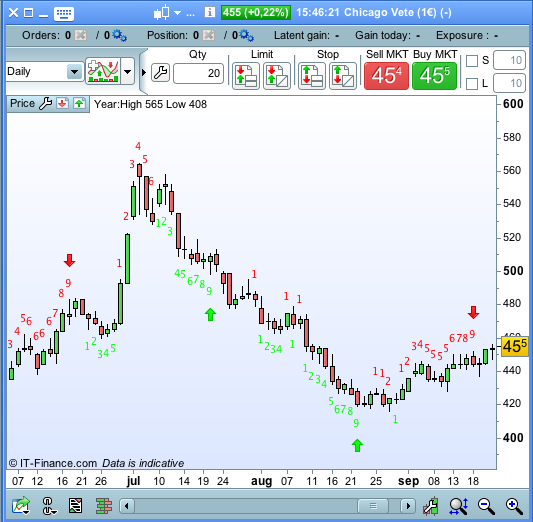
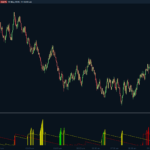
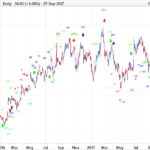
On request I programmed the Thomas Demark indicator TD Sequential -Setup. It counts up to 9 consecutive bars to complete the setup and if the setup is completed with a “perfection buy /sell signal” it draws an arrow over/below the signal candle.
The TD Setup requires 9 consecutive bars matching criteria plus a final criterium to generate a buy/sell signal. After A TD Setup is completed the TD countdown starts which requires 13 occurrences of a pattern that don’t have to be consecutive. On completion this generates additional buy/sell signals (blue arrows).
The TD Sequential Indicator was developed by Tom DeMark for trading on the FOREX market. It is also suitable for the market of commodities and options.
This indicator looks for the opposite trend in order to anticipate and identify the turning points of the market. It provides signals in intraday and also on daily timeframe.
Discussions about this indicator can be found in this forum topic: https://www.prorealcode.com/topic/td-sequential-setup/
once TDSL=0
once TDSS=0
once BuySetup=0
once SellSetup=0
Once BuyCountdown=0
once SellCountdown=0
if close[1]>close[5] and close<close[4] then
 bearishflip=1
 bullishflip=0
elsif close[1]<close[5] and close>close[4] then
 bullishflip=1
 bearishflip=0
endif
if close<close[4] and bearishflip then
 TDSL=TDSL+1
 TDSS=0
elsif close>close[4] and bullishflip then
 TDSS=TDSS+1
 TDSL=0
endif
if TDSL>0 and TDSL<10 then
 drawtext("#TDSL#",barindex,low-10*pipsize) coloured(0,255,0)
endif
if TDSL=9 then
 L=(low<low[3] and low<low[2]) or (low[1]<low[2] and low[1]<low[3])
 bearishflip=0
 TDSL=0
 BuySetup=1
 if L then
  DRAWARROWUP(barindex,low-20*pipsize) coloured(0,255,0)
 endif
endif
if TDSS>0 and TDSS<10 then
 drawtext("#TDSS#",barindex,high+10*pipsize) coloured(255,0,0)
endif
if TDSS=9 then
 S=(high>high[2] and high>high[3]) or (high[1]>high[3] and high[1]>high[2])
 bullishflip=0
 TDSS=0
 SellSetup=1
 if S then
  DRAWARROWDOWN(barindex,high+20*pipsize) coloured(255,0,0)
 endif
endif
if BuySetup then
 if close<=low[2] then
  BuyCountdown=BuyCountdown+1
  drawtext("#BuyCountdown#",barindex,low-10*pipsize) coloured(0,0,255)
 endif
 if BuyCountdown=8 then
  Bar8=barindex
 elsif BuyCountdown=13 then     // TD Countdown perfection buy
  if low<=close[barindex-Bar8] then
   DRAWARROWUP(barindex,low-20*pipsize) coloured(0,0,255)
  endif
  BuySetup=0
  BuyCountdown=0
 endif
elsif SellSetup then
 if close>=high[2] then
  SellCountdown=SellCountdown+1
  drawtext("#SellCountdown#",barindex,high+10*pipsize) coloured(0,0,255)
 endif
 if SellCountdown=8 then
  Bar8=barindex
 elsif SellCountdown=13 then  //TD Countdown perfection sell
  if high>=close[barindex-Bar8] then
   DRAWARROWDOWN(barindex,high+20*pipsize) coloured(0,0,255)
  endif
  SellSetup=0
  SellCountdown=0
 endif
endif
return
Comments
You must be logged in to post a comment.



hii , i wonder if it is possible to create a screener based on demark indicator for exemple if the trend is down 100ema and 200ema are down and an arrow signal to sell has just pinted


I thought a little bit about this and came to the conclusion that there will be differences when you use this indicator on a daily chart (like i see you did). This is cause by IG markets infamous sunday candle. The problem is when I adapt it to daily timeframe to take care of the sunday candle it will give wrong results on any other timeframe instead. :-S
Daily Chart of EUR/USD. On the right the original indicator (paid indicator) that runs on Trade Station, on the left the same chart with your code with Prorealtime. As you can see there are many differences, and mostly the original one provides exact count Direct link: https://s1.postimg.org/17ru2bt5un/TD_CHART_COMPARISION.png
Hi Despair Thanks for writing the code and for generously making it available to the public. I have been using Trading View and there is quite a good TD Sequential available on that platform but in some ways your version is superior, since it includes the "+" for the unperfected TD Sequential Countdown. The TV version that I am using does however have a handy feature in that it identifies the resistance and support lines, which are taken from the Lows of the TD Sell Setup and the Highs of the TD Buy Setup. If I knew how to code I would try to include these but alas I am unable, and so I'm wondering if you are someone else would consider adding this handy feature? Cheers Sydneyhom