







Standard Deviation & Standard Error Linear Regression Channel
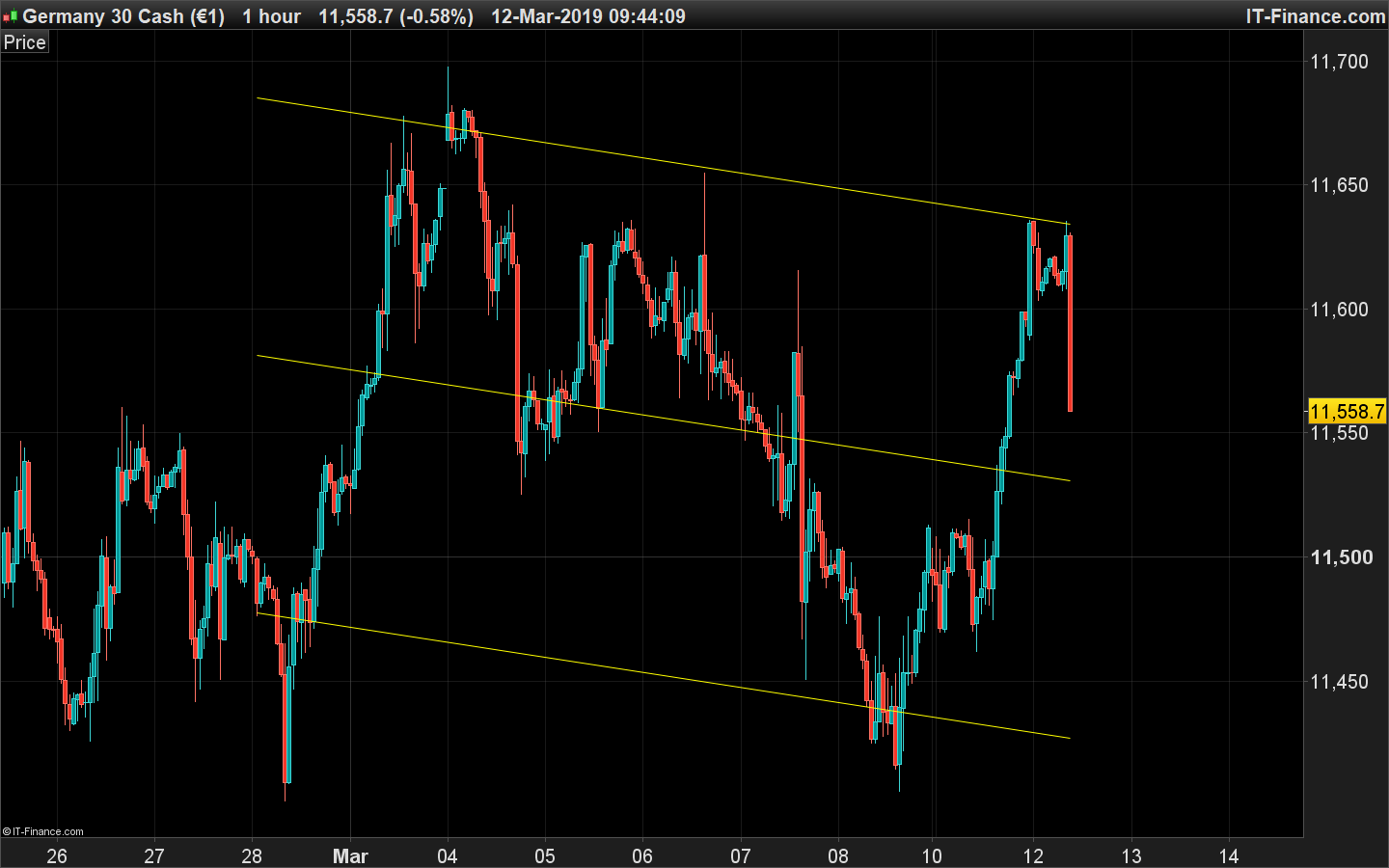
Here is the code for the linear regression channel of standard deviation and standard error. It is the same one than the tools of the platform.
You can change the lookback period which correspond of the amount of candlesticks for the linear regression calculation.
The ChannelType setting is used to change the calculation type of the upper and lower channel between the standard deviation and the standard error. You can also change the deviation multiplier which is set to 1 by default.
//PRC_Std and Ste LinRegChannel | indicator
//Standard Deviation and Standard Error
//Linear Regression Channel
//12.03.2019
//Nicolas @ www.prorealcode.com
//Sharing ProRealTime knowledge

defparam drawonlastbaronly=true
defparam calculateonlastbars=1000
// --- settings
lookback= 200 //channel period
ChannelType = 1 //1= Standard Deviation ; 2= Standard Erro
NbDeviation = 1 //Deviation multiplier
colorRed = 255
colorGreen = 255
colorBlue = 0
// --- end of settings

sumx = 0
sumy = 0
sumxy = 0
sumx2 = 0

for cmpt = lookback downto 0 do
 tmpx = cmpt
 tmpy = close[cmpt]
 sumy = sumy+tmpy
 sumx = sumx+tmpx
 sumx2 = sumx2 + (tmpx*tmpx)
 sumxy = sumxy + (tmpy*tmpx)
next

n = lookback+1

if (sumx2 = sumx * sumx) then // protection to avoid infinite values
 b = sumxy - sumx * sumy
else
 b = (n * sumxy - sumx * sumy) / (n * sumx2 - sumx * sumx)
endif
a = (sumy - b * sumx) / n

drawsegment(barindex[lookback],a+b*lookback,barindex,a+b*0) coloured(colorRed,colorGreen,colorBlue)

//channel
if ChannelType = 1 then //Standard Deviation
 dat = std[lookback]*NbDeviation
else
 dat = ste[lookback]*NbDeviation
endif
drawsegment(barindex[lookback],(a+b*lookback)+dat,barindex,a+b*0+dat) coloured(colorRed,colorGreen,colorBlue)
drawsegment(barindex[lookback],(a+b*lookback)-dat,barindex,a+b*0-dat) coloured(colorRed,colorGreen,colorBlue)

return
Comments
You must be logged in to post a comment.



Because this is indeed nothing more of what you describe. A mean with +/- standard deviation is known as the Bollinger Bands. A standard deviation channel is a projection in the past of a least square moving average with upper and lower lines made with STD or STE multiplied by a factor.

Hallo. Sehr guter Trendline Indikator. Ich würde gerne die Linien dicker haben. Kann mir jemand sagen was ich beim Indikator ändern kann damit diese dicker und grösser werden? Danke.


Hello Nicolas, this is great, however the actual PRT standard error and standard deviation channels keep on plotting themselves keeping the starting bar fixed and changing with the new bar dynamically. Do you have a code for these 2 dynamic channels please? Many thanks.

Thanks again Nicolas. My question is, how can I set a general delay to make backtests: for example, to set the standard lookback of 200 but starting x bars before and ending also x bars before. I want to see how this indicator behaves depending of the time, to define strategies for buying and selling. Lookback should be the same, only delayed on the time. And the other question is how to set an automatic trading herewith: as the lines are segments, I cannot define my strategy like "IF close > upperband THEN SELL.."

Very helpful! Thank you Nicolas
Hi Nicolas, Fantastic work, I'm really grateful for this. I was wondering if it would be possible to remove (or make transparent) the middle line. Could you please let me know what code should I add to the indicator code to make this happen? Thank you very much.