El’s Better Volume

El’s Better Volume

Hi all

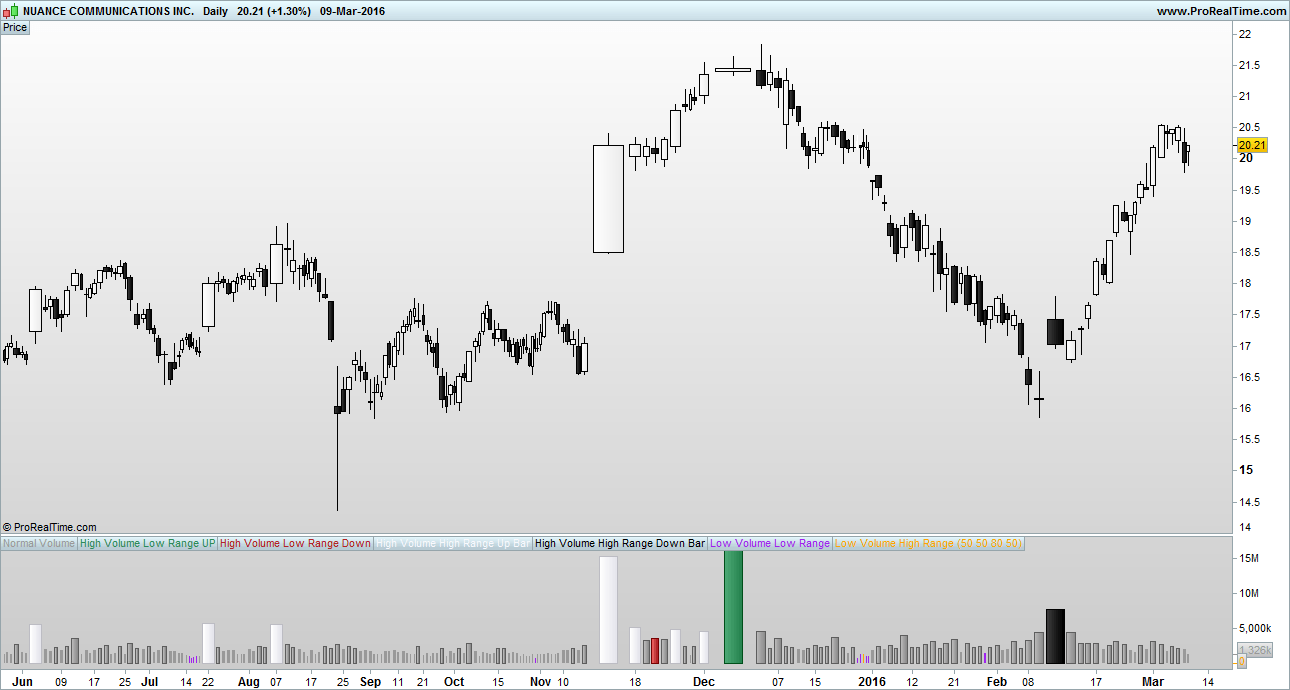
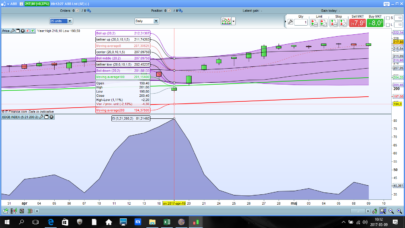
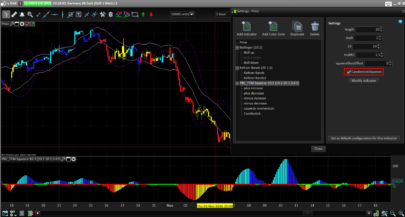
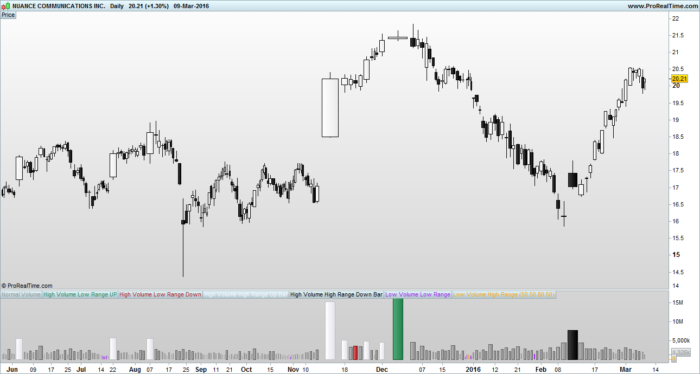
Thought id share my Better Volume indicator to contribute something to the site 🙂 this is my solution to a problem as i felt other better volume indicators out there were over complicating the problem. I used a few MA’s and the built in RANGE() to clean it up.

A link about ‘Better Volume’ and how to interpret it…
http://emini-watch.com/free-stuff/volume-indicator/

You may need to change the colours around for better visability on your background. Feel free to mod it asyou like.

El

Share this

Risk disclosure:

No information on this site is investment advice or a solicitation to buy or sell any financial instrument. Past performance is not indicative of future results. Trading may expose you to risk of loss greater than your deposits and is only suitable for experienced investors who have sufficient financial means to bear such risk.

ProRealTime ITF files and other attachments : How to import ITF files into ProRealTime platform?

PRC is also on YouTube, subscribe to our channel for exclusive content and tutorials

  1. Tarquin • 03/10/2016 #

    Hi,
    Thanks for posting this, I downloaded your first version of Better Volume and it works really well. So I tried loading your second version when I saw the link and although the file is described as my-better-volume-2.itf it only downloads as my-better-volume-1.itf. Am I doing something wrong, or is it possible the link on your post contains the previous file and not the new one?
    Kind Regards,
    Tony

  2. El Chupacabra • 03/10/2016 #

    Hi Tony, just seen your message. TBH I haven’t made a version 2!, maybe the moderator has done? Its a bit of a funny system on here you cant just add your own indicators and stuff without it going through a moderator first. Here is the code im using mate, keep it simple :)….
    // Variables to add:
    // Label in Program = \"vMA\", Label in properties window = \"Volume Moving Average\", Type = int, Default = \"50\"
    // Label in Program = \"vPercentLower\", Label in properties window = \"Low Volume %\", Type = int, Default = \"50\"
    // Label in Program = \"vPercentHigerr\", Label in properties window = \"High Volume %\", Type = int, Default = \"80\"
    // Label in Program = \"BarRanger\", Label in properties window = \"Bar Range\", Type = int, Default = \"50\"

    //Change all indicator styles to \"Histogram\" apart from teh two volume moving averages : LowVolume, HighVolume ..... keep them as lines or make them invisable

    VolumeMA = Average[vMA](VOLUME)

    LowVolume = (VolumeMA - ((VolumeMA * vPercentLower) / 100))
    HighVolume = (VolumeMA + ((VolumeMA * vPercentHigher) / 100))

    Vol = VOLUME
    ONCE HVLRU = 0
    ONCE HVLRD = 0
    ONCE HVHRU = 0
    ONCE HVHRD = 0
    ONCE LVLR = 0
    ONCE LVHR = 0

    c1 = VOLUME > HighVolume AND RANGE < Average[BarRange](RANGE) AND CLOSE > OPEN
    IF c1 THEN
    HVLRU = VOLUME
    Vol = 0
    ELSE
    HVLRU = 0
    ENDIF

    c2 = VOLUME > HighVolume AND RANGE < Average[BarRange](RANGE) AND CLOSE < OPEN
    IF c2 THEN
    HVLRD = VOLUME
    Vol = 0
    ELSE
    HVLRD = 0
    ENDIF

    c3 = VOLUME > HighVolume AND RANGE > Average[BarRange](RANGE) AND CLOSE > OPEN
    IF c3 THEN
    HVHRU = VOLUME
    Vol = 0
    ELSE
    HVHRU = 0
    ENDIF

    c4 = VOLUME > HighVolume AND RANGE > Average[BarRange](RANGE) AND CLOSE < OPEN
    IF c4 THEN
    HVHRD = VOLUME
    Vol = 0
    ELSE
    HVHRD = 0
    ENDIF

    c5 = VOLUME < LowVolume AND RANGE < Average[BarRange](RANGE)
    IF c5 THEN
    LVLR = VOLUME
    Vol = 0
    ELSE
    LVLR = 0
    ENDIF

    c6 = VOLUME < LowVolume AND RANGE > Average[BarRange](RANGE)
    IF c6 THEN
    LVHR = VOLUME
    Vol = 0
    ELSE
    LVHR = 0
    ENDIF

    RETURN Vol COLOURED (153,153,153) AS \"Normal Volume\", HVLRU COLOURED (46,139,87) AS \"High Volume Low Range UP\", HVLRD COLOURED (178,34,34) AS \"High Volume Low Range Down\", HVHRU COLOURED (248,248,255) AS \"High Volume High Range Up Bar\", HVHRD COLOURED (0,0,0) AS \"High Volume High Range Down Bar\", LVLR COLOURED (160,32,240) AS \"Low Volume Low Range\", LVHR COLOURED (255,165,0) AS \"Low Volume High Range\", HighVolume COLOURED (216,191,216) AS \"High Vol MA\", LowVolume COLOURED (216,191,216) AS \"Low Vol MA\"


avatar
Register or

Likes

avatar avatar avatar avatar avatar
Related users ' posts
Nicolas We do not offer free assistance for TOS. However, you can send demand for private paid codin...
phanz Hi community. May I know how you use this indicator please? Is it on the zero cross over? ...
sydney43025 Hello, I'm digging up this topic because I uploaded the code on a PRT v11.1 but the indicato...
Nicolas in order to use renko bricks in a trading strategy or in a screener, I would recommenced thi...
pp_playaflamenca I understand. I visited the page https://market.prorealcode.com/product/prt-renko/ Actua...
Nicolas renko bricks are not repainting, they are using the price movement in their definition. But ...
David Balance thanks for sharing this excellent indicator.  Here are some thoughts.  please ad...
Maz
9 years ago
Francesco78 very nice, thanks!
Wilko Interesting! Thanks for sharing!
BjornH Extremely nice, thanks!
finplus Thanks for the job. Which variables do you suggest for timeframe 1 hour? 
Maz Depends massively on your market and the volatility. I suggest using the variable optimizer ...
1Randy This a great momentum filter! I would like to see volume momentum incorporated into the indi...
otty82  THX looks good!
century nice one , thank you
arvindrao01 Hey! Does anyone have a pinescript (tradingview) code for this?
supertiti Il manque 2 slash devant len dans le code dur car la variable ne marche pas bonne journée
larmhen
9 years ago
HerveS_67 Bonjour, A quoi correspondent les données S, M, L ? Hello, What do the data S, M, L?
Vinks_o_7 aux paramĂštres Ă  rentrer : 5 20 et 200...
bruces Hi. Thank you that is what I am looking for. As well as the chart, I want to also add to a...
Jodal Bonjour Nicolas, Merci pour cet indicateur! Est-ce possible de configurer une alerte pou...
Nicolas Merci pour le post dans le forum en respectant les rÚgles de publication énoncées dans le ca...
Dron De lo mejorcito
Swingforfortune
9 years ago
gatarayihajp Hi swingforfortune, Thanks a lot about your interesting posting. Let ask you to explain mor...
Swingforfortune Hello. Basically they are a twist of the MACD histogram and can be used as such. They visua...
gatarayihajp Hi again Thanks for the explanation. Have a good day
gabri Roman made the strategy, I made the code and Maze made it bulltproof. You can use it I belie...
Roman Francesco78 here is the strategy: https://www.prorealcode.com/topic/highlowopen-prices-for...
Francesco78 Thank you!
Nicolas
9 years ago
jiminykricket Hi Nicolas, Its fair to say i'm a relative novice with ProRealtime and as such i am not sur...
Nicolas You can use assisted creation in probacktest, you'll get a quick overview on how to call a p...
jiminykricket Thanks Nicolas, i'll take a look
CavalierDeCesDames Bonjour Nicolas, Thanks for your use full job. I tried this indicator on a shorter timefram...
Nicolas You are welcome. I'm glad you like it.
Bolbo It does not appear over the price indicator on V11. Thanks in advance.
Maxime Baudin Nice, thanks!
rowestock Hi Nicolas, I am revisiting this indicator and wanted to ask, is it possible to replace sty...
Nicolas Why not, please add a new request in our probuilder forums.
majid52026 Hi I want MBXF Timing for mq5 Does anyone have this indicator???
dertopen Hi Nicolas good work for the code translation when i chek the mbfx system site i see in t...
Nicolas Yes, just change the color by yourself in the indicator settings window.
bearbull As per PhilipSchultz question above, has anybody managed to add code for when it turns blue,...
Ybr35 Bonjour Nicolas, lorsque je lance l'indicateur, il m'est indiqué que je dois définir les var...
Nicolas L'idéal est de télécharger le fichier itf joint sur cette page et de l'importer dans la plat...

Top