Nicolas

AFL Winner oscillator
Category: Indicators By: Nicolas Created: April 27, 2017, 2:33 PM
April 27, 2017, 2:33 PM
Indicators
20 Comments
AFL Winner oscillator

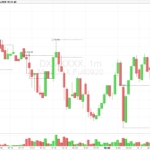
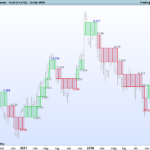
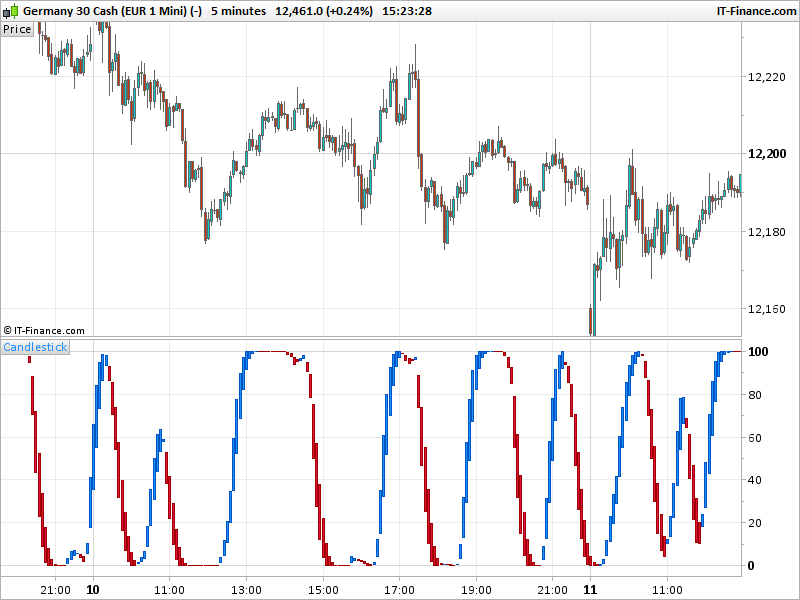
The Alf Winner indicator oscilllates between 0.00 (oversold) and 105 (overbought) values depending upon market conditions. Red bars suggest bearish pressure and green bars bullish pressure. It’s recommended to use this oscillator in conjunction with trend following indicators to trade in the direction of the overall trend.

Up trends: look to buy near the 0.00 level at the first green bar. Down trends: look to sell near the 105 level at the first red bar.
(description found on the web).

This indicator use a conjunction of price action (average of 2 times Close + High + Low) and Volumes in its formula, it results an oscillation between the 2 oversold and overbought zones. The curve is double smoothed with Weighted Moving Average, periods can be changed in the settings.

//PRC_AFL Winner | indicator
//27.04.2017
//Nicolas @ www.prorealcode.com
//Sharing ProRealTime knowledge
//Translated from MT4 version 

//---Settings
//PERIOD = 10
//AVG = 5
//---end of settings

if barindex>period then  
 period=max(period,2)
 avg=max(avg,2)

 pa = (2*close+high+low)/4

 scost5=summation[avg](volume*pa)
 svolume5=summation[avg](volume)

 pa5=scost5/svolume5

 mmin=lowest[period](pa5)
 mmax=highest[period](pa5)

 rsv=((pa5-mmin)/max(mmax-mmin,pointsize))*100

 pak = average[avg,2](rsv)
 pad = average[avg,2](pak)

 if pak>pad then 
  drawcandle(pad,pak,pad,pak) coloured(30,144,255)
 else
  drawcandle(pak,pad,pak,pad) coloured(220,20,60)
 endif
endif

return 
 

Download
Filename: PRC_AFL-Winner.itf
Downloads: 657
Nicolas
Nicolas Legend
I created ProRealCode because I believe in the power of shared knowledge. I spend my time coding new tools and helping members solve complex problems. If you are stuck on a code or need a fresh perspective on a strategy, I am always willing to help. Welcome to the community!
Author’s Profile

Comments

jiminykricket
9 years ago
#

Hi Nicolas, Its fair to say i'm a relative novice with ProRealtime and as such i am not sure how to use this code in my strategies. As a layman's example with RSI; "Indicator1 = RSI[14](Close) RSIBuy = (Indicator1 70) " What would the syntax be for this code though? Do i have to call it first and if so, how do i then reference it? Many thanks in advance, James

jiminykricket
9 years ago
#

Thanks Nicolas, i'll take a look

Nicolas
9 years ago
#

You can use assisted creation in probacktest, you'll get a quick overview on how to call a personal indicator. You can also find examples in our online Probuilder documentation, look at CALL instruction.

patrick3
9 years ago
#

Merci Nicolas pour cet indicateur

flakess
9 years ago
#

bonjour pourquoi il fonctionne pas sur mon PRT ? sa me fait rien du tout

Nicolas
9 years ago
#

L'indicateur a besoin de Volume pour se calculer, vérifier que l'instrument en question en possède.

sagittario75
9 years ago
#

Hi, I find your very useful indicator for my strategy. Can you also have a code for the proscreener?


T-rader
9 years ago
#

Hi!

I´m trying the indicator on dax but i only get it to work between 17:30 and 22:00. During the actual tradinghuors theres just a black gap.

Can you help me Nicolas?

Nicolas
9 years ago
#

Depends of your timezone, but this indicator needs Volume to compute correctly, so there might be no Volumes between those schedules.

Peter J
9 years ago
#

Great stuff thanks Nicolas.

Peter J
9 years ago
#

Hi Nicolas it's not related I'm sorry but I'm trying to learn coding and am a complete novice.  I have a strategy I want to back test based on round numbers, pin bars and moving averages does this sound easy for me to learn or should I not bother?  Any help you can offer would be massively appreciated.

Many thanks

Pete

Nicolas
9 years ago
#

For personal assistance, you can submit your request with the form on this page: https://www.prorealcode.com/trading-programming-services/

Nicolas
9 years ago
#

I believe you will find all these informations (code snippets) on our forums already. If you have time to spend looking for those terms and compile all of them together in a strategy, it would be a very good exercise!

Peter J
9 years ago
#

Thanks Nicolas I'll give it a go. Computers and coding is not my thing but who knows. If all else fails would you be interested in coding the strategy and if so how much would you charge? 

Frankiesc
9 years ago
#

Thanks Nicolas for youy fast response!!

Frankiesc
9 years ago
#

Dear Nicolas,

Thanks for this indicator!!

I would like to set an alarm on this indicator (prc-afi-winner.itf) to let me know every time a candle changes color (to blue to red to red to blue). Is this possible in any way?

Thanks in advance!!

Nicolas
9 years ago
#

It's not possible to give alerts with the code sorry. You have to set an alarm yourself with the dedicated platform tool for this purpose.

gatarayihajp
9 years ago
#

OK, Merci encore

gatarayihajp
9 years ago
#

Bonjour Nicolas, 

Merci infiniment pour cet indicateur mais je constate qu'il ne s'affiche pas sur le PRT plateform.

Nicolas
9 years ago
#

It needs Volume to calculate correctly. Please use it on a security which have Volumes!

ProRealCode ProRealCode
Loading...