







Trend Following Moving Averages
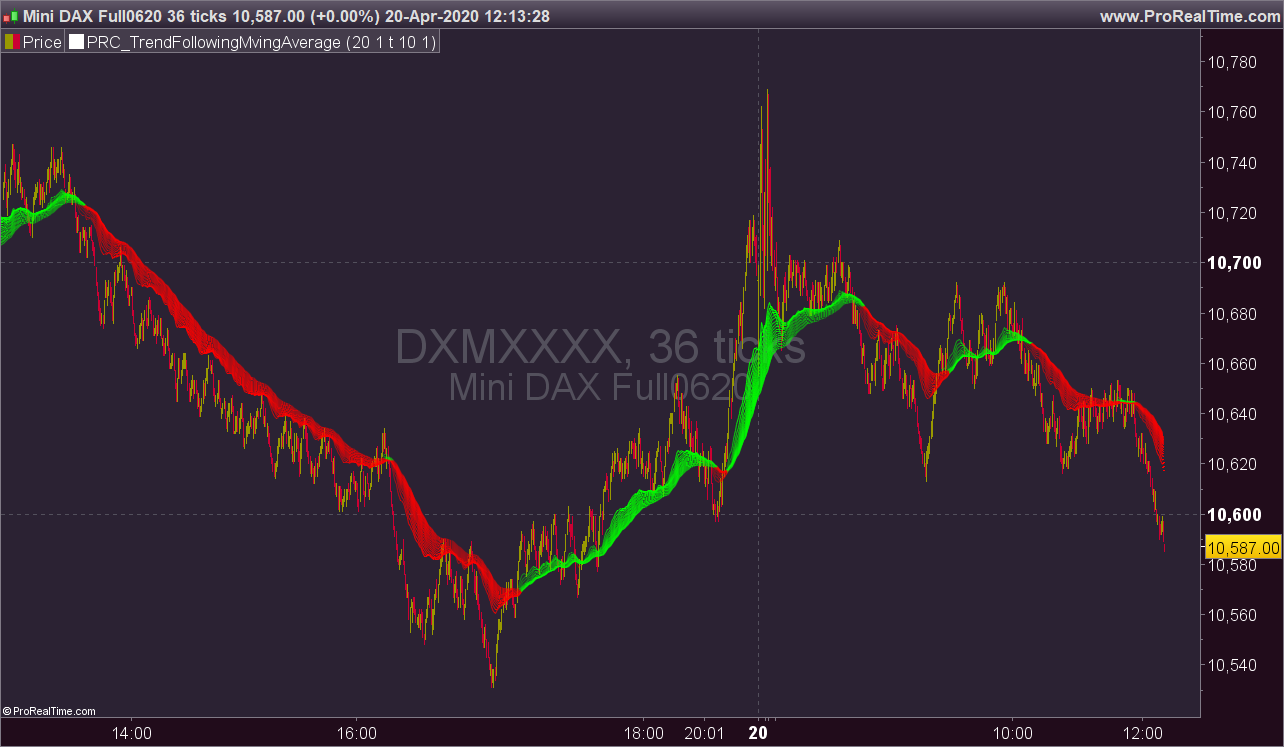
On each bar it creates a channel by highest/lowest point of a MA. highest point is upper line and lowest point is lower line of the MA channel,
It gets highest and lowest point of last 300 bars, (say Price Channel )
If the width of MA channel is greater than certain rate of price channel then it decides there is trend
After it decided there is trend, it calculates the rate between channel and MA. Bigger result means stronger trend.
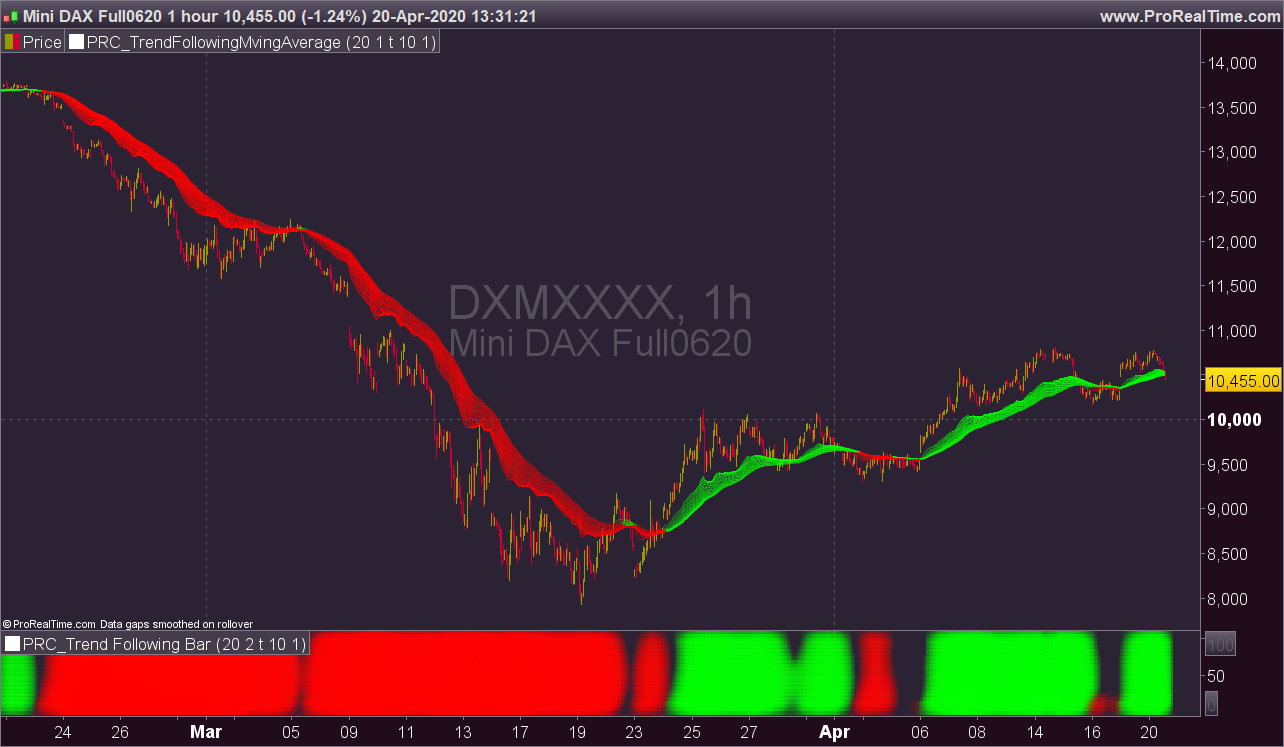
According to rate of MA channel and the price channel , MA Line becomes lighter/darker. so when you look at the MA Line’s color you can see the trend strength.
You can choose each of the available default MA type of the platform as source.
“Period to Check Trend” is the period to create MA channel. Bigger period cause more sensitivity.
“Trend Channel Rate %” is rate of price channel . Price channel created by using highest/lowest of last 300 bars. I did this to make the script works on all time frames correctly.
“Use Linear Regression” is used to get rid of noise. it may cause 1-2 bars latency.
(description from the original author LonesomeTheBlue, all credits go to him). Indicator converted from pinescript with some adaptation to make it works with ProRealTime.
This indicator only works on PRTv11 onwards.
//PRC_TrendFollowingMvingAverage | indicator
//20.04.2020
//Nicolas @ www.prorealcode.com
//Sharing ProRealTime knowledge
//converted from Pinescript version

// --- settings
prd = 20 //Period to Check Trend
rateinp = 1 //Trend Channel Rate %  minval = 0.1, step = 0.1
ulinreg = 1 // 1=true, Use Linear Regression
linprd = 10 //Linear Regression Period, minval = 2
matype = 1 //ma type 0=sma, 1-ema, etc.
// --- end of settings

rate = rateinp / 100
pricerange = highest[300](close) - lowest[300](close)
chan = pricerange * rate

p = 5
while p<=100 do
 //trend
 masrc = average[p,matype](close)
 if ulinreg then
  ma = LinearRegression[linprd](masrc)
 else
  ma = masrc
 endif

 hh = highest[prd](ma)
 ll = lowest[prd](ma)
 diff = abs(hh-ll)

 if diff>chan then
  if ma>ll+chan then
   trend=1
  elsif ma<hh-chan then
   trend=-1
  else
   trend=0
  endif
 else
  trend=0
 endif

 ret = trend*diff/chan

 alpha = min(255,(80+abs(ret*10)))
 if ret<0 then
  r=255
  g=0
 else
  r=0
  g=255
 endif

 iprev=$prev[p]
 drawsegment(barindex,ma,max(0,barindex-1),iprev) coloured(r,g,0,alpha)

 $prev[p] = ma
 p=p+5
wend

return
Comments
You must be logged in to post a comment.



I would like a screener that highlights the color change of the indicator (from red to green and vice versa). Can you help me? Thanks again Nicolas
Just done Nicolas https://www.prorealcode.com/topic/screener_trend-following-moving-averages/
Ok Nicolas apro il topic su "Supporto ProScreener" in italiano
Hello Nicolas, it's possible to make screener with this indicator ? Thanks a lot

Hello Nicolas, is it possible to make a backtest with this moving average? For example "if trend = red then sellshort".
And also, the boolean "ulinreg" messes up the backtest, how do I define it?
I´m wondering which parameter decides the color of the average? Is the color decided by the "trend" input?

Jag får felkod på rad 56?


Dear Nicolas, just try touse your indicator with backtest but it's not working. is anybody reach to use it? regards