







Trend Checker
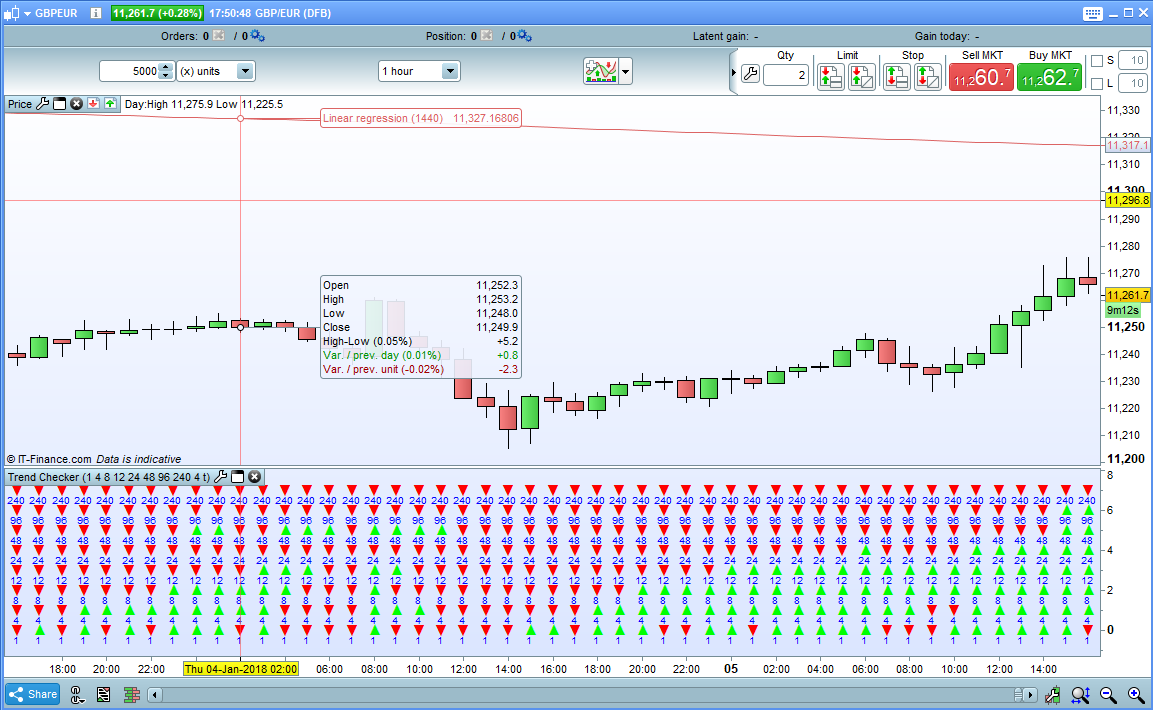
Trend Checker is a simple indicator that allows you to quickly and easily check long, medium and short term trends. It has eight rows that can each be set to display the overall trend for whatever look back period you choose. It simply compares the price now to the price at the beginning of each look back period and decides if it is up or down and displays a green or red arrow.
Works on all markets and all time frames although you will have to set each period for the chosen time frame as required.
For example if you apply the indicator to a 1 hour chart you may wish to set periods of 1, 4, 24 and 144 to represent 1 hour, 4 hour, 1 day and 1 week periods. On a daily chart you might have 1, 6, 24, 96, and 312 to represent 1 day, 1 week, 1 month and 1 year. You can choose whatever periods you like in whatever order you like and you can turn any row off by setting it to zero. So you can have very long term trends in the top half then a gap and shorter term trends in the bottom half – the options are endless!
The price used can be set to any of the following by changing the PriceType setting to:
0 – Close
1 – Open
2 – Total Price
3 – Typical Price
4 – Weighted Close
5 – Median Price
Under each arrow is shown the number of the period it represents. If you do not want this then untick the ‘NumbersOnOff’ box.
I advise downloading the itf file rather than cut and paste to ensure you get all the functions to work correctly.
//Trend Checker
//Created by Vonasi

//Row1 = 1
//Row1 = 2
//Row1 = 4
//Row1 = 8
//Row1 = 12
//Row1 = 24
//Row1 = 48
//Row1 = 96
//PriceType = 0
//NumbersOnOff = 1

IF PriceType >=0 and PriceType <=5 THEN
 IF PriceType = 0 THEN
  PT = close
 ENDIF

 IF PriceType = 1 THEN
  PT = open
 ENDIF

 IF PriceType = 2 THEN
  PT = TotalPrice
 ENDIF

 IF PriceType = 3 THEN
  PT = TypicalPrice
 ENDIF

 IF PriceType = 4 THEN
  PT = WeightedClose
 ENDIF

 IF PriceType = 5 THEN
  PT = MedianPrice
 ENDIF
ELSE
 PT = 0
ENDIF

IF Row1 > 0 THEN
 IF PT > PT[Row1] THEN
  DRAWTEXT("▲", BarIndex,0.0,SansSerif,BOLD,12) COLOURED(0,255,0)
 ELSE
  IF PT < PT[Row1] THEN
   DRAWTEXT("▼", BarIndex,0.0,SansSerif,BOLD,12) COLOURED(255,0,0)
  ENDIF
 ENDIF
 IF NumbersOnOff THEN
  DRAWTEXT("#Row1#", BarIndex,-0.5,SansSerif,Standard,10) COLOURED(0,0,255)
 ENDIF
ENDIF


IF Row2 > 0 THEN
 IF PT > PT[Row2] THEN
  DRAWTEXT("▲", BarIndex,1.0,SansSerif,BOLD,12) COLOURED(0,255,0)
 ELSE
  IF PT < PT[Row2] THEN
   DRAWTEXT("▼", BarIndex,1.0,SansSerif,BOLD,12) COLOURED(255,0,0)
  ENDIF
 ENDIF
 IF NumbersOnOff THEN
  DRAWTEXT("#Row2#", BarIndex,0.5,SansSerif,Standard,10) COLOURED(0,0,255)
 ENDIF
ENDIF

IF Row3 > 0 THEN
 IF PT > PT[Row3] THEN
  DRAWTEXT("▲", BarIndex,2.0,SansSerif,BOLD,12) COLOURED(0,255,0)
 ELSE
  IF PT < PT[Row3] THEN
   DRAWTEXT("▼", BarIndex,2.0,SansSerif,BOLD,12) COLOURED(255,0,0)
  ENDIF
 ENDIF
 IF NumbersOnOff THEN
  DRAWTEXT("#Row3#", BarIndex,1.5,SansSerif,Standard,10) COLOURED(0,0,255)
 ENDIF
ENDIF

IF Row4 > 0 THEN
 IF PT > PT[Row4] THEN
  DRAWTEXT("▲", BarIndex,3.0,SansSerif,BOLD,12) COLOURED(0,255,0)
 ELSE
  IF PT < PT[Row4] THEN
   DRAWTEXT("▼", BarIndex,3.0,SansSerif,BOLD,12) COLOURED(255,0,0)
  ENDIF
 ENDIF
 IF NumbersOnOff THEN
  DRAWTEXT("#Row4#", BarIndex,2.5,SansSerif,Standard,10) COLOURED(0,0,255)
 ENDIF
ENDIF

IF Row5 > 0 THEN
 IF PT > PT[Row5] THEN
  DRAWTEXT("▲", BarIndex,4.0,SansSerif,BOLD,12) COLOURED(0,255,0)
 ELSE
  IF PT < PT[Row5] THEN
   DRAWTEXT("▼", BarIndex,4.0,SansSerif,BOLD,12) COLOURED(255,0,0)
  ENDIF
 ENDIF
 IF NumbersOnOff THEN
  DRAWTEXT("#Row5#", BarIndex,3.5,SansSerif,Standard,10) COLOURED(0,0,255)
 ENDIF
ENDIF

IF Row6 > 0 THEN
 IF PT > PT[Row6] THEN
  DRAWTEXT("▲", BarIndex,5.0,SansSerif,BOLD,12) COLOURED(0,255,0)
 ELSE
  IF PT < PT[Row6] THEN
   DRAWTEXT("▼", BarIndex,5.0,SansSerif,BOLD,12) COLOURED(255,0,0)
  ENDIF
 ENDIF
 IF NumbersOnOff THEN
  DRAWTEXT("#Row6#", BarIndex,4.5,SansSerif,Standard,10) COLOURED(0,0,255)
 ENDIF
ENDIF

IF Row7 > 0 THEN
 IF PT > PT[Row7] THEN
  DRAWTEXT("▲", BarIndex,6.0,SansSerif,BOLD,12) COLOURED(0,255,0)
 ELSE
  IF PT < PT[Row7] THEN
   DRAWTEXT("▼", BarIndex,6.0,SansSerif,BOLD,12) COLOURED(255,0,0)
  ENDIF
 ENDIF
 IF NumbersOnOff THEN
  DRAWTEXT("#Row7#", BarIndex,5.5,SansSerif,Standard,10) COLOURED(0,0,255)
 ENDIF
ENDIF

IF Row8 > 0 THEN
 IF PT > PT[Row8] THEN
  DRAWTEXT("▲", BarIndex,7.0,SansSerif,BOLD,12) COLOURED(0,255,0)
 ELSE
  IF PT < PT[Row8] THEN
   DRAWTEXT("▼", BarIndex,7.0,SansSerif,BOLD,12) COLOURED(255,0,0)
  ENDIF
 ENDIF
 IF NumbersOnOff THEN
  DRAWTEXT("#Row8#", BarIndex,6.5,SansSerif,Standard,10) COLOURED(0,0,255)
 ENDIF
ENDIF

Hi=7.5
Lo=-1.0

Return Hi,Lo
![Price Acceptance Reversal Planner [AGPro Series]](https://www.prorealcode.com/wp-content/uploads/2026/05/NASDAQ-5-minutes-150x150.png)

Comments
You must be logged in to post a comment.

Hi Vonasi, i have a question for you, the comand "pricetype" where did you found it in the manual of prorealtime?
PriceType is just a variable that I use. The value decides what type of price is used in the calculations. If you download the ITF file and import and then add the indicator you can then click on the spanner and change the PriceType value as follows: 0 – Close 1 – Open 2 – Total Price 3 – Typical Price 4 – Weighted Close 5 – Median Price
I noticed a couple of typo errors in the code. The list of variables lines 4 to 11 should be //Row1 //Row2 //Row3 etc to 8 and not //Row1 //Row1 //Row1 etc. Just in case someone wants to remove the // and enter the values manually. If you install the ITF and change the values in the indicator windows this is irrelevant. The other minor error is that line 40 should read PT = close so that the indicator defaults to close for any incorrect value entered. If you don't change this minor error then you just don't get any arrows for an incorrect value.