







RSI Divergences finder
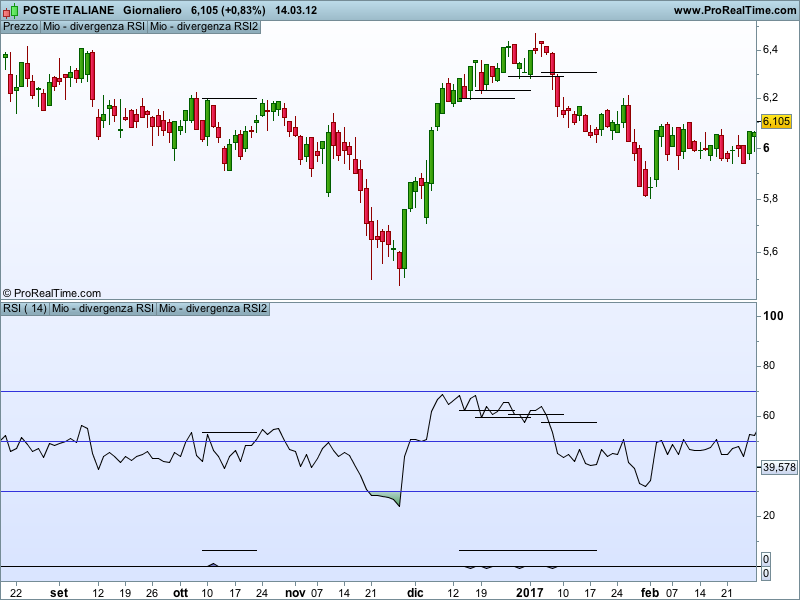
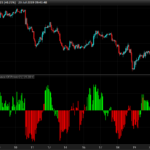
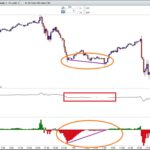
This indicator finds the divergences between price and RSI and draw a segment (on price on RSI or both) at the highest value between the two peaks (for bullish divergencies) or at the lowest value reached between the two bottoms (for bearish divergencies). I use this levels as entry for long/short positions. Only when the price close above or under this levels I have an entry signal. On the picture is hard to see the segments because PRT doesn’t allow to change the tickness and the style.
Blue skies
//Variables
a=rsi[14](close)
once RefCloseDownOld=0
once RefRSIDownOld=0
once RefCloseUpOld=0
once RefRSIUpOld=0
once BarBullOld=0
once BarBearOld=0

//Conditions to identify max and min
c1=a[4]>a[2] and a[3]>a[2] and a[1]>a[2] and a>a[2]
c2=a[4]<a[2] and a[3]<a[2] and a[1]<a[2] and a<a[2]

//finding the double bottom
if c1 then
 RefCloseDownNew=close[2]
 RefRSIDownNew=a[2]
 BarBullNew=barindex[2]
endif
if RefCloseDownNew<RefCloseDownOld and RefRSIDownNew>RefRSIDownOld then
 //double slash next line if you don't needed the mark on a different window
 bulldiv=1
 //entry price for long on price window // double slash next line if not needed
 DRAWSEGMENT(BarBullNew, highest[(BarBullnew-BarBullOld)](close[1]), BarBullNew+10, highest[(BarBullnew-BarBullOld)](close[1]))
 //entry price for long on RSI window // double slash next line if not needed
 DRAWSEGMENT(BarBullNew, highest[(BarBullnew- BarBullOld)](a[1]), BarBullNew+10, highest[(BarBullnew-BarBullOld)](a[1]))
else
 bulldiv=0
endif

//Finding the double top
if c2 then
 RefCloseUpNew=close[2]
 RefRSIUpNew=a[2]
 BarBearNew=barindex[2]
endif
if RefCloseUpNew>RefCloseUpOld and RefRSIUPNew<RefRSIUpOld then
 //double slash next line if you don't needed the mark on a different window
beardiv=-1
 //entry price for short on price window // double slash next line if not needed
 DRAWSEGMENT(BarBearNew, LOWEST[(BarBearnew-BarBearOld)](close[1]), BarBearNew+10,  LOWEST[(BarBearnew-BarBearOld)](close[1]))
 //entry price for short on RSI window // double slash next line if not needed
 DRAWSEGMENT(BarBearNew, LOWEST[(BarBearnew-BarBearOld)](a[1]), BarBearNew+10, LOWEST[(BarBearnew-BarBearOld)](a[1]))
else
 beardiv=0
endif

//drawing
RefCloseDownOld=RefCloseDownNew
RefRSIDownOld=RefRSIDownNew
RefCloseUpOld=RefCloseUpNew
RefRSIUpOld=RefRSIUpNew
BarBullOld=BarBullNew
BarBearOld=BarBearNew

return bulldiv, beardiv
Comments
You must be logged in to post a comment.

Bonjour, J'ai des soucis de lecture de syntaxe avec la variable "drawsegment" sur la version PRT 2021 gratuite. Et par ailleurs sur beaucoup d'autre code de divergence RSI, car beaucoup utilise cette variable. Je cherche un screener de divergences RSI et je n'ai pas le niveau pour régler ce probleme... Pourriez-vous m'aider, merci d'avance.



Based on this wonderful job I would like to propose this little change in the code that allows to make the divergent highs and lows more conspicuous on the RSI chart; (sorry to post the code like this, but the insert does not seem to work here ) Best //Variables a=rsi[14](close) once RefCloseDownOld=0 once RefRSIDownOld=0 once RefCloseUpOld=0 once RefRSIUpOld=0 once BarBullOld=0 once BarBearOld=0 //Conditions to identify max and min c1=a[4]>a[2] and a[3]>a[2] and a[1]>a[2] and a>a[2] // bottom c2=a[4]<a[2] and a[3]<a[2] and a[1]<a[2] and a<a[2] // top //finding the double bottom if c1 then RefCloseDownNew=close[2] RefRSIDownNew=a[2] BarBullNew=barindex[2] endif if RefCloseDownNewRefRSIDownOld then //double slash next line if you don't needed the mark on a different window bulldiv=a*0.9 //entry price for long on price window // double slash next line if not needed //DRAWSEGMENT(BarBullOld, RefCloseDownOld - 2, BarBullNew, RefCloseDownNew - 2)coloured(255,0,0) //entry price for long on RSI window // double slash next line if not needed DRAWSEGMENT(BarBullOld, RefRSIDownOld - 2, BarBullNew, RefRSIDownNew - 2)coloured(255,0,0) else bulldiv=0 endif //Finding the double top if c2 then RefCloseUpNew=close[2] RefRSIUpNew=a[2] BarBearNew=barindex[2] endif if RefCloseUpNew>RefCloseUpOld and RefRSIUPNew<RefRSIUpOld then //double slash next line if you don't needed the mark on a different window beardiv=a*0.9 //entry price for short on price window // double slash next line if not needed //DRAWSEGMENT(BarBearOld, RefCloseUpOld - 2, BarBearNew, RefCloseUpNew - 2)coloured(255,0,0) //entry price for short on RSI window // double slash next line if not needed DRAWSEGMENT(BarBearOld, RefRSIUpOld + 2, BarBearNew, RefRSIUpNew + 2)coloured(255,0,0) else beardiv=0 endif RefCloseDownOld=RefCloseDownNew RefRSIDownOld=RefRSIDownNew RefCloseUpOld=RefCloseUpNew RefRSIUpOld=RefRSIUpNew BarBullOld=BarBullNew BarBearOld=BarBearNew //grafica return bulldiv coloured (0,255,0) style (histogram,1), beardiv coloured (255,0,0) style (histogram,1)


Great work, I like very much! Can you encode this for other indicators that also provide strong divergence signals? Maybe MACD, stochastics, momentum. I have in mind to create a divergence strategy, let's say 5 divergences, and if 3 out of 5 agree the trade is started. See Screenshort attached, the 1x you can see Bearic divergences of CCI, MACD, RSI in the same candle Bullish divergences of CCI, MACD, RSI in the same candle Accordingly, the share price "follows" the divergences... Can you program that? Translated with www.DeepL.com/Translator

22 DRAWSEGMENT(BarBullNew, highest[(BarBullnew-BarBullOld)](close), BarBullNew+10, highest[(BarBullnew-BarBullOld)](close))
//entry price for long on RSI window // double slash next line if not needed
24 DRAWSEGMENT(BarBullNew, highest[(BarBullnew-BarBullOld)](a), BarBullNew+10, highest[(BarBullnew-BarBullOld)](a))
There is a warning signal on both..
Andy, that was another code I made. You should either import the mio-divergenza-rsi.itf file that you find in the attachments or copy the code above and make a new indicator on your PRT (you can name it the way you want). After these steps are done click on the wrench symbol, then choose “Add indicator” and click on the indicator you just made (or imported)
Salut Mika, j'ai la version V11.1, la formule fonctionne. Mais il est préférable, dixit Nicolas, d'importer la formule (mio-divergenza-rsi.itf) plutôt que de faire un copier coller