LOWEST[254] does not work for relatively new stock

Viewing 4 posts - 1 through 4 (of 4 total)
  • Author
    Posts
  • #41993 quote
    benzhang1986benzhang1986
    Participant
    New

    I am trying to find the lowest price of a stock for the past N weeks. For BABA, when I use LOWEST[254] applied to weeks, BABA get filtered out in the screener result because it is a relatively new stock and does not have 254 weeks of history. I would think if the stock does not have enough history, LOWEST will just return me the lowest in the period that is available for that stock. But it just filter them out, which is not what I want. So my question is how can I achieve what I want? Is there a variable that captures the number of bars available for a given stock so I can use that variable? eg. LOWEST[NumbersOfBarsAvailable]

    Also, what if I wanna apply screener to data prior to 254 weeks ago. Is there a feature like that? Can I apply unit bar to months, in addition to days and weeks? That would be another solution.

    ps: LOWEST[254] is the max I can go it seems. If above variable(NumbersOfBarsAvailable) exists, and the value is more than 254, I guess it would not work either. I would have to do LOWEST[MIN(254,NumbersOfBarsAvailable)] I guess.

    Any suggestions and/or answers to my above questions will be greatly appreciated!

    #41997 quote
    NicolasNicolas
    Keymaster
    Legend

    254 bars is the max history available in ProScreener. BARINDEX will give you the number of bars read in the history, and since history is read from left to right, your code snippet:

    NumbersOfBarsAvailable = barindex
    ll = LOWEST[MIN(254,NumbersOfBarsAvailable)]

    should work.

    A simple test with this dummy screener code should return you the quantity of bars available for each stock:

    NumbersOfBarsAvailable = barindex
    ll = LOWEST[MIN(254,NumbersOfBarsAvailable)]
    
    screener [ll] (NumbersOfBarsAvailable as "bars available")

    (not tested, could not work 🙂 )

    #42147 quote
    benzhang1986benzhang1986
    Participant
    New

    barIndex actually means something totally different. I think it only means something when you are doing a for loop of some kind. I don’t think your code will work. Can you try it?

    #42162 quote
    NicolasNicolas
    Keymaster
    Legend

    Did you test yourself? It works, but we made a wrong use of LOWEST 😐

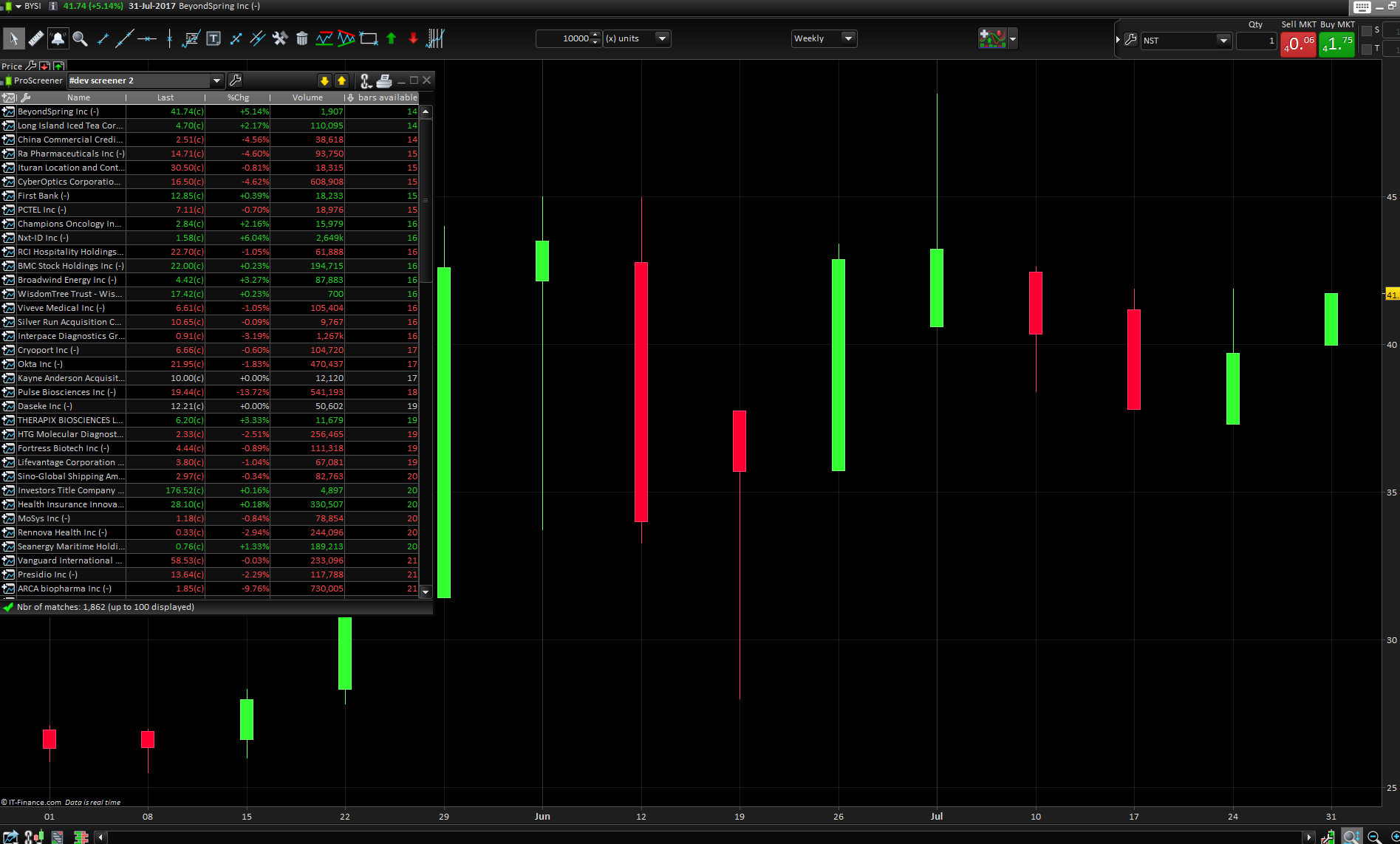
    Please find below the good code and the result of a stock with only 14 bars in a weekly chart, bars quantity seems to be correctly returned in the criteria column of the screener window.

    NumbersOfBarsAvailable = barindex
    ll =MIN(254,NumbersOfBarsAvailable)
    
    screener [ll] (NumbersOfBarsAvailable as "bars available")
    count-bars-quantity-for-a-stock.png count-bars-quantity-for-a-stock.png
Viewing 4 posts - 1 through 4 (of 4 total)
  • You must be logged in to reply to this topic.

ProRealAI ProRealAI New

Stuck on this ProBuilder code?

Describe what this topic is trying to build, in plain English, and ProRealAI writes the ProRealTime™ indicator, screener or system for you.

Available in 7 languages
Try ProRealAI

LOWEST[254] does not work for relatively new stock


ProScreener: Market Scanners & Detection

New Reply
Author
Summary

This topic contains 3 replies,
has 2 voices, and was last updated by NicolasNicolas

9 years, 1 month ago.

Topic Details
Forum: ProScreener: Market Scanners & Detection
Language: English
Started: 07/30/2017
Status: Active
Attachments: 1 files
ProRealCode ProRealCode
Loading...