







Big Line Strategy
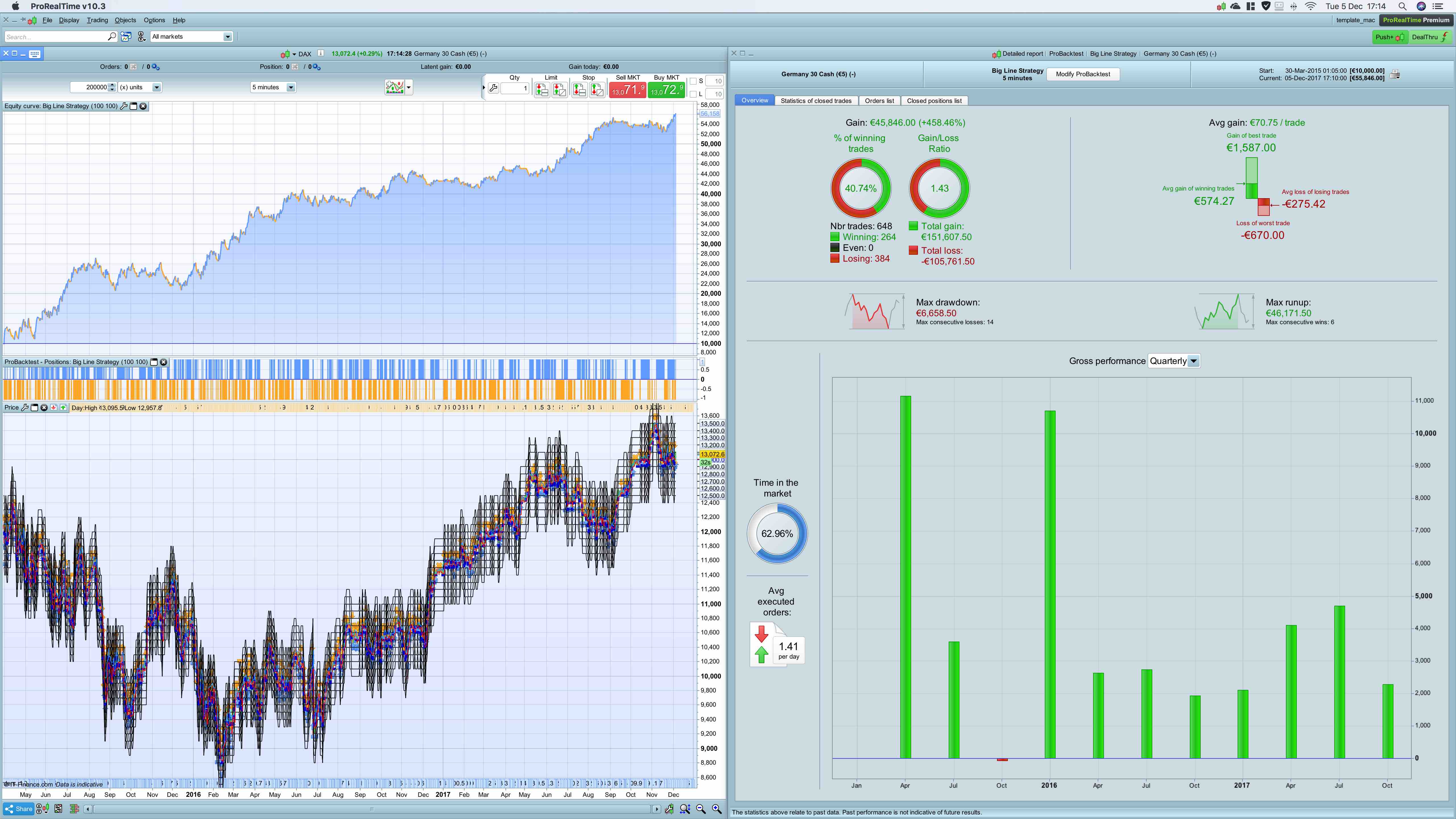
a Big Line Strategy
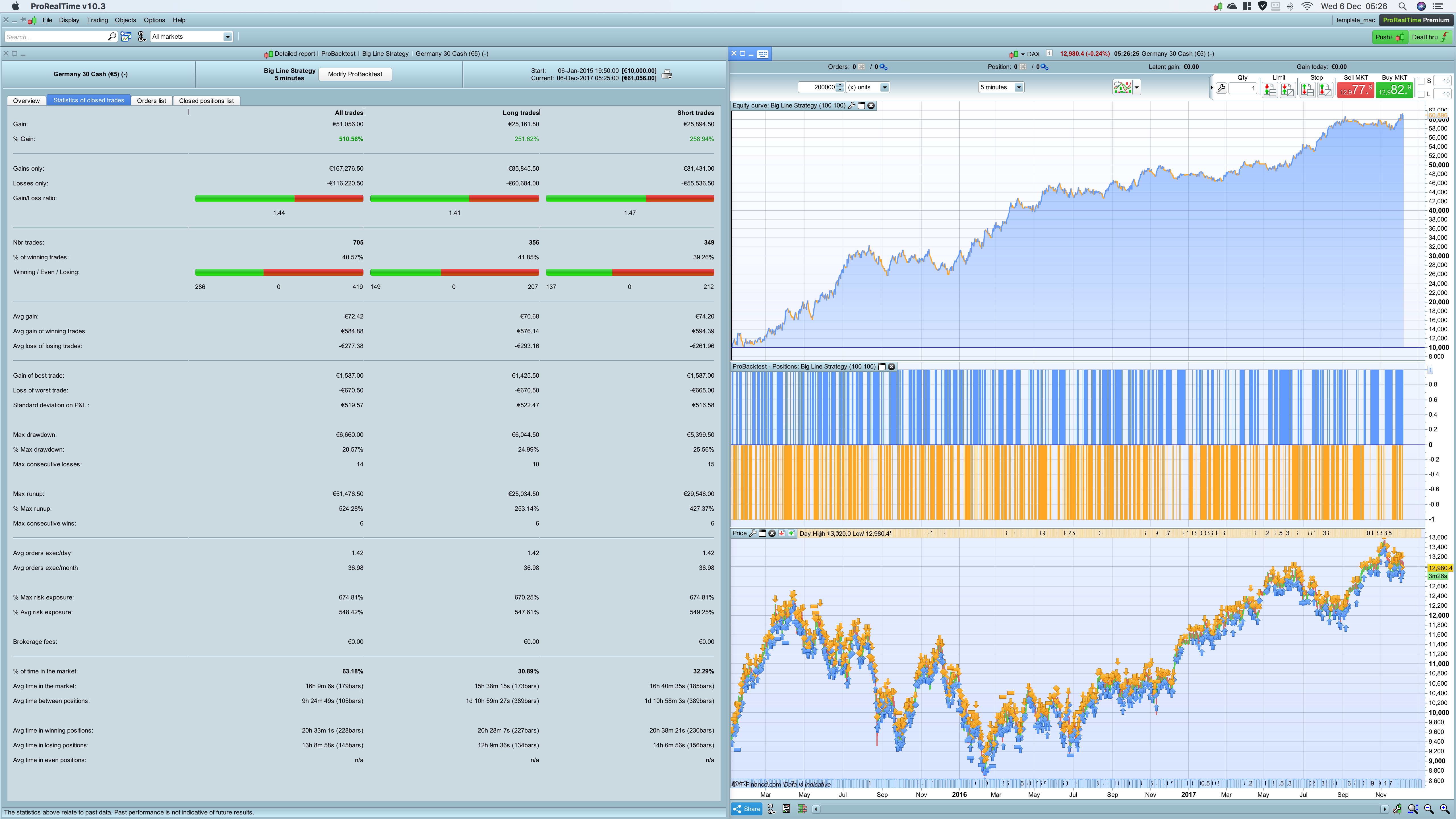
Just played around with the idea to enter a trade around a big line because it could have more potential. I focussed on the DAX.
- dax 5 minutes
- 200k bars
- spread 1
- stoploss 1, trailing stop 1.5, profit target 2.5
- trading times 9-18h
- keeps positions overnight, but closes at Friday 18h
One extra criteria was needed and it looks back at high/low max 2 days
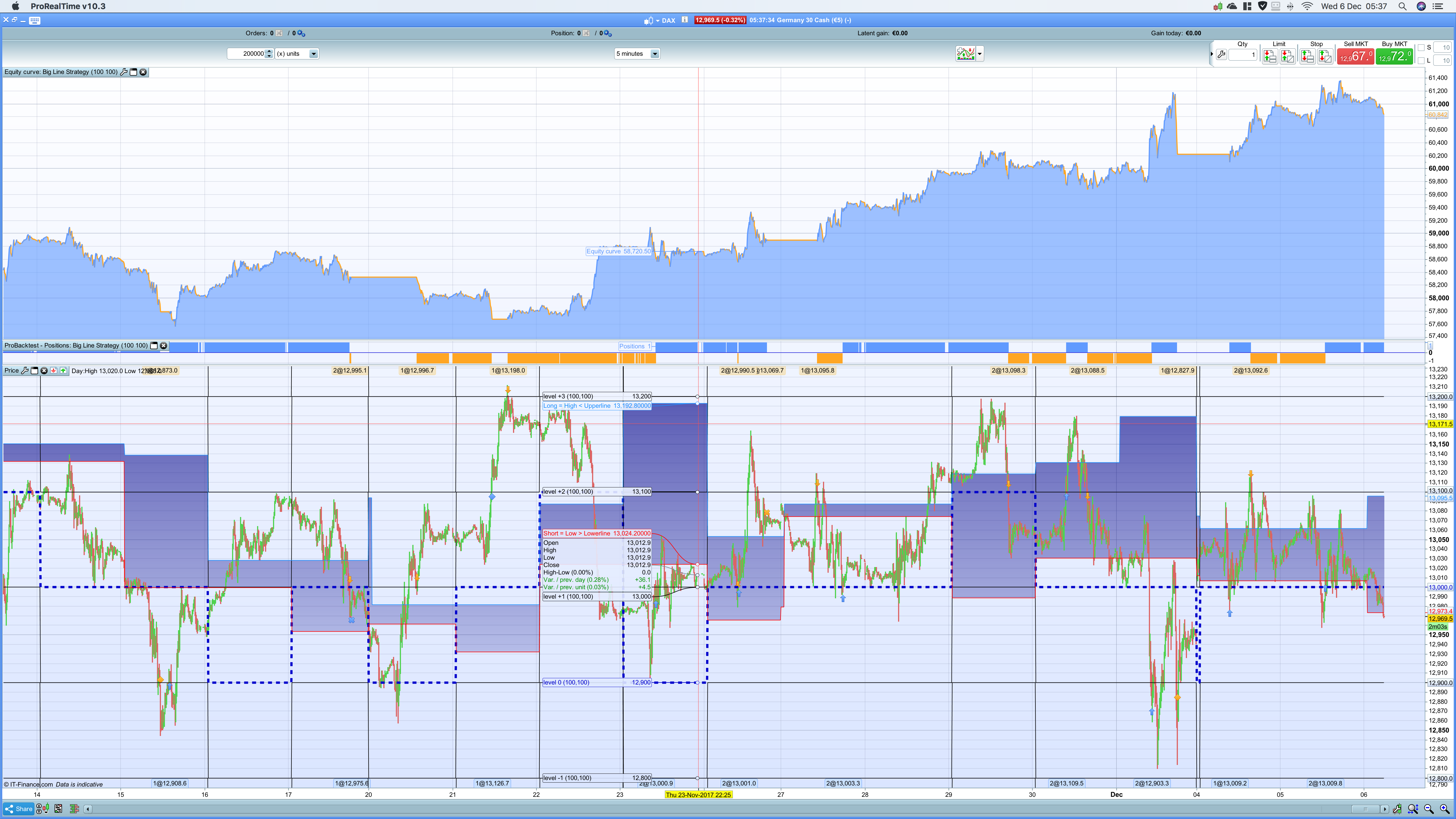
Included is a Big Line indicator which should be added to the price-chart. This makes sure you set the correct lines. The values can be used then in the strategy.
tip: in the price-chart, set settings on : vertical autoscaling; use price only
M=100 F=100 causes the DAX to enter around the 100 lines if criteria are met.
If you set M=100 and F=50 it enters on the 50 lines. By adjusting it should be flexible for other markets. It’s not meant to optimise.
Optional is the Big Line Indicator EC for the price chart. It shows visually the extra criteria.
//-------------------------------------------------------------------------
// Main code : Big Line Strategy
//-------------------------------------------------------------------------

// common rules
DEFPARAM CUMULATEORDERS = false
DEFPARAM PRELOADBARS = 10000

// time rules
ONCE entertime = 090000
ONCE lasttime  = 180000
ONCE closetime = 240000 // greater then 23.59 means it continues position overnight
ONCE closetimefriday=180000

tt1 = time >= entertime
tt2 = time <= lasttime
tradetime = tt1 and tt2

// positionsize and stops
positionsize=1
sl=1   // % stoploss
ts=1.5 // % trailing stop
pt=2.5 // % profit target

// setup number of trades intraday
if IntradayBarIndex = 0 then
 longtradecounter = 0
 Shorttradecounter = 0
endif

// trade criteria
lc = tradetime and countoflongshares < 1 and longtradecounter < 1
sc = tradetime and countofshortshares < 1 and shorttradecounter < 1

// line criteria
CurrentPrice = round(dclose(1))
MPmod  = M
Factor = F   // defines lines
AboveLevel0 = CurrentPrice mod MPmod
StartLevel = CurrentPrice - AboveLevel0

Level00Up = Startlevel
Level10Up = StartLevel + (1*Factor)
Level20Up = StartLevel + (2*Factor)
Level30Up = StartLevel + (3*Factor)
Level40Up = StartLevel + (4*Factor)
Level50Up = StartLevel + (5*Factor)
Level60Up = StartLevel + (6*Factor)
Level70Up = StartLevel + (7*Factor)
Level80Up = StartLevel + (8*Factor)
Level90Up = StartLevel + (9*Factor)

Level00Down = Startlevel
Levell0Down = StartLevel - (1*Factor)
Level20Down = StartLevel - (2*Factor)
Level30Down = StartLevel - (3*Factor)
Level40Down = StartLevel - (4*Factor)
Level50Down = StartLevel - (5*Factor)
Level60Down = StartLevel - (6*Factor)
Level70Down = StartLevel - (7*Factor)
Level80Down = StartLevel - (8*Factor)
Level90Down = StartLevel - (9*Factor)

l0= close crosses over Level00Up or close crosses over Level00Down
l1= close crosses over Level10Up or close crosses over Levell0Down
l2= close crosses over Level20Up or close crosses over Level20Down
l3= close crosses over Level30Up or close crosses over Level30Down
l4= close crosses over Level40Up or close crosses over Level40Down
l5= close crosses over Level50Up or close crosses over Level50Down
l6= close crosses over Level60Up or close crosses over Level60Down
l7= close crosses over Level70Up or close crosses over Level70Down
l8= close crosses over Level80Up or close crosses over Level80Down
l9= close crosses over Level90Up or close crosses over Level90Down

s0= close crosses under Level00Down or close crosses under Level00Up
s1= close crosses under Levell0Down or close crosses under Level10Up
s2= close crosses under Level20Down or close crosses under Level20Up
s3= close crosses under Level30Down or close crosses under Level30Up
s4= close crosses under Level40Down or close crosses under Level40Up
s5= close crosses under Level50Down or close crosses under Level50Up
s6= close crosses under Level60Down or close crosses under Level60Up
s7= close crosses under Level70Down or close crosses under Level70Up
s8= close crosses under Level80Down or close crosses under Level80Up
s9= close crosses under Level90Down or close crosses under Level90Up

// extra criteria
elc=high < MIN(dhigh(1),dhigh(2))
esc=low > MAX(dlow(1),dlow(2))

// long entry
If lc and elc and (l0 or l1 or l2 or l3 or l4 or l5 or l6 or l7 or l8 or l9) then
 buy positionsize contract at market
 longtradecounter=longtradecounter + 1
endif

// short entry
if sc and esc and (s0 or s1 or s2 or s3 or s4 or s5 or s6 or s7 or s8 or s9) then
 sellshort positionsize contract at market
 shorttradecounter=shorttradecounter + 1
endif

// exit all
If onmarket and time >= closetime then
 sell at market
 exitshort at market
endif

// exit friday at set closetime
if onmarket and (CurrentDayOfWeek=5 and time>=closetimefriday) then
 sell at market
 exitshort at market
endif

// build-in exit
SET STOP %LOSS sl %TRAILING ts
SET TARGET %PROFIT pt
Comments
You must be logged in to post a comment.

Hello There is a mistake in trailing stop code, I think that this should fix the problem sl=1 // % stoploss ts=1.5 // % trailing stop pt=2.5 // % profit target tsconvert=ts*close/100 // build-in exit SET STOP %LOSS sl SET STOP TRAILING tsconvert // trailing % doesn't work , value must be written in points SET TARGET %PROFIT pt I will run in demo

Please remove the parameters and set values M and F to 100 in this code. In the code add manually a trailing stop posted in the library. My purpose was for backtesting first. @noisette. Thnx for the idea! I will have a quick test. Right now it has too many trades, but it's a good platform to build on. I have some ideas how to proceed to reduce those but more idea's are welcome ! ps. To get a complete result including January 2015. Set timeframe for i.e. 10 minutes and switch back to 5min. January is now included which makes long and short gains more equal and profitable.

there is a problem with the %trailing stop. Doesn´t work in ProOrder.


sorry paul, but system says that is not possible to put many stop order combined...what have to do? thanks