







ZIGZAG Base High/Low (Arrays)
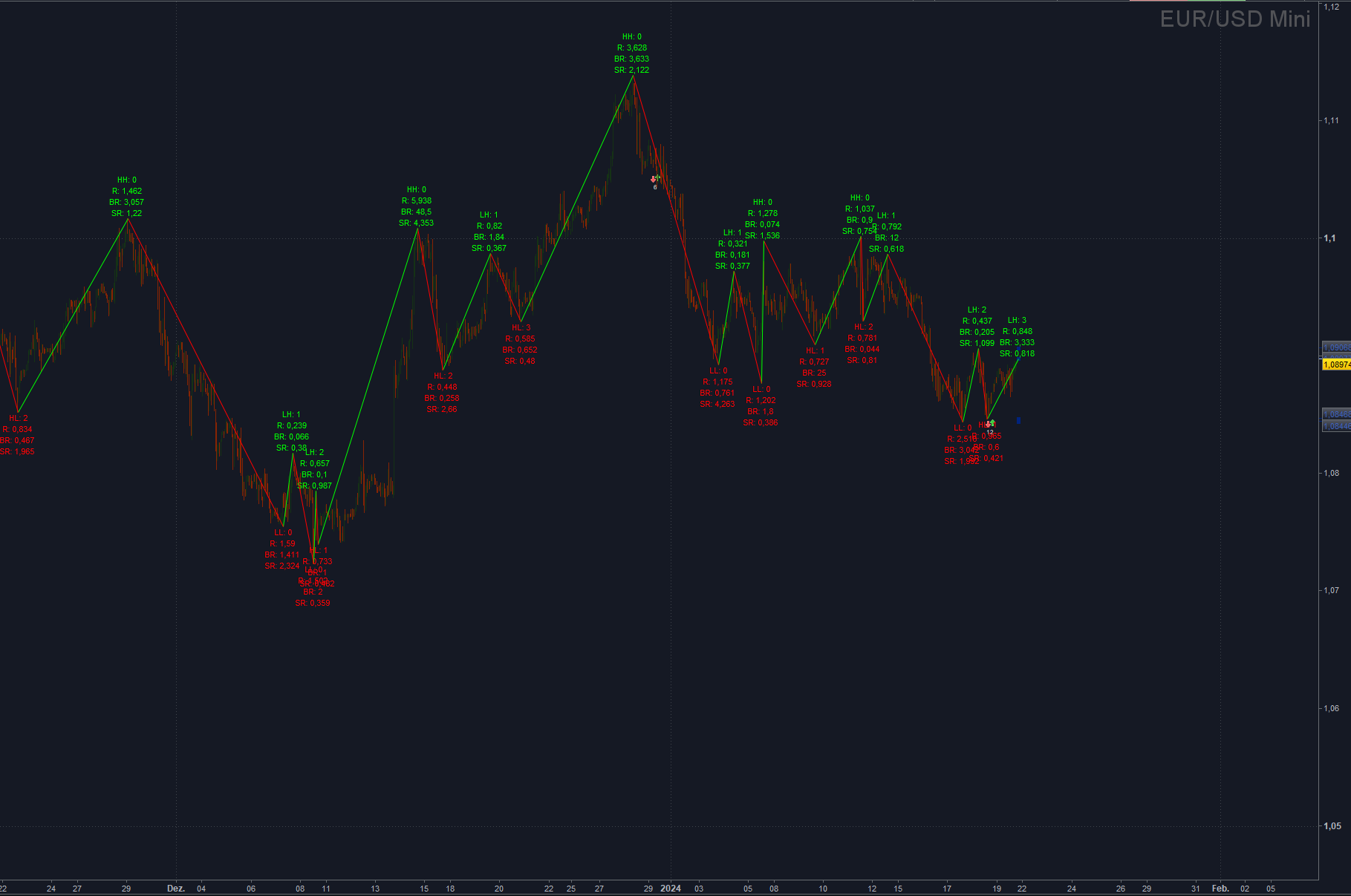
ZigZag base indicator
Calculation is done on High and Lows. A high point is identified, if the highest bar is the current bar. A low point is identified, if the lowest bar is the current bar.
This can be base of any kind of zigzag based indicator.
All zigzag points and his values are stored to a set of arrays.
It will count LH Lower Highs and HL Higher Lows, if HH OR LL occured then LH or HL counter is 0.
It can be used for 1-2-3 pattern or any other pattern algos.
It will also save some ratio value ratio, rizeratio, Barratio.
– Ratio : current move against lasmove 1 = 100% retracement 0.5 = 50% retracement
– Barratio : current move bar length against lasmove bar length
– Sizeration current move against last move of the same direction.
Paramters:
AllowDouble = Allow New High or Low points at the same bar
AllowOverflow = Force a new High or Low Point, if no new high or low point was found after cLength
CheckUpOrDownCandle = New high or low points are only allowed if Candle is up for highs or is down for lows
It return the last 4 zigzag point at the last barindex. Maybe usefull, when will use it for a breakout strategy. If you don’t want this, then replace the “return” line with a simple “return.
Code:
// ZigZag base indicator
// This can be base of any kind of zigzag based indicator
// all zigzag points and his values are stored to a set of arrays
// it will count LH Lower Highs and HL Higher Lows, if HH OR LL occured then LH or HL counter is 0
// this can be used for 1-2-3 pattern
// it will also save some ratio value ratio, rizeratio, Barratio
// ratio : current move against lasmove 1 =  100% retracement 0.5 = 50% retracement
// barratio : current move bar length against lasmove bar length
// sizeration current move against last move of the same direction.
// AllowDouble = Allow New High or Low points at the same bar
// AllowOverflow = Force a new High or Low Point, if no new high or low point was found after cLength
// CheckUpOrDownCandle = New high or low points are only allowed if Candle is up for highs or is down for lows
// It return the last 4 zigzag point at the last barindex.
DEFPARAM DrawOnLastBarOnly = true

// ----- settings -----
MaxBars = 1000
ShowLabel = 1
AllowDouble = 0 //Allow New High or Low points at the same bar
AllowOverflow = 1 //Force a new High or Low Point, if no new high or low point was found after cLength
CheckUpOrDownCandle = 0 //New high or low points are only allowed if Candle is up for highs or is down for lows
// --------------------

cLength = Max(1,cLength)
if IsLastBarUpdate THEN
// Reset Arrays
UNSET($pPrice1)
UNSET($pBar1)
UNSET($pDir1)
UNSET($pNumber1)
UNSET($pTrend1)
UNSET($pSizeRatio)
UNSET($pBarRatio)
UNSET($pRatio)
UNSET($pHighNumber1)
UNSET($pLowNumber1)

from = MIN(BarIndex ,MaxBars )
for i = from -1 DOWNTO  0 DO
//// NEW Code
candlepHighBar = highestBars[cLength] (High[i])
candlepLowBar  = lowestBars[cLength] (Low[i])
candlepHigh    = highest[cLength] (High[i])
candlepLow     = lowest[cLength] (Low[i])
if CheckUpOrDownCandle THEN
bCandleIsHigh    = Open[i] <= Close[i]
bCandleIsLow     = Open[i] >= Close[i]
ELSE
bCandleIsHigh    = 1
bCandleIsLow     = 1
ENDIF
pDir = 1
updateLastPivot = 0
newPivot = 0
doublePivot = 0
newBar = barindex[i]
distanceFromLastPivot = 0
//var counter = 0
//var lastCounterBar = 0
forceDoublePivot = 0
pIndex1 = LastSet($pBar1)
if(pIndex1 >= 0) THEN
lastpPrice  = $pPrice1[pIndex1]
lastpBar    = $pBar1[pIndex1]
lastpDir    = SGN($pDir1[pIndex1])
pDir        = SGN($pDir1[pIndex1])
distanceFromLastPivot = newBar - lastpBar
ENDIF
if(pIndex1 >= 1) THEN
llastPrice  = $pPrice1[pIndex1-1]
llastDir    = SGN($pDir1[pIndex1-1])
llastBar    = $pBar1[pIndex1-1]
forceDoublePivot = (pDir = 1 and candlepLowBar = 0 AND candlepLow < llastPrice AND bCandleIsLow) OR (pDir = -1 and candlepHighBar = 0 AND candlepHigh > llastPrice AND bCandleIsHigh)
if NOT AllowDouble then
forceDoublePivot = 0
ENDIF
ENDIF
if AllowOverflow THEN
overflow = distanceFromLastPivot >= clength
ELSE
overflow = 0
ENDIF
if ((pDir = 1 and candlepHighBar = 0 ) or (pDir = -1 and candlepLowBar = 0 )) and pIndex1 >1 THEN
if pDir = 1 THEN
val = candlepHigh
ELSE
val = candlepLow
ENDIF
removeOld = val * lastpDir >= lastpPrice * lastpDir
if(removeOld) THEN
updateLastPivot = 1
newPivot = 1
// Update Pivot ------------------------------------------------------------------------
dir = SGN(pDir)
newDir = dir
pivotratio = 1
pivotbarRatio = 1
pivotsizeRatio = 1
$pPrice1[pIndex1] = val
$pBar1[pIndex1] = newBar
$pDir1[pIndex1] = newDir
$pSizeRatio[pIndex1] = pivotsizeRatio
$pBarRatio[pIndex1]  = pivotbarRatio
$pRatio[pIndex1]     = pivotratio
$pHighNumber1[pIndex1] = 1
$pLowNumber1[pIndex1] = 1
// Check Dir AND Ratios
dir = SGN($pDir1[pIndex1])
if(pIndex1 >=1) then
lastValue = $pPrice1[pIndex1-1]
if(pIndex1 >=2) THEN
lval = $pPrice1[pIndex1]
llastValue = $pPrice1[pIndex1-2]
if newDir * lval > newDir * llastValue THEN
newDir = 2* newDir
if newDir > 0 then
$pHighNumber1[pIndex1] = 0
$pLowNumber1[pIndex1] = $pLowNumber1[pIndex1-1]
ELSE
$pHighNumber1[pIndex1] = $pHighNumber1[pIndex1-1]
$pLowNumber1[pIndex1] = 0
endif
ELSE
newDir = newDir
if newDir > 0 then
$pHighNumber1[pIndex1] = $pHighNumber1[pIndex1-2] + 1
$pLowNumber1[pIndex1] = $pLowNumber1[pIndex1-1]
ELSE
$pHighNumber1[pIndex1] = $pHighNumber1[pIndex1-1]
$pLowNumber1[pIndex1] = $pLowNumber1[pIndex1-2] + 1
ENDIF
ENDIF
pivotratio = round(abs(lastValue-lval)/abs(llastValue - lastValue), 3)
pivotbarRatio = round(abs($pBar1[pIndex1-1]- newBar)/abs($pBar1[pIndex1-2] - $pBar1[pIndex1-1]), 3)

if(pIndex1 >=3) then
lllastValue = $pPrice1[pIndex1-3]
pivotsizeRatio = round(abs(lastValue-lval)/abs(lllastValue - llastValue), 3)
endif
ENDIF
ENDIF
$pDir1[pIndex1]        = newDir
$pSizeRatio[pIndex1]   = pivotsizeRatio
$pBarRatio[pIndex1]    = pivotbarRatio
$pRatio[pIndex1]       = pivotratio

ENDIF
ENDIF
if ((pDir = 1 and candlepLowBar = 0 AND bCandleIsLow) or (pDir = -1 and candlepHighBar = 0 AND bCandleIsHigh)) and (newPivot = 0 or forceDoublePivot > 0) THEN
if pDir = 1 THEN
val = candlepLow
ELSE
val = candlepHigh
ENDIF
// NEW PIVOT -------------------------------------------------------------------------------
dir = SGN(pDir)
newDir = -1*dir
pivotratio = 1
pivotbarRatio = 1
pivotsizeRatio = 1
pIndex1 = pIndex1 + 1
$pPrice1[pIndex1] = val
$pBar1[pIndex1] = newBar
$pDir1[pIndex1] = newDir
$pSizeRatio[pIndex1] = pivotsizeRatio
$pBarRatio[pIndex1]  = pivotbarRatio
$pRatio[pIndex1]     = pivotratio
$pHighNumber1[pIndex1] = 1
$pLowNumber1[pIndex1] = 1
// Check Dir AND Ratios
dir = SGN($pDir1[pIndex1])
if(pIndex1 >=1) then
lastValue = $pPrice1[pIndex1-1]
if(pIndex1 >=2) THEN
lval = $pPrice1[pIndex1]
llastValue = $pPrice1[pIndex1-2]
if newDir * lval > newDir * llastValue THEN
newDir = 2* newDir
if newDir > 0 then
$pHighNumber1[pIndex1] = 0
$pLowNumber1[pIndex1] = $pLowNumber1[pIndex1-1]
ELSE
$pHighNumber1[pIndex1] = $pHighNumber1[pIndex1-1]
$pLowNumber1[pIndex1] = 0
endif
ELSE
newDir = newDir
if newDir > 0 then
$pHighNumber1[pIndex1] = $pHighNumber1[pIndex1-2] + 1
$pLowNumber1[pIndex1] = $pLowNumber1[pIndex1-1]
ELSE
$pHighNumber1[pIndex1] = $pHighNumber1[pIndex1-1]
$pLowNumber1[pIndex1] = $pLowNumber1[pIndex1-2] + 1
ENDIF
ENDIF
pivotratio = round(abs(lastValue-lval)/abs(llastValue - lastValue), 3)
pivotbarRatio = round(abs($pBar1[pIndex1-1]- newBar)/abs($pBar1[pIndex1-2] - $pBar1[pIndex1-1]), 3)

if(pIndex1 >=3) then
lllastValue = $pPrice1[pIndex1-3]
pivotsizeRatio = round(abs(lastValue-lval)/abs(lllastValue - llastValue), 3)
endif
ENDIF
ENDIF
$pDir1[pIndex1]      = newDir
$pSizeRatio[pIndex1] = pivotsizeRatio
$pBarRatio[pIndex1]  = pivotbarRatio
$pRatio[pIndex1]     = pivotratio

doublePivot = newPivot
newPivot = 1

ENDIF
if(overflow and newPivot = 0 ) THEN
if pDir = 1 THEN
ipivot    = candlepLow
ipivotbar = newBar-candlepLowBar
ELSE
ipivot    = candlepHigh
ipivotbar = newBar-candlepHighBar
ENDIF
// NEW PIVOT -------------------------------------------------------------------------
dir = SGN(pDir)
newDir = -1*dir
pivotratio = 1
pivotbarRatio = 1
pivotsizeRatio = 1
pIndex1 = pIndex1 + 1
$pPrice1[pIndex1] = ipivot
$pBar1[pIndex1] = ipivotbar
$pDir1[pIndex1] = newDir
$pSizeRatio[pIndex1] = pivotsizeRatio
$pBarRatio[pIndex1]  = pivotbarRatio
$pRatio[pIndex1]     = pivotratio
$pHighNumber1[pIndex1] = 1
$pLowNumber1[pIndex1] = 1
// Check Dir AND Ratios
dir = SGN($pDir1[pIndex1])
if(pIndex1 >=1) then
lastValue = $pPrice1[pIndex1-1]
if(pIndex1 >=2) THEN
lval = $pPrice1[pIndex1]
llastValue = $pPrice1[pIndex1-2]
if newDir * lval > newDir * llastValue THEN
newDir = 2* newDir
if newDir > 0 then
$pHighNumber1[pIndex1] = 0
$pLowNumber1[pIndex1] = $pLowNumber1[pIndex1-1]
ELSE
$pHighNumber1[pIndex1] = $pHighNumber1[pIndex1-1]
$pLowNumber1[pIndex1] = 0
endif
ELSE
newDir = newDir
if newDir > 0 then
$pHighNumber1[pIndex1] = $pHighNumber1[pIndex1-2] + 1
$pLowNumber1[pIndex1] = $pLowNumber1[pIndex1-1]
ELSE
$pHighNumber1[pIndex1] = $pHighNumber1[pIndex1-1]
$pLowNumber1[pIndex1] = $pLowNumber1[pIndex1-2] + 1
ENDIF
ENDIF
pivotratio = round(abs(lastValue-lval)/abs(llastValue - lastValue), 3)
pivotbarRatio = round(abs($pBar1[pIndex1-1]- $pBar1[pIndex1])/abs($pBar1[pIndex1-2] - $pBar1[pIndex1-1]), 3)

if(pIndex1 >=3) then
lllastValue = $pPrice1[pIndex1-3]
pivotsizeRatio = round(abs(lastValue-lval)/abs(lllastValue - llastValue), 3)
endif
ENDIF
ENDIF
$pDir1[pIndex1]      = newDir
$pSizeRatio[pIndex1] = pivotsizeRatio
$pBarRatio[pIndex1]  = pivotbarRatio
$pRatio[pIndex1]     = pivotratio
newPivot = 1
ENDIF
// New Point update point
if newPivot THEN
// WHAT TODO ?
if pIndex1 >= 3 then
myPrice = $pPrice1[pIndex1]
lmyPrice = $pPrice1[pIndex1-1]
llmyPrice = $pPrice1[pIndex1-2]
lllmyPrice = $pPrice1[pIndex1-3]
ENDIF
ENDIF
NEXT

// draw
for x = LastSet($pBar1) DOWNTO 1 DO
SizeRatio = $pSizeRatio[x]
BarRatio  = $pBarRatio[x]
Ratio     = $pRatio[x]
Hnumber   = $pHighNumber1[x]
Lnumber   = $pLowNumber1[x]
if ShowLabel THEN
if $pDir1[x] = 1 THEN
DRAWTEXT("LH: #Hnumber#nR: #Ratio#nBR: #BarRatio#nSR: #SizeRatio#nnnn ", $pBar1[x], $pPrice1[x]) COLOURED("lime")
ELSIF $pDir1[x] = 2 THEN
DRAWTEXT("HH: #Hnumber#nR: #Ratio#nBR: #BarRatio#nSR: #SizeRatio#nnnn ", $pBar1[x], $pPrice1[x]) COLOURED("lime")
ELSIF $pDir1[x] = -1 THEN
DRAWTEXT("nnnn HL: #Lnumber#nR: #Ratio#nBR: #BarRatio#nSR: #SizeRatio#", $pBar1[x], $pPrice1[x]) COLOURED("red")
ELSIF $pDir1[x] = -2 THEN
DRAWTEXT("nnnn LL: #Lnumber#nR: #Ratio#nBR: #BarRatio#nSR: #SizeRatio#", $pBar1[x], $pPrice1[x]) COLOURED("red")
ENDIF
ENDIF
if $pDir1[x] < 0 THEN
DRAWSEGMENT($pBar1[x-1] , $pPrice1[x-1] , $pBar1[x] , $pPrice1[x] ) COLOURED("red") STYLE (LINE,1 )
elsif $pDir1[x] > 0 THEN
DRAWSEGMENT($pBar1[x-1] , $pPrice1[x-1] , $pBar1[x] , $pPrice1[x] ) COLOURED("lime") STYLE (LINE,1 )
ELSE
DRAWSEGMENT($pBar1[x-1] , $pPrice1[x-1] , $pBar1[x] , $pPrice1[x] ) COLOURED("cyan") STYLE (LINE,1 )
ENDIF
NEXT
ENDIF

if myPrice > llmyPrice AND lmyPrice > lllmyPrice THEN
R=0
G=255
B=0
elsif myPrice > llmyPrice AND lmyPrice > lllmyPrice THEN
R=255
G=0
B=0
ELSE
R=0
G=35
B=125
ENDIF

// return last 4 zigzag points
RETURN myPrice STYLE (POINT ,5)COLOURED(R,G,B) , lmyPrice STYLE (POINT ,5)COLOURED(R,G,B), llmyPrice STYLE (POINT ,5)COLOURED(R,G,B) ,lllmyPrice STYLE (POINT ,5)COLOURED(R,G,B)
// return nothing
// RETURN
Comments
You must be logged in to post a comment.
Hello LucasBest, thanks for your comment. Point 1: Yes your are right. The Zigzag version is more fractal based. For me a ZZ indicator should show turning points (highs and lows). So the calculation should be done on candle high and candle low. With "vertical" calculation(percentage) you can see some jumping ZZ points. Example: If you see serveral Dojis with long shadows, then the high and low of this candle can be in the range of the percentage change, even if the low or high is not lower or higher then the candle before. Thats why i prefer to indentify ZZ points as higher highs or lower lows. Point2: Yes your are right. The goal was to limit the calculation to a specific range of bars. Sometimes i have open a chart with 10k bars. If i would do the calculation over all bars, then the time for calculation would take longer the first time. I can remove the calculation loop. But i don't know, how to update this post with the new code. best regards Gidien

Thanks for the hint. I think i know now, why this happen. The "settings" block was added by the reviewer. I believe, that it could be difficult to find all parameters directly in the sourcecode. I will add this block next time directly to the source code. The correct settings block: // ----- settings ----- MaxBars = 1000 ShowLabel = 1 AllowDouble = 0 //Allow New High or Low points at the same bar AllowOverflow = 1 //Force a new High or Low Point, if no new high or low point was found after cLength CheckUpOrDownCandle = 0 //New high or low points are only allowed if Candle is up for highs or is down for lows cLength = 3 // how many bars lookback to find highs or lows // -------------------- I think , it would be a nice feature to have the possibilty to declare input parameters inside the source code in the next version: Like this: INPUT("Name", "Description", Type(integer, bool...) , Value)

Thank you for sharing your work, both original and very disconcerting. When I went through the code, two things struck me (if I may): 1 - we are closer to a fractal code than a zigzag code. The fractal code determines the new highs and lows based on a minimum bar number (horizontality). The Zigzag code determines that there is a change of direction from a certain vertical movement. This minimum vertical movement to change direction can sometimes be done in 1 bar... This makes the Zigzag code (based on verticality = prices) more responsive and often more consistent, because it is the price that counts. 2 - The code erases everything and redo all the calculations at each new bar, which is incongruous and especially very time-consuming...