Volume by time
Introduction
Intraday volume is not flat. The open and the close of a session are always busy, lunch hours are quiet, and a news release at a fixed time shows up every day at the same bar. Comparing the volume of a 10:30 bar with a moving average of the last 20 bars mixes all of that together, so a perfectly normal opening bar looks huge and a busy lunch bar looks small.
Volume by Time, by LuxAlgo, compares every bar only with the bars that opened at the same time of day in previous sessions. Each bar gets its own reference: what volume is normal at that exact time. On top of that, the reference is coloured by the direction that usually dominates at that time, so you can see at a glance whether a given hour tends to be driven by buyers or by sellers.
Theory Behind the Indicator
The indicator groups bars by their opening time (hours, minutes and seconds). For each time of day it keeps a history of volumes:
- the volume is stored with a sign: positive when the bar closed above its open, negative otherwise;
- the very first value of each time of day is stored as it is, without sign.
From that history it computes two numbers for the current bar:
- the average (or median) of the signed values: if it is positive, bullish volume usually dominates at this time and the reference is drawn in green; otherwise in red;
- the average (or median) of the absolute values: the typical volume at this time of day, which is the height of the reference.
The history can cover the whole chart or only the last N sessions (the Length parameter). With Length = 0 every past session is used.
Key Features at a Glance
- Volume reference specific to each time of day, not a rolling average of the last bars.
- Average or median, for a reference that is robust to a few exceptional sessions.
- Adjustable memory: the whole history or the last N days.
- The reference is coloured by the dominant direction of volume at that time of day.
- Optional bi-directional mode: bearish volume below zero, bullish volume above.
How to Read the Indicator
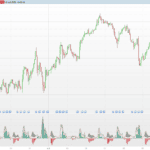
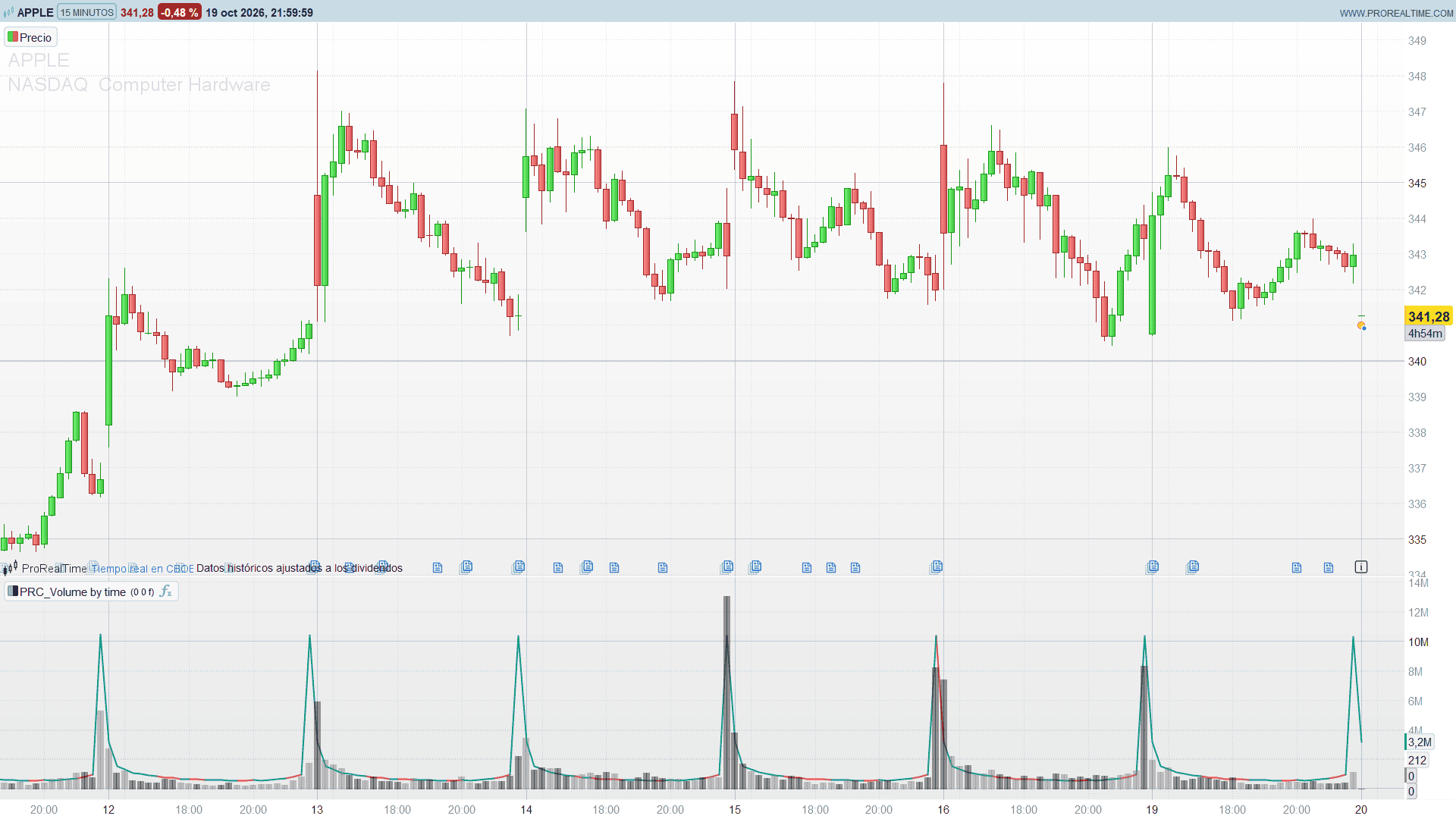
- Filled bar (grey for bullish bars, black for bearish bars): the volume of the current bar.
- Outline bar (green or red): the normal volume at this time of day. Green means that bullish volume has usually dominated at this time, red that bearish volume has.
- Volume bar well above its outline: unusual activity for that time of day, even if the absolute volume looks ordinary compared with the bars around it. This is where the indicator shows its value, for example a quiet-looking lunch bar that is actually twice its normal volume.
- Volume bar inside its outline: normal participation for that time.
- In bi-directional mode, bars and references below zero are bearish, above zero bullish, which makes it easy to spot a bearish bar at a time of day that is usually bullish.
The data box shows the volume, the reference and the number of sessions used for each bar.
Practical Applications
- Relative volume by time: filter breakouts by asking whether the volume is high for that time of day, not for the last few bars.
- Session structure: the colour of the outlines shows which hours tend to carry buying or selling pressure on the instrument.
- News and auctions: recurring events at fixed times stop looking exceptional, while a genuinely unusual reaction still stands out.
The indicator is built for intraday charts. On daily or higher timeframes every bar has the same opening time, so the reference becomes a plain average of all bars.
Indicator Configuration
- avgType (default 0): 0 = Average, 1 = Median of the values stored for each time of day.
- lenDays (default 0): number of values (sessions) kept for each time of day. 0 uses the whole history loaded on the chart.
- biDir (default 0): 1 draws bearish volume and red references below zero and bullish ones above zero.
- upR, upG, upB / dnR, dnG, dnB: colours of the reference outline when bullish or bearish volume dominates.
- upVR, upVG, upVB / dnVR, dnVG, dnVB, volA: colours and transparency of the volume bars.
The Code
//---------------------------------------------------------------
// PRC_Volume by Time
// version = 0
// 20.10.2026
// Iván González @ www.prorealcode.com
// Author: LuxAlgo
// Sharing ProRealTime knowledge
//--------------------------------------------------------------------//
// Settings
//--------------------------------------------------------------------//
avgType = 0        // Analysis type: 0 = Average, 1 = Median
lenDays = 0        // Length (days): values kept for each time of day, 0 = whole history
biDir = 0          // Bi-directional: 1 = bearish volume below zero, bullish volume above zero
// Average volume line colours
upR = 8
upG = 153
upB = 129
dnR = 242
dnG = 54
dnB = 69
// Volume colours (alpha 102 = 60% transparent)
upVR = 120
upVG = 123
upVB = 134
dnVR = 0
dnVG = 0
dnVB = 0
volA = 102
//--------------------------------------------------------------------//
// Volume of the bar, signed by its direction
//--------------------------------------------------------------------//
vol = volume
IF close > open THEN
   sVol = vol
ELSE
   sVol = 0 - vol
ENDIF
// Time of day of the bar, measured in seconds from the first bar of the session.
// opentime is in the platform time zone, not the exchange one: when the user's
// country and the exchange change to summer time on different dates, the whole
// session moves one hour on the user's clock. Elapsed time keeps the same bars
// together all year round.
hh = floor(opentime / 10000)
mm = floor(opentime / 100) - hh * 100
ss = opentime - floor(opentime / 100) * 100
todSec = hh * 3600 + mm * 60 + ss
ONCE startSec = -1
IF intradaybarindex = 0 AND barindex > 0 THEN
   startSec = todSec
ENDIF
IF 0 > startSec THEN
   // First session on the chart, usually loaded from the middle: its bars get
   // keys of their own so they are not mixed with the rest of the sessions
   tKey = 86400 + todSec
ELSE
   tKey = todSec - startSec
   IF 0 > tKey THEN
      // Session that crosses midnight
      tKey = tKey + 86400
   ENDIF
ENDIF
//--------------------------------------------------------------------//
// Each bar is linked to the previous bar with the same time of day.
// Only pure assignments indexed by barindex: re-running the live bar on
// every tick rewrites the same values instead of adding them again.
//--------------------------------------------------------------------//
IF isset($lastB[tKey]) THEN
   IF $lastB[tKey] = barindex THEN
      prevB = $prevSame[barindex]
   ELSE
      prevB = $lastB[tKey]
   ENDIF
ELSE
   prevB = -1
ENDIF
$lastB[tKey] = barindex
$prevSame[barindex] = prevB
IF prevB < 0 THEN
   // The first value of each time of day is stored unsigned, as in the original
   $val[barindex] = vol
   $cnt[barindex] = 1
   $cumV[barindex] = vol
   $cumA[barindex] = vol
   $startB[barindex] = barindex
ELSE
   $val[barindex] = sVol
   $cnt[barindex] = $cnt[prevB] + 1
   $cumV[barindex] = $cumV[prevB] + sVol
   $cumA[barindex] = $cumA[prevB] + vol
   $nextSame[prevB] = barindex
   // Window full: the oldest value of this time of day leaves the window
   IF lenDays > 0 AND $cnt[barindex] > lenDays THEN
      // Read the start into a variable first: an array element used directly
      // as the index of another array stops the indicator with an error
      oldStart = $startB[prevB]
      $startB[barindex] = $nextSame[oldStart]
   ELSE
      $startB[barindex] = $startB[prevB]
   ENDIF
ENDIF
//--------------------------------------------------------------------//
// Average or median of the window (signed values and absolute values)
//--------------------------------------------------------------------//
sB = $startB[barindex]
winN = $cnt[barindex] - $cnt[sB] + 1
IF avgType = 0 THEN
   rawAvg = ($cumV[barindex] - $cumV[sB] + $val[sB]) / winN
   absAvg = ($cumA[barindex] - $cumA[sB] + abs($val[sB])) / winN
ELSE
   FOR mPass = 1 TO 2 DO
      // Copy the window: this bar and its predecessors at the same time of day
      bW = barindex
      FOR kW = 0 TO winN - 1 DO
         IF mPass = 1 THEN
            $wq[kW] = $val[bW]
         ELSE
            $wq[kW] = abs($val[bW])
         ENDIF
         bW = $prevSame[bW]
      NEXT
      // Wirth's selection: leaves the kSel-th smallest value at position kSel
      kSel = floor(winN / 2)
      loQ = 0
      hiQ = winN - 1
      WHILE loQ < hiQ DO
         pvQ = $wq[kSel]
         iQ = loQ
         jQ2 = hiQ
         WHILE iQ <= jQ2 DO
            WHILE $wq[iQ] < pvQ DO
               iQ = iQ + 1
            WEND
            WHILE pvQ < $wq[jQ2] DO
               jQ2 = jQ2 - 1
            WEND
            IF iQ <= jQ2 THEN
               tmpQ = $wq[iQ]
               $wq[iQ] = $wq[jQ2]
               $wq[jQ2] = tmpQ
               iQ = iQ + 1
               jQ2 = jQ2 - 1
            ENDIF
         WEND
         IF jQ2 < kSel THEN
            loQ = iQ
         ENDIF
         IF kSel < iQ THEN
            hiQ = jQ2
         ENDIF
      WEND
      medQ = $wq[kSel]
      // Even count: average of the two middle values. Everything left of kSel is
      // now smaller or equal, so the lower middle value is the largest of them.
      IF winN MOD 2 = 0 THEN
         lowQ = $wq[0]
         IF kSel > 1 THEN
            FOR kW = 1 TO kSel - 1 DO
               lowQ = max(lowQ, $wq[kW])
            NEXT
         ENDIF
         medQ = (medQ + lowQ) / 2
      ENDIF
      IF mPass = 1 THEN
         rawAvg = medQ
      ELSE
         absAvg = medQ
      ENDIF
   NEXT
ENDIF
//--------------------------------------------------------------------//
// Colours and display
//--------------------------------------------------------------------//
IF rawAvg > 0 THEN
   aR = upR
   aG = upG
   aB = upB
   dirAvg = absAvg
ELSE
   aR = dnR
   aG = dnG
   aB = dnB
   dirAvg = 0 - absAvg
ENDIF
IF close > open THEN
   vR = upVR
   vG = upVG
   vB = upVB
ELSE
   vR = dnVR
   vG = dnVG
   vB = dnVB
ENDIF
IF biDir = 1 THEN
   avgTop = dirAvg
   volTop = sVol
ELSE
   avgTop = absAvg
   volTop = vol
ENDIF
// Volume: filled candle. Only one DRAWCANDLE per bar is displayed (the last
// one drawn), so the average volume is the coloured line of the RETURN
DRAWCANDLE(0, max(0, volTop), min(0, volTop), volTop) COLOURED(vR, vG, vB, volA) BORDERCOLOR(vR, vG, vB, volA)
// Volume and window length only for the data box (invisible lines)
RETURN volTop COLOURED(vR, vG, vB, 0) AS "Volume", avgTop COLOURED(aR, aG, aB, 255) STYLE(line, 2) AS "Average Volume", winN COLOURED(120, 123, 134, 0) AS "Avg Length"
Conclusion
Volume only means something against what is normal, and in intraday trading what is normal depends on the time of day. Volume by Time gives every bar its own benchmark and adds the dominant direction on top, which makes unusual participation much easier to spot.