







DeltaFlow Volume Profile
Introduction
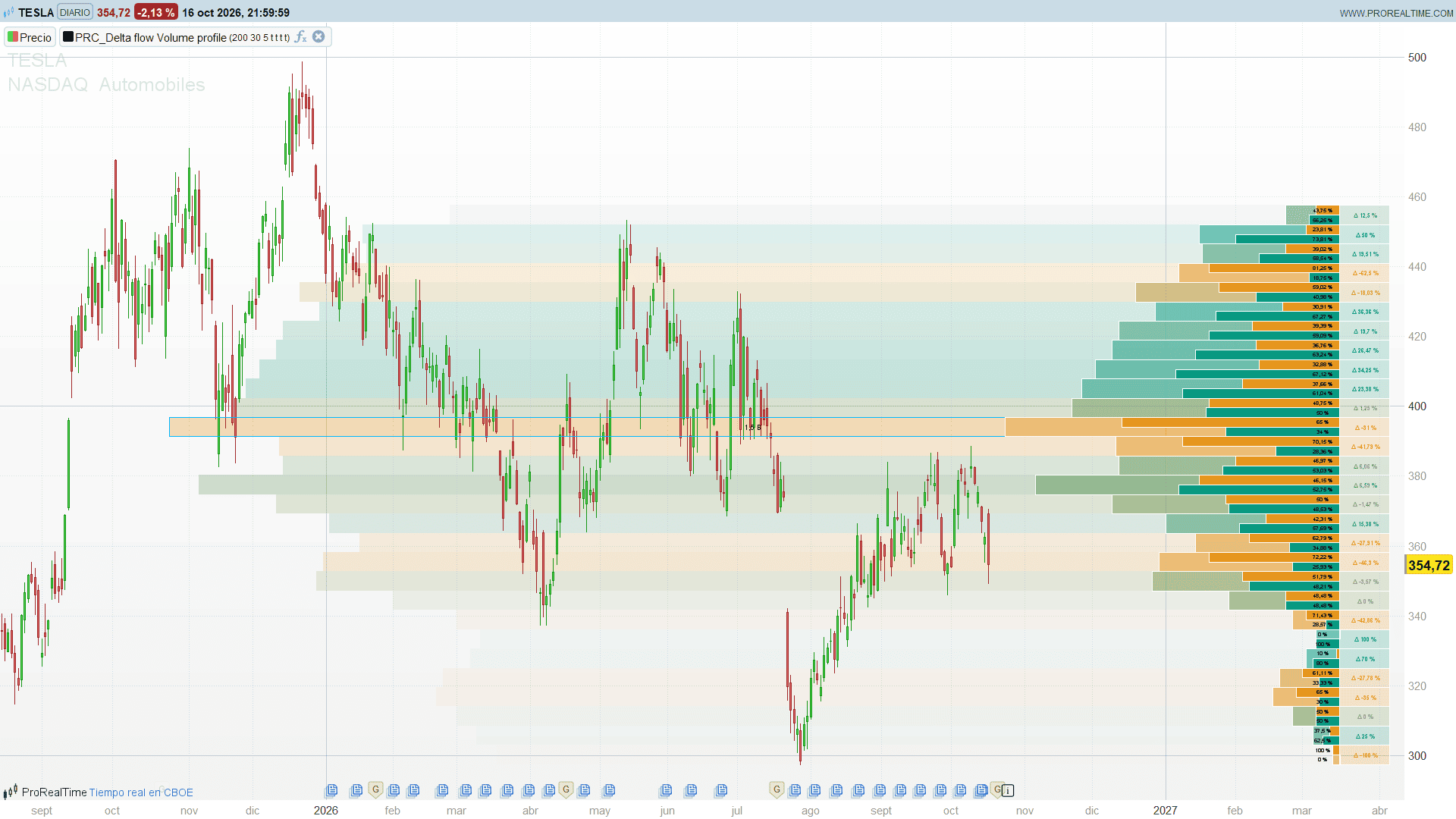
A classic volume profile tells you where volume traded. It does not tell you who was in control at each level. The DeltaFlow Volume Profile adds that second layer: for every price level it splits the volume into buying and selling, shows the share of each side and colours the level by its delta. On top of that, a heat map projects the delta of each level back over the price bars, and the Point of Control is highlighted with its volume.
Theory Behind the Indicator
The profile is built from the last 200 bars (plus the current one).
- Price levels: the range between the highest high and the lowest low of the window is split into 30 equal bins.
- Distributing volume: the volume of each bar is assigned by its close. It is added to every bin whose middle lies within one bin height of the close, so a close usually feeds two neighbouring bins, which smooths the profile.
- Buy and sell volume: a bar that closes at or above its open counts as buying volume; a bar that closes below its open counts as selling volume.
- Length of each level: proportional to its total volume, from 0 to 100 bars. The level with the most volume reaches 100 bars and is the Point of Control (PoC).
- Delta: for each level, the percentage of buying volume minus the percentage of selling volume. A delta of +40 means buying volume clearly dominated that price area.
The delta drives the colours: levels with a delta of -30 or less are orange, levels with +30 or more are teal, and everything in between is a smooth blend of the two.
Key Features at a Glance
- Volume profile with an adjustable lookback and number of bins.
- Buy and sell volume bars inside every level, with the percentage of each side.
- Delta label next to every level, coloured by the delta itself.
- Delta heat map extending back over the price bars, more opaque on high-volume levels.
- Point of Control box with the volume traded at that level.
- Each layer can be switched on or off, and all colours are adjustable.
How to Read the Indicator
- Long levels are high-volume areas: prices the market accepted. They often act as support or resistance when price returns to them.
- Short levels are low-volume areas that price crossed quickly. Price tends to move fast through them again.
- Teal levels (positive delta) show areas where buyers were dominant; orange levels (negative delta) show areas controlled by sellers.
- The PoC is the fairest price of the window. A teal PoC suggests acceptance with buying pressure; an orange one, distribution.
- The heat map lets you see at a glance, directly over the candles, which price zones were dominated by each side.
The profile is drawn about 105 bars to the right of the last bar. Leave enough free space on the right of the chart, or scroll it, to see it complete.
Practical Applications
- Support and resistance: high-volume levels with a strong delta in favour of the trend are candidates for pullback entries.
- Breakouts: a breakout through a low-volume area tends to travel faster than one into a high-volume area.
- Absorption: a high-volume level with a delta against the recent move can point to absorption and a possible reversal.
- Context for intraday trading: with a lookback that covers the session, the profile shows where the session’s volume and delta concentrated.
Indicator Configuration
- lookBack (default 200): number of bars included in the profile.
- binsAmount (default 30): number of price levels, between 10 and 100.
- offset (default 5): extra shift of the profile to the right, in bars.
- deltaHeatMap (default 1): 1 shows the delta heat map behind the price bars, 0 hides it.
- deltaDisplay (default 1): 1 shows the delta label next to each level.
- volumeBars (default 1): 1 shows the buy and sell volume bars with their percentages.
- pocDisplay (default 1): 1 shows the Point of Control box and its volume.
- bullR, bullG, bullB (default 8, 153, 129): buying volume colour.
- bearR, bearG, bearB (default 230, 150, 30): selling volume colour.
- pocR, pocG, pocB (default 0, 183, 255): PoC colour.
The Code
//---------------------------------------------------------------
// PRC_DeltaFlow Profile
// version = 0
// 19.10.2026
// Iván González @ www.prorealcode.com
// Author: BigBeluga
// Sharing ProRealTime knowledge
//--------------------------------------------------------------------//
// The whole profile is rebuilt and redrawn on every update
DEFPARAM DRAWONLASTBARONLY = true
//--------------------------------------------------------------------//
// Settings
//--------------------------------------------------------------------//
lookBack = 200      // Bars included in the profile
binsAmount = 30     // Number of price bins (10 to 100)
offset = 5          // Extra shift of the profile to the right (bars)
deltaHeatMap = 1    // 1 = delta heat map behind the bars, 0 = off
deltaDisplay = 1    // 1 = delta label next to each bin, 0 = off
volumeBars = 1      // 1 = buy / sell volume bars with their percentages, 0 = off
pocDisplay = 1      // 1 = Point of Control box with its volume, 0 = off
// Colours
bullR = 8           // Buy volume colour (teal)
bullG = 153
bullB = 129
bearR = 230         // Sell volume colour (orange)
bearG = 150
bearB = 30
pocR = 0            // PoC colour
pocG = 183
pocB = 255
//--------------------------------------------------------------------//
binsAmount = max(10, min(100, round(binsAmount)))
IF islastbarupdate THEN
   // Bars actually available (the profile uses lookBack + 1 bars)
   lbEff = min(lookBack, barindex)
   //-----------------------------------------------------------------//
   // Price range of the window
   //-----------------------------------------------------------------//
   topP = high
   botP = low
   FOR i = 0 TO lbEff DO
      topP = max(topP, high[i])
      botP = min(botP, low[i])
   NEXT
   stepP = (topP - botP) / binsAmount
   //-----------------------------------------------------------------//
   // Volume per bin. A close adds its volume to every bin whose middle
   // is within one bin height of it (up to two bins), split into
   // buy volume (close >= open) and sell volume (close below open)
   //-----------------------------------------------------------------//
   FOR k = 0 TO binsAmount - 1 DO
      $vAll[k] = 0
      $vBull[k] = 0
      $vBear[k] = 0
   NEXT
   FOR i = 0 TO lbEff DO
      priceI = close[i]
      vollI = volume[i]
      bearI = open[i] > close[i]
      FOR k = 0 TO binsAmount - 1 DO
         midK = botP + stepP * k + stepP / 2
         IF stepP >= abs(midK - priceI) THEN
            $vAll[k] = $vAll[k] + vollI
            IF bearI THEN
               $vBear[k] = $vBear[k] + vollI
            ELSE
               $vBull[k] = $vBull[k] + vollI
            ENDIF
         ENDIF
      NEXT
   NEXT
   maxV = ArrayMax($vAll)
   //-----------------------------------------------------------------//
   // Drawing (nothing to draw without volume)
   //-----------------------------------------------------------------//
   IF maxV > 0 THEN
      startX = barindex + 100 + offset
      FOR k = 0 TO binsAmount - 1 DO
         lowerK = botP + stepP * k
         upperK = lowerK + stepP
         midK = lowerK + stepP / 2
         // Bin length in bars: 0 to 100 (100 = Point of Control)
         volK = floor($vAll[k] / maxV * 100)
         bullV = floor($vBull[k] / maxV * 100)
         bearV = floor($vBear[k] / maxV * 100)
         IF volK > 0 THEN
            // Share of buy and sell volume in the bin (%)
            bullsPct = min(100, bullV / volK * 100)
            bearsPct = bearV / volK * 100
            deltaK = bullsPct - bearsPct
            // Delta colour: gradient from the sell colour (delta -30 or below)
            // to the buy colour (delta +30 or above)
            tG = max(0, min(1, (deltaK + 30) / 60))
            dR = bearR + (bullR - bearR) * tG
            dG = bearG + (bullG - bearG) * tG
            dB = bearB + (bullB - bearB) * tG
            // Heat map: same colour, opacity growing with the bin volume
            IF deltaHeatMap THEN
               aHeat = round(0.765 * volK)
               DRAWRECTANGLE(startX - lookBack - 50 - volK, upperK, startX, lowerK) COLOURED(dR, dG, dB, 0) FILLCOLOR(dR, dG, dB, aHeat)
            ENDIF
            // Point of Control
            IF volK = 100 AND pocDisplay THEN
               pocV = $vAll[k]
               DRAWRECTANGLE(startX - lookBack - 50 - volK, upperK, startX, lowerK) COLOURED(pocR, pocG, pocB, 255)
               DRAWTEXT("#pocV#", startX - (lookBack + 50 + volK) / 2, midK, SansSerif, Standard, 9) COLOURED(0, 0, 0)
            ENDIF
            // Delta label next to the bin
            IF deltaDisplay THEN
               dTxt = round(deltaK * 100) / 100
               DRAWRECTANGLE(startX + 15, upperK, startX, lowerK) COLOURED(255, 255, 255, 255) FILLCOLOR(dR, dG, dB, 51)
               DRAWTEXT("Δ #dTxt#%", startX + 7.5, midK, SansSerif, Bold, 8) COLOURED(dR, dG, dB)
            ENDIF
            // Bin body (total volume)
            DRAWRECTANGLE(startX - volK, upperK, startX, lowerK) COLOURED(255, 255, 255, 255) FILLCOLOR(dR, dG, dB, 128)
            // Buy volume (lower half) and sell volume (upper half)
            IF volumeBars THEN
               bTxt = round(bullsPct * 100) / 100
               sTxt = round(bearsPct * 100) / 100
               DRAWRECTANGLE(startX - bullV, midK, startX, lowerK) COLOURED(255, 255, 255, 255) FILLCOLOR(bullR, bullG, bullB, 255)
               DRAWRECTANGLE(startX - bearV, upperK, startX, midK) COLOURED(255, 255, 255, 255) FILLCOLOR(bearR, bearG, bearB, 255)
               DRAWTEXT("#bTxt#%", startX - 5, (midK + lowerK) / 2, SansSerif, Standard, 7) COLOURED(0, 0, 0)
               DRAWTEXT("#sTxt#%", startX - 5, (upperK + midK) / 2, SansSerif, Standard, 7) COLOURED(0, 0, 0)
            ENDIF
         ENDIF
      NEXT
   ENDIF
ENDIF
RETURN
Conclusion
The DeltaFlow Volume Profile turns a plain volume profile into a map of who controlled each price area. Combining the volume at each level with its buy/sell delta and projecting it over the chart makes it easier to judge which levels are likely to hold and which ones price may slice through.