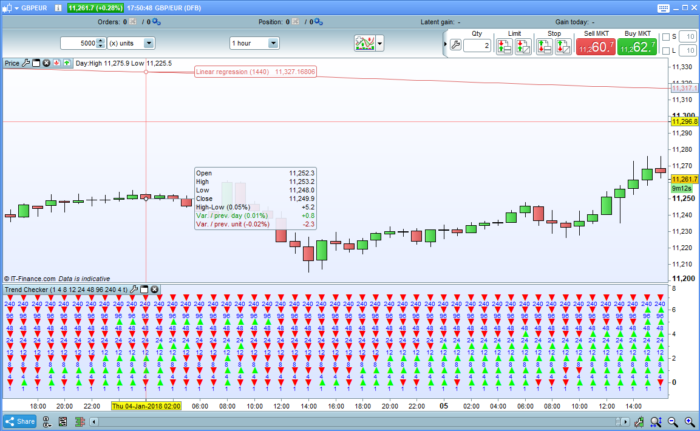
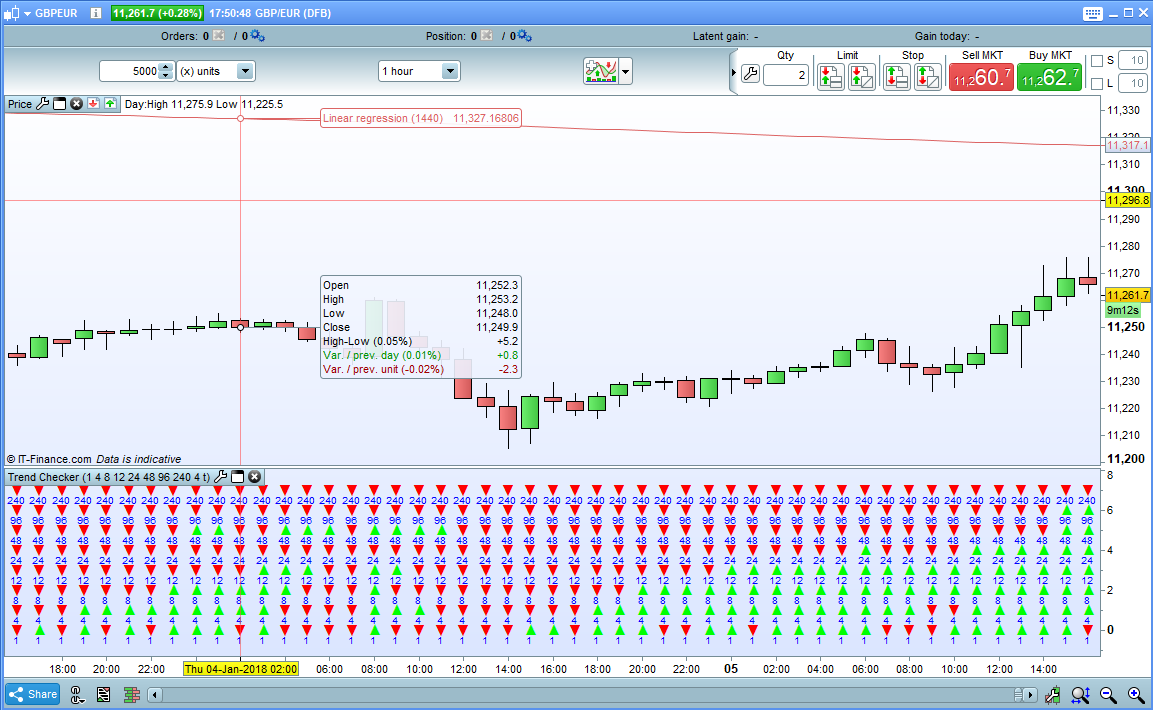
Trend Checker is a simple indicator that allows you to quickly and easily check long, medium and short term trends. It has eight rows that can each be set to display the overall trend for whatever look back period you choose. It simply compares the price now to the price at the beginning of each look back period and decides if it is up or down and displays a green or red arrow.
Works on all markets and all time frames although you will have to set each period for the chosen time frame as required.
For example if you apply the indicator to a 1 hour chart you may wish to set periods of 1, 4, 24 and 144 to represent 1 hour, 4 hour, 1 day and 1 week periods. On a daily chart you might have 1, 6, 24, 96, and 312 to represent 1 day, 1 week, 1 month and 1 year. You can choose whatever periods you like in whatever order you like and you can turn any row off by setting it to zero. So you can have very long term trends in the top half then a gap and shorter term trends in the bottom half – the options are endless!
The price used can be set to any of the following by changing the PriceType setting to:
0 – Close
1 – Open
2 – Total Price
3 – Typical Price
4 – Weighted Close
5 – Median Price
Under each arrow is shown the number of the period it represents. If you do not want this then untick the ‘NumbersOnOff’ box.
I advise downloading the itf file rather than cut and paste to ensure you get all the functions to work correctly.
|
1 2 3 4 5 6 7 8 9 10 11 12 13 14 15 16 17 18 19 20 21 22 23 24 25 26 27 28 29 30 31 32 33 34 35 36 37 38 39 40 41 42 43 44 45 46 47 48 49 50 51 52 53 54 55 56 57 58 59 60 61 62 63 64 65 66 67 68 69 70 71 72 73 74 75 76 77 78 79 80 81 82 83 84 85 86 87 88 89 90 91 92 93 94 95 96 97 98 99 100 101 102 103 104 105 106 107 108 109 110 111 112 113 114 115 116 117 118 119 120 121 122 123 124 125 126 127 128 129 130 131 132 133 134 135 136 137 138 139 140 141 142 143 144 145 146 147 148 149 150 151 152 |
//Trend Checker //Created by Vonasi //Row1 = 1 //Row1 = 2 //Row1 = 4 //Row1 = 8 //Row1 = 12 //Row1 = 24 //Row1 = 48 //Row1 = 96 //PriceType = 0 //NumbersOnOff = 1 IF PriceType >=0 and PriceType <=5 THEN IF PriceType = 0 THEN PT = close ENDIF IF PriceType = 1 THEN PT = open ENDIF IF PriceType = 2 THEN PT = TotalPrice ENDIF IF PriceType = 3 THEN PT = TypicalPrice ENDIF IF PriceType = 4 THEN PT = WeightedClose ENDIF IF PriceType = 5 THEN PT = MedianPrice ENDIF ELSE PT = 0 ENDIF IF Row1 > 0 THEN IF PT > PT[Row1] THEN DRAWTEXT("▲", BarIndex,0.0,SansSerif,BOLD,12) COLOURED(0,255,0) ELSE IF PT < PT[Row1] THEN DRAWTEXT("▼", BarIndex,0.0,SansSerif,BOLD,12) COLOURED(255,0,0) ENDIF ENDIF IF NumbersOnOff THEN DRAWTEXT("#Row1#", BarIndex,-0.5,SansSerif,Standard,10) COLOURED(0,0,255) ENDIF ENDIF IF Row2 > 0 THEN IF PT > PT[Row2] THEN DRAWTEXT("▲", BarIndex,1.0,SansSerif,BOLD,12) COLOURED(0,255,0) ELSE IF PT < PT[Row2] THEN DRAWTEXT("▼", BarIndex,1.0,SansSerif,BOLD,12) COLOURED(255,0,0) ENDIF ENDIF IF NumbersOnOff THEN DRAWTEXT("#Row2#", BarIndex,0.5,SansSerif,Standard,10) COLOURED(0,0,255) ENDIF ENDIF IF Row3 > 0 THEN IF PT > PT[Row3] THEN DRAWTEXT("▲", BarIndex,2.0,SansSerif,BOLD,12) COLOURED(0,255,0) ELSE IF PT < PT[Row3] THEN DRAWTEXT("▼", BarIndex,2.0,SansSerif,BOLD,12) COLOURED(255,0,0) ENDIF ENDIF IF NumbersOnOff THEN DRAWTEXT("#Row3#", BarIndex,1.5,SansSerif,Standard,10) COLOURED(0,0,255) ENDIF ENDIF IF Row4 > 0 THEN IF PT > PT[Row4] THEN DRAWTEXT("▲", BarIndex,3.0,SansSerif,BOLD,12) COLOURED(0,255,0) ELSE IF PT < PT[Row4] THEN DRAWTEXT("▼", BarIndex,3.0,SansSerif,BOLD,12) COLOURED(255,0,0) ENDIF ENDIF IF NumbersOnOff THEN DRAWTEXT("#Row4#", BarIndex,2.5,SansSerif,Standard,10) COLOURED(0,0,255) ENDIF ENDIF IF Row5 > 0 THEN IF PT > PT[Row5] THEN DRAWTEXT("▲", BarIndex,4.0,SansSerif,BOLD,12) COLOURED(0,255,0) ELSE IF PT < PT[Row5] THEN DRAWTEXT("▼", BarIndex,4.0,SansSerif,BOLD,12) COLOURED(255,0,0) ENDIF ENDIF IF NumbersOnOff THEN DRAWTEXT("#Row5#", BarIndex,3.5,SansSerif,Standard,10) COLOURED(0,0,255) ENDIF ENDIF IF Row6 > 0 THEN IF PT > PT[Row6] THEN DRAWTEXT("▲", BarIndex,5.0,SansSerif,BOLD,12) COLOURED(0,255,0) ELSE IF PT < PT[Row6] THEN DRAWTEXT("▼", BarIndex,5.0,SansSerif,BOLD,12) COLOURED(255,0,0) ENDIF ENDIF IF NumbersOnOff THEN DRAWTEXT("#Row6#", BarIndex,4.5,SansSerif,Standard,10) COLOURED(0,0,255) ENDIF ENDIF IF Row7 > 0 THEN IF PT > PT[Row7] THEN DRAWTEXT("▲", BarIndex,6.0,SansSerif,BOLD,12) COLOURED(0,255,0) ELSE IF PT < PT[Row7] THEN DRAWTEXT("▼", BarIndex,6.0,SansSerif,BOLD,12) COLOURED(255,0,0) ENDIF ENDIF IF NumbersOnOff THEN DRAWTEXT("#Row7#", BarIndex,5.5,SansSerif,Standard,10) COLOURED(0,0,255) ENDIF ENDIF IF Row8 > 0 THEN IF PT > PT[Row8] THEN DRAWTEXT("▲", BarIndex,7.0,SansSerif,BOLD,12) COLOURED(0,255,0) ELSE IF PT < PT[Row8] THEN DRAWTEXT("▼", BarIndex,7.0,SansSerif,BOLD,12) COLOURED(255,0,0) ENDIF ENDIF IF NumbersOnOff THEN DRAWTEXT("#Row8#", BarIndex,6.5,SansSerif,Standard,10) COLOURED(0,0,255) ENDIF ENDIF Hi=7.5 Lo=-1.0 Return Hi,Lo |
Share this
No information on this site is investment advice or a solicitation to buy or sell any financial instrument. Past performance is not indicative of future results. Trading may expose you to risk of loss greater than your deposits and is only suitable for experienced investors who have sufficient financial means to bear such risk.
ProRealTime ITF files and other attachments : Filename : download the ITF files
Find other exclusive trading pro-tools on 
PRC is also on YouTube, subscribe to our channel for exclusive content and tutorials























Hi Vonasi, i have a question for you, the comand “pricetype” where did you found it in the manual of prorealtime?
PriceType is just a variable that I use. The value decides what type of price is used in the calculations. If you download the ITF file and import and then add the indicator you can then click on the spanner and change the PriceType value as follows:
0 – Close
1 – Open
2 – Total Price
3 – Typical Price
4 – Weighted Close
5 – Median Price
I noticed a couple of typo errors in the code. The list of variables lines 4 to 11 should be //Row1 //Row2 //Row3 etc to 8 and not //Row1 //Row1 //Row1 etc. Just in case someone wants to remove the // and enter the values manually. If you install the ITF and change the values in the indicator windows this is irrelevant.
The other minor error is that line 40 should read PT = close so that the indicator defaults to close for any incorrect value entered. If you don’t change this minor error then you just don’t get any arrows for an incorrect value.