


PRT Bands turning green

Viewing 6 posts - 1 through 6 (of 6 total)
  • Author
    Posts
  • #222194 quote
    benkunzbenkunz
    Participant
    New

    Hi,
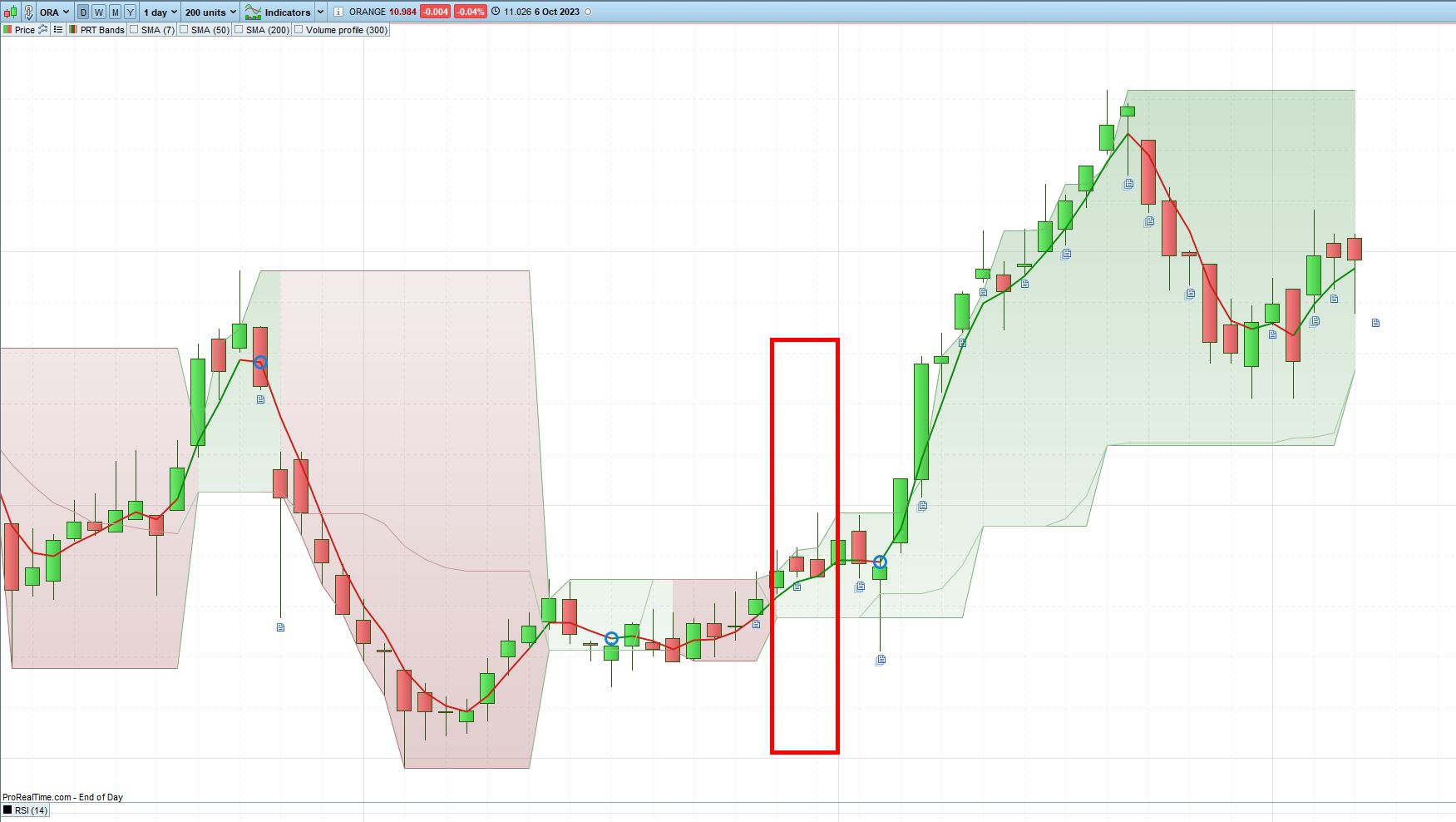
    I’m looking for a screener that would return stocks for which the background color for the PRT bands just turned green over the last 3 days.
    anyone would know how to code this one ?
    thanks

    2023-10-09-13_12_41-ORANGE-Daily-10.984-0.04-6-Oct-2023.jpg 2023-10-09-13_12_41-ORANGE-Daily-10.984-0.04-6-Oct-2023.jpg
    #222210 quote
    benkunzbenkunz
    Participant
    New

    here is one way to do it :


    up = PRTBandsUp
    dn = PRTBandsDown
     
    if close crosses over up and trend<=0 then //le prix casse la bande supérieure
    trend=1 //tendance haussière
    elsif close crosses under dn and trend>=0 then //le prix casse la bande inférieure
    trend=-1 //tendance baissière
    endif
    
    screener[(trend=1 and trend[1]=-1) or (trend=1 and trend[1]=1 and trend[2]=-1) or (trend=1 and trend[1]=1 and trend[2]=1 and trend[3]=-1)] (Average[50](Volume))
    
    #222211 quote
    benkunzbenkunz
    Participant
    New

    Hi,
    I managed to get my screener working for the PRT bands, but I’m struggling with filtering on volumes.
    here is the initial version :

    up = PRTBandsUp
    dn = PRTBandsDown
     
    if close crosses over up and trend<=0 then //le prix casse la bande supérieure
    trend=1 //tendance haussière
    elsif close crosses under dn and trend>=0 then //le prix casse la bande inférieure
    trend=-1 //tendance baissière
    endif
    
    screener[(trend=1 and trend[1]=-1) or (trend=1 and trend[1]=1 and trend[2]=-1) or (trend=1 and trend[1]=1 and trend[2]=1 and trend[3]=-1)] (Average[50](Volume))
    

    This does the job and returns 144 results on Nasdaq.
    Then I tried to add a filter on volumes to get rid of less liquid stocks by adding 2 conditions on average and lowest value:

    up = PRTBandsUp
    dn = PRTBandsDown
     
    if close crosses over up and trend<=0 then //le prix casse la bande supérieure
    trend=1 //tendance haussière
    elsif close crosses under dn and trend>=0 then //le prix casse la bande inférieure
    trend=-1 //tendance baissière
    endif
    
    // DEFAULT CONDITIONS
    v1 = Average[50](Volume) >= 50
    v2 = Lowest[256](Volume) >= 15
    defaultConditons = v1 AND v2
    // DEFAULT CONDITIONS
    
    screener[((trend=1 and trend[1]=-1) or (trend=1 and trend[1]=1 and trend[2]=-1) or (trend=1 and trend[1]=1 and trend[2]=1 and trend[3]=-1)) and defaultConditons] (Average[50](Volume))

    Now the screener will only return 8 results. Apple will an average of 60.2M is excluded by this filter. Makes no sense to me. What did I do wrong/misundertand ?
    thanks

    #222217 quote
    JSJS
    Participant
    Master

    Hi,

    C1=Summation[3](Trend=1)=2

    C2=Summation[3](Trend=1)=1

    Screener[C1 or C2]

    If you take the last three days, it is: Trend[0], Trend[1] and Trend[2]

    #222218 quote
    JSJS
    Participant
    Master

    Hi,

    When I use the “Default Conditions” in your screener, I get almost the same number of shares back as without the “Default Conditions”…

    Be careful with the spelling of “Default Conditions (Conditons)”

    I think you’re at the limit of your historical data usage…

    How much historical data can/may you use 256 or 1024?

    #222225 quote
    benkunzbenkunz
    Participant
    New
    256 yeah, thanks, the issue is coming from that. Really annoyning that no warning is displayed…
Viewing 6 posts - 1 through 6 (of 6 total)

  • You must be logged in to reply to this topic.

ProRealAI ProRealAI New

Stuck on this ProBuilder code?

Describe what this topic is trying to build, in plain English, and ProRealAI writes the ProRealTime™ indicator, screener or system for you.

Available in 7 languages
Try ProRealAI

PRT Bands turning green


ProScreener: Market Scanners & Detection

New Reply
Author
author-avatar
benkunz @benkunz Participant
Summary

This topic contains 5 replies,
has 2 voices, and was last updated by benkunzbenkunz

2 years, 11 months ago.

Topic Details
Forum: ProScreener: Market Scanners & Detection
Language: English
Started: 10/09/2023
Status: Active
Attachments: 1 files
ProRealCode ProRealCode
Loading...

