Multi timeframe – MTF indicators for ProRealTime

Viewing 15 posts - 106 through 120 (of 165 total)
  • Author
    Posts
  • #215448 quote
    Marpat
    Participant
    New

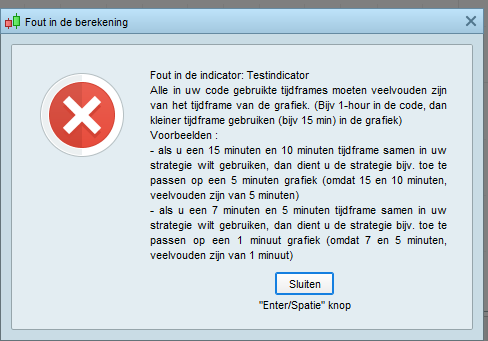
    Could someone help me with the following. I’ve created an indicator with a default timeframe and the monthly timeframe. The code seems to be good but when i want to apply it I get this message, see attachment below. When I look on the daily timeframe or the weekly it doesn’t matter, same message.

    Thank you in advance.

    Foutmelding.png Foutmelding.png
    #215452 quote
    PeterSt
    Participant
    Master

    Hi Marpat,

    Further explanation would not help, as the message is overly clear (as long as you can read Dutch 😉 ).

    The suggestion would now be to show your code, including a screenshot of the timeframe used on your chart. But hint in advance : the timeframe of a week would not fit in the timeframe of one month. So don’t make the mistake that this is so.
    The timeframes must really be dividable. Like 4 hours and 1 hour.

    Regards,
    Peter

    druby thanked this post
    #215467 quote
    druby
    Participant
    New

    Hello, further to PeterST comments…

    Because the timeframe used in the Timeframe instruction needs to be a multiple of the Default timeframe.

    Try replacing  the ‘1month’ with ‘4weeks’.

    I think that because a Month can be a different number of  days, a default of ‘1day’ should work.

    However, ‘1week’ doesn’t divide into all the months.

    Regards

    #215483 quote
    PeterSt
    Participant
    Master

    I think that because a Month can be a different number of  days, a default of ‘1day’ should work.

    I did not try it, but I don’t think that will work. In this case because you still can’t say that any month always exists of an equal amount of working (trading) days. Besides we have the one month comprising of 30 days, the other of 31, then 28 or 29 …

    We must think more in “math” terms. You must be able to have a paper with all the boundaries of the faster timeframe and overlay that with a transparent with the slower timeframe boundaries. Now the lines of the latter should exactly lay over the lines of the faster timeframe.

    #215484 quote
    Nicolas
    Keymaster
    Master

    Try replacing  the ‘1month’ with ‘4weeks’.

    This should work, please try this workaround.

    #215490 quote
    pableitor
    Participant
    Master

    I think that because a Month can be a different number of days, a default of ‘1day’ should work.

    I did not try it, but I don’t think that will work. In this case because you still can’t say that any month always exists of an equal amount of working (trading) days. Besides we have the one month comprising of 30 days, the other of 31, then 28 or 29 …

    I just tried this code on a daily chart:

    timeframe(1 month,updateonclose)
    x = close
    timeframe(default)
    return x

    it seems a 1 month indicator works fine on daily charts.

    PeterSt thanked this post
    #217417 quote
    blindax
    Participant
    New

    hi, I’m trying to display multiple segment based on différent timeframe. Here is the code :

    timeframe (1h,UPDATEONCLOSE)
    SThour=Supertrend[m,p]
    timeframe (4h,UPDATEONCLOSE)
    ST4h=Supertrend[m,p]
    timeframe (daily,UPDATEONCLOSE)
    STday=Supertrend[m,p]
    timeframe (weekly,UPDATEONCLOSE)
    STweek=Supertrend[m,p]
    timeframe(15mn,UPDATEONCLOSE)
    st = Supertrend[m,p]
     
    drawsegment(barindex[longueur]+3,sthour,barindex[2]+3,sthour) coloured(r1h,v1h,b1h)style(Line,2)
    drawtext(“ST 1h”,barindex+3,sthour) coloured(r1h,v1h,b1h)
    drawsegment(barindex[longueur]+3,st4h,barindex[2]+3,st4h) coloured(r4h,v4h,b4h)style(Line,2)
    drawtext(“ST 4h”,barindex+3,st4h) coloured(r4h,v4h,b4h)
    drawsegment(barindex[longueur]+3,stday,barindex[2]+3,stday) coloured(r1d,v1d,b1d)style(Line,2)
    drawtext(“ST 1j”,barindex+3,stday) coloured(r1d,v1d,b1d)
    drawsegment(barindex[longueur]+3,stweek,barindex[2]+3,stweek) coloured(r1w,v1w,b1w)style(Line,2)
    drawtext(“ST 1w”,barindex+3,stweek) coloured(r1w,v1w,b1w)

    It works perfectly for “ST 1h” and “ST 4H” but nothing displays for “ST 1J” and “ST 1W”, any idea of the pb ?

    #217438 quote
    robertogozzi
    Moderator
    Master

    Try increasing the number of units.

    If you are using a 15-minute TF, there are:

    • 4 units (bars) in one hour
    • 16 units in 4 hours
    • 96 units in a day
    • 480 units in a week (even slightly more if an instrument also trades on Sundays)

    So, if you use an indicator with, say, 10 periods, you will have to multiply the highest of the above numbers (480)  by at least 10, etc…

    #220186 quote
    LaMaille
    Participant
    Junior

    Can we use timeframe instruction after IF / Then ?

    If we want to test what is the default timeframe before deciding which other timeframe to apply for example…

    #220191 quote
    robertogozzi
    Moderator
    Master

    No, you can’t. It’s not allowed, as it’s not allowed to use a variable for the number of hours, days, minutes, etc…

    #220194 quote
    LaMaille
    Participant
    Junior

    This is very sad…

    Thanks for the reply

    #228541 quote
    gustavobp
    Participant
    New

    Hey everyone! Thanks for share!

    i have any ask about this code for Multiframe support.

    Can i use this same code multiframe for apply in Strategies automated , too? Or is it only for apply in any indicators?

    If is not, Can yoy share me any code example for apply in 2 diffrenets multiframe in any strategies (notr indicators), please?

    Thanks you!

    #228545 quote
    robertogozzi
    Moderator
    Master

    The Multi Time Frame support is available both in strategies and indicators.

    You can search this forum for its acronym MTF to retrieve many links to examples and snippets that will help you delve into MTF coding.

    #229706 quote
    nevtek
    Participant
    New

    Hi all,

    Since today I encounter some problems with a MTF indicator. It worked before.
    On a 5min chart, I want to use the Daily timeframe.

    Pseudo code

    TIMEFRAME(daily)
    b = open[1]
    
    TIMEFRAME(5 minutes)
    ret = (close + b) / 2
    
    return ret

    I shows my ‘ret’ line for a second, and then says ‘Calculation error’. I am using RTH as trading hours (ETH never worked).
    ProScreener works fine. Using hours instead of daily works. So the problem is really this ‘daily’ timeframe.

    Does somebody else encounter the same problems? Do I have to code this differently? For example using ’24 hours’?

    Thanks!

    #229707 quote
    Jerome888
    Participant
    Average

    Hi

    perhaps not enough history/units are loaded on your 5 min charts ?

Viewing 15 posts - 106 through 120 (of 165 total)
  • You must be logged in to reply to this topic.

Multi timeframe – MTF indicators for ProRealTime


ProBuilder: Indicators & Custom Tools

New Reply
Author
author-avatar
Nicolas @nicolas Keymaster
Summary

This topic contains 164 replies,
has 53 voices, and was last updated by PeterSt

10 months ago.

Topic Details
Forum: ProBuilder: Indicators & Custom Tools
Language: English
Started: 05/27/2020
Status: Active
Attachments: 49 files
Logo Logo
Loading...