array variables availability in ProRealTime – examples and discussions

Viewing 15 posts - 136 through 150 (of 255 total)
  • Author
    Posts
  • #165521 quote
    Bard
    Participant
    Master

    Hi @Robertogozzi,  thanks for taking a look at this. I had an elaborate detailed question about some date issues with Market Watch and IG Index typed out here but (fortunately for you!) lost it somehow scrolling between Macbook desktops.

    Basically, in short: Is there any reason why Saturday 20200321 doesn’t plot yet for every other Saturday and month does (except Jan 2021)?

    Why are 20210116 and 20210117 missing?

    Also I launched the PRT option dates indicator to check something and realised that every green line is plotted on the day before every single date in my indicator. How come?

    Note: The official option expiry is technically on the third Saturday of each month, with trading stopping the day before (See Market Watch calendar linked in previous post). IG have the last option dealing a day earlier on the Thursday and expiry on Fridays. PRT has taken the Friday / Saturday Market Watch indicator dates and plotted them on the day before, i.e. Thursdays and Fridays?

    Is is possible to forward project and plot dates for April, May, June etc 2021?

    Cheers!

    #165528 quote
    robertogozzi
    Moderator
    Master
    As I said DATE is the date when a bar closes, so it can only be plotted just mircosecoinds before the next bar opens (if it opens, though!). As the market shuts down on Friday 20200320, no line can be plotted when the market is closed. The same is for the other two days. Tha latter one is a SUNDAY date (which exists), but, being the date when the prior candle is closed, there is NO saturday candle at the close of which a line can be plotted. If, in this case, you use OPENDATE a line will be plotted.
    #165558 quote
    Bard
    Participant
    Master
    Cheers @Robertogozzi, I wish had I had a copy of my lost long answer to explain better what I meant above in my “short” reply! I don’t understand the interdependency of the two dates in each month in terms of how PRT deals with them. Isn’t each date and it’s reciprocal green line an independent “Or” event? For example, Re: Two missing green lines during March 2020. The first line (a Friday) was a “fat thumb error” — 202003120 coded instead of 20200320. That line now appears when the “1” error is corrected. But not only does that Friday line appear but a line for Saturday too? If I remove just the date, Saturday 20200321, both lines still appear?
    I wrote: Also I launched the PRT option dates indicator to check something and realised that every green line is plotted on the day before every single date in my indicator. How come?
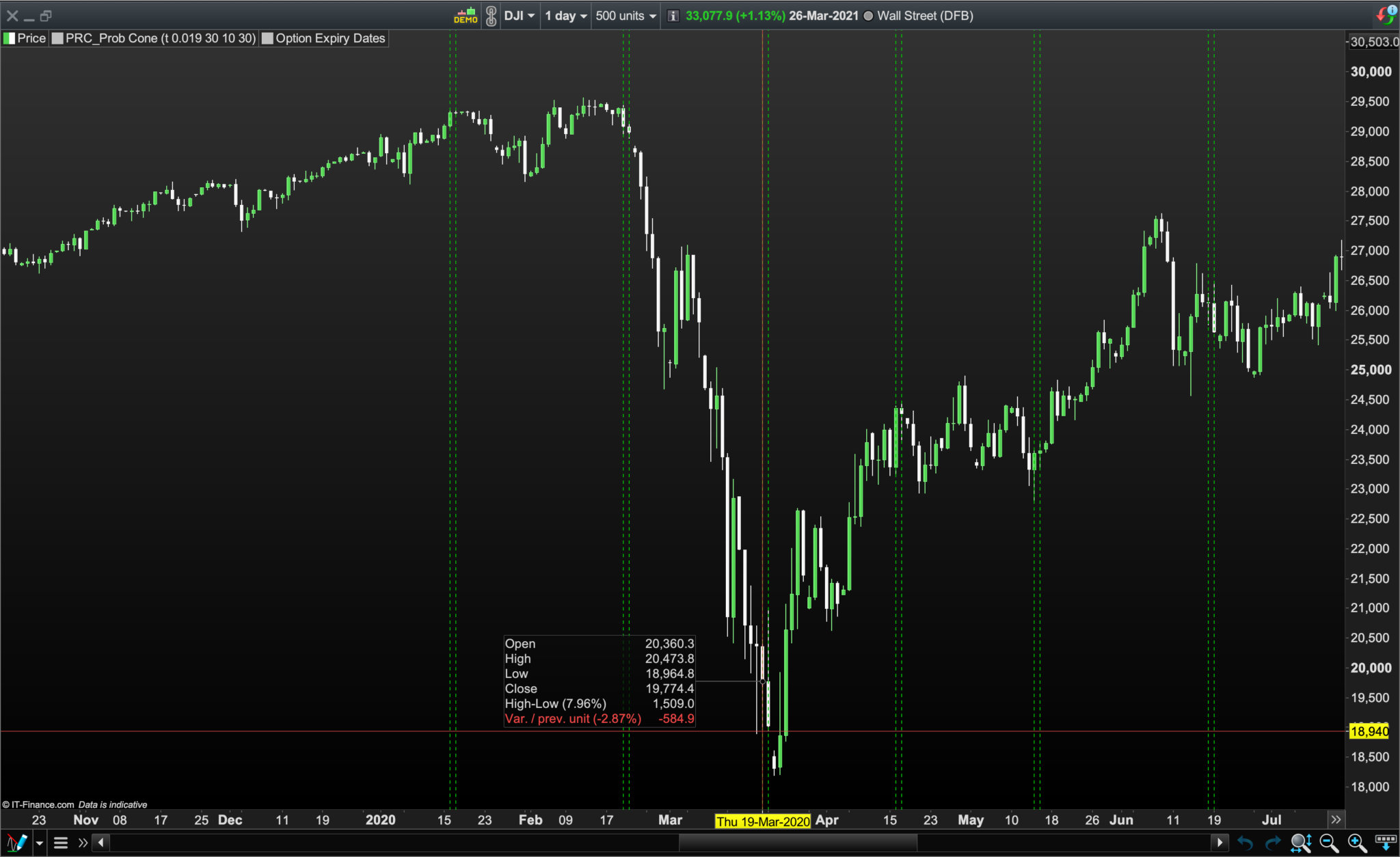
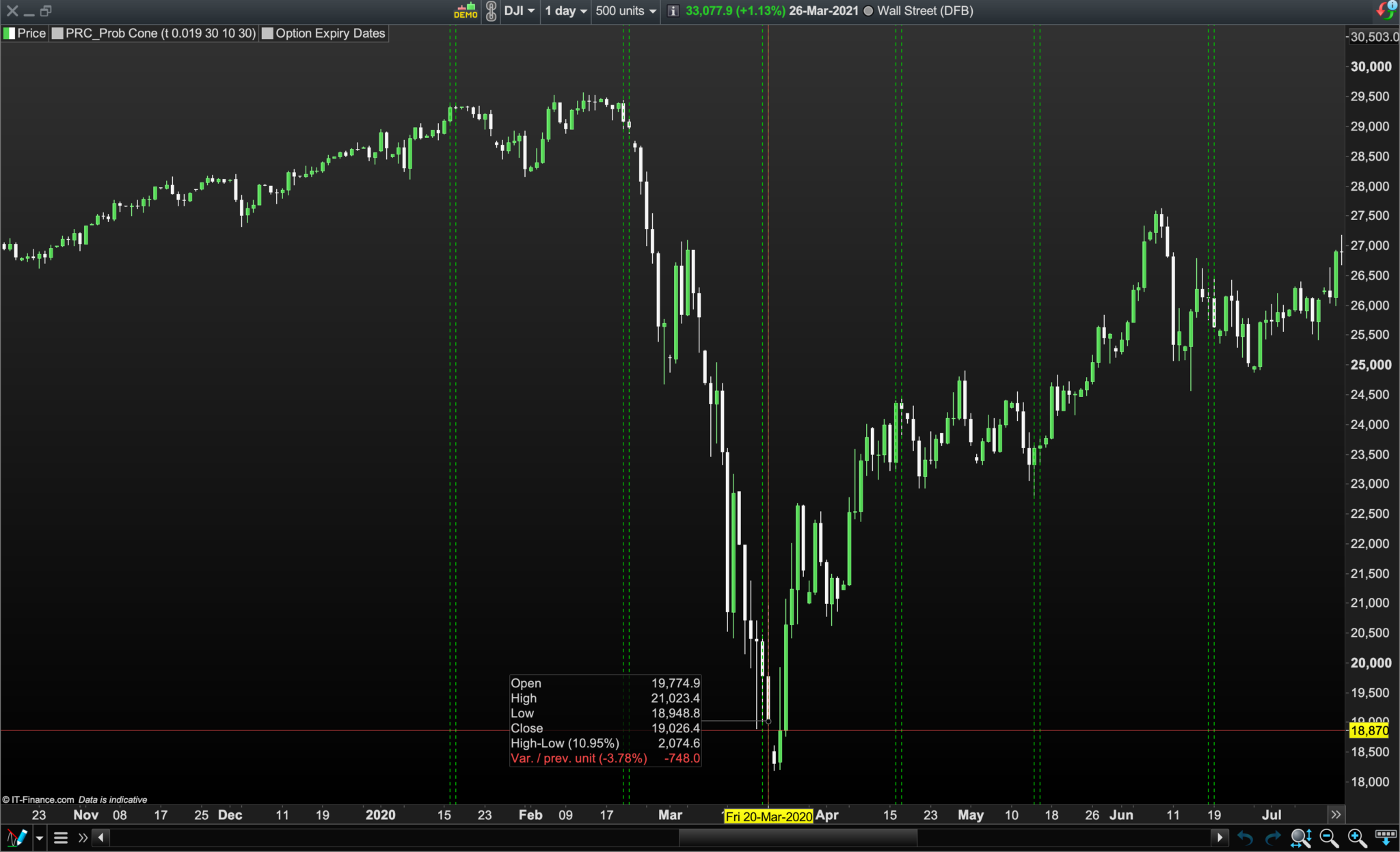
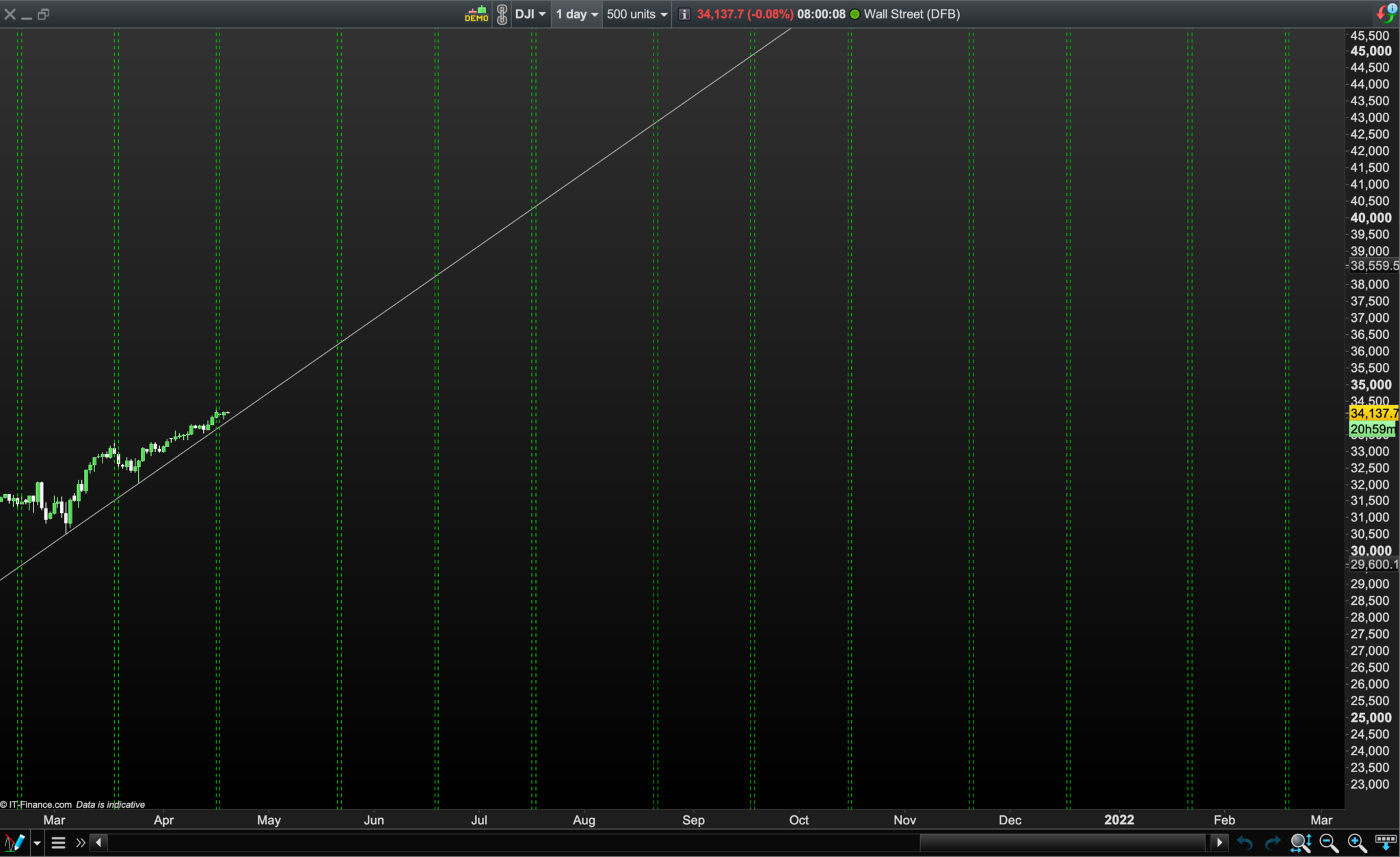
    PRT brings forward every single coded Friday and Saturday date I have like: “OR date = 20200320 OR date = 20200321” by one day? It’s plotting them on “DATE” 20200319 OR date = 20200320? Pls see images “19 mch 2020” and “20 mch 2020. The green lines are not plotted on the days coded — namely, Fridays and Saturdays — but on one day before, Thursdays and Fridays? So I decided to simplify and removed all the Saturday Option Expiry dates and left just Friday “Stop Trading” (which is after all the most important warning) and re-launched and I still get two green lines on two different consecutive days, Thursdays and Fridays? What am I missing here?
    robertogozzi wrote: (Your first reply written 27th Mch 2021) Date (Saturday) 20200321 cannot be plotted because DATE is the date when a candle closes and it should have been plotted at the closure of Friday, March 20th, but it can’t be plotted because the systems stops due to the end of the week. (Your second reply 28th Mch 2021) As I said DATE is the date when a bar closes, so it can only be plotted just mircoseconds before the next bar opens (if it opens, though!). As the market shuts down on Friday 20200320, no line can be plotted when the market is closed.
    As mentioned, it makes no difference if Saturday 20200321 is included in the code or not. Two lines are both plotted at the same time only when 202003120 is corrected to 20200320 and even if 20200321 (or any other second date of the month) is deleted from the code. All other Friday and Saturdays for 2020/2021 (bar jan 2021) plot okay despite being on a Friday and on the end of a week? Missing Jan 2021 lines: I tried OPENDATE for Jan 2021 but it wouldn’t plot. The Options Council actually states Jan 2021 Option Expiry was Friday 15th Jan 2021 so I amended the January dates to 20210115 and 20210116 and now every month plots expirations. Lastly, why can’t PRT project forward and plot dates for April, May, June etc 2021 like other options software? Not a criticism, just wondered if there was a way round this? I hope that makes more sense. Thanks very much, Best Bard.
    19-mch-2020.png 19-mch-2020.png 20-mch-2020.png 20-mch-2020.png
    #165561 quote
    robertogozzi
    Moderator
    Master
    You can plot in the future:
    // plot N bars in the future
    DrawSegment(BarIndex[20],close, BarIndex+10,close)
    //
    // plot up to a date in the future
    DrawSegment(BarIndex[20],close, DateToBarIndex(20210402),close)
    Bard thanked this post
    #165562 quote
    robertogozzi
    Moderator
    Master
    But I am not aware of limits to how many bars or dates in the future are allowed.
    Bard thanked this post
    #165901 quote
    Bard
    Participant
    Master
    Thanks a lot for the code, I’ll try it out at the weekend @Robertogozzi. I’m still not sure why PRT is treating theses two option dates each month as interdependent instead of  independent (interdependent because if I remove one date both green lines disappear?) or why it plots the date a day before the actual coded close date?
    #166156 quote
    Bard
    Participant
    Master
    Thanks very much for your help Roberto. This is the completed Indicator and I’ve added the Probability Cone Indicator code too in the hope that perhaps we could add/code them together in one indicator and then add this to the library @Robertogozzi, @Nicolas?
    //Option Stop Trading Dates and Expiry Dates 2020/2021
    //https://www.marketwatch.com/optionscenter/calendar
    //https://www.optionseducation.Org/referencelibrary/expiration-calendar
    
    If Date = 20200117  Or Date = 20200221  Or Date = 20200320  Or Date = 20200417  Or Date = 20200515  Or Date = 20200619  Or Date = 20200717  Or Date = 20200821  Or Date = 20200918  Or Date = 20201016  Or Date = 20201120  Or Date = 20201218  Or Date = 20210115  Or Date = 20210219  Or Date = 20210319  Or Date = 20210416  Or Date = 20210521  Or Date = 20210618  Or Date = 20210716  Or Date = 20210820  Or Date = 20210917  Or Date = 20211015  Or Date = 20211119  Or Date = 20211217  Then
    DrawvLine(BarIndex[+0])Coloured (0,200,0)style (DottedLine)
    EndIf
    
    // Plot up to a Date in the Future (1 Year)
    DrawvLine(DateToBarIndex(20210416))Coloured (0,200,0)style (DottedLine)
    DrawvLine(DateToBarIndex(20210417))Coloured (0,200,0)style (DottedLine)
    DrawvLine(DateToBarIndex(20210521))Coloured (0,200,0)style (DottedLine)
    DrawvLine(DateToBarIndex(20210522))Coloured (0,200,0)style (DottedLine)
    DrawvLine(DateToBarIndex(20210618))Coloured (0,200,0)style (DottedLine)
    DrawvLine(DateToBarIndex(20210619))Coloured (0,200,0)style (DottedLine)
    DrawvLine(DateToBarIndex(20210716))Coloured (0,200,0)style (DottedLine)
    DrawvLine(DateToBarIndex(20210717))Coloured (0,200,0)style (DottedLine)
    DrawvLine(DateToBarIndex(20210820))Coloured (0,200,0)style (DottedLine)
    DrawvLine(DateToBarIndex(20210821))Coloured (0,200,0)style (DottedLine)
    DrawvLine(DateToBarIndex(20210917))Coloured (0,200,0)style (DottedLine)
    DrawvLine(DateToBarIndex(20210918))Coloured (0,200,0)style (DottedLine)
    DrawvLine(DateToBarIndex(20211015))Coloured (0,200,0)style (DottedLine)
    DrawvLine(DateToBarIndex(20211016))Coloured (0,200,0)style (DottedLine)
    DrawvLine(DateToBarIndex(20211119))Coloured (0,200,0)style (DottedLine)
    DrawvLine(DateToBarIndex(20211120))Coloured (0,200,0)style (DottedLine)
    DrawvLine(DateToBarIndex(20211217))Coloured (0,200,0)style (DottedLine)
    DrawvLine(DateToBarIndex(20211218))Coloured (0,200,0)style (DottedLine)
    DrawvLine(DateToBarIndex(20220121))Coloured (0,200,0)style (DottedLine)
    DrawvLine(DateToBarIndex(20220122))Coloured (0,200,0)style (DottedLine)
    DrawvLine(DateToBarIndex(20220218))Coloured (0,200,0)style (DottedLine)
    DrawvLine(DateToBarIndex(20220219))Coloured (0,200,0)style (DottedLine)
    DrawvLine(DateToBarIndex(20220318))Coloured (0,200,0)style (DottedLine)
    DrawvLine(DateToBarIndex(20220319))Coloured (0,200,0)style (DottedLine)
    //
    
    Return
    // https://www.prorealcode.com/topic/array-variables-availability-in-prorealtime/
    // (please do not remove the link above for future reference)
    // Example #2: probability cone
    
    defparam drawonlastbaronly=true
    
    // --- settings
    //PriceField = 1 //1=customclose ; 0=high/low
    //vol = 0.025 //Assumed Volatility (ideally based on volTyp)
    //BarsFuture = 20 //No. of days ahead
    //stdPer = 2 //Std. Dev. quantity
    //decay = 12 //decay the cone at the previous X bar
    // --- end of settings
    
    Price = customclose
    
    hh=undefined
    ll=undefined
    if(islastbarupdate) then
    for i = 0 to BarsFuture do
    
    //cone calculation
    StdDev = StdPer *  Price * Vol * sqrt( i / 365 ) //3.6*
    if( PriceField ) then
    $u[i] = high[decay] + stdDev
    $d[i] = low[decay] - stdDev
    else
    $u[i] = Price[decay] + stdDev
    $d[i] = Price[decay] - stdDev
    endif
    
    if i>0 then
    //upper cone
    drawsegment(barindex[decay]+i,$u[i],barindex[decay]+i-1,$u[i-1]) coloured(0,255,0)
    drawpoint(barindex[decay]+i,$u[i],1) coloured(0,255,0)
    //lower cone
    drawsegment(barindex[decay]+i,$d[i],barindex[decay]+i-1,$d[i-1]) coloured(255,0,0)
    drawpoint(barindex[decay]+i,$d[i],1) coloured(255,0,0)
    //filling the zone
    drawtriangle(barindex[decay]+i,$u[i],barindex[decay]+i-1,$u[i-1],barindex[decay]+i,$d[i]) coloured(150,150,150,50) bordercolor(150,150,150,0)
    drawtriangle(barindex[decay]+i-1,$d[i-1],barindex[decay]+i,$d[i],barindex[decay]+i-1,$u[i-1]) coloured(150,150,150,50) bordercolor(150,150,150,0)
    endif
    
    next
    //plot the middle line
    drawsegment(barindex[decay],($u[0]+$d[0])/2,barindex[decay]+BarsFuture,($u[0]+$d[0])/2) style(dottedline)
    //plot the highest and lowest boundaries of the cone
    hh=(arraymax($u)+arraymin($u))/2
    ll=(arraymax($d)+arraymin($d))/2
    endif
    
    return hh as "Short Call", ll as "Short Put"
    
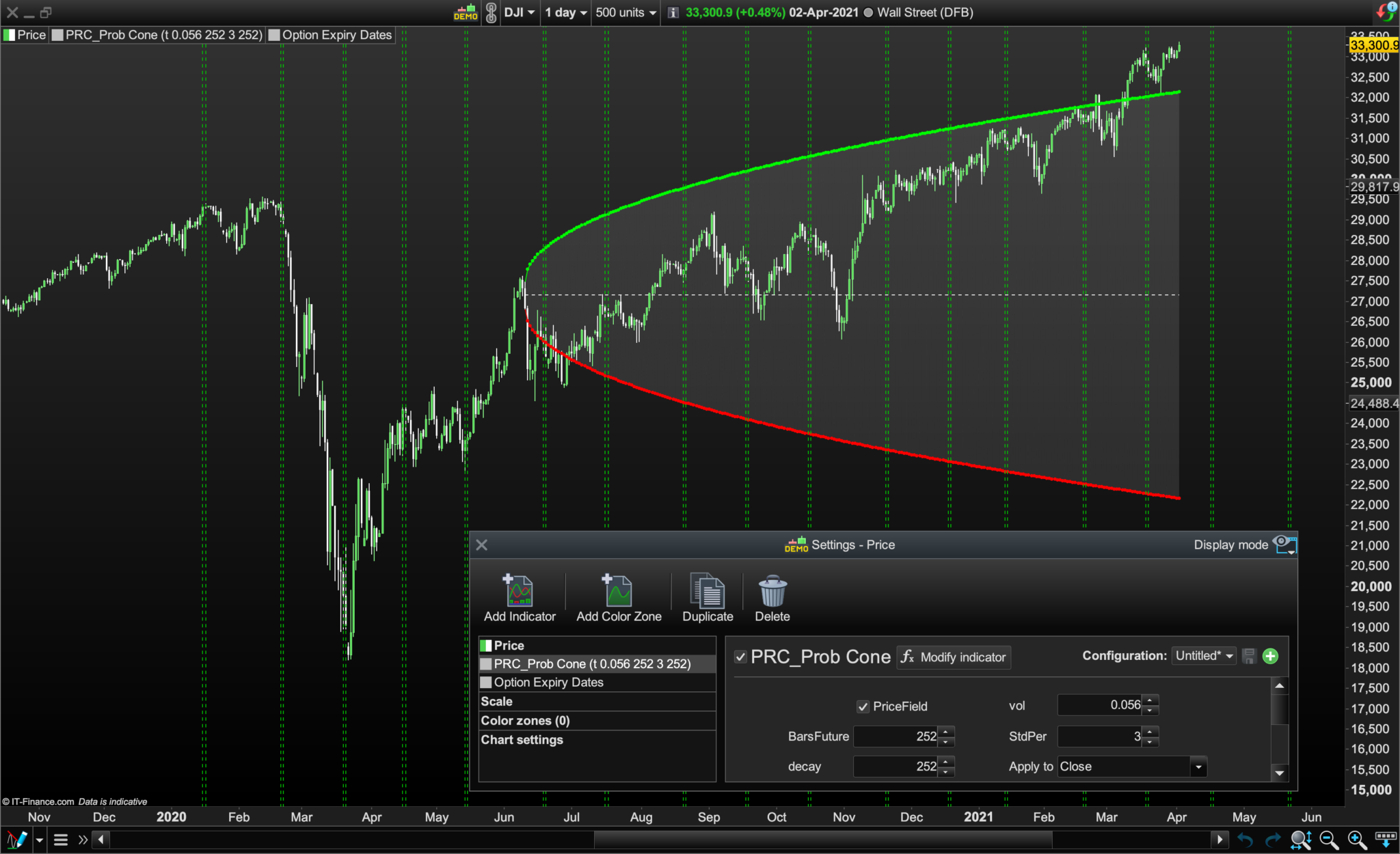
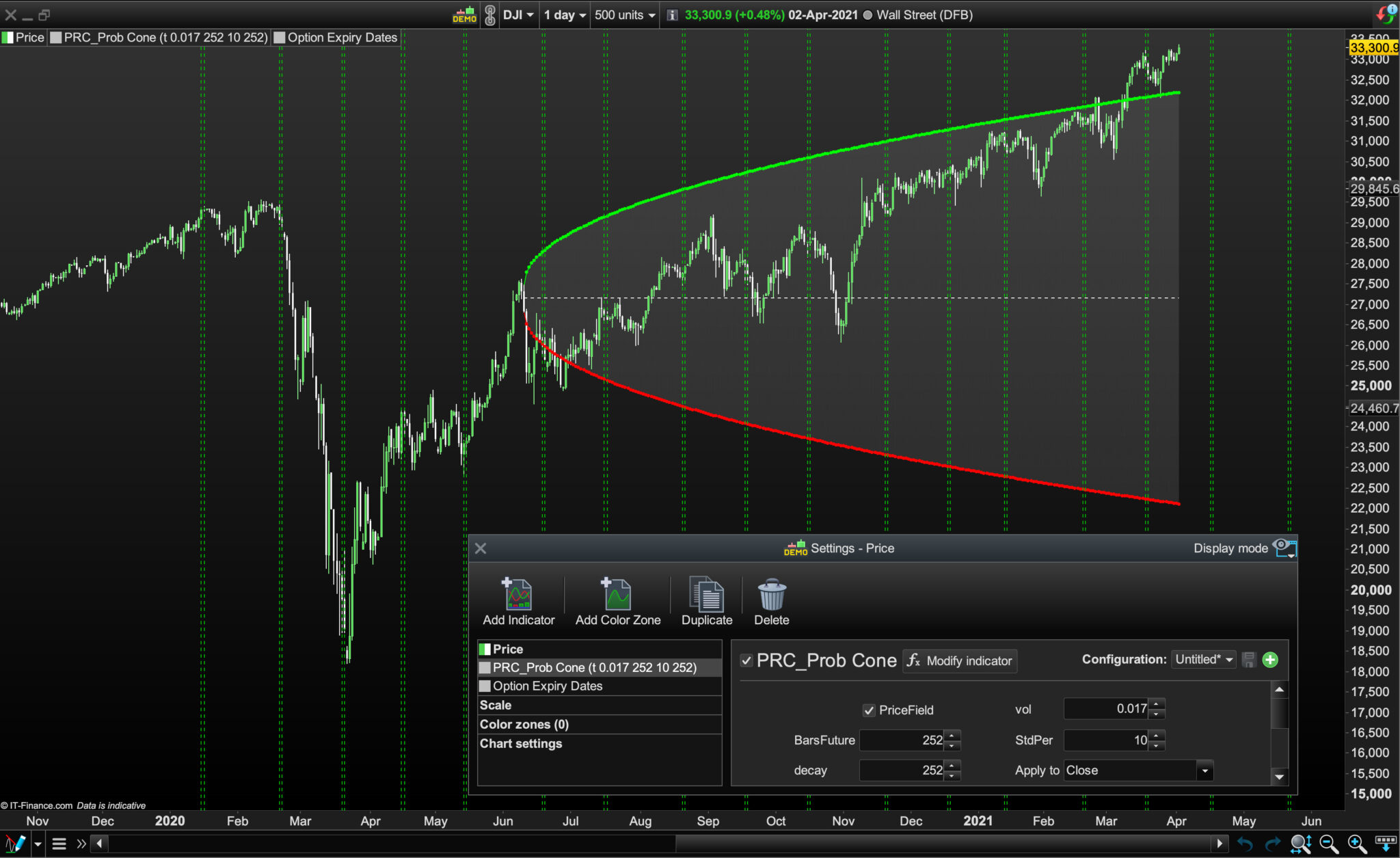
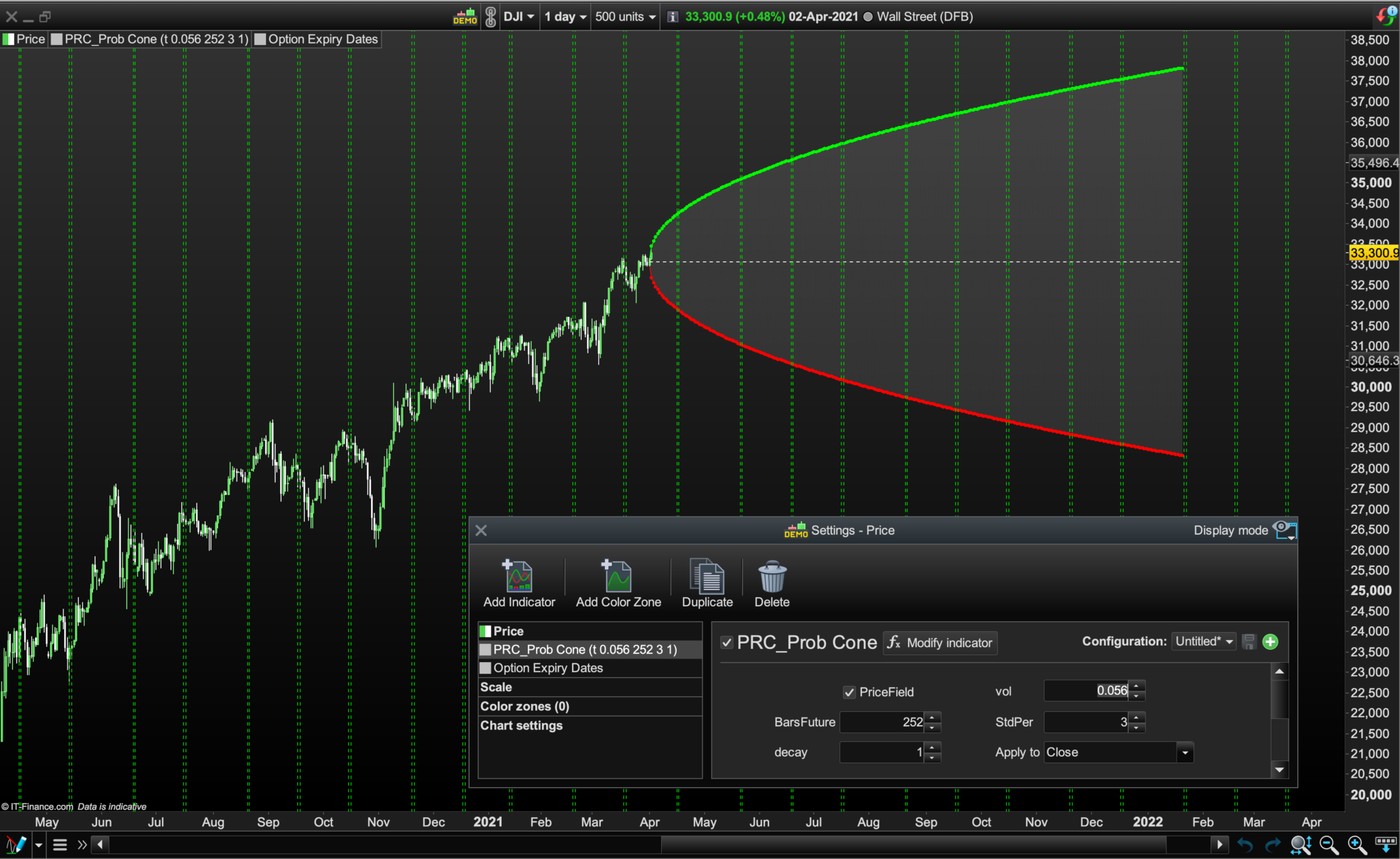
    Volatility % Setting for the Probability Cone: For the Probability Cone indicator’s standard deviation volatility setting bear in mind that although the 1985-2020 annualised standard deviation (SD) for the Dow Jones was 17.61%, the DIJA VIX high / low SD for the last 12 months ranged between approximately 17% and 56%: https://fred.stlouisfed.org/series/VXDCLS S&P VIX Explained: https://www.spindices.com/vix-intro/ Note: Having a wide SD and low Volatility % setting (or visa versa), but choosing a decay date of a mini market fall out doesn’t mitigate you from forecasting Probability Cone errors! (Pls see images). Cheers, Bard

    Prob-Cone-Option-Expiry-Dates-b.png Prob-Cone-Option-Expiry-Dates-b.png Prob-Cone-Option-Expiry-Dates-c.jpg Prob-Cone-Option-Expiry-Dates-c.jpg
    #166159 quote
    Bard
    Participant
    Master
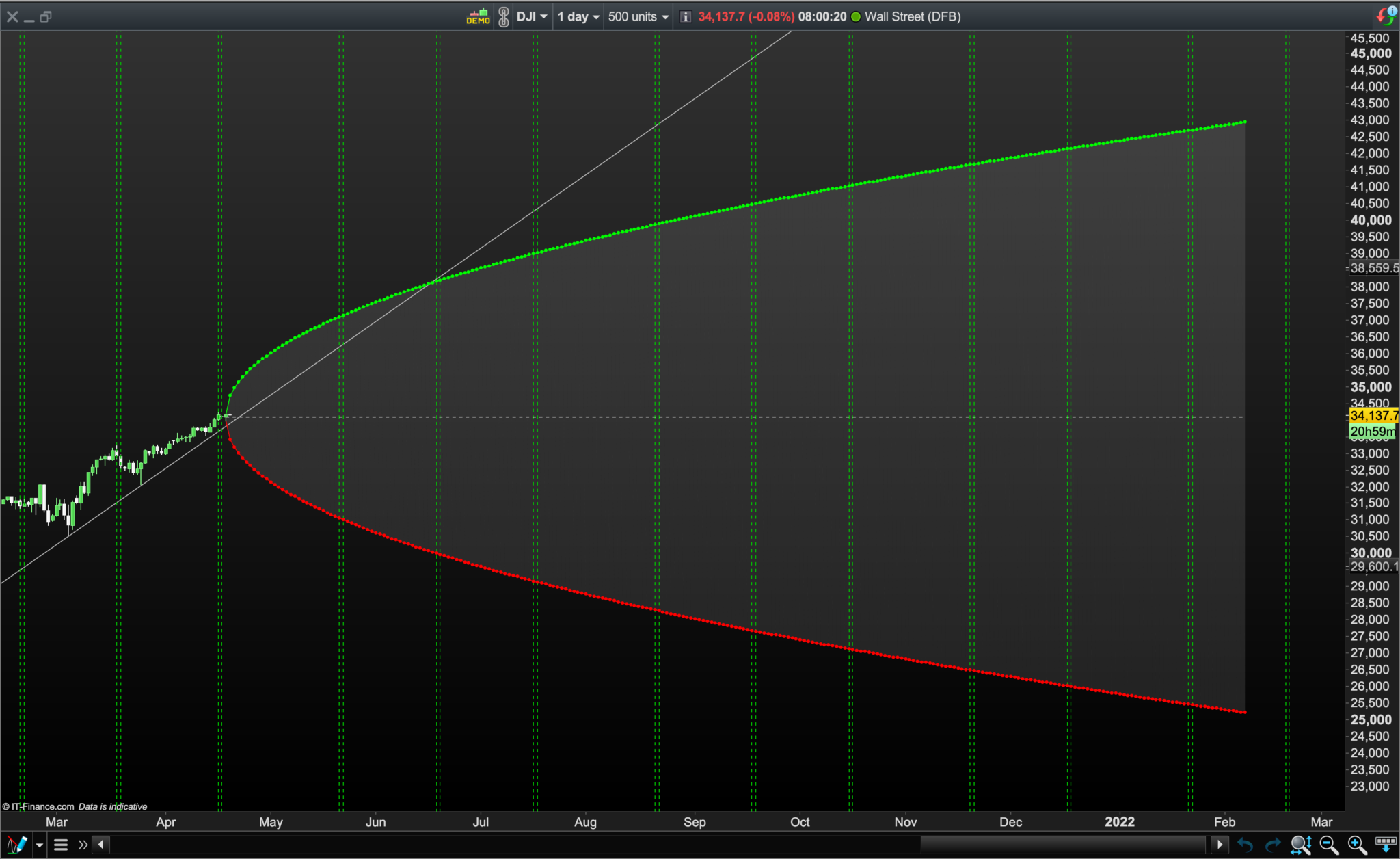
    Better image showing 12 month forward Dow Jones Option Expiration Dates, (potentially for the Library).
    Prob-Cone-12-Month-Forward-Option-Expiry-Dates.png Prob-Cone-12-Month-Forward-Option-Expiry-Dates.png
    #166180 quote
    Vonasi
    Moderator
    Master
    Knowing how price has deviated in the past is interesting but knowing how it has deviated after an event compared to a datum is even more interesting:
    Edge Finder and Condition Tester
    #166183 quote
    Bard
    Participant
    Master
    Interesting stuff! I’ll take a look this week. I’ll be using the probability cone indicator (which is standard kit for high end options trading platforms) to help me make option strike price decisions in relation to volatility projections and option expiries. Great for Strangles and Spreads.
    jonpt88 thanked this post
    #166732 quote
    TradeRight
    Participant
    Junior
      I have searched the forum and topic to find how to return the index number of arraymax but not discovered it. Can someone tell me the way to do this please.
    #166755 quote
    Nicolas
    Keymaster
    Master
    There is no instruction to get the array max index automatically, loop through the array to find what column of the array contain the value of arraymax.
    TradeRight thanked this post
    #166757 quote
    Vonasi
    Moderator
    Master
    Store the barindex value in a second array at the same location every time you store a value in your first array. Then loop through to find the location of  ARRAYMAX and the barindex number will be at the same location in the second array.
    TradeRight thanked this post
    #167567 quote
    Bard
    Participant
    Master
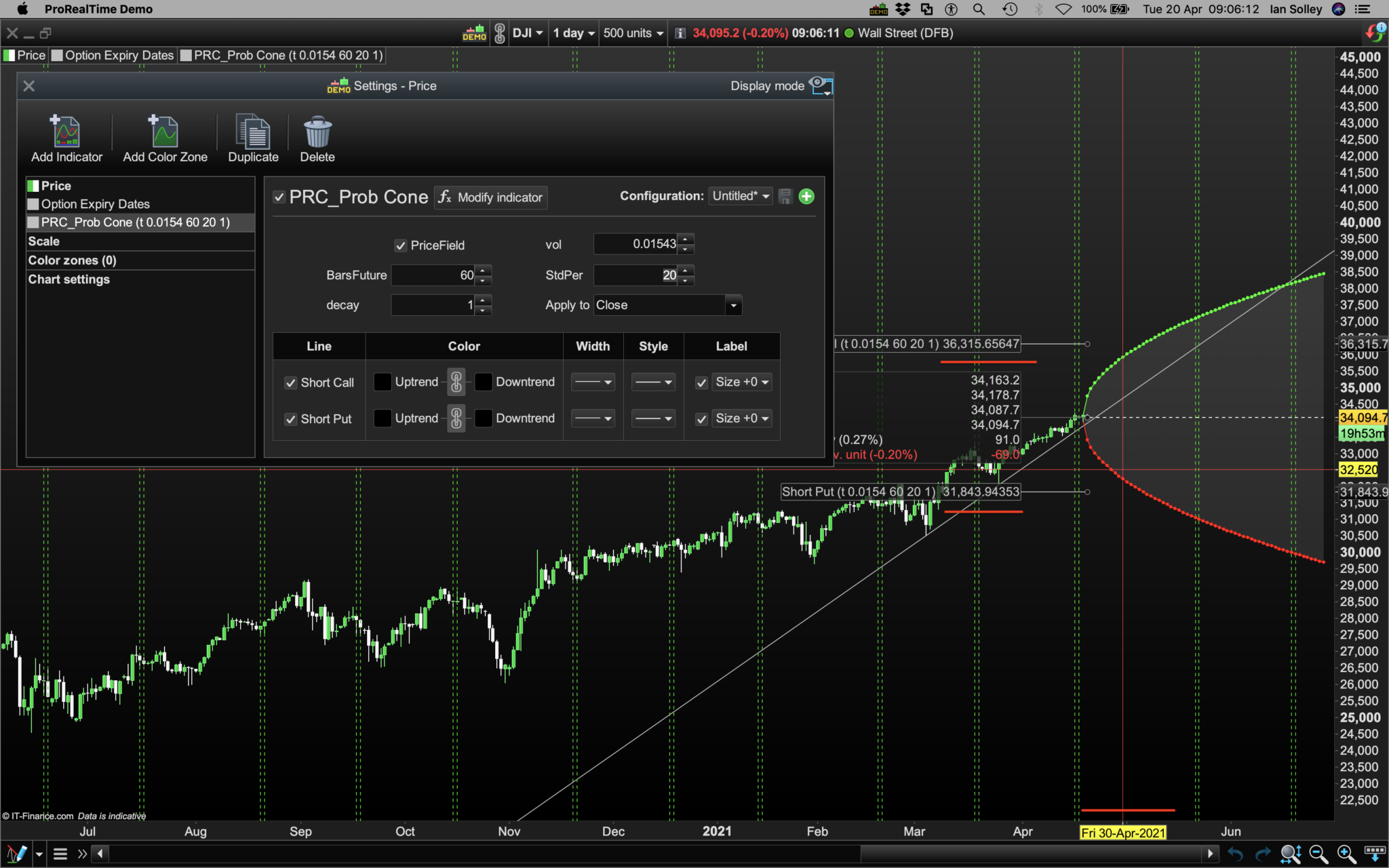
    I’m really grateful for this new Probability Cone indicator @Nicolas, it’s something that only high end Options Trading platforms provide. I’ve added green dotted date lines for FOMC meetings to it for my Daily Dow and it’s been working fine until this morning. The cone seems to be disappearing and then reappearing? I was using a 252 day Bars Future setting without any issue a fortnight ago, now it only seems stable if I use a setting below 90. Increase it to 100 days in the future and the cone starts disappearing again. It doesn’t seem to be effected by altering the Decay and Std Dev settings, the latter of which I’ve replicated the disappearing cone at 20 std devs down to 2 std devs). Could it be my internet connection or its taking more time to calculate or calculating more often? Cheers.
    1-3.png 1-3.png 2.png 2.png
    #167579 quote
    Bard
    Participant
    Master
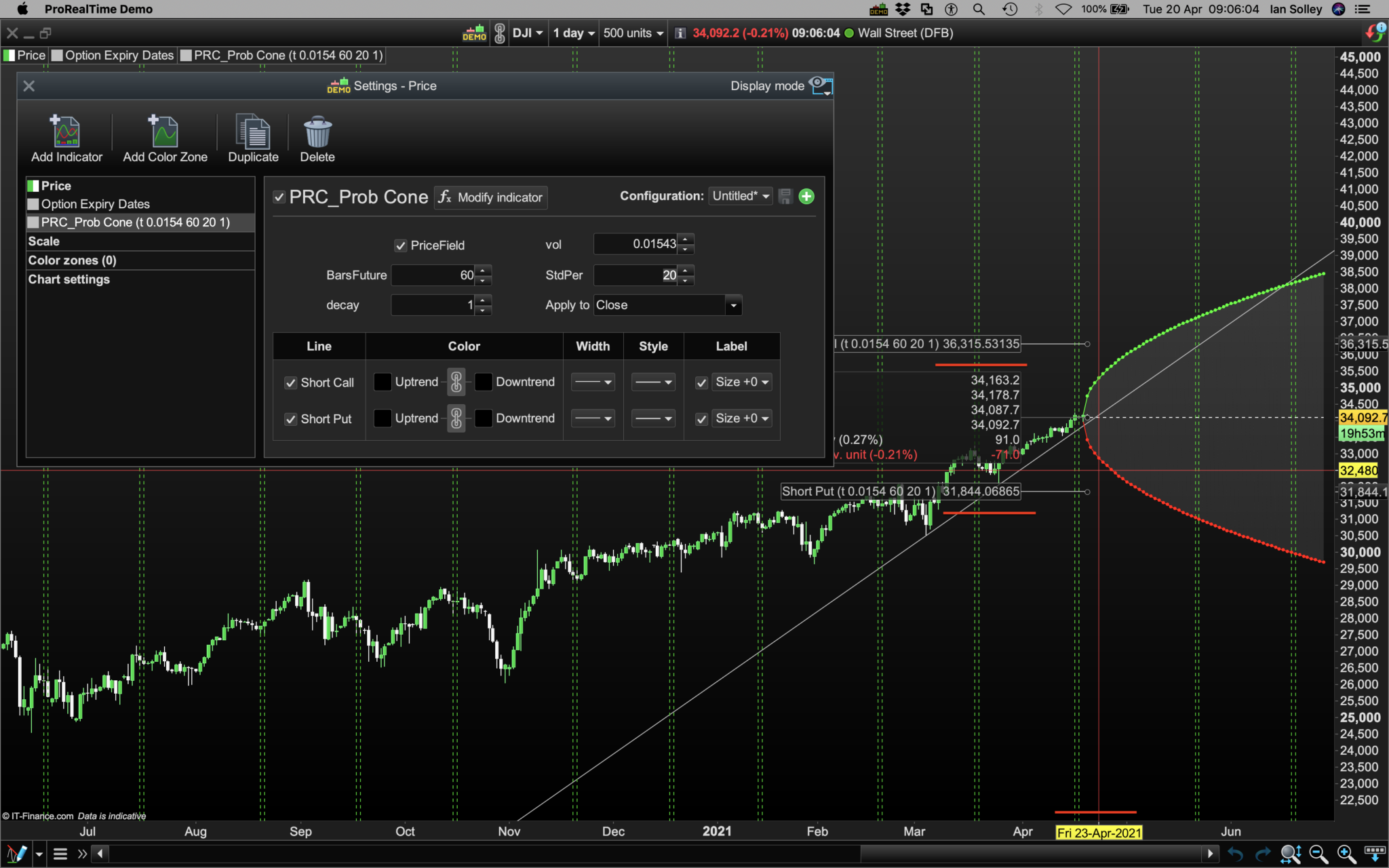
    Ps// Is there a way to make the crosshairs return that actual Dow values as you move the crosshair forward into the future? HH and LL values are static regardless of how far you move the crosshairs forward. Pls see 3 x red markup lines on each of the two chart screens. Thanks. Here’s the code, just in case:
    // https://www.prorealcode.com/topic/array-variables-availability-in-prorealtime/
    // (please do not remove the link above for future reference)
    // Example #2: probability cone
    
    //Volatility: These Dow and VIX readings at web addresses below are yearly. If Volatility = 17%, that's annual and ready for input in this cone indicator.
    //For 30 day volatility divide volatility index number by the sq root of 12:
    //Eg, 20 / 3.46 = 5.78%
    
    //Dow
    //https://fred.stlouisfed.org/series/VXDCLS
    //https://markets.businessinsider.com/index/dow-jones-djia-vix
    
    //VIX
    //https://fred.stlouisfed.org/series/VIXCLS
    //https://markets.businessinsider.com/index/vix
    
    //Best VIX Explanation:
    //https://www.spindices.com/vix-intro/
    
    
    defparam drawonlastbaronly=true
    
    // --- settings
    //PriceField = 1 //1=customclose ; 0=high/low
    //vol = 0.025 //Assumed Volatility (ideally based on volTyp)
    //BarsFuture = 20 //No. of days ahead
    //stdPer = 2 //Std. Dev. quantity
    //decay = 12 //decay the cone at the previous X bar
    // --- end of settings
    
    Price = customclose
    
    hh=undefined
    ll=undefined
    if(islastbarupdate) then
    for i = 0 to BarsFuture do
    
    //cone calculation
    StdDev = StdPer *  Price * Vol * sqrt( i / 365 ) //3.6*
    if( PriceField ) then
    $u[i] = high[decay] + stdDev
    $d[i] = low[decay] - stdDev
    else
    $u[i] = Price[decay] + stdDev
    $d[i] = Price[decay] - stdDev
    endif
    
    if i>0 then
    //upper cone
    drawsegment(barindex[decay]+i,$u[i],barindex[decay]+i-1,$u[i-1]) coloured(0,255,0)
    drawpoint(barindex[decay]+i,$u[i],1) coloured(0,255,0)
    //lower cone
    drawsegment(barindex[decay]+i,$d[i],barindex[decay]+i-1,$d[i-1]) coloured(255,0,0)
    drawpoint(barindex[decay]+i,$d[i],1) coloured(255,0,0)
    //filling the zone
    drawtriangle(barindex[decay]+i,$u[i],barindex[decay]+i-1,$u[i-1],barindex[decay]+i,$d[i]) coloured(150,150,150,50) bordercolor(150,150,150,0)
    drawtriangle(barindex[decay]+i-1,$d[i-1],barindex[decay]+i,$d[i],barindex[decay]+i-1,$u[i-1]) coloured(150,150,150,50) bordercolor(150,150,150,0)
    endif
    
    next
    //plot the middle line
    drawsegment(barindex[decay],($u[0]+$d[0])/2,barindex[decay]+BarsFuture,($u[0]+$d[0])/2) style(dottedline)
    //plot the highest and lowest boundaries of the cone
    hh=(arraymax($u)+arraymin($u))/2
    ll=(arraymax($d)+arraymin($d))/2
    endif
    
    return hh as "Short Call", ll as "Short Put"
    
    Friday-20210423-copy.png Friday-20210423-copy.png Friday-20210430-copy.png Friday-20210430-copy.png
Viewing 15 posts - 136 through 150 (of 255 total)
  • You must be logged in to reply to this topic.

array variables availability in ProRealTime – examples and discussions


ProBuilder: Indicators & Custom Tools

New Reply
Author
author-avatar
Nicolas @nicolas Keymaster
Summary

This topic contains 254 replies,
has 50 voices, and was last updated by robertogozzi
1 year, 4 months ago.

Topic Details
Forum: ProBuilder: Indicators & Custom Tools
Language: English
Started: 02/06/2020
Status: Active
Attachments: 59 files
Logo Logo
Loading...