




More from ProRealCode
ProRealCode - Trading & Coding with ProRealTime™
The ProRealTime™ community on the web! Officially sharing ProRealTime knowledge to Worldwide users since 2015!



Step ALMA VHF Filter Hi/Lo
November 15, 2018, 1:15 PM
Indicators
5 Comments
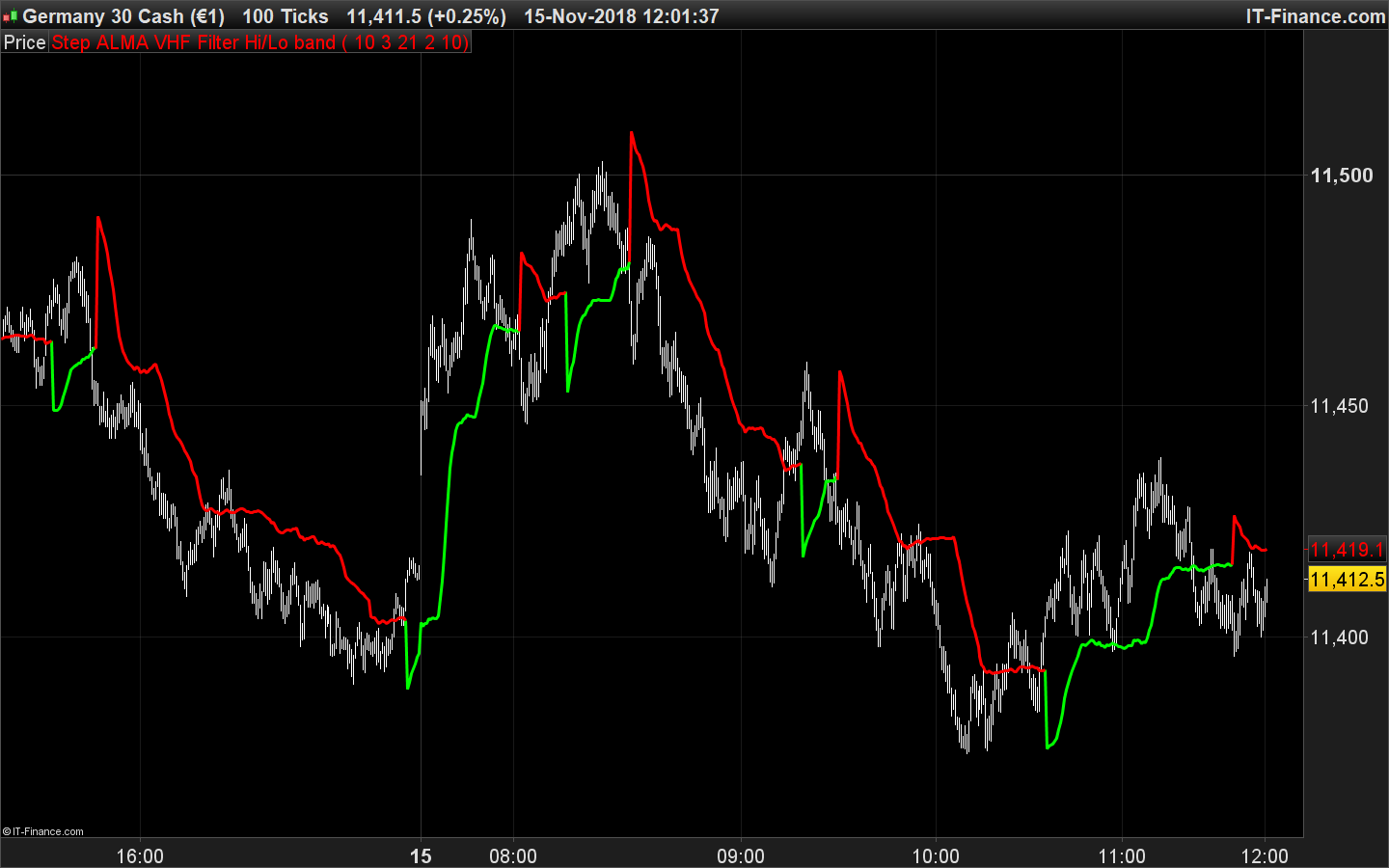
Since I get many positive returns about the ALMA VHF Hi/Lo Bands posted previously, I decided to add the “step” function to it. The version below adds a filtering made with ATR such as a SuperTrend-like indicator.
//PRC_StepALMA-VHF Hi/Lo band | indicator
//15.11.2018
//Nicolas @ www.prorealcode.com
//Sharing ProRealTime knowledge

// --- settings
Window = 7
Sigma = 3
VHFp = 21
Sensitivity  = 2     // Sensivity Factor
StepSize     = 14      // Step Size period
// --- end of settings

hh = CALL "PRC_ALMA VHF filter"[window, sigma, VHFp](high)
ll = CALL "PRC_ALMA VHF filter"[window, sigma, VHFp](low)

if hh<hh[1] and low<ll then
 trend=-1
elsif ll>ll[1] and high>hh then
 trend=1
endif

if trend=1 then
 iline=ll

else
 iline=hh

endif

//step function
Sensitivity = max(Sensitivity,1*pointsize)
ATRStepSize=averagetruerange[StepSize]
Step = max(ATRStepSize,1*pointsize)
size = sensitivity*Step
phigh = highest[7](iline)
plow = lowest[7](iline)
stepMulti = 1.0
workStepsmax  = phigh+2.0*size*stepMulti
workStepsmin  = plow-2.0*size*stepMulti
workSteptrend = workSteptrend[1]
pprice = customclose
if (pprice>workStepsmax[1]) then
 workSteptrend =  1
endif
if (pprice<workStepsmin[1]) then
 workSteptrend = -1
endif
if (workSteptrend =  1) then
 if (workStepsmin < workStepsmin[1]) then
  workStepsmin=workStepsmin[1]
 endif
 result = workStepsmin+size*stepMulti
 r=0
 g=255
 b=0
endif

if (workSteptrend = -1) then
 if (workStepsmax > workStepsmax[1]) then
  workStepsmax=workStepsmax[1]
 endif
 result = workStepsmax-size*stepMulti
 r=255
 g=0
 b=0
endif

return result coloured(r,g,b) style(line,3) as "Step ALMA VHF Filter Hi/Lo band"
This code is needed for the above one to work properly:
//PRC_ALMA VHF filter | indicator
//11.11.2018
//Nicolas @ www.prorealcode.com
//Sharing ProRealTime knowledge

// --- settings
Window = 7
Sigma = 3
VHFp = 21
// --- end of settings

Price = customClose

//VHF
Length=VHFp

CloseDiff = 0
SumDiff = 0

Serie = Price

For Counter = 0 to Length - 1 do
 CloseDiff = Abs(serie[Counter] - serie[Counter + 1])
 SumDiff = SumDiff + CloseDiff
next

If SumDiff = 0 Then
 SumDiff = 1
endif

VHF = (Highest[Length](serie) - Lowest[Length](serie)) / SumDiff
//

Offset = max(0.01,1- VHF)

m = (Offset * (Window - 1))
s = Window/Sigma

WtdSum = 0
CumWt  = 0

for k = 0 to Window - 1 do
 Wtd = Exp(-((k-m)*(k-m))/(2*s*s))
 WtdSum = WtdSum + Wtd * Price[Window - 1 - k]
 CumWt = CumWt + Wtd
next

ALAverage = WtdSum / CumWt

RETURN ALAverage
Download
Filename:
PRC_StepALMA-VHF-HiLo-band.itf
Downloads:
317
Download
Filename:
PRC_ALMA-VHF-filter.itf
Downloads:
339
Legend
I created ProRealCode because I believe in the power of shared knowledge. I spend my time coding new tools and helping members solve complex problems.
If you are stuck on a code or need a fresh perspective on a strategy, I am always willing to help. Welcome to the community!
Author’s Profile
Similar code
ATR adaptive EMAIndicators
Vidya (Variable Index Dynamic Average).Indicators
Deviation-Scaled Moving Average – DSMAIndicators
Adaptive Composite MA (ACMA)Indicators
18 rainbow averagesIndicators

Loading...
Merci Nicolas! First Happy new Year 2020. Very good indicator BUT (yes the french "oui, mais") the prorealtime is dramatically slow when I add this indicator even if I display only 200 Units in PRT. I suppose that the CALL of the "prc_alma-vhf-filter" indicator is slowing everything. What can I do to avoid this problem? Thank you.