




QQE Threshold Indicator – Enhanced Signal Precision with Dynamic RSI Bands
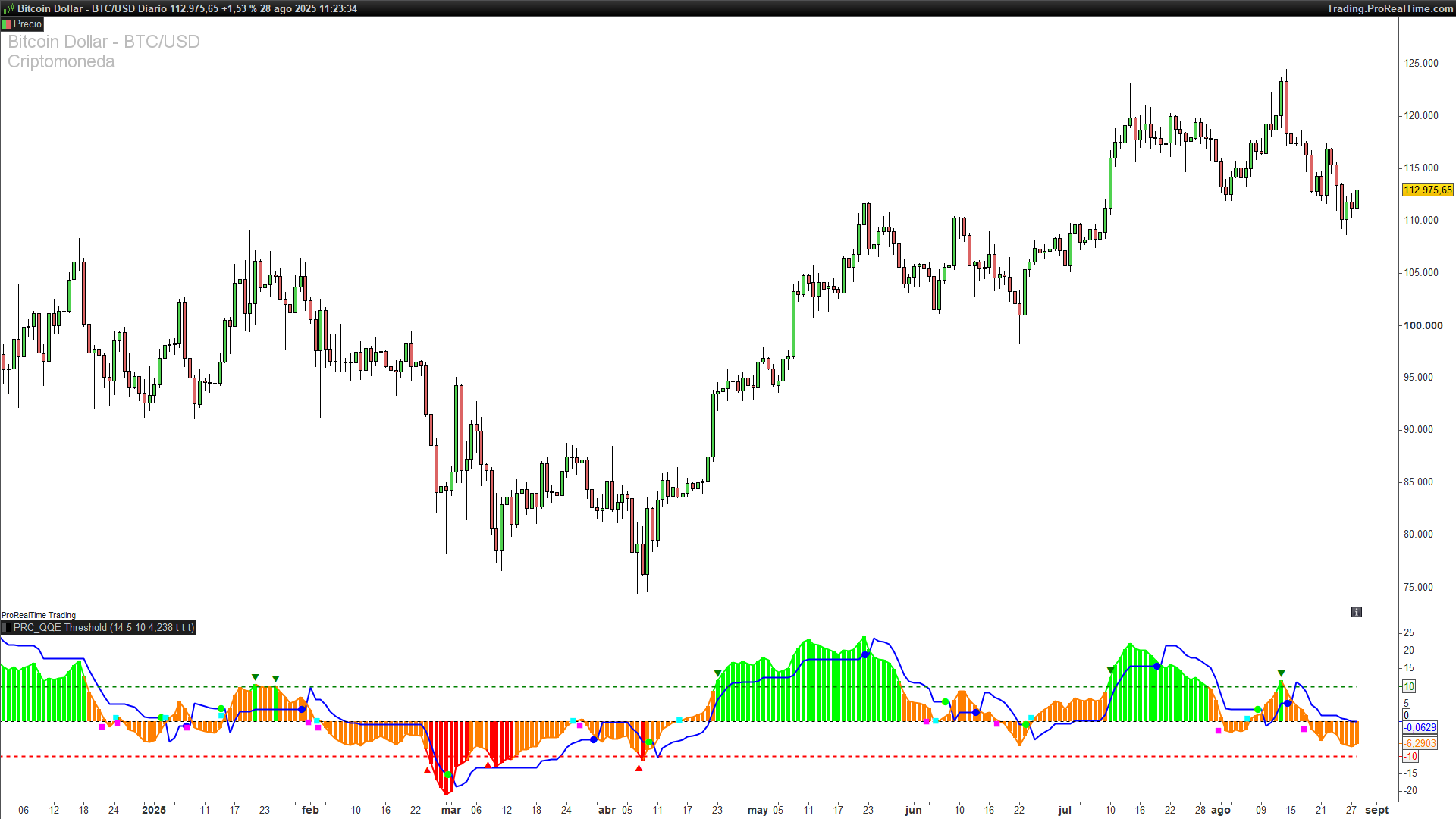
1. Introduction
The QQE Threshold indicator is an advanced variation of the classic Quantitative Qualitative Estimation (QQE), developed by Glaz. This version adds intelligent threshold-based signal recognition to the traditional QQE model, giving traders enhanced insights into market momentum, reversals, and breakout strength.
This indicator is especially useful for traders seeking early and visually clear signals based on RSI dynamics, combined with adaptive volatility filters and a powerful color-coded visualization.
Note: This indicator builds upon the original QQE (Quantitative Qualitative Estimation) logic, which was also published on ProRealCode. If you’re unfamiliar with the core QQE concept, you can read the detailed breakdown here.
2. Indicator Fundamentals
The QQE Threshold is based on a smoothed Relative Strength Index (RSI) and integrates it with a volatility-based trailing line derived from Average True Range (ATR) of the RSI. Here’s how it works:
-
The base RSI is calculated and then smoothed using a simple moving average (
SF). -
From the smoothed RSI, a dynamic ATR of the RSI is computed and multiplied by a constant factor (
QQE) to determine the distance of the upper and lower bands. -
These bands evolve with price action and define a trailing stop-like structure for RSI values.
The innovation in this version lies in the use of threshold zones, visually displayed with user-defined upper and lower boundaries (default ±10), highlighting overbought and oversold pressure zones.
3. Signal Interpretation
The QQE Threshold indicator provides three core types of signals, which are customizable via toggles in the code:
-
Trend Signal Crosses (
showQQEx)
When the smoothed RSI crosses the dynamic band:-
Green dot (●) → Long signal (bullish shift)
-
Blue dot (●) → Short signal (bearish shift)
-
-
Zero Line Crosses (
showQQEz)
When the smoothed RSI crosses the 50 level:-
Aqua square (◼) → Upward momentum
-
Fuchsia square (◼) → Downward momentum
-
-
Threshold Channel Exits (
showQQEc)
When RSI exits the threshold zone:-
Green down triangle (▼) → RSI above +Threshold → Potential overbought
-
Red up triangle (▲) → RSI below -Threshold → Potential oversold
-
These signals help traders identify momentum shifts, trend reversals, and extreme sentiment zones with great clarity.
Additionally, a histogram colored based on the RSI position relative to the threshold adds quick visual feedback:
-
Green → Above threshold (bullish)
-
Red → Below threshold (bearish)
-
Orange → Neutral zone
4. Customizable Parameters
The indicator is flexible and includes several parameters for user customization:
-
RsiPeriod(default: 14): Period for the base RSI calculation. -
SF(default: 5): Smoothing factor for the RSI. -
QQE(default: 4.238): Multiplier applied to ATR of RSI to form the bands. -
Threshold(default: 10): Threshold zone for overbought/oversold levels. -
showQQEx,showQQEz,showQQEc: Toggles to show/hide specific signals.
Users can adapt these values depending on their trading strategy, asset volatility, or timeframe. For example:
-
A lower threshold (e.g., 5) makes the system more sensitive.
-
A higher smoothing factor slows down the reaction for trend-following strategies.
5. Practical Use Cases
This indicator can be applied in multiple trading styles:
-
Trend Confirmation: Confirm entries when RSI crosses the dynamic trailing band in the direction of the trend.
-
Reversal Detection: Use threshold zone exits as alerts for possible exhaustion and mean reversion.
-
Momentum Filtering: Combine with other indicators (e.g., moving averages) to confirm strength before acting.
-
Visual Clarity: The signal markers help discretionary traders spot important moments without second-guessing.
It’s ideal for swing trading, day trading, and momentum-based setups on any asset class.
6. Indicator Code in ProRealTime
//-----------------------------------------------------//
//PRC_QQE Threshold by Glaz
//version = 0
//27.06.24
//Iván González @ www.prorealcode.com
//Sharing ProRealTime knowledge
//-----------------------------------------------------//
//-----Inputs------------------------------------------//
src=close //Rsi Source
RsiPeriod=14 //Rsi Length
SF=5 //Rsi Smoothing
QQE=4.238 //Fast QQE Factor
ThreshHold=10 //Thresh-hold
showQQEx=1 //Show Smooth Rsi and QQE Signal crosses
showQQEz=1 //Show Smooth Rsi Zero crosses
showQQEc=1 //Show Smooth Rsi Thresh Hold Channel Exits
//-----------------------------------------------------//
WildersPeriod=RsiPeriod*2-1
myrsi=rsi[RsiPeriod](src)
RsiMa=average[SF,1](myrsi)
AtrRsi=abs(RsiMa[1]-RsiMa)
MaAtrRsi=average[WildersPeriod,1](AtrRsi)
dar=average[WildersPeriod,1](MaAtrRsi)*QQE
//-----------------------------------------------------//
longband=0
shortband=0
trend=0

DeltaFastAtrRSI=dar
RsIndex=RsiMa
newShortBand=RsIndex+DeltaFastAtrRSI
newLongBand=RsIndex-DeltaFastAtrRSI
//-----------------------------------------------------//
if RsIndex[1]>longband[1] and RsIndex>longband[1] then
longband=max(longband[1],newlongband)
else
longband=newlongband
endif
//-----------------------------------------------------//
if RsIndex[1]<shortband[1] and RsIndex<shortband[1] then
shortband=min(shortband[1],newshortband)
else
shortband=newshortband
endif
//-----------------------------------------------------//
if RsIndex crosses over shortband[1] then
trend=1
elsif longband[1] crosses over RsIndex then
trend=-1
else
trend=trend[1]
endif
//-----------------------------------------------------//
if trend=1 then
FastAtrRsiTL=longband
else
FastAtrRsiTL=shortband
endif
//-----------------------------------------------------//
if showQQEx and FastAtrRsiTL < RsIndex then
QQExlong=QQExlong+1
if QQExlong=1 then
drawtext("●︎",barindex[1],FastAtrRsiTL[1]-50)coloured("lime")
endif
else
QQExlong=0
endif
if showQQEx and FastAtrRsiTL > RsIndex then
QQExshort=QQExshort+1
if QQExshort=1 then
drawtext("●︎",barindex[1],FastAtrRsiTL[1]-50)coloured("blue")
endif
else
QQExshort=0
endif

//-----------------------------------------------------//
if showQQEz and RsIndex>=50 then
QQEzlong=QQEzlong+1
if QQEzlong=1 then
drawtext("◼︎",barindex,RsiMa-50)coloured("aqua")
endif
else
QQEzlong=0
endif
if showQQEz and RsIndex<50 then
QQEzshort=QQEzshort+1
if QQEzshort=1 then
drawtext("◼︎︎",barindex,RsiMa-50)coloured("fuchsia")
endif
else
QQEzshort=0
endif
//-----------------------------------------------------//
if showQQEc and RsIndex>(50+ThreshHold) then
QQEclong=QQEclong+1
if QQEclong=1 then
drawtext("▼",barindex,RsiMa-50+2)coloured("green")
endif
else
QQEclong=0
endif
if showQQEc and RsIndex<(50-ThreshHold) then
QQEcshort=QQEcshort+1
if QQEcshort=1 then
drawtext("▲︎",barindex,RsiMa-50-2)coloured("red")
endif
else
QQEcshort=0
endif
//-----------------------------------------------------//
if RsiMa-50 > ThreshHold then
r=0
g=255
b=0
elsif RsiMa-50<-ThreshHold then
r=255
g=0
b=0
else
r=255
g=127
b=0
endif
//-----------------------------------------------------//
//-----------------------------------------------------//
return (RsiMa-50) coloured(r,g,b)style(histogram,1),(FastAtrRsiTL-50) coloured("blue")style(line,2), (RsiMa-50) coloured(r,g,b)style(line,2), ThreshHold style(dottedline,2)coloured("green"),-ThreshHold style(dottedline,2)coloured("red"),0 style(dottedline,1)
