Adaptive Inertia Ribbon (AIR)
Introduction
A classic moving average ribbon uses fixed periods: 20, 25, 30 bars and so on. That works in one kind of market and fails in the other. With short periods the ribbon hugs a clean trend but whipsaws in a range; with long periods it ignores the noise but reacts late when a real move starts.
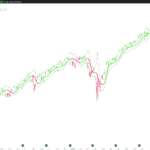
The Adaptive Inertia Ribbon by HPotter solves this by letting the ribbon change its own depth. It measures how directional the recent price movement is, its “inertia”, and stretches or shrinks the periods of every line with it. In a clean one-way move the ribbon tightens and follows price closely; in a choppy market it widens, slows down and filters the noise. On top of the ribbon, the indicator marks the bars where price breaks through the fast line in the direction of the ribbon.
Theory Behind the Indicator
The indicator is built in three steps.
1. Directional ratio. Two exponential averages are calculated over the last 20 bars: one of the bar-to-bar change of the close and one of its absolute value. Their ratio goes from -1 to +1. A value close to +1 means almost every bar closed higher; close to -1, almost every bar closed lower; close to 0, price went up and down and got nowhere.
2. Inertia factor. The ratio is turned into a multiplier between a minimum (0.5) and a maximum (2.0):
factor = minMult + (maxMult – minMult) x (1 – |ratio|)
A strong move in either direction (|ratio| near 1) gives a factor near 0.5. A directionless market (ratio near 0) gives a factor near 2.0.
3. The ribbon. Each line is an exponential moving average whose period is its base period multiplied by the inertia factor: (20 + 5 x i) x factor for line i, never below 2 bars. With the default settings, the eight lines have base periods of 20, 25, 30… up to 55 bars. In a strong trend they shrink to 10 to about 28 bars; in a range they stretch to 40 to 110 bars. The factor is recalculated on every bar, so each average adjusts its weight bar by bar instead of switching between fixed settings.
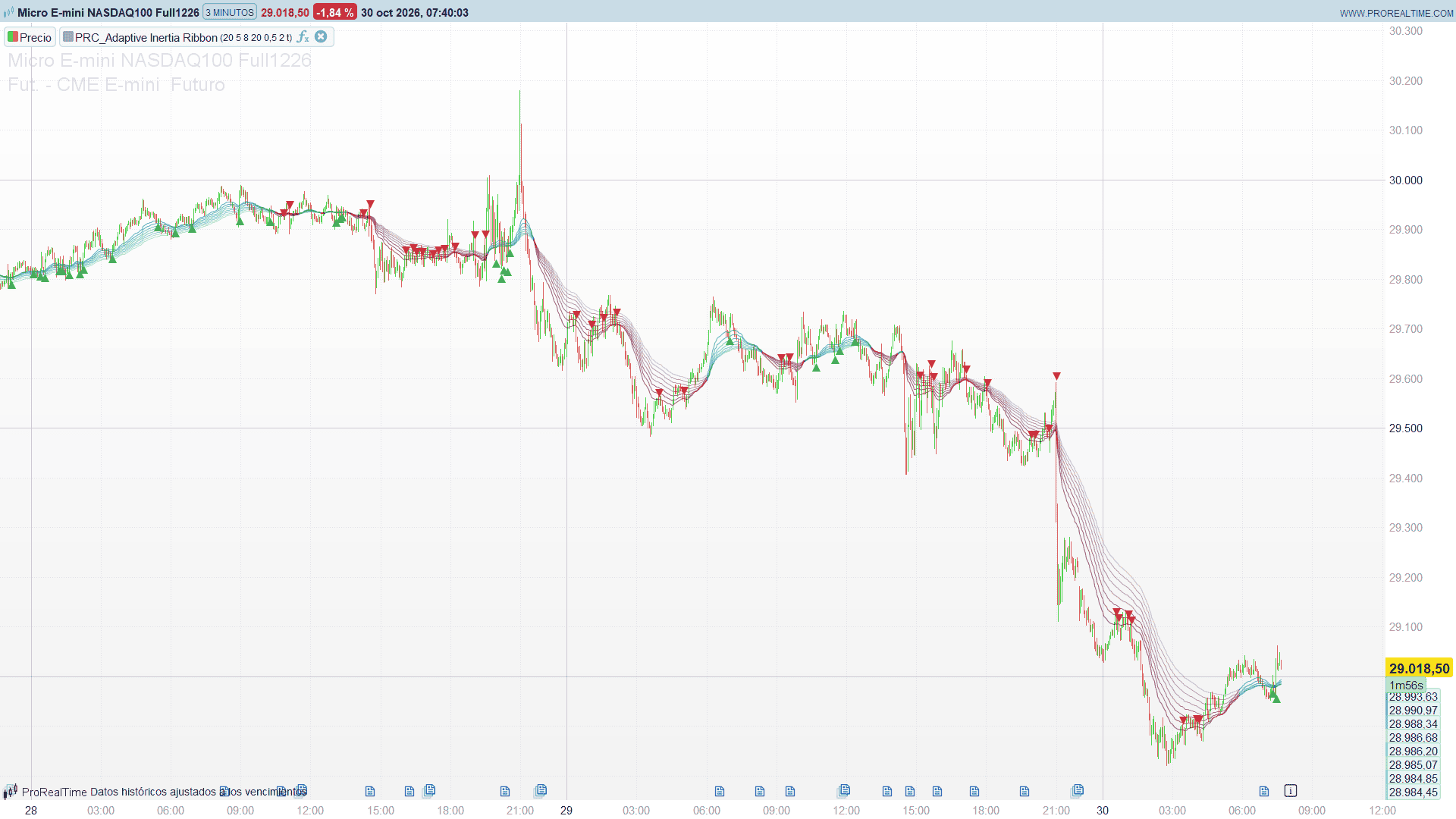
The direction of the ribbon is given by its two extremes: it points up while the fastest line is above the slowest one, and down otherwise. All lines are drawn in teal when it points up and in maroon when it points down, each one a little more transparent than the previous one, so the fast lines stand out.
Key Features at a Glance
- Ribbon of 2 to 10 exponential moving averages over price (8 by default).
- Periods that adapt to the directional strength of the market on every bar.
- Tight, fast ribbon in clean trends; wide, slow ribbon in choppy markets.
- Ribbon direction from the fastest and the slowest line, shown with the colour of all the lines.
- Breakout signals: price crossing the fast line in the direction of the ribbon.
How to Read the Indicator
- Teal ribbon: the fast line is above the slow one, the trend is up. Maroon ribbon: the trend is down.
- A narrow, steep ribbon means the market is moving in one direction with little noise: the periods are short and the lines follow price closely.
- A wide, flat ribbon means the market has no clear direction: the periods have stretched and the lines move slowly. The lines crossing each other inside a flat ribbon are typical of a range.
- Green triangle below the bar (buy): the close crosses above the fast line while the ribbon points up. After a pullback into the ribbon, price resumes the uptrend.
- Red triangle above the bar (sell): the close crosses below the fast line while the ribbon points down.
- A colour change of the whole ribbon is a change of trend; it does not create a signal by itself. The signals only come from price crossing the fast line in the direction the ribbon already has.
Practical Applications
- Trend filter: trade only in the direction of the ribbon colour.
- Pullback entries: the buy and sell triangles mark the bars where price comes back through the fast line after a pullback, in the direction of the trend.
- Regime reading: the width and slope of the ribbon show at a glance whether the market is trending cleanly or chopping sideways, which helps to choose between trend-following and range tactics.
- Pullback zone: in a trend, the band between the fast and the middle lines is a moving reference to watch how deep a pullback goes before price turns back through the fast line.
Indicator Configuration
Ribbon settings:
- Source: price used for the ribbon, selected in the indicator settings (default close). The directional ratio and the signals always use the close.
- basePeriod (default 20, minimum 2): base period of the fast line.
- lineStep (default 5, minimum 1): bars added to the base period from one line to the next.
- lineCount (default 8, from 2 to 10): number of lines. The last one is the slow line that sets the direction of the ribbon.
Adaptivity (inertia):
- inertiaLen (default 20, minimum 5): bars of the averages used for the directional ratio.
- minMult (default 0.5): multiplier of the periods in a strong one-way move.
- maxMult (default 2.0): multiplier of the periods in a directionless market.
Signals:
- showSignals (default 1): 1 = show the buy and sell triangles, 0 = hide them.
The ribbon starts on the first bar of the chart, but the averages need a few hundred bars to settle: on a chart with little history, load more bars so that the visible part is not affected by the start.
The Code
//---------------------------------------------------------------
// PRC_Adaptive Inertia Ribbon (AIR)
// version = 0
// 22.10.2026
// Iván González @ www.prorealcode.com
// Author: HPotter
// Sharing ProRealTime knowledge
//--------------------------------------------------------------------//

// ===================== INPUTS =====================
// Ribbon settings
src = customclose     // Source: choose it in the indicator settings (default close)
basePeriod = 20       // Base Period of the fast line (2 or more)
lineStep = 5          // Step Between Lines, in bars (1 or more)
lineCount = 8         // Line Count (2 to 10)

// Adaptivity (inertia)
inertiaLen = 20       // Inertia Calculation Period (5 or more)
minMult = 0.5         // Min Adaptivity Multiplier: used in a strong one-way move
maxMult = 2.0         // Max Adaptivity Multiplier: used in a choppy market

// Signals
showSignals = 1       // 1 = show the ribbon breakout signals

// ===================== CALCULATIONS =====================
baseV = max(2, round(basePeriod))
stepV = max(1, round(lineStep))
countV = max(2, min(10, round(lineCount)))
inertV = max(5, round(inertiaLen))
minM = max(0.1, minMult)
maxM = max(1.0, maxMult)

// Bar-to-bar change of the close (0 on the first bar, so no undefined value
// enters the averages)
IF barindex = 0 THEN
   priceChg = 0
ELSE
   priceChg = close - close[1]
ENDIF
absChg = abs(priceChg)

// Exponential averages of the change and of its absolute value, seeded with the
// simple average of the first inertiaLen changes like a standard EMA
kIn = 2 / (inertV + 1)
avgChg = average[inertV](priceChg)
avgAbs = average[inertV](absChg)
IF barindex < inertV THEN
   smChg = 0
   smAbs = 0
ELSIF barindex = inertV THEN
   smChg = avgChg
   smAbs = avgAbs
ELSE
   smChg = kIn * priceChg + (1 - kIn) * smChg[1]
   smAbs = kIn * absChg + (1 - kIn) * smAbs[1]
ENDIF

// Directional ratio, from -1 (every bar down) to +1 (every bar up).
// 0 while the averages have no value yet and when the price did not move at all
dirRatio = 0
IF barindex >= inertV THEN
   IF smAbs <> 0 THEN
      dirRatio = smChg / smAbs
   ENDIF
ENDIF

// Inertia factor: a strong one-way move gives minMult (short, fast lines),
// a choppy market gives maxMult (long, slow lines)
inertiaF = minM + (maxM - minM) * (1 - abs(dirRatio))

// Weight of each line: period = (basePeriod + i * lineStep) * inertia factor,
// never below 2 bars
w0 = 2 / (max(2, baseV * inertiaF) + 1)
w1 = 2 / (max(2, (baseV + stepV) * inertiaF) + 1)
w2 = 2 / (max(2, (baseV + 2 * stepV) * inertiaF) + 1)
w3 = 2 / (max(2, (baseV + 3 * stepV) * inertiaF) + 1)
w4 = 2 / (max(2, (baseV + 4 * stepV) * inertiaF) + 1)
w5 = 2 / (max(2, (baseV + 5 * stepV) * inertiaF) + 1)
w6 = 2 / (max(2, (baseV + 6 * stepV) * inertiaF) + 1)
w7 = 2 / (max(2, (baseV + 7 * stepV) * inertiaF) + 1)
w8 = 2 / (max(2, (baseV + 8 * stepV) * inertiaF) + 1)
w9 = 2 / (max(2, (baseV + 9 * stepV) * inertiaF) + 1)

// The ten lines: exponential averages of the source whose weight changes on
// every bar, seeded with the source on the first bar. Plain variables and not
// arrays, so that on the live bar every tick starts again from the previous close
IF barindex = 0 THEN
   rib0 = src
   rib1 = src
   rib2 = src
   rib3 = src
   rib4 = src
   rib5 = src
   rib6 = src
   rib7 = src
   rib8 = src
   rib9 = src
ELSE
   rib0 = rib0[1] * (1 - w0) + src * w0
   rib1 = rib1[1] * (1 - w1) + src * w1
   rib2 = rib2[1] * (1 - w2) + src * w2
   rib3 = rib3[1] * (1 - w3) + src * w3
   rib4 = rib4[1] * (1 - w4) + src * w4
   rib5 = rib5[1] * (1 - w5) + src * w5
   rib6 = rib6[1] * (1 - w6) + src * w6
   rib7 = rib7[1] * (1 - w7) + src * w7
   rib8 = rib8[1] * (1 - w8) + src * w8
   rib9 = rib9[1] * (1 - w9) + src * w9
ENDIF

// Slowest line in use
IF countV = 2 THEN
   slowLine = rib1
ELSIF countV = 3 THEN
   slowLine = rib2
ELSIF countV = 4 THEN
   slowLine = rib3
ELSIF countV = 5 THEN
   slowLine = rib4
ELSIF countV = 6 THEN
   slowLine = rib5
ELSIF countV = 7 THEN
   slowLine = rib6
ELSIF countV = 8 THEN
   slowLine = rib7
ELSIF countV = 9 THEN
   slowLine = rib8
ELSE
   slowLine = rib9
ENDIF

// Ribbon direction: up while the fast line is above the slowest one
trendUp = 0
IF rib0 > slowLine THEN
   trendUp = 1
ENDIF

// ===================== SIGNALS =====================
// Buy: the close crosses above the fast line while the ribbon points up.
// Sell: the close crosses below the fast line while the ribbon points down
buySig = 0
sellSig = 0
IF barindex > 0 THEN
   IF trendUp = 1 AND close > rib0 AND close[1] <= rib0[1] THEN
      buySig = 1
   ENDIF
   IF trendUp = 0 AND close < rib0 AND close[1] >= rib0[1] THEN
      sellSig = 1
   ENDIF
ENDIF

// Gap between the candle and the signal triangle
atrV = averagetruerange[14](close)
IF barindex >= 14 THEN
   sigGap = 0.3 * atrV
ELSE
   sigGap = 0.3 * (high - low)
ENDIF

IF showSignals = 1 AND buySig = 1 THEN
   DRAWTEXT("▲", barindex, low - sigGap) COLOURED(76, 175, 80, 255)
ENDIF
IF showSignals = 1 AND sellSig = 1 THEN
   DRAWTEXT("▼", barindex, high + sigGap) COLOURED(242, 54, 69, 255)
ENDIF

// ===================== DRAWING =====================
// Teal while the ribbon points up, maroon while it points down
IF trendUp = 1 THEN
   lineR = 8
   lineG = 153
   lineB = 129
ELSE
   lineR = 136
   lineG = 14
   lineB = 79
ENDIF

// Lines beyond the line count are not drawn
IF countV >= 3 THEN
   out2 = rib2
ELSE
   out2 = undefined
ENDIF
IF countV >= 4 THEN
   out3 = rib3
ELSE
   out3 = undefined
ENDIF
IF countV >= 5 THEN
   out4 = rib4
ELSE
   out4 = undefined
ENDIF
IF countV >= 6 THEN
   out5 = rib5
ELSE
   out5 = undefined
ENDIF
IF countV >= 7 THEN
   out6 = rib6
ELSE
   out6 = undefined
ENDIF
IF countV >= 8 THEN
   out7 = rib7
ELSE
   out7 = undefined
ENDIF
IF countV >= 9 THEN
   out8 = rib8
ELSE
   out8 = undefined
ENDIF
IF countV >= 10 THEN
   out9 = rib9
ELSE
   out9 = undefined
ENDIF

// Each line a little more transparent than the previous one
RETURN rib0 COLOURED(lineR, lineG, lineB, 178) AS "Line 1", rib1 COLOURED(lineR, lineG, lineB, 163) AS "Line 2", out2 COLOURED(lineR, lineG, lineB, 147) AS "Line 3", out3 COLOURED(lineR, lineG, lineB, 132) AS "Line 4", out4 COLOURED(lineR, lineG, lineB, 117) AS "Line 5", out5 COLOURED(lineR, lineG, lineB, 102) AS "Line 6", out6 COLOURED(lineR, lineG, lineB, 86) AS "Line 7", out7 COLOURED(lineR, lineG, lineB, 71) AS "Line 8", out8 COLOURED(lineR, lineG, lineB, 56) AS "Line 9", out9 COLOURED(lineR, lineG, lineB, 40) AS "Line 10"