Removing Indicator Labels from shared chart

Viewing 4 posts - 1 through 4 (of 4 total)
  • Author
    Posts
  • #110307 quote
    LarrikinLarrikin
    Participant
    Average

    Hi,

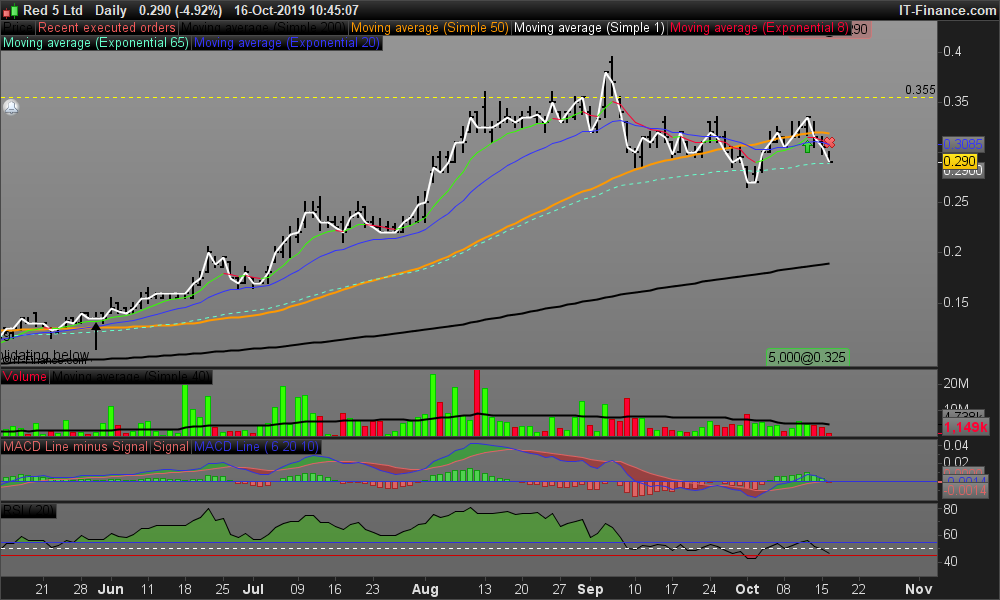
    Is there a way to remove the indicator labels from a “shared” chart so that they don’t block more important information (See image)

    Thanks

    David

    RED-Daily.png RED-Daily.png
    #110312 quote
    NicolasNicolas
    Keymaster
    Legend

    No you can’t remove the indicators labels. I think that you should expand the picture size when the export window popup. With a larger picture, the labels should not overlap the indicators anymore!

    #110334 quote
    PierrePierre
    Moderator
    Average

    Hi,

    It’s now possible in version 11.1.

    From the Settings menu, click on “Templates” > “Charts” > Under the “Indicator titles”, select  “Panel minimized”.

    The titles of the indicators will not be displayed anymore when you share a chart.

    Regards,

    Pierre

    #110357 quote
    LarrikinLarrikin
    Participant
    Average

    Awesome!

    I’m with I.G. so I guess I wait until Christmas. (Thanks Pierre)

    But in the meant time, I’ll expand the chart to full screen before sharing. (Thanks Nicolas)

Viewing 4 posts - 1 through 4 (of 4 total)

  • You must be logged in to reply to this topic.

ProRealAI ProRealAI New

Stuck on this ProBuilder code?

Describe what this topic is trying to build, in plain English, and ProRealAI writes the ProRealTime™ indicator, screener or system for you.

Available in 7 languages
Try ProRealAI

Removing Indicator Labels from shared chart


Platform Support: Charts, Data & Broker Setup

New Reply
Author
author-avatar
Larrikin @larrikin Participant
Summary

This topic contains 3 replies,
has 3 voices, and was last updated by LarrikinLarrikin

6 years, 11 months ago.

Topic Details
Forum: Platform Support: Charts, Data & Broker Setup
Language: English
Started: 10/16/2019
Status: Active
Attachments: 1 files
ProRealCode ProRealCode
Loading...