ProRealTime innovates – A new way to place orders from your computer.
Twitter: https://twitter.com/ProRealTime
Facebook: https://www.facebook.com/ProRealTime/
Trading with STREAM DECK
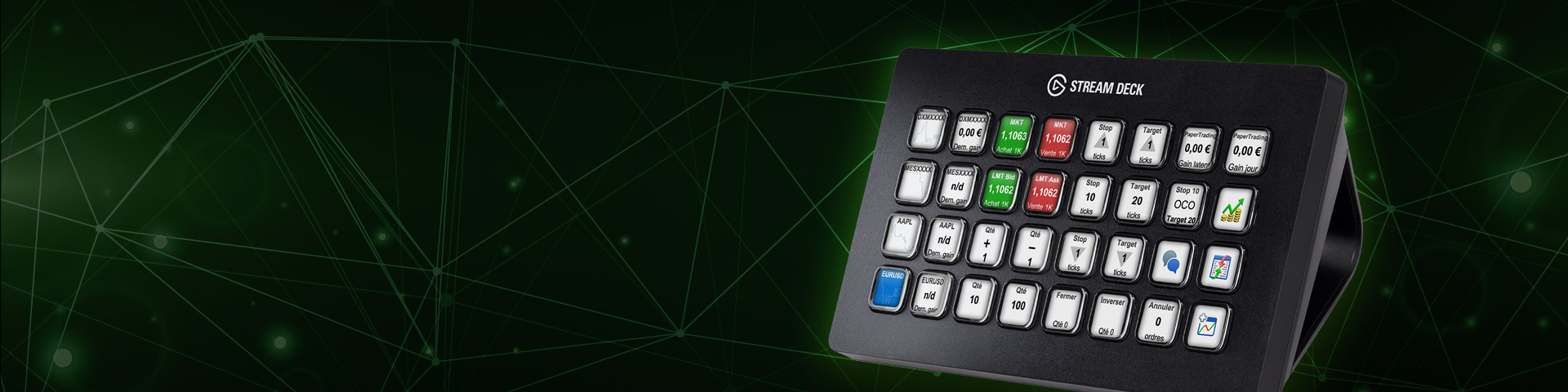
Its now possible to trade with ProRealTime using a Stream Deck. Faster order placement. Visual comfort. Completely customizable. Learn more: https://prorealtime.com/en/stream-deck
[attachment file=”114162″]
[youtube]https://youtu.be/8gGlkG86mcM[/youtube]
Adapt the interface to your way of trading
You can configure the buttons of your Stream Deck to:
- Display in real-time the latest Bid/Ask of the instruments you follow.
- Display the value of your portfolio.
- Monitor your open positions.
- Place Market, Limit, Stop or OCO orders.
- Move your Limit and Stop orders.
- Close or invert a position, cancel all your orders at once.
- Open windows of your platform (list, chart, order list, …).
Example configurations
Multiple instruments:
Dark or light theme
Choose between the light or dark theme and configure the brightness of your Stream Deck buttons.
Hi,
We’ve just released a platform update to enhance compatibility with the latest Stream Deck models.
In addition to WINDOWS & MAC, they are now compatible with LINUX (15 keys model & 32 keys model).
Hello
I purchased a stream deck 15 taps, and I can not see the PRT stream deck set up menu on my MAC OS SIERRA
The stream deck menu is visible on MAS OS MOJAVE
If I remember well, the menu was visible under mac OS SIERRA few weeks ago
Who can support this problem solving?
Thank you
@maurice57
You should send a support ticket to PRT by using the report tool in the help menu section of the platform.
Is it possile to dedicate a monitor with the same interface, instead of Stream Deck?
I find the use of the mouse better than any button to push manually
Thanks
That’s an idea you can propose to ProRealTime through their suggestion box:
https://www.prorealtime.com/en/contact?suggestion=1
I’ve had a StreamDeck for a few days now and so thought that I would give my thoughts on it – a sort of review. I am not really a manual trader but can instantly see that as a tool to give instant instructions to the PRT platform it will be very powerful and very intuitive. When you switch to your PRT platform your PRT buttons that you have chosen instantly show on the StreamDeck which is a very nice touch. The buttons are little LCD screens and very clear and very responsive so for a manual trader saving on several mouse clicks to perform an action such as buy, sell etc would be much faster.
One negative is the stand which is a bit plasticky and fiddly but OK unless you want to move the StreamDeck around a lot in which case you might knock a support away very easily and spend a bit too much time standing it up again!
One thing that has turned out to be a very big benefit of the StreamDeck is that you can set lots of different profiles (sets of buttons) and set them to automatically show on the buttons when an app is launched or to launch an app. So for example if I start a video on my favourite mediaplayer the StreamDeck can instantly show me all the buttons that let me play, stop, pause, volume up, volume down etc. If I open a browser then it can show me buttons that let me access all my favourite websites with just one click. Even if the browser is not open then I can just select my ‘website’ profile and and click on the website I want and it will launch my browser with that website.
I even have profiles set up so that at the click of a button a timer will start that sounds an alarm when my boiled eggs are ready or another timer when my pasta is cooked. I also have a profile where the buttons tell me all the times in the major trading markets right now. The potential to save on mouse movements and clicks seems huge.
When I heard about the StreamDeck I thought it was just another toy but after just a few days I have been persuaded that it is a very useful tool. Now if they had just made it bluetooth to get rid of the USB wire and improved the stand it would get 10/10 instead of 9/10 from me.
I was very doubtful when I first read about the StreamDeck of how useful it would actually be in real life but after just a few days I am wondering how I lived without it!
If you want to use your StreamDeck for trading with PRT then you should be aware that it only works on v11.
if they had just made it bluetooth to get rid of the USB wire
Would the Streamdecck support / work with a
bluetooth dongle?
Thanks for the review Vonasi. You asked a good question GraHal, that would be very interesting, I think that it might works! I will ask the question at people of ITF who developed the nice interface for trading.
The USB wire seems to come out of the StreamDeck in the wrong place in my mind as it sticks out the top of the unit which is rather ugly. It is also hard wired in so you can’t remove it or change it for a shorter cable.
It is also hard wired in
Weird … you’d expect to be terminated on a usb port and then you could have as long or short a cable as you want.
Also if it was usb connector type output then it likely would accept a dongle plugged in the usb?
Also if it was usb connector type output then it likely would accept a dongle plugged in the usb?
I guess a Bluetooth dongle may connect on the end of hard wired lead?