


LRLR Pine to Proreal

Viewing 3 posts - 1 through 3 (of 3 total)
  • Author
    Posts
  • #243534 quote
    lukapexlukapex
    Participant
    New
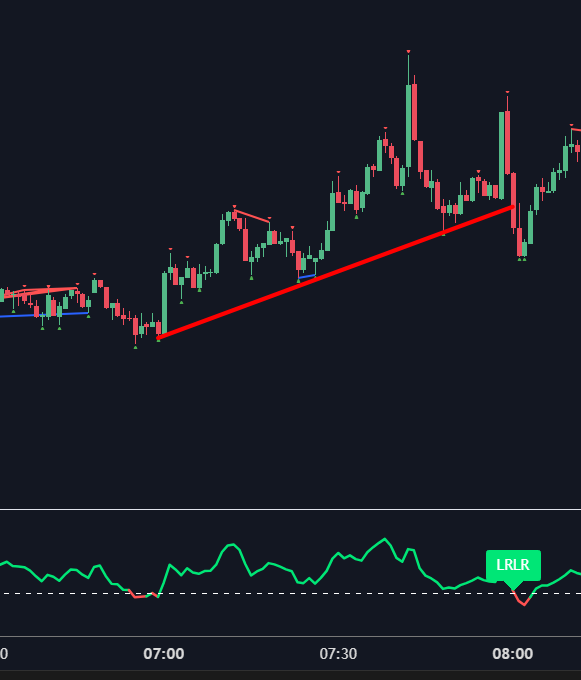
    Hello! I made this indicator to replicate when we have low resistance liquidity runs- basically diagonal support and resistance. It does not show diagonal lines, but it shows a line in a separate window, which after 1h of staying bellow or above the zero line writes ‘LRLR’. You can see how it looks on the picture. Thank You in advance!!

    //@version=5
    strategy(“LRLR”, overlay=false, initial_capital=10000, default_qty_type=strategy.percent_of_equity, default_qty_value=100, commission_type=strategy.commission.percent, commission_value=0.0)
    src = input(ohlc4, title=”source”)
    // definition of “Jurik Moving Average”, by Everget
    jma(_src,_length,_phase,_power) =>
        phaseRatio = _phase < -100 ? 0.5 : _phase > 100 ? 2.5 : _phase / 100 + 1.5
        beta = 0.45 * (_length – 1) / (0.45 * (_length – 1) + 2)
        alpha = math.pow(beta, _power)
        var float jma = 0.0
        var float e0 = 0.0
        var float e1 = 0.0
        var float e2 = 0.0
        e0 := (1 – alpha) * _src + alpha * nz(e0[1])
        e1 := (_src – e0) * (1 – beta) + beta * nz(e1[1])
        e2 := (e0 + phaseRatio * e1 – nz(jma[1])) * math.pow(1 – alpha, 2) + math.pow(alpha, 2) * nz(e2[1])
        jma := e2 + nz(jma[1])
        jma
    //// //// Determine Angle by KyJ //// ////
    angle(_src) =>
        rad2degree = 180/3.14159265359  //pi
        rad2degree * math.atan((_src[0] – _src[1])/ta.atr(14))
    jma_line = jma(src,10,50,1)
    ma = ta.ema(src,input.int(56))
    jma_slope = angle(jma_line)
    ma_slope = angle(ma)
    ///////////// Rate Of Change /////////////
    source = close
    roclength = input.int(12, minval=1)
    pcntChange = input.int(2, minval=1)
    roc = 100 * (source – source[roclength]) / source[roclength]
    emaroc = ta.ema(roc, roclength / 2)
    isMoving() => emaroc > (pcntChange / 2) or emaroc < (0 – (pcntChange / 2))
    ///////////// LRLR Detection /////////////
    var int bars_per_hour = 0
    var bool valid_timeframe = false
    // Određivanje broja svećica po satu samo za dozvoljene timeframe-ove
    if timeframe.period == “1”
        bars_per_hour := 60
        valid_timeframe := true
    else if timeframe.period == “3”
        bars_per_hour := 20
        valid_timeframe := true
    else if timeframe.period == “5”
        bars_per_hour := 12
        valid_timeframe := true
    else if timeframe.period == “15”
        bars_per_hour := 4
        valid_timeframe := true
    else if timeframe.period == “30”
        bars_per_hour := 2
        valid_timeframe := true
    // Detekcija promene boje (prelaska iznad/ispod 0)
    changed_above = ma_slope >= 0 and ma_slope[1] < 0
    changed_below = ma_slope <= 0 and ma_slope[1] > 0
    // Brojanje svećica od promene
    var int count_since_change = 0
    count_since_change := changed_above or changed_below ? 0 : count_since_change + 1
    // Praćenje trenutnog stanja (iznad/ispod 0)
    var bool is_above = false
    is_above := changed_above ? true : changed_below ? false : is_above
    // LRLR signali – prikazuju se SAMO kada se navrši tačno 1h
    show_above_lrlr = valid_timeframe and is_above and count_since_change == bars_per_hour
    show_below_lrlr = valid_timeframe and not is_above and count_since_change == bars_per_hour
    ///////////// Plotting /////////////
    hline(0, title=’Zero line’, color=color.white, linewidth=1)
    plot(ma_slope, title=”ma slope”, linewidth=2, color=ma_slope>=0?color.lime:color.red)
    // LRLR Labels
    if show_above_lrlr
        label.new(bar_index, ma_slope, text=”LRLR”, color=color.lime, style=label.style_label_down, textcolor=color.white)
    if show_below_lrlr
        label.new(bar_index, ma_slope, text=”LRLR”, color=color.red, style=label.style_label_up, textcolor=color.white)
    Screenshot-2025-02-06-003306.png Screenshot-2025-02-06-003306.png
    #243564 quote
    Iván GonzálezIván González
    Moderator
    Legend

    Here it is:

    //-------------------------------------------//
    //PRC_LRLR
    //version = 0
    //06.02.2025
    //Iván González @ www.prorealcode.com
    //Sharing ProRealTime knowledge
    //-------------------------------------------//
    // Inputs
    //-------------------------------------------//
    showLRLR=1
    //Bars per hour
    if gettimeframe=60 then
    barsPerHour=60
    elsif gettimeframe=180 then
    barsPerHour=20
    elsif gettimeframe=300 then
    barsPerHour=12
    elsif gettimeframe=600 then
    barsPerHour=6
    elsif gettimeframe=900 then
    barsPerHour=4
    elsif gettimeframe=1800 then
    barsPerHour=2
    else
    barsPerHour=undefined
    showLRLR=0
    endif
    //moving average
    period=56
    src=(open+high+low+close)/4
    //-------------------------------------------//
    // Determine Angle
    //-------------------------------------------//
    atr=averagetruerange[14](close)
    ma=average[period,1](src)
    maSlope=atan((ma-ma[1])/atr)
    //-------------------------------------------//
    // LRLR Detection
    //-------------------------------------------//
    changedAbove=maSlope>=0 and maSlope[1]<0
    changedBelow=maSlope<=0 and maSlope[1]>0
    
    countSinceChange=barssince(changedAbove or changedBelow)
    
    if changedAbove then
    isAbove=1
    isBelow=0
    r=0
    g=255
    b=0
    elsif changedBelow then
    isAbove=0
    isBelow=1
    r=255
    g=0
    b=0
    endif
    
    if showLRLR and countSinceChange=barsPerHour then
    if isAbove then
    drawtext("LRLR",barindex,maSlope+0.2*maSlope)coloured(r,g,b)
    else
    drawtext("LRLR",barindex,maSlope-0.2*maSlope)coloured(r,g,b)
    endif
    endif
    
    //-------------------------------------------//
    return maSlope coloured(r,g,b)style(line,2),0 style(dottedline)
    lukapex thanked this post
    #243567 quote
    lukapexlukapex
    Participant
    New

    Thank you very much! <3

Viewing 3 posts - 1 through 3 (of 3 total)

  • You must be logged in to reply to this topic.

ProRealAI ProRealAI New

Stuck on this ProBuilder code?

Describe what this topic is trying to build, in plain English, and ProRealAI writes the ProRealTime™ indicator, screener or system for you.

Available in 7 languages
Try ProRealAI

LRLR Pine to Proreal


ProBuilder: Indicators & Custom Tools

New Reply
Author
author-avatar
lukapex @lukapex Participant
Summary

This topic contains 2 replies,
has 2 voices, and was last updated by lukapexlukapex

1 year, 7 months ago.

Topic Details
Forum: ProBuilder: Indicators & Custom Tools
Language: English
Started: 02/06/2025
Status: Active
Attachments: 1 files
ProRealCode ProRealCode
Loading...

