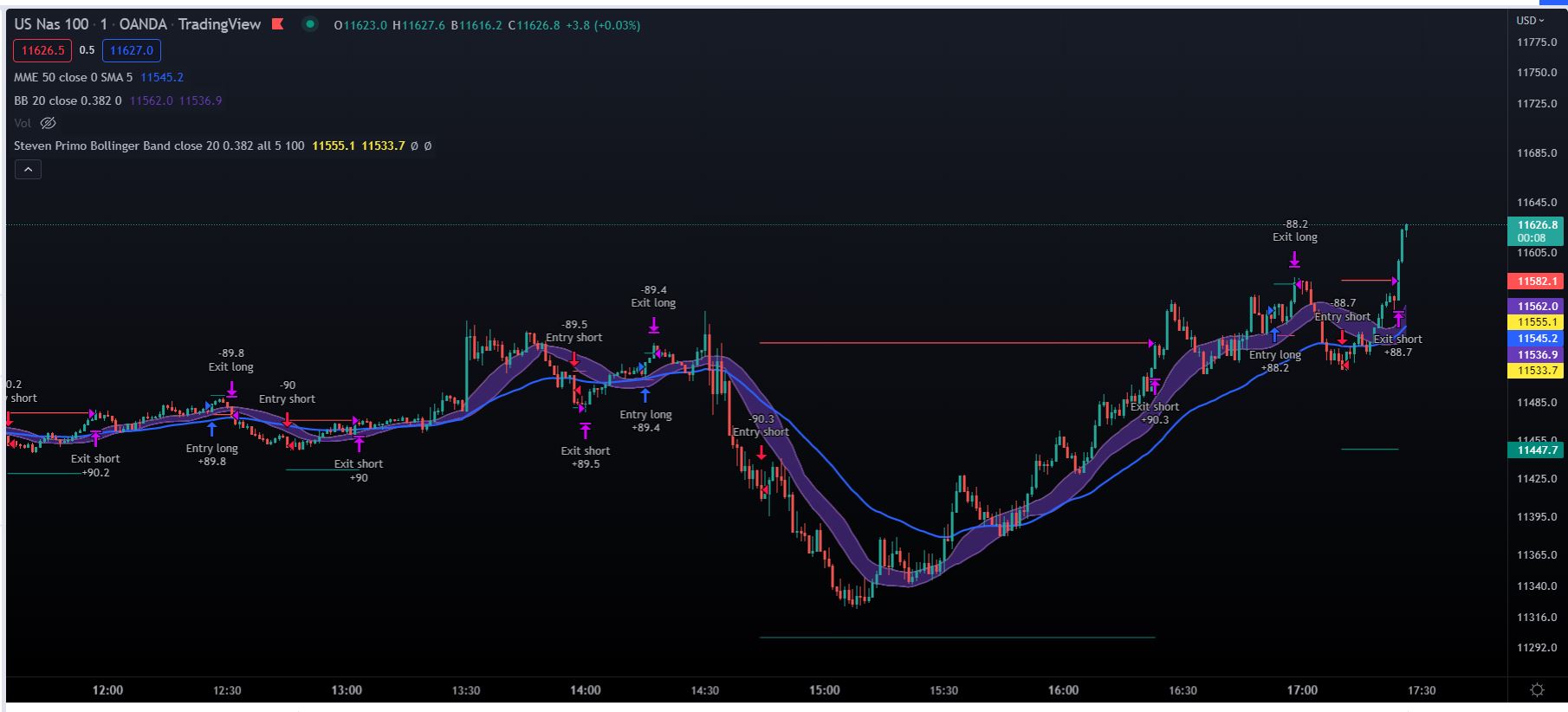
Strategy to enter long or short using Bollinger Bands with deviation of 0.382, We need to have 5 Candles closing above the Upper Bollinger band, entry above the last swing high of those 5 candles, Stop is set under the last swing low and target is the same range.
here is the Code:
//@version=5
strategy(“Steven Primo Bollinger Band”, overlay=true, default_qty_type=strategy.percent_of_equity, default_qty_value=100, process_orders_on_close=true, max_labels_count=500)
// Constants
var TRANSP = 5
var LONG = strategy.direction.long
var SHORT = strategy.direction.short
var ALL = strategy.direction.all
var S_BOLLINGER = “Bollinger settings”
var S_SETUP = “Setup settings”
// Inputs
src = math.log(input.source(close, “Price source”, group=S_BOLLINGER))
var bollingerLength = input.int(20, “Bollinger length”, minval=3, group=S_BOLLINGER, inline=S_BOLLINGER)
var mult = input.float(0.382, “Standard deviation”, minval=0.0, step=0.1, group=S_BOLLINGER, inline=S_BOLLINGER)
var orderDirection = input.string(LONG, “Order direction”, options=[LONG, SHORT, ALL], group=S_SETUP)
var useTrailingStop = input.bool(false, “Use trailing stop”, group=S_SETUP)
var consecutiveCloses = input.int(5, “Consecutive closes for the setup”, minval=1, group=S_SETUP, inline=S_SETUP)
var extension = input.int(100, “Extension (%)”, minval=100, group=S_SETUP, inline=S_SETUP) / 100.0
// Getting the BB
[middle, upper, lower] = ta.bb(src, bollingerLength, mult)
middle := math.exp(middle)
upper := math.exp(upper)
lower := math.exp(lower)
// Plotting the BB
var colorAtTheLimits = color.new(color.yellow, TRANSP)
var colorAtTheMiddle = color.new(color.blue, TRANSP)
plot(middle, “Middle band”, colorAtTheMiddle, display=display.none)
plot(upper, “Upper band”, colorAtTheLimits)
plot(lower, “Lower band”, colorAtTheLimits)
// MA setup
// BB setup
longComparison() => close >= upper
shortComparison() => close <= lower
var countLong = 0
var countShort = 0
incCount(count, comparison) =>
if comparison
if count == 0 and comparison[1]
0
else
count + 1
else
0
countLong := incCount(countLong, longComparison())
countShort := incCount(countShort, shortComparison())
// Pivot setup
pivotHigh = ta.pivothigh(1, 1)
pivotLow = ta.pivotlow(1, 1)
pivotInRange(pivot, count) => ta.barssince(pivot) < count
pvHighInRange = pivotInRange(pivotHigh, countLong)
pvLowInRange = pivotInRange(pivotLow, countShort)
// Entry price
epLong = fixnan(pivotHigh) + syminfo.mintick
epShort = fixnan(pivotLow) – syminfo.mintick
// Stop price
getRange(currentPrice, pivot, cond, tickMod) =>
if cond
currentPrice
else
fixnan(pivot) + syminfo.mintick * tickMod
var stopLong = 0.0
var stopShort = 0.0
stopLong := epShort
stopShort := epLong
// Target price
getTarget(stopPrice, entryPrice) =>
totalTicks = (entryPrice – stopPrice) * extension
entryPrice + totalTicks
var targetLong = 0.0
var targetShort = 0.0
targetLong := getTarget(stopLong, epLong)
targetShort := getTarget(stopShort, epShort)
// Entry condition
canBuy = countLong >= consecutiveCloses and pvHighInRange and high < epLong
canSell = countShort >= consecutiveCloses and pvLowInRange and low > epShort
// Entry orders
inMarket = strategy.opentrades != 0
var plotTarget = 0.0
var plotStop = 0.0
strategy.risk.allow_entry_in(orderDirection)
if not inMarket
if canBuy
plotTarget := targetLong
plotStop := stopLong
strategy.entry(“long”, strategy.long, stop=epLong, comment=”Entry long”)
else if canSell
plotTarget := targetShort
plotStop := stopShort
strategy.entry(“short”, strategy.short, stop=epShort, comment=”Entry short”)
else
strategy.cancel(“long”)
strategy.cancel(“short”)
// Exit orders
strategy.exit(“long”, “long”, stop=stopLong, limit=targetLong, comment=”Exit long”)
strategy.exit(“short”, “short”, stop=stopShort, limit=targetShort, comment=”Exit short”)
else
countLong := 0
countShort := 0
// Trailing stop
if useTrailingStop and inMarket
if strategy.position_entry_name == “long”
strategy.exit(“long”, “long”, stop=stopLong, limit=plotTarget, comment=”Exit long”, when=stopLong > plotStop)
plotStop := stopLong
else
strategy.exit(“short”, “short”, stop=stopShort, limit=plotTarget, comment=”Exit short”, when=stopShort < plotStop)
plotStop := stopShort
// Plot exit
plotCond(price) => inMarket ? price : inMarket[1] ? price[1] : na
plot(plotCond(plotStop), “Stop loss”, color.red, style=plot.style_linebr)
plot(plotCond(plotTarget), “Target”, color.teal, style=plot.style_linebr)