Bollinger band error

Viewing 5 posts - 1 through 5 (of 5 total)
  • Author
    Posts
  • #211848 quote
    8278sv8278sv
    Participant
    New

    Hi

    I seem to be getting unexpected results when testing a strategy on Bollinger bands. For the purposes of trying to work out what the issue is, I’ve totally stripped down the code to just the below – from this it seems to be an issue with bollinger bands alone. Was wondering if anyone else had this issue.

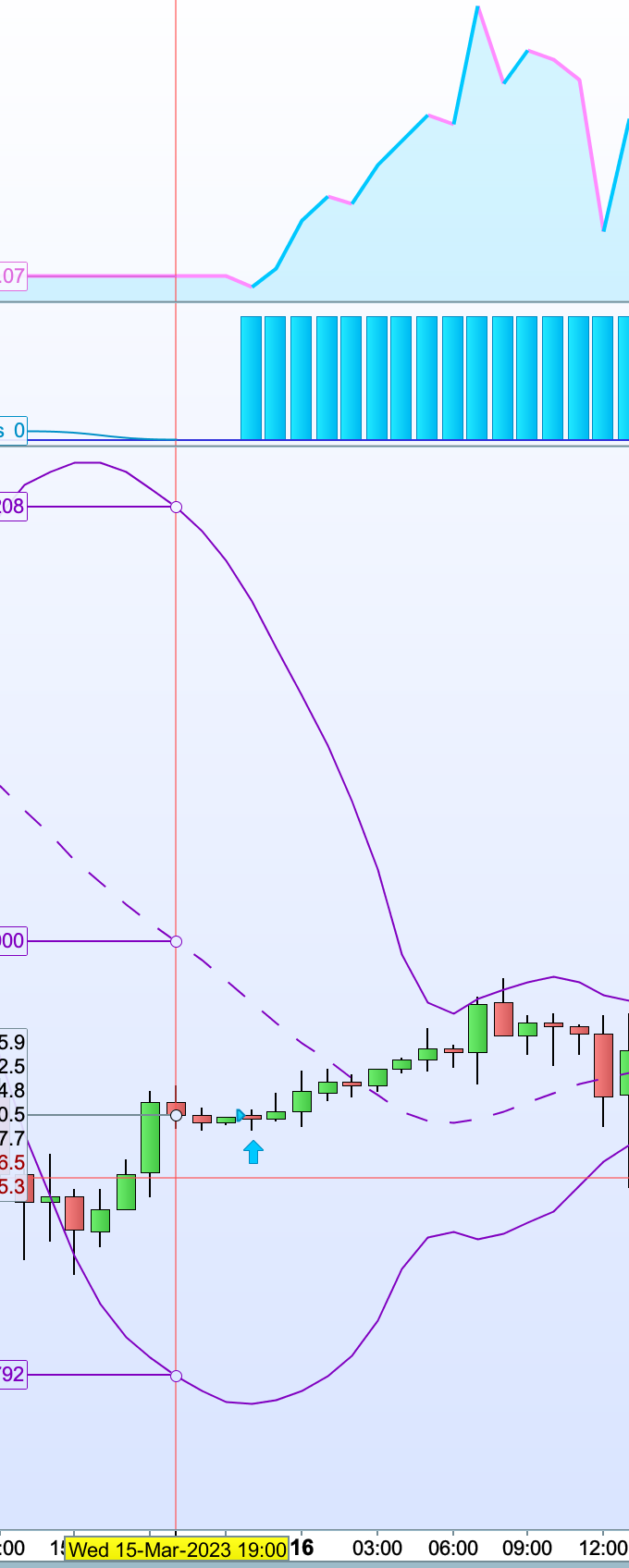
    It doesnt enter when I thought it should. I.e. when the close is above the lower bollinger band. INstead it enters at some random point – see screen shot. THis is EUR USD (1 hour)

    bbl = BollingerDown[20](close)
    Bullish0 = close >= bbl
    
    
    IF Bullish0 THEN
    buy 1 perpoint AT MARKET
    Screenshot-2023-03-20-at-22.01.38.png Screenshot-2023-03-20-at-22.01.38.png
    #211855 quote
    NicolasNicolas
    Keymaster
    Legend

    Are you sure the bollinger bands on your chart has the same exact settings? (period = 20, deviation = 2.0).

    #211866 quote
    8278sv8278sv
    Participant
    New

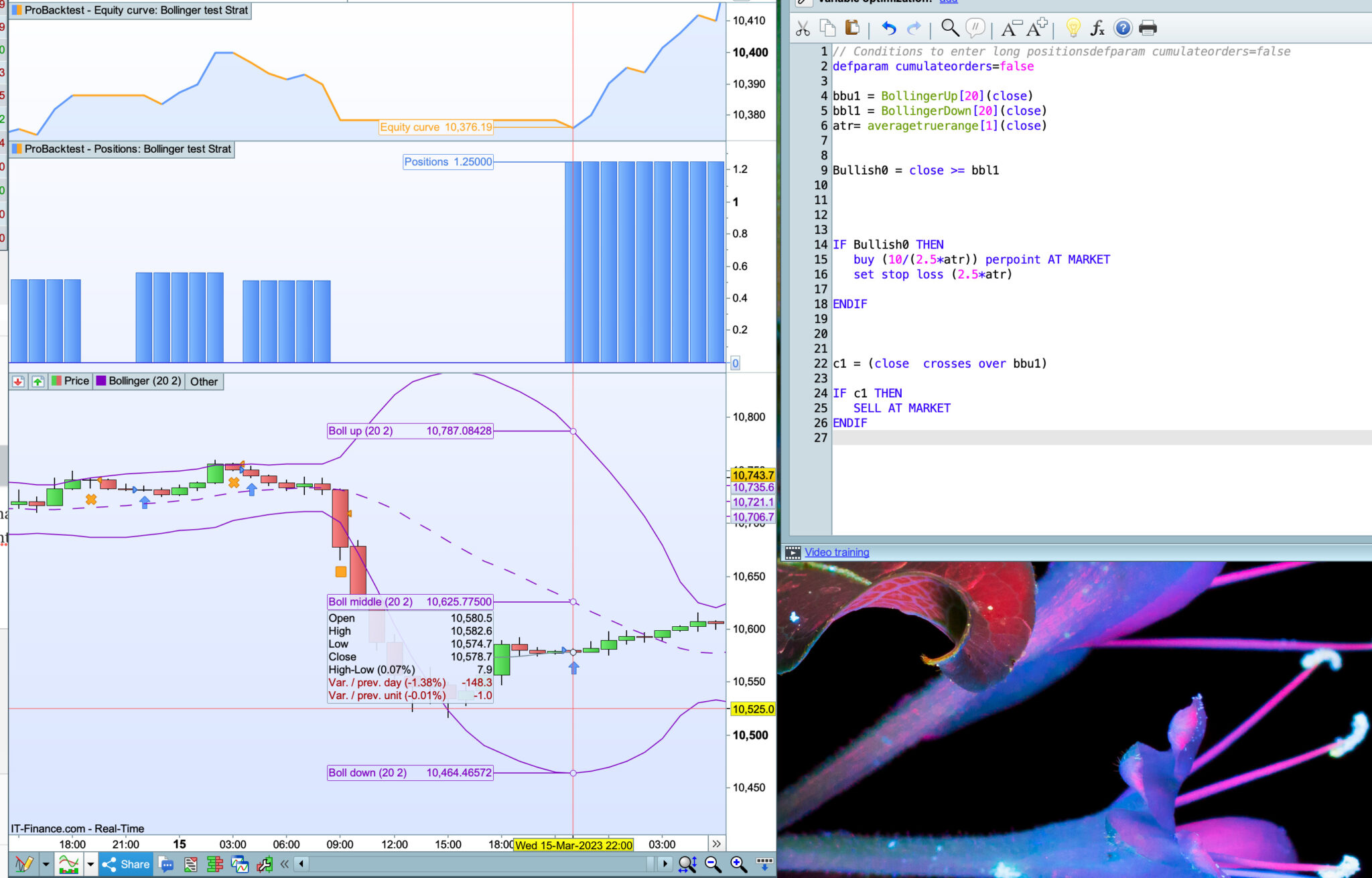
    Hi Nicolas. It is set at the same properties. But looks like I made an error – many, many apologies all! The real issue seems to be with the average true range. I didnt include it in the previous message as didnt think there was an issue with this. Anyhow see below – full code. Any idea what the problem can be? I want to use the atr as part of the buy and stop loss as a risk management method. When i change it to for example ‘buy 1 perpoint at market’ and similar for stop loss then it seems to work fine.


    // Conditions to enter long positions
    
    defparam cumulateorders=false
    
    bbu1 = BollingerUp[20](close)
    bbl1 = BollingerDown[20](close)
    atr= averagetruerange[1](close)
    
    
    Bullish0 = close >= bbl1


    IF Bullish0 THEN
    buy (10/(2.5*atr)) perpoint AT MARKET
    set stop loss (2.5*atr)
    
    ENDIF


    c1 = (close  crosses over bbu1)
    
    IF c1 THEN
    SELL AT MARKET
    ENDIF
    
    Screenshot-2023-03-21-at-09.54.00.jpg Screenshot-2023-03-21-at-09.54.00.jpg
    #211871 quote
    NicolasNicolas
    Keymaster
    Legend

    Ok so the problem is located in your contract size calculation, if the size is too small, then no order will be triggered.

    I suggest you set a minimal contract size like this:

    minSize = 0.1 //define here what would be the minimal size 
    
    buy max(minSize,(10/(2.5*atr))) perpoint AT MARKET
    8278sv thanked this post
    #211881 quote
    8278sv8278sv
    Participant
    New

    Thank you so much Nicolas

Viewing 5 posts - 1 through 5 (of 5 total)

  • You must be logged in to reply to this topic.

ProRealAI ProRealAI New

Stuck on this ProBuilder code?

Describe what this topic is trying to build, in plain English, and ProRealAI writes the ProRealTime™ indicator, screener or system for you.

Available in 7 languages
Try ProRealAI

Bollinger band error


ProOrder: Automated Strategies & Backtesting

New Reply
Author
author-avatar
8278sv @8278sv Participant
Summary

This topic contains 4 replies,
has 2 voices, and was last updated by 8278sv8278sv

3 years, 6 months ago.

Topic Details
Forum: ProOrder: Automated Strategies & Backtesting
Language: English
Started: 03/20/2023
Status: Active
Attachments: 2 files
ProRealCode ProRealCode
Loading...