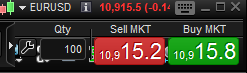
I would like to see the guaranteed stops added too. Also price tabs to execute trades from, something like in the picture added. Maybe with QTY in between buy ans sell and the current spread is there somewhere too.
Scale setting on the time and price should save with your template too.
It would be great if one could use the DRAWTEXT command also in strategies and not only in indicators.
And a possibility to pause and resume backtests. Now PRT loggs you out every 12h. When it does so it stops all tests and all is lost. This practically limits the backtest time to 12h. It is impossible to run tests that take longer than 12h which is especially with WF-tests not very long.
Another function that I often are missing is the possibility to
- export all customized settings from Demo to live and vice versa; drawings, chart, indicators, proorders, proscreeners..etc.,
- Alarms set in Proorder is pushed to mobile device
Cheers Kasper
Extended palette with customizable colours.
-> preserve code indentation when copy/paste outside of the platform! 🙂
I suggest that the TIMEFRAME keyword be matched by ENDTF (or ENDTIMEFRAME) keyword, just like IF …. ENDIF, to make sure that if someone forgets to use again TIMEFRAME to return to the original time frame, a warning is issued.
In the below example from PRT documentation, if the second TIMEFRAME is forgotten, the screener will yield erratic results. Warning about a missing matching ENDTF might help realize there is some unwanted logic error:
REM Condition 1 and 2: MACD weekly < 0 and increasing
TIMEFRAME(weekly)
MyMACD = MACD[12,26,9](Close)
c1 = MyMACD < 0 AND MyMACD > MyMACD[1]
REM Condition 2: Daily Stochastic < 30
TIMEFRAME(daily)
MySTO = Stochastic[14,3](Close)
c2 = MySTO < 30
REM Set Stop Level
MyStop = High[1]
REM Criteria: Proximity to the high of the previous day
Criteria = (Close / MyStop - 1) * 100
REM Condition 3: Price is less than previous day's high or no more than 5% above it.
c3 = Criteria < 5
SCREENER[c1 AND c2 AND c3](Criteria)
Would be very useful and less frustrating if there could be a single tick box to stop ALL Strategies from running (currently each Strategy has to be individually stopped).
There could be a tick option to stop only Strategies not showing a Position / Not Trading.
GraHal
 Maz
MazParticipant
Veteran
Optimizer – to show ALL the results, not just the top x results. Option to select how many results to view on one page – ie show me top 10, top 100 results.
Optimizer – to iterate through timeframes (temporal and non temporal) as well as through variables. Select in advance what timeframes to include.
Optimizer – ability to shift variables up and down in priority order
Optimizer – ability to iterate up and DOWN
Optimizer – option to change default sort to hit rate for example
Optimizer – to navigate more inteligently through iterations rather than a “brute force” / “dumb” style. Options to select iteration algorithm. There are many different algorithms you can use. For example to follow the profit trail – a “ripple” algorithm: If you had 4 variables to iterate through, select the mid point or starting point for 2, 3, 4 and iterate through 1. Select the most profitable point of variable (or best hit rate – option to select) 1. From there iterate through 2. Select the most profitable point of 1 and 2. Iterate through 3… and so on. After this is done, do it again, and again, and again. until the result can’t get better. Much faster and no need to try every single combination.
46/ Bring back the “Label in Properties Windows”, which disappeared in 10.3
47 /Ability to move up/down variables in the “Definition of Variables” window, actually if you want to sort them, you need to delete them all first..
I wrote this before but i have to say so again. THis 12h limit is MEGA ANNOYING! Everyday i lose data because of this stupid logging out.
Can they PLEASE create a possibility to save ongoing tests and resume them after logging out (if that has to be done)!?
I agree Despair it happens to me also, I know it’s illogical, but you / we need to get in the habit of going File / Save Template and then your code will be saved even if you get logged out (while on the toilet, making coffee etc)
In my opinion it’s illogical because after seeing your Bot with a name (even My System*) in the list with others then your brain kinda tells you it is saved … but oh no it isn’t unless you go File / Save Template!
Yes, losing code is of course worst but also that it is impossible to resume backtests that were running before one logs out is more than annoying.
That should be changed, along with an option to archive and save backtest results.
I wish I could DUPLICATE alerts on charts for different pairs/instruments on the same TF.
Say I want to be alerted when Eur/Usd, Gbp/Usd, Aud/Usd…. reach OverBought on Stochastic and Adx > 30 on the Daily TF.
Now I have to add the same alarm for each pair, while I would like to simply duplicate it for other pairs/indexes…. on the same TF.
Thanks.