Hi Nicolas, is it ready yet for trading accounts (V11) with Interactive Brokers?
I don’t think it is available presently for that type of account, but very soon. Best way to verify is by typing one of the array instruction (or by copy/paste one of the examples of that topic) and check if there is a syntax error 😉
I created a little code that uses arrays to create a seasonality curve. It might be of interest to anyone reading this topic so here is the link to that indicator:
Seasonality Curve using arrays.
Another example posted by Roberto, the Meander Bands updated with ARRAYS
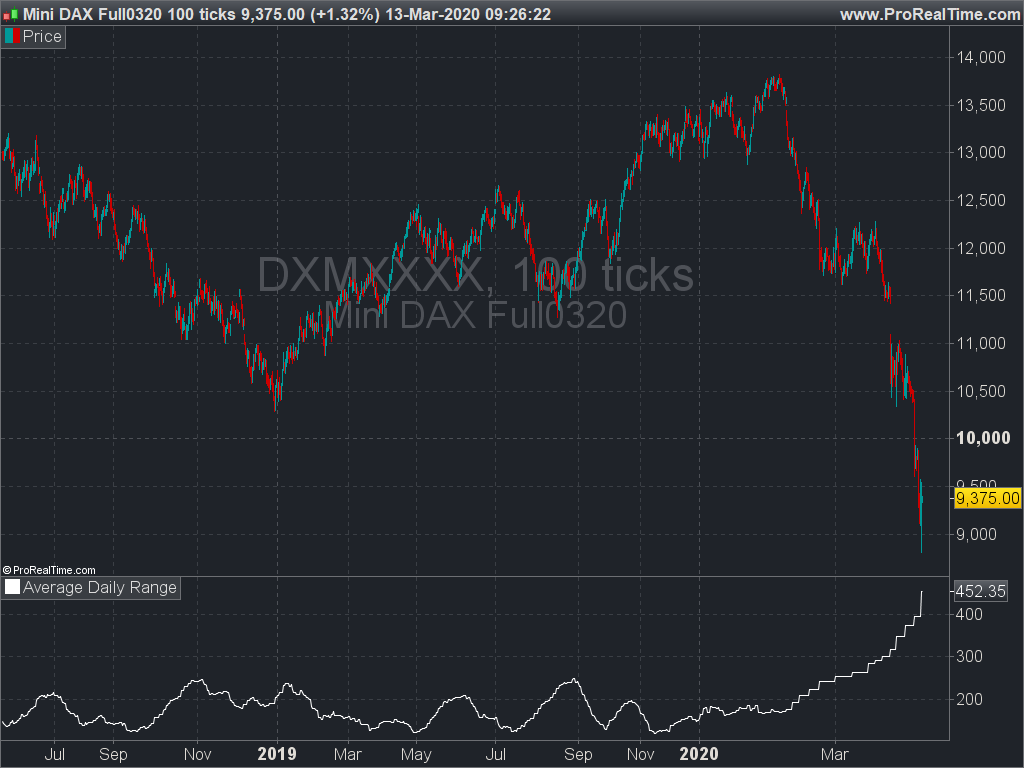
Example #7: calculate the Average Daily Range (ADR)
A simple example on how to store a value in an array while the history is loaded. Each new day, the $drange variable increase its index to save the previous day range (High-Low). Once the array length is sufficient (has enough values) to calculate the average period, the calculation is made. Therefore, we only use a quick loop through the array and not through the global data history to fetch the last X days range to calculate the ADR.
// https://www.prorealcode.com/topic/array-variables-availability-in-prorealtime/
// (please do not remove the link above for future reference)
// Example #7: Average Daily Range

//--- settings
adrperiod = 20
//--- end of settings

sum = 0
if day<>day[1] then
 $drange[lastset($drange)+1]=dhigh(1)-dlow(1)
 if lastset($drange)>=adrperiod  then
  for i = lastset($drange) downto lastset($drange)-adrperiod do
   sum = sum+$drange[i]
  next
  adr = sum/adrperiod
 endif
endif

return adr as "Average Daily Range"
Hi Nicolas,
I’ve a question for the expert.
Is it possible with the new array function (or without) to calculate live price projection targets in the chart with the corresponding probability?
And if so, would it be possible to create a template in which we enter our conditions?
Thank you.
Fabian
Yes, that would be possible. You just have to deal with the probability calculation.
I developed my seasonality curve indicator that uses arrays further and it might be of interest for anyone studying the use of arrays.
Find it here:
Seasonality Curve using arrays.
Are arrays only used for data? ie external to the code. Or could they somehow be used to select indicator variables within the code? I’m thinking of something like this
//PRC_Stochastic RSI | indicator
lengthRSI = lr //RSI period
lengthStoch = ls //Stochastic period
smoothK = sk //Smooth signal of stochastic RSI
smoothD = sd //Smooth signal of smoothed stochastic RSI
myRSI = RSI[lengthRSI](close)
MinRSI = lowest[lengthStoch](myrsi)
MaxRSI = highest[lengthStoch](myrsi)
StochRSI = (myRSI-MinRSI) / (MaxRSI-MinRSI)
K = average[smoothK](stochrsi)*100
D = average[smoothD](K)

c1 = K>D
c2 = K<D
where the 4 variables result in hundreds or thousands of workable combinations.
You can store any value you like in an array. So you could say recognise a set of candle price action on the chart and then store all the periods of an indicator that were within a certain range at this time.
For example you could have an array with storage locations from 1 to 200 and when price does something you like add one to each location if the price was above that period average. So for example:
if (my event happens) then
for a = 2 to 200
if close > average[a] then
$avg[a] = $avg[a] + 1
endif
next
endif
So now we have a store of which averages were correct the most often.
Thanks Vonasi, it seems a hugely powerful tool. I’ll have to do some serious homework to get my head around it.
Think of arrays as dynamic variables. You can create as many variables as you want, on the fly. Store everything in arrays and use them later (or not) in your code.
If the variables are dynamic, is it self-optimizing? In the StochasticRSI example, if each variable had an array of 2-20 would the code then select the most effective combination? Or is it recording what would have been the best combination for future reference?