I think Peter is talking about history of arrays, the values they used to have X bars ago.
No ?
I’d say the discussion could be interesting (including me missing it all !).
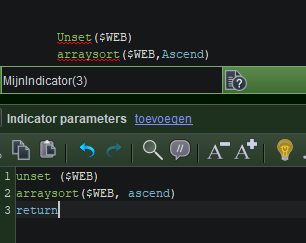
So No, I am *not* talking about $Arr[x,3] or something – the 3 denoting 3 bars back. When arrays would work as “expected” (from normal coding environments) then this is not even needed. But the other day I found out this (if my memory serves me well) :
What I would always be talking about is about Strategy code.
What you, Nicolas, would normally think about is Indicator code.
… And that other day it seemed to me that Indicator code does do what I’d want or would find normal …
**Better skip till under the horizontal line below.**
There is much more going on which an inherent coder (me) can’t think of for logic. This is, for example, the variables in Strategy Code being accessible by Indicator code (I suppose you know that, *or* by now I am talking from my *ss). What I should add is that I am not heading for that this is all “wrong” as such, because if it works, it works, and if it is what PRT coders are used to, who am I to debunk it. But so many things don’t work as expected, and it makes me make mistakes (in judgment but also in coding). Anyway, this is not a subject really. This is :
The question from @fhornus is there for a reason. And if I were you or Roberto, I would answer with a “but this is just possible !”. Instead of (like Roberto) coming up with an other solution (which is a moot one IMHO and springs from misunderstanding). So possibly I understand what fhornus’ problem is, and this is from within Strategy code. The point is also (kind of) :
He uses ONCE in his question for a reason. I would do that too (and in my topic about it from 2 months or so back, I actually presented all around ONCE). This in itself is so super vague that I can (and have !) posted about the usage of Once with a completely wrong perception. Still – when it is interpreted by e.g. Roberto- his responses are so different from what I expect, that it indeed leads to *ME* (!!) having it wrong, while he can not see it. Too hard to explain, but this is probably why I understand fhornus’ question.
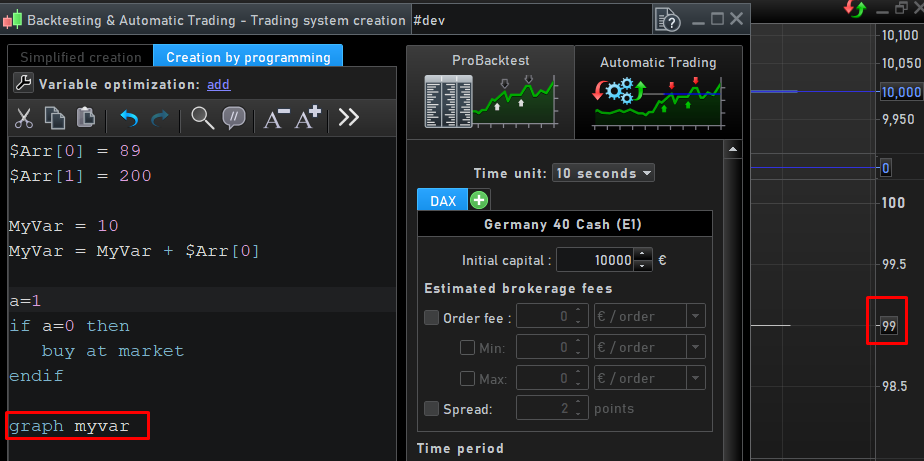
If I – in Strategy code – do something like
$Arr[0] = 89
$Arr[1] = 200
then in a next bar call (call of my Strategy code) I want to work with $Arr[0] and $Arr[1]. But it can’t because it does not exist any more. And would I apply
MyVar = 10
MyVar = MyVar + $Arr[0]
I’ll receive a nice 10 instead of 99 because of the internal construction (this is caught internally) and I can’t even see I am doing it wrongly (no error message because that is how PRT deals with it). The logical solution :
Once $Arr[]
This is not related to the history of arrays and that I 20 bars further want to see the array content of the first or second etc. bar. The application of arrays is for normal coding environments (be it Basic, C++, VB.net, cobol, Fortran, Mumps) completely different from how PRT presents it. And since the Indicator Code can do it (can it ??) it is beyond me why not with Strategy code. It would be useful !!
Do I have it all wrong ?