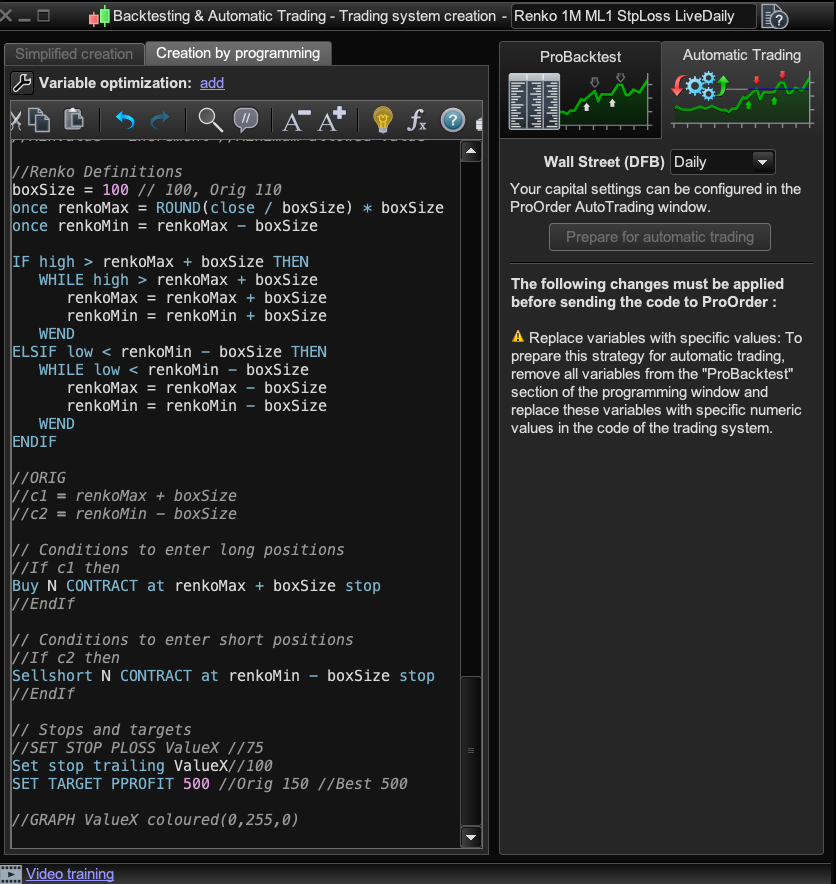
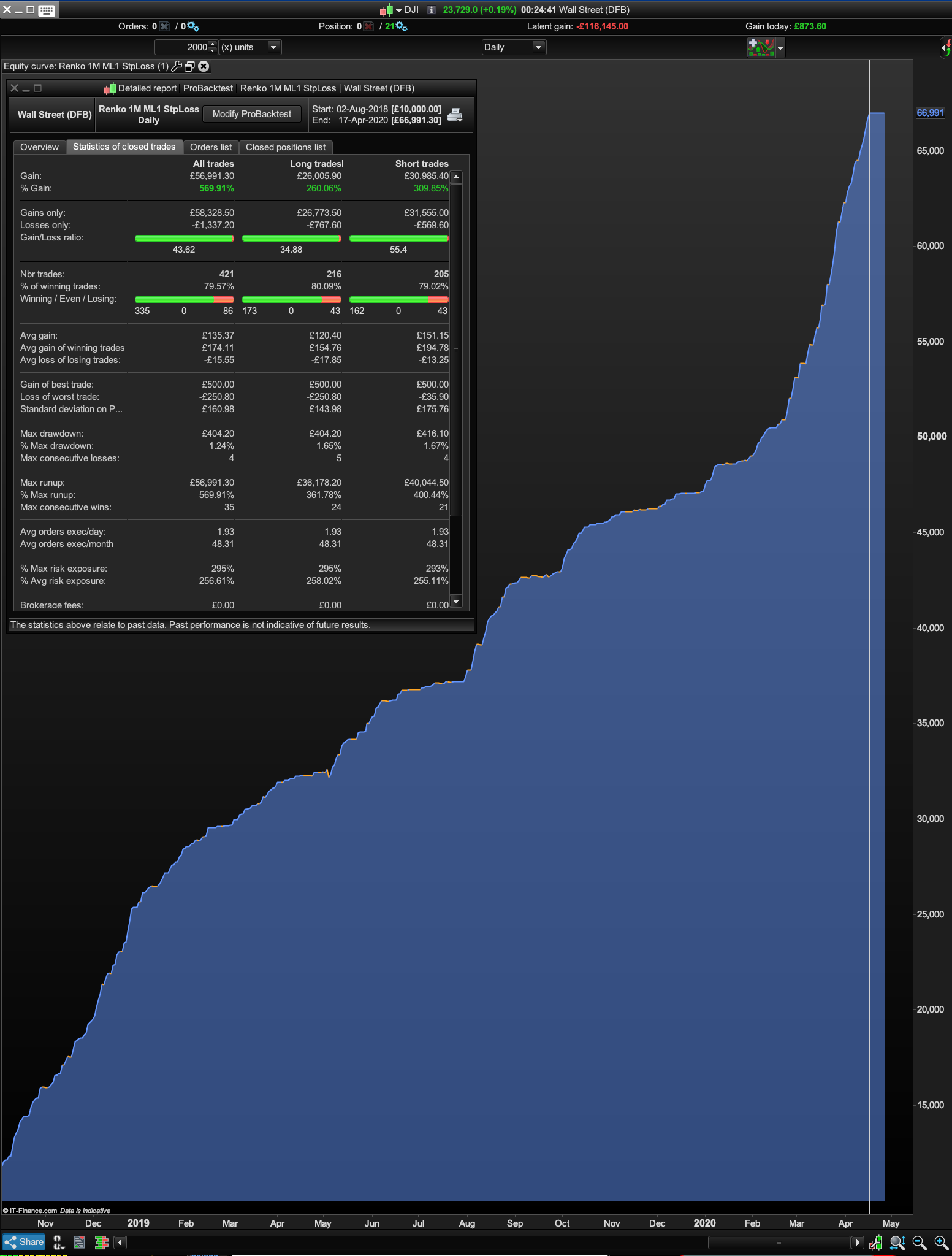
I played around with settings Paul and simplified the entry and exit and re-added Reset Period for better performance. I’ll check out your latest v4 TS tonight or tomorrow. Cheers for posting it!
Is Once ValueX and Once ValueY doing anything?
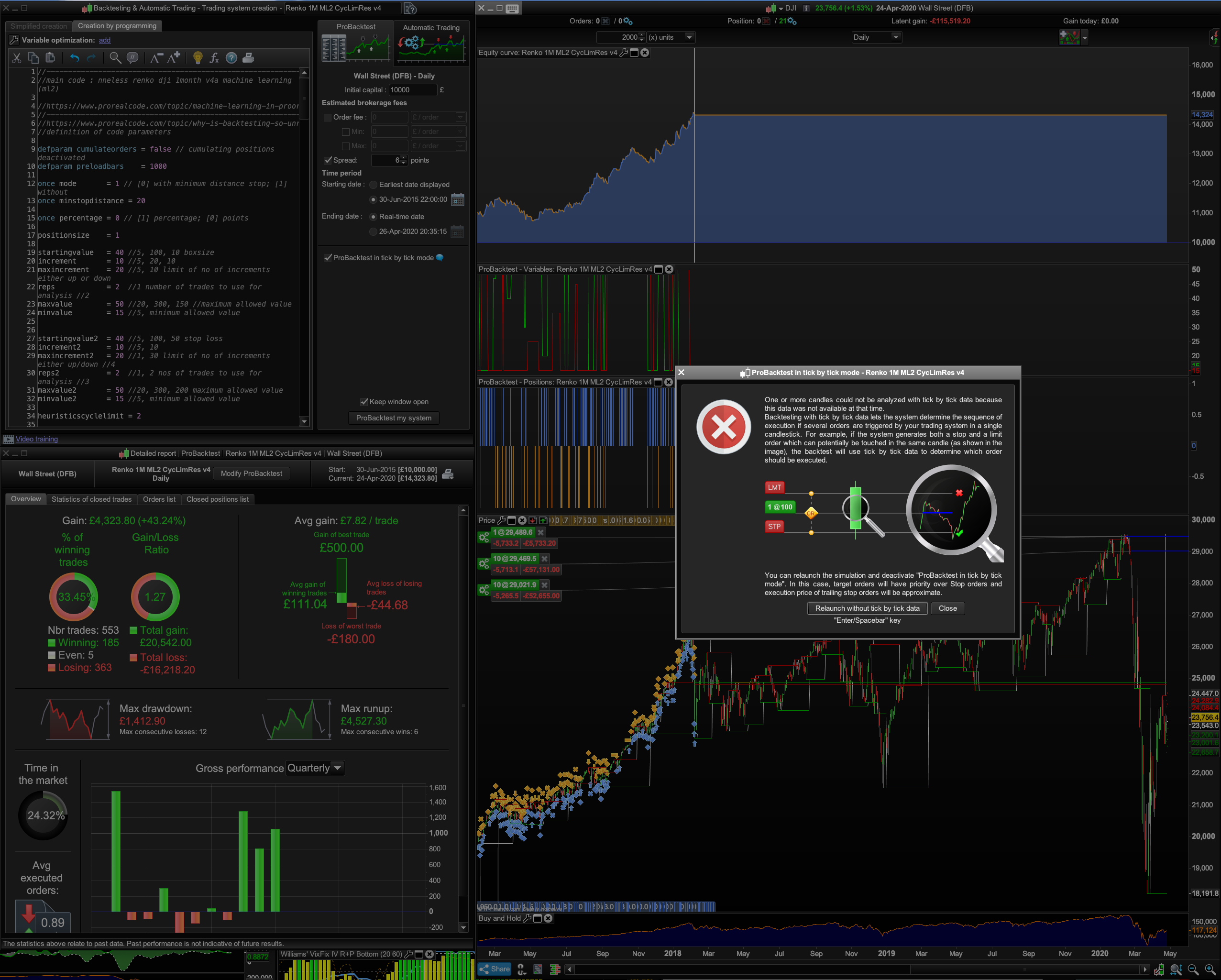
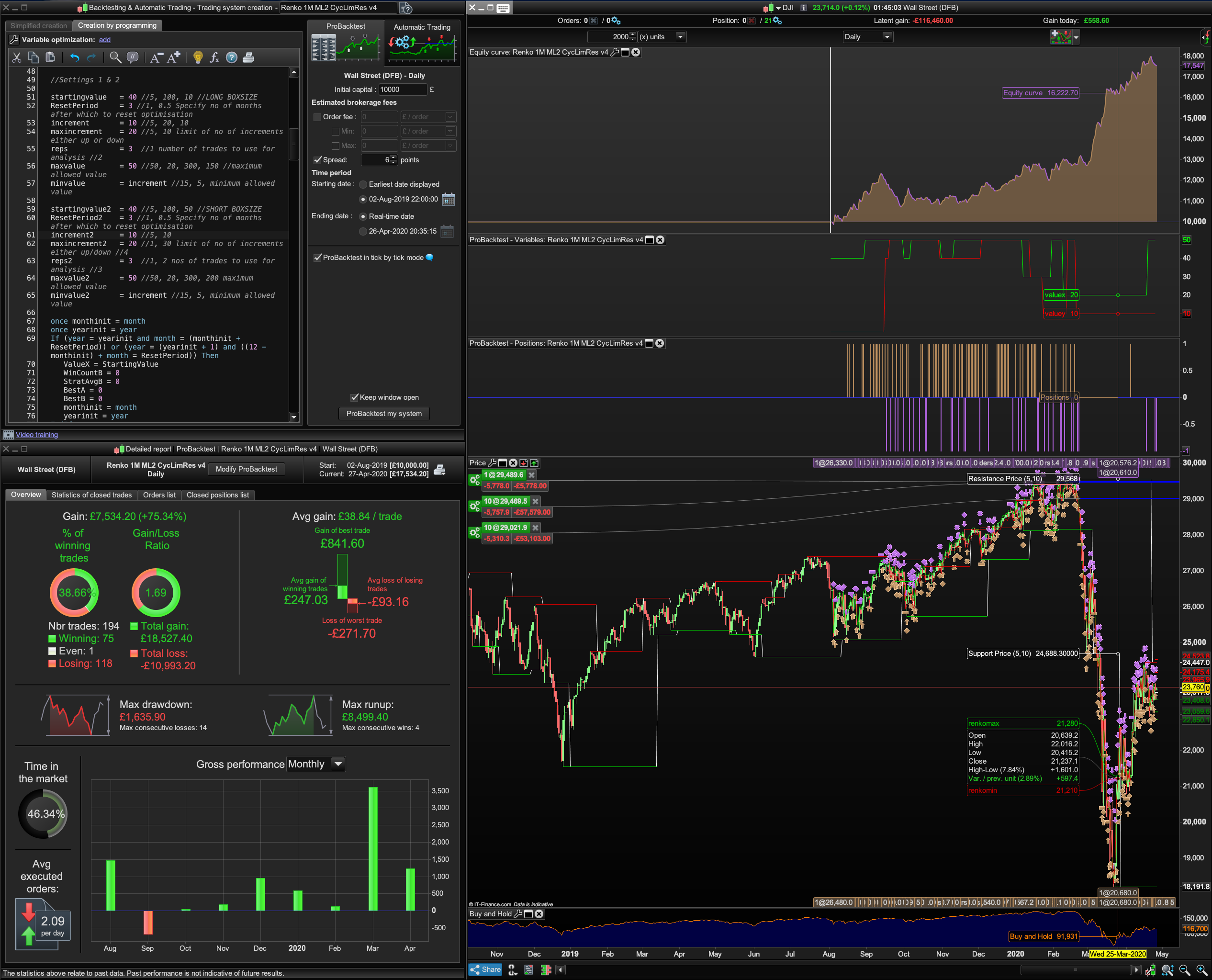
I also wonder with the fact that starting value =40 and max value = 50 how can the green graph show a ValueX and ValueY Boxsize to be smaller than that, at 20 and 10 respectively in this screenshot 1 below:? The gap between that starting value and max value is the basis of the ML stepping through values to find the right ones.. unless from optimisations and experience you can narrow it down to 40 to 50 boxsize from the get go. (It seems, based on optimisations to be 10 and 20 for both the BoxSize and the Trailing Stop).
//-------------------------------------------------------------------------
//main code : Paul/Bard Renko 1M ML2 v4b machine learning (ml2)
MLx2 applied to Long and Short Boxsize

//https://www.prorealcode.com/topic/machine-learning-in-proorder/page/3/#post-121130
//-------------------------------------------------------------------------
//https://www.prorealcode.com/topic/why-is-backtesting-so-unreliable/#post-110889
//definition of code parameters

defparam cumulateorders = false // cumulating positions deactivated
defparam preloadbars    = 1000

//once mode       = 0//1 // [0] with minimum distance stop; [1] without
//once minstopdistance = 20

//once percentage = 0 // [1] percentage; [0] points

//Money Management
//Capital = 10000 + strategyprofit //Current profit made by the closed trades of the running strategy.
N = 1//30*Capital / Close

heuristicscyclelimit = 2

once heuristicscycle = 0
once heuristicsalgo1 = 1
once heuristicsalgo2 = 0

if heuristicscycle >= heuristicscyclelimit then
if heuristicsalgo1 = 1 then
heuristicsalgo2 = 1
heuristicsalgo1 = 0
elsif heuristicsalgo2 = 1 then
heuristicsalgo1 = 1
heuristicsalgo2 = 0
endif
heuristicscycle = 0
else
once valuex = startingvalue
once valuey = startingvalue2
endif

if heuristicsalgo1 = 1 then

//heuristics algorithm 1 start

if (onmarket[1] = 1 and onmarket = 0) or (longonmarket[1] = 1 and longonmarket and countoflongshares < countoflongshares[1]) or (longonmarket[1] = 1 and longonmarket and countoflongshares > countoflongshares[1]) or (shortonmarket[1] = 1 and shortonmarket and countofshortshares < countofshortshares[1]) or (shortonmarket[1] = 1 and shortonmarket and countofshortshares > countofshortshares[1]) or (longonmarket[1] and shortonmarket) or (shortonmarket[1] and longonmarket) then
optimise = optimise + 1
endif

//Settings 1 & 2

startingvalue   = 40 //5, 100, 10 //LONG BOXSIZE
ResetPeriod     = 3 //1, 0.5 Specify no of months after which to reset optimisation
increment       = 10 //5, 20, 10
maxincrement    = 20 //5, 10 limit of no of increments either up or down
reps            = 3  //1 number of trades to use for analysis //2
maxvalue        = 50 //50, 20, 300, 150 //maximum allowed value
minvalue        = increment //15, 5, minimum allowed value

startingvalue2  = 40 //5, 100, 50 //SHORT BOXSIZE
ResetPeriod2    = 3 //1, 0.5 Specify no of months after which to reset optimisation
increment2      = 10 //5, 10
maxincrement2   = 20 //1, 30 limit of no of increments either up/down //4
reps2           = 3  //1, 2 nos of trades to use for analysis //3
maxvalue2       = 50 //50, 20, 300, 200 maximum allowed value
minvalue2       = increment //15, 5, minimum allowed value

once monthinit = month
once yearinit = year
If (year = yearinit and month = (monthinit + ResetPeriod)) or (year = (yearinit + 1) and ((12 - monthinit) + month = ResetPeriod)) Then
ValueX = StartingValue
WinCountB = 0
StratAvgB = 0
BestA = 0
BestB = 0
monthinit = month
yearinit = year
EndIf

once valuex  = startingvalue
once pincpos = 1 //positive increment position
once nincpos = 1 //negative increment position
once optimise = 0 //initialize heuristicks engine counter (must be incremented at position start or exit)
once mode1 = 1 //switches between negative and positive increments
//once wincountb = 3 //initialize best win count
//graph wincountb coloured (0,0,0) as "wincountb"
//once stratavgb = 4353 //initialize best avg strategy profit
//graph stratavgb coloured (0,0,0) as "stratavgb"

if optimise = reps then
wincounta = 0 //initialize current win count
stratavga = 0 //initialize current avg strategy profit
heuristicscycle = heuristicscycle + 1

for i = 1 to reps do
if positionperf(i) > 0 then
wincounta = wincounta + 1 //increment current wincount
endif
stratavga = stratavga + (((positionperf(i)*countofposition[i]*close)*-1)*-1)
next
stratavga = stratavga/reps //calculate current avg strategy profit
//graph (positionperf(1)*countofposition[1]*100000)*-1 as "posperf1"
//graph (positionperf(2)*countofposition[2]*100000)*-1 as "posperf2"
//graph stratavga*-1 as "stratavga"
//once besta = 300
//graph besta coloured (0,0,0) as "besta"
if stratavga >= stratavgb then
stratavgb = stratavga //update best strategy profit
besta = valuex
endif
//once bestb = 300
//graph bestb coloured (0,0,0) as "bestb"
if wincounta >= wincountb then
wincountb = wincounta //update best win count
bestb = valuex
endif

if wincounta > wincountb and stratavga > stratavgb then
mode1 = 0
elsif wincounta < wincountb and stratavga < stratavgb and mode1 = 1 then
valuex = valuex - (increment*nincpos)
nincpos = nincpos + 1
mode1 = 2
elsif wincounta >= wincountb or stratavga >= stratavgb and mode1 = 1 then
valuex = valuex + (increment*pincpos)
pincpos = pincpos + 1
mode1 = 1
elsif wincounta < wincountb and stratavga < stratavgb and mode1 = 2 then
valuex = valuex + (increment*pincpos)
pincpos = pincpos + 1
mode1 = 1
elsif wincounta >= wincountb or stratavga >= stratavgb and mode1 = 2 then
valuex = valuex - (increment*nincpos)
nincpos = nincpos + 1
mode1 = 2
endif

if nincpos > maxincrement or pincpos > maxincrement then
if besta = bestb then
valuex = besta
else
if reps >= 10 then
weightedscore = 10
else
weightedscore = round((reps/100)*100)
endif
valuex = round(((besta*(20-weightedscore)) + (bestb*weightedscore))/20) //lower reps = less weight assigned to win%
endif
nincpos = 1
pincpos = 1
elsif valuex > maxvalue then
valuex = maxvalue
elsif valuex < minvalue then
valuex = minvalue
endif

optimise = 0
endif

// heuristics algorithm 1 end

elsif heuristicsalgo2 = 1 then

// heuristics algorithm 2 start

if (onmarket[1] = 1 and onmarket = 0) or (longonmarket[1] = 1 and longonmarket and countoflongshares < countoflongshares[1]) or (longonmarket[1] = 1 and longonmarket and countoflongshares > countoflongshares[1]) or (shortonmarket[1] = 1 and shortonmarket and countofshortshares < countofshortshares[1]) or (shortonmarket[1] = 1 and shortonmarket and countofshortshares > countofshortshares[1]) or (longonmarket[1] and shortonmarket) or (shortonmarket[1] and longonmarket) then
optimise2 = optimise2 + 1
endif

//Settings 2

once monthinit2 = month
once yearinit2 = year
If (year = yearinit2 and month = (monthinit2 + ResetPeriod2)) or (year = (yearinit2 + 1) and ((12 - monthinit2) + month = ResetPeriod2)) Then
ValueY = StartingValue2
WinCountB2 = 0
StratAvgB2 = 0
BestA2 = 0
BestB2 = 0
monthinit2 = month
yearinit2 = year
EndIf

once valuey = startingvalue2
once pincpos2 = 1 //positive increment position
once nincpos2 = 1 //negative increment position
once optimise2 = 0 //initialize heuristicks engine counter (must be incremented at position start or exit)
once mode2 = 1 //switches between negative and positive increments
//once wincountb2 = 3 //initialize best win count
//graph wincountb2 coloured (0,0,0) as "wincountb2"
//once stratavgb2 = 4353 //initialize best avg strategy profit
//graph stratavgb2 coloured (0,0,0) as "stratavgb2"

if optimise2 = reps2 then
wincounta2 = 0 //initialize current win count
stratavga2 = 0 //initialize current avg strategy profit
heuristicscycle = heuristicscycle + 1

for i2 = 1 to reps2 do
if positionperf(i2) > 0 then
wincounta2 = wincounta2 + 1 //increment current wincount
endif
stratavga2 = stratavga2 + (((positionperf(i2)*countofposition[i2]*close)*-1)*-1)
next
stratavga2 = stratavga2/reps2 //calculate current avg strategy profit
//graph (positionperf(1)*countofposition[1]*100000)*-1 as "posperf1-2"
//graph (positionperf(2)*countofposition[2]*100000)*-1 as "posperf2-2"
//graph stratavga2*-1 as "stratavga2"
//once besta2 = 300
//graph besta2 coloured (0,0,0) as "besta2"
if stratavga2 >= stratavgb2 then
stratavgb2 = stratavga2 //update best strategy profit
besta2 = valuey
endif
//once bestb2 = 300
//graph bestb2 coloured (0,0,0) as "bestb2"
if wincounta2 >= wincountb2 then
wincountb2 = wincounta2 //update best win count
bestb2 = valuey
endif

if wincounta2 > wincountb2 and stratavga2 > stratavgb2 then
mode2 = 0
elsif wincounta2 < wincountb2 and stratavga2 < stratavgb2 and mode2 = 1 then
valuey = valuey - (increment2*nincpos2)
nincpos2 = nincpos2 + 1
mode2 = 2
elsif wincounta2 >= wincountb2 or stratavga2 >= stratavgb2 and mode2 = 1 then
valuey = valuey + (increment2*pincpos2)
pincpos2 = pincpos2 + 1
mode2 = 1
elsif wincounta2 < wincountb2 and stratavga2 < stratavgb2 and mode2 = 2 then
valuey = valuey + (increment2*pincpos2)
pincpos2 = pincpos2 + 1
mode2 = 1
elsif wincounta2 >= wincountb2 or stratavga2 >= stratavgb2 and mode2 = 2 then
valuey = valuey - (increment2*nincpos2)
nincpos2 = nincpos2 + 1
mode2 = 2
endif

if nincpos2 > maxincrement2 or pincpos2 > maxincrement2 then
if besta2 = bestb2 then
valuey = besta2
else
if reps2 >= 10 then
weightedscore2 = 10
else
weightedscore2 = round((reps2/100)*100)
endif
valuey = round(((besta2*(20-weightedscore2)) + (bestb2*weightedscore2))/20) //lower reps = less weight assigned to win%
endif
nincpos2 = 1
pincpos2 = 1
elsif valuey > maxvalue2 then
valuey = maxvalue2
elsif valuey < minvalue2 then
valuey = minvalue2
endif

optimise2 = 0
endif
// heuristics algorithm 2 end
endif

//
boxsizel = ValueX
boxsizes = ValueY

//
renkomaxl = round(close / boxsizel) * boxsizel
renkominl = renkomaxl - boxsizel

renkomaxs = round(close / boxsizes) * boxsizes
renkomins = renkomaxs - boxsizes

//
if high > renkomaxl + boxsizel then
renkomaxl = renkomaxl + boxsizel
renkominl = renkominl + boxsizel
endif
if low < renkomins - boxsizes then
renkomaxs = renkomaxs - boxsizes
renkomins = renkomins - boxsizes
endif


// Conditions to enter long positions
Buy N CONTRACT at renkoMaxL + boxSizeL stop

// Conditions to enter short positions
Sellshort N CONTRACT at renkoMinS - boxSizeS stop


//
//if percentage then
//set stop %loss 0.25 %trailing 0.5
//set target %profit 2
//else
set stop ptrailing 50 //50 + 100
set target pprofit 500
//endif

//
graphonprice renkomaxl + boxsizel coloured(0,200,0) as "renkomax"
graphonprice renkomins - boxsizes coloured(200,0,0) as "renkomin"

graph ValueX coloured(0,255,0)
graph ValueY coloured(255,0,0)
I wrote the above last night, didn’t get round to finishing more testing before commenting. Now I’ve spent the day testing and thinking about what are we really best suited to apply our ML code to?
Is 1 x ML better than 2 x ML? (Depends if it’s the Ehlers Univ Oscillator, in that case ML2 is better, but with Renko I think ML1 is better).
But, after tons of optimisations I keep seeing low Boxsizes of 10 or 20 and ditto for the Trailing Stop. Is that achievable in the Demo/Live environment?
If so what’s the point of setting the starting value at 100 and Max Value to 200 if the ML would do better at figuring out if it’s better to use 10 or 20 in increments of 5?
Hence Paul’s tight Settings values of 40 and 50 appear to perform better.
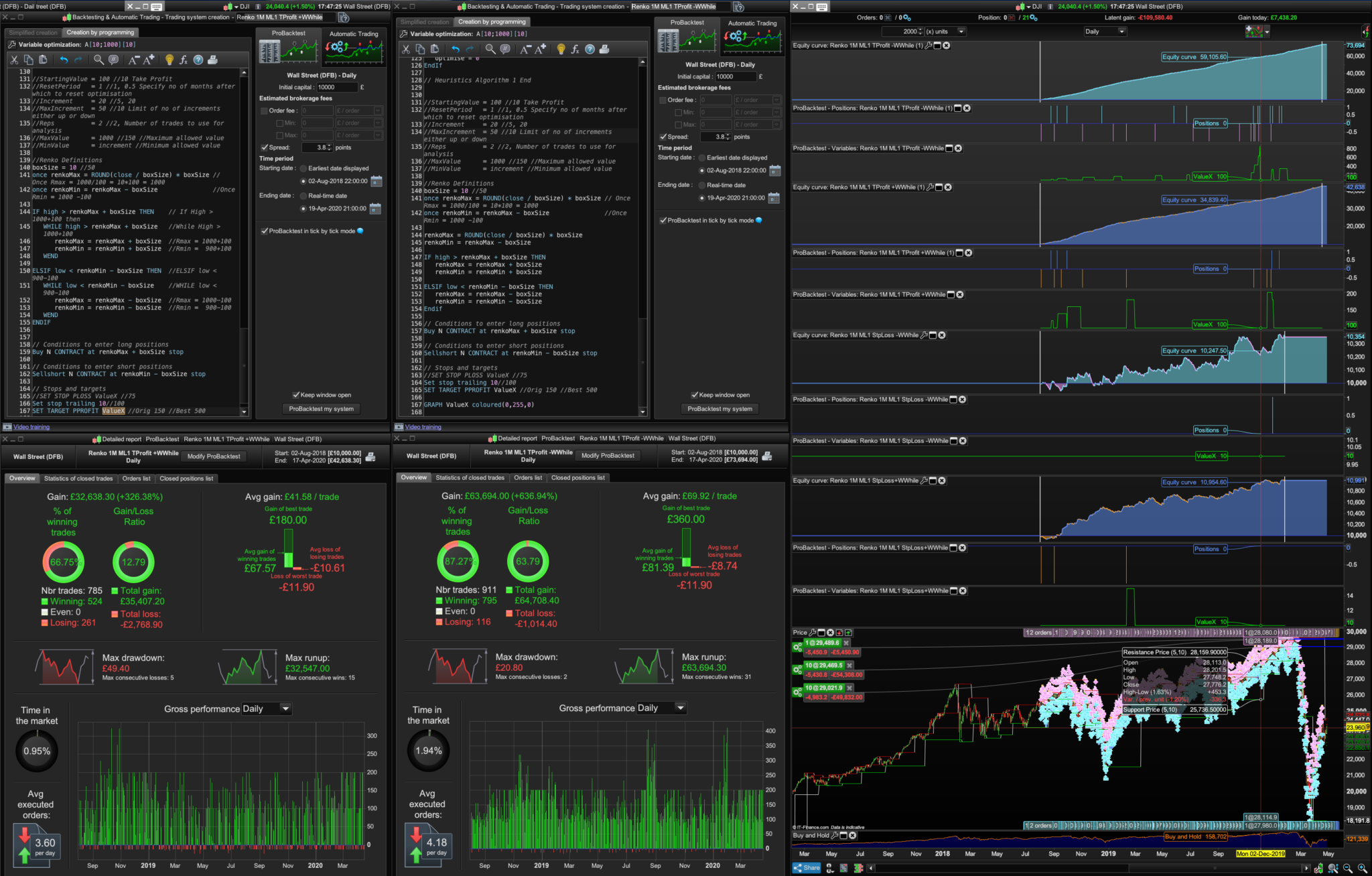
Note: testing with 100 for Boxsize and 100 for Trailing Stop and testing over very short Daily date ranges like Feb to April 2010, it doesn’t produce tbt warnings and the equity curves actually look more realistic: Renko TP ML1 ITF attached (set those values to Boxsize =10o and Trailing Stop =10o).
So… that just leaves the static “500” figure for Take Profit (TP) that I settled upon after lots of manual tests on different instruments like the Dow, £/$, Brent Crude etc.
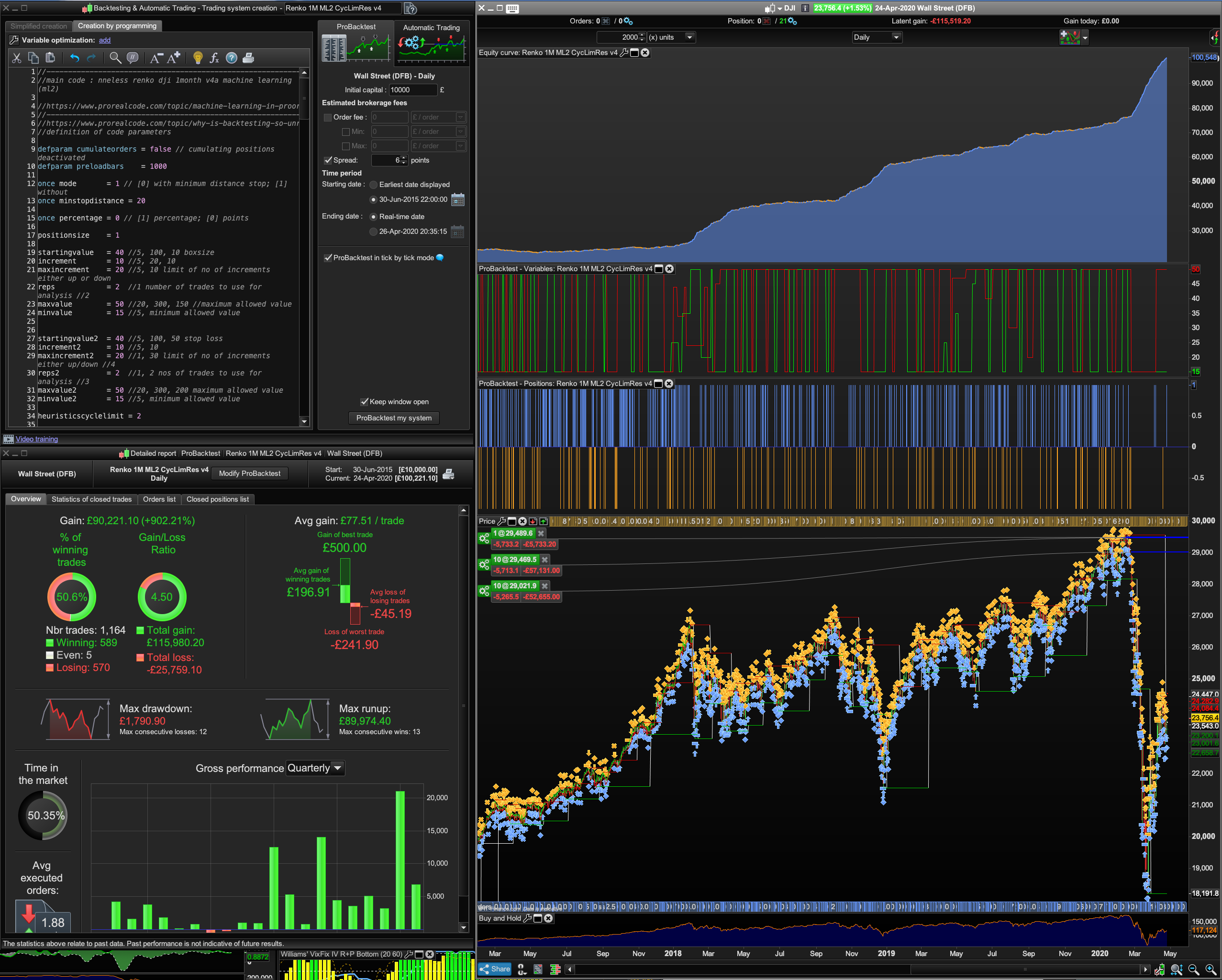
Well what if you apply ML1 to the TP whilst fixing the Boxsize and Trailing Stop at 10 (or 20) each? Please see screenshot 2 – ignore bottom two equity curves.
Now obviously this was a fully intentioned tbt test, but judging by the smoothness of the equity curve just didn’t turn out to be a tbt test or give you a warning.
Sometimes, however, if you keep playing with the date ranges — and eventually get that tbt failure warning, and if you’re lucky the offending Renko box that caused the tbt test to fail is at the end of your test dates, and if you hit “close” instead of “launch non tbt” test — you’ll still get to see what the system can do.
The point is even with these fantasy results the win ratios, the gain/loss ratio and profits are far higher targeting ML1 on the TP value than anything else I’ve seen fantasy result of!
I also found that the Wend/While was better when ML1 was applied to the Stop Loss system but not always when using Wend/While on the TP system. Depends on the date ranges, if you set the dates to like £/$ Daily 02/03/ to present, the Wend While wins. If you set if to the last 5 months the without Wend/While system wins. So, is it worth applying ML to work out and switch between a system with Wend and While or without Wend and While, can that be done?
Right, that’s a lot to take in, but it’d be good to get peoples feedback and ideas. Cheers.