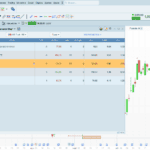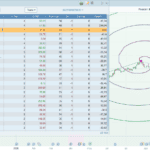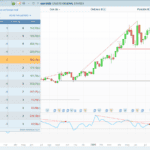







Rising & Falling Wedge Screener
Introduction
The Rising & Falling Wedge Detector draws wedges on one chart. This screener answers the question that indicator cannot: which instruments have a wedge on them right now?
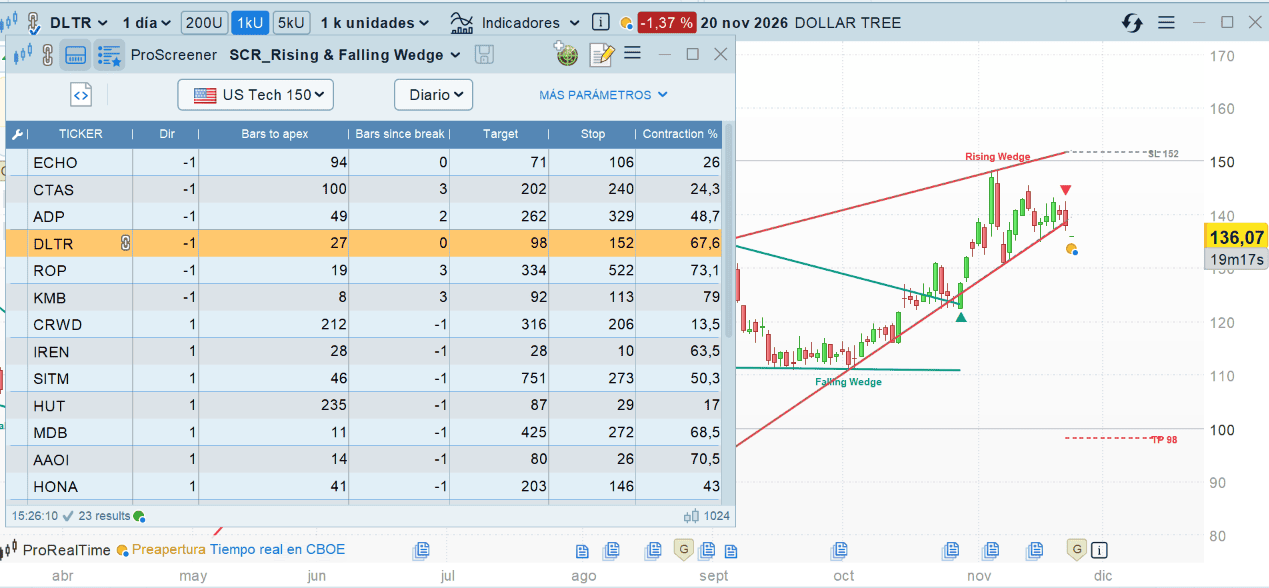
It runs the same detection engine — the same swing pivots, the same six geometry gates, the same convergence test and the same breakout rule — with the drawing layer stripped out. What the chart shows as two converging lines, the screener returns as a row with the two trigger levels in it.
Two Things Worth Scanning For
A wedge is useful at two different moments, and they call for different scans.
Forming. The shape has passed all six geometry gates and price is still trading between the two boundaries, so it has not broken out yet. This is the state a scanner is really for: it hands you the candidates before the move, with both boundaries printed in the table so you know exactly where the trigger sits. Set sigMode = 1.
Just broken. The breakout was confirmed within the last maxBarsAge bars, and the target and stop are frozen at the breakout bar. This is the signal already fired. Set sigMode = 0.
sigMode = 2, the default, returns both and gives priority to a fresh break when the two coincide. The Bars since break column tells them apart: -1 means forming, 0 means it broke on the current bar, N means it broke N bars ago.
A wedge that broke out is never listed again as forming. Once price has closed outside the lines, the shape is spent: it stays in the list as a breakout while it is younger than maxBarsAge, and then it drops out.
What the Columns Mean
- Dir — 1 for a bullish setup (falling wedge), -1 for a bearish one (rising wedge).
- Bars since break — -1 if the wedge is still forming, otherwise the age of the breakout (0 = it broke on the current bar).
- Upper and Lower — the two boundaries evaluated at the current bar. On a forming wedge these are the trigger levels: a close above Upper confirms the bullish break, a close below Lower the bearish one. On a wedge that already broke, they are where it broke.
- Target and Stop — the measured move and the opposite boundary. On a forming wedge they are projections, so you can judge the reward-to-risk before the trigger is hit.
- Contraction % — how far the figure has narrowed from its widest point. Higher means a more mature wedge, closer to resolution.
- Bars to apex — how many bars until the two boundaries would meet. This is the pattern’s clock: a wedge with three bars to its apex is out of room, one with sixty has time.
Between them, Upper, Lower, Target and Stop give a complete setup per row rather than a bare signal.
Filtering the Results
Four inputs govern what comes back:
sigMode(2) — 0 just broken, 1 forming, 2 both.maxBarsAge(5) — how old a breakout may be and still be listed.dirFilter(0) — 0 both directions, 1 bullish only, 2 bearish only.minApexBars(0) — minimum bars left to the apex for a forming wedge. Zero means no extra filter, which matches the indicator exactly. Raise it to drop wedges that are about to run out of room.
Everything else — pivotLen, minSizeATR, convStrict, minContract, maxBars and the three breakout filters — carries the same defaults as the indicator. Keep them in sync: changing a value here and not on the chart is the fastest way to end up with a list that does not match what you see.
If you get too many results, the parameters to raise are minSizeATR and convStrict. Both demand a better wedge. Raising pivotLen also cuts the count, but it does so by changing what counts as a swing, which moves every boundary on the chart too.
A Word on History Depth
ProScreener works on 255 bars with a Complete licence and 1024 with Premium, while your chart may hold far more. The engine needs 2 * pivotLen + 21 bars of warm-up, which is 31 with the defaults — irrelevant against 255.
The one setting that changes this is the EMA filter. With useEma = 1 and emaLen = 200 the warm-up jumps to 201 bars, leaving roughly 54 usable bars on a Complete licence. The screener will then miss wedges the chart happily shows. The filter is off by default for that reason; turn it on only if you are on Premium, or accept the shortened window knowingly.
Reading the List Against the Chart
Before trusting any screener, check it against the thing it is derived from. Take two or three results, open the chart with the indicator on it, and compare: the Upper and Lower values should sit on the two lines it draws, and Bars since break should match the arrow. If they do not, the usual culprit is a parameter that was changed on one side only, or the history depth above.
The Code
Paste it into a new ProScreener. No DEFPARAM — screeners do not take one.
//---------------------------------------------------------------
//PRC_Rising & Falling Wedge Screener
//version = 1
//23.11.26
//Iván González @ www.prorealcode.com
//Author: HexaTrades
//Sharing ProRealTime knowledge
//--------------------------------------------------------------------//
// Finds instruments with a wedge either FORMING (shape complete, price still
// inside, not broken yet) or JUST BROKEN, using the same engine as the PRC_Rising-Falling-Wedge-Detector
// indicator (HexaTrades).
//
// Identical detection engine: same pivots, same six geometry gates, same
// convergence test, same breakout rule and same filters. Only the drawing layer,
// the ring buffer and the dashboard have been removed. One deliberate difference:
// a wedge only counts as "forming" while price is still inside it, so a wedge
// that broke more than maxBarsAge bars ago is not listed again as forming.
// No DEFPARAM (not allowed in screeners).
//
// History window: ProScreener gives 255 bars (Complete) or 1024 (Premium). With
// useEma = 1 and emaLen = 200 a Complete licence leaves ~54 usable bars, so the
// screener and the chart can disagree. Keep the EMA filter off, or use Premium.

//=== INPUTS: DETECTION (same defaults as the indicator) ===
pivotLen    = 5       // bars left/right to confirm a swing. Lower = more wedges
minSizeATR  = 0.5     // reject wedges whose widest part is under this many ATR
convStrict  = 1.05    // how much faster the converging line must move (1.0 = any)
minContract = 0.10    // wedge must narrow by at least this fraction of its width
maxBars     = 250     // reject wedges spanning more than this many bars

//=== INPUTS: FILTERS (same defaults as the indicator) ===
useEma      = 0       // 1 = only confirm breakouts aligned with the EMA
emaLen      = 200     // EMA length
useVol      = 0       // 1 = volume confirmation on the breakout candle
volMult     = 1.3     // volume > x average
useBrkSize  = 1       // 1 = minimum breakout candle size
brkSizeATR  = 0.2     // breakout candle body >= this many ATR

//=== INPUTS: SCREENER FILTERING ===
sigMode     = 2       // 0 = wedge just broken, 1 = wedge forming, 2 = both
maxBarsAge  = 5       // max bars since the breakout (modes 0 and 2)
dirFilter   = 0       // 0 = both, 1 = bullish only, 2 = bearish only
minApexBars = 0       // forming wedge: extra filter, min bars left to the apex.
                      // 0 = no extra filter (identical to the indicator). Raise it to
                      // drop wedges about to run out of room

//=== CORE MEASURES ===
atrV   = averagetruerange[14](close)
volAvg = average[20](volume)
emaVal = average[emaLen,1](close)

tickSz = pointsize
IF tickSz <= 0 THEN
   tickSz = 0.01
ENDIF

minBars = 2 * pivotLen + 21
IF useEma = 1 THEN
   minBars = max(minBars, emaLen + 1)
ENDIF

//=== 1. PIVOTS (confirmed only, pivotLen bars behind = non repainting) ===
once nPh = 0
once nPl = 0
once phOldV = 0
once phOldX = 0
once phNewV = 0
once phNewX = 0
once plOldV = 0
once plOldX = 0
once plNewV = 0
once plNewX = 0

pivWin = 2 * pivotLen + 1

IF barindex > pivWin THEN
   IF high[pivotLen] > highest[pivotLen](high) AND high[pivotLen] > highest[pivotLen](high)[pivotLen+1] THEN
      phOldV = phNewV
      phOldX = phNewX
      phNewV = high[pivotLen]
      phNewX = barindex - pivotLen
      nPh = nPh + 1
   ENDIF
   IF low[pivotLen] < lowest[pivotLen](low) AND low[pivotLen] < lowest[pivotLen](low)[pivotLen+1] THEN
      plOldV = plNewV
      plOldX = plNewX
      plNewV = low[pivotLen]
      plNewX = barindex - pivotLen
      nPl = nPl + 1
   ENDIF
ENDIF

//=== 2. STATE ===
once sigDir  = 0      // direction of the latest confirmed signal
once sigTp   = 0
once sigSl   = 0
once sigBar  = 0
once sigUp   = 0      // upper boundary at the breakout bar
once sigLow  = 0      // lower boundary at the breakout bar
once sigCtr  = 0      // contraction, in %, at the breakout bar
once sigApx  = 0      // bars left to the apex at the breakout bar
once sigPhX  = 0      // pivots that built the wedge already signalled, so the
once sigPlX  = 0      // same wedge is never listed again as "forming" afterwards

// forming-wedge state, rebuilt from scratch on every bar
formDir  = 0
formUp   = 0
formLow  = 0
formTp   = 0
formSl   = 0
formCtr  = 0
formApx  = 0

//=== 3. WEDGE GEOMETRY AND BREAKOUT ===
IF barindex > minBars AND nPh >= 2 AND nPl >= 2 AND phNewX > phOldX AND plNewX > plOldX THEN

   upSlope = (phNewV - phOldV) / max(phNewX - phOldX, 1)
   dnSlope = (plNewV - plOldV) / max(plNewX - plOldX, 1)

   curUpper  = phOldV + upSlope * (barindex - phOldX)
   curLower  = plOldV + dnSlope * (barindex - plOldX)
   prevUpper = phOldV + upSlope * (barindex - 1 - phOldX)
   prevLower = plOldV + dnSlope * (barindex - 1 - plOldX)

   startBar   = min(phOldX, plOldX)
   spanBars   = barindex - startBar
   upperStart = phOldV + upSlope * (startBar - phOldX)
   lowerStart = plOldV + dnSlope * (startBar - plOldX)

   wedgeH   = upperStart - lowerStart
   widthNow = curUpper - curLower

   sizeOk = 0
   IF wedgeH >= atrV * minSizeATR THEN
      sizeOk = 1
   ENDIF

   // contraction, guarded: wedgeH can be zero or negative on warm-up bars
   contrPct = 0
   IF wedgeH > 0 THEN
      contrPct = (wedgeH - widthNow) / wedgeH * 100
   ENDIF

   // apex: bars left until the two boundaries meet
   slopeDiff = upSlope - dnSlope
   apexAhead = 1
   apexBars  = 9999
   IF slopeDiff <> 0 THEN
      apexX = (plOldV - phOldV - dnSlope * plOldX + upSlope * phOldX) / slopeDiff
      IF apexX <= barindex THEN
         apexAhead = 0
      ELSE
         apexBars = round(apexX - barindex)
      ENDIF
   ENDIF

   geomOk = 0
   IF wedgeH > 0 AND widthNow > 0 AND widthNow < wedgeH AND apexAhead = 1 THEN
      IF contrPct >= minContract * 100 AND spanBars >= pivotLen AND spanBars <= maxBars THEN
         geomOk = 1
      ENDIF
   ENDIF

   //--- Shapes ---
   risingShape = 0
   IF phNewV > phOldV AND plNewV > plOldV AND upSlope > 0 AND dnSlope > 0 THEN
      IF dnSlope > upSlope * convStrict AND sizeOk = 1 AND geomOk = 1 THEN
         risingShape = 1
      ENDIF
   ENDIF

   fallingShape = 0
   IF phNewV < phOldV AND plNewV < plOldV AND upSlope < 0 AND dnSlope < 0 THEN
      IF upSlope < dnSlope * convStrict AND sizeOk = 1 AND geomOk = 1 THEN
         fallingShape = 1
      ENDIF
   ENDIF

   //--- Breakouts ---
   brkDown = 0
   IF close < curLower AND close[1] >= prevLower THEN
      brkDown = 1
   ENDIF
   brkUp = 0
   IF close > curUpper AND close[1] <= prevUpper THEN
      brkUp = 1
   ENDIF

   //--- Filters ---
   volOk = 1
   IF useVol = 1 AND volAvg > 0 THEN
      volOk = 0
      IF volume > volAvg * volMult THEN
         volOk = 1
      ENDIF
   ENDIF

   brkSizeOk = 1
   IF useBrkSize = 1 THEN
      brkSizeOk = 0
      IF abs(close - open) >= atrV * brkSizeATR THEN
         brkSizeOk = 1
      ENDIF
   ENDIF

   emaOkBull = 1
   emaOkBear = 1
   IF useEma = 1 THEN
      emaOkBull = 0
      IF close > emaVal THEN
         emaOkBull = 1
      ENDIF
      emaOkBear = 0
      IF close < emaVal THEN
         emaOkBear = 1
      ENDIF
   ENDIF

   filtersOk = 0
   IF volOk = 1 AND brkSizeOk = 1 THEN
      filtersOk = 1
   ENDIF

   //--- Confirmed rising wedge (bearish breakdown) ---
   IF risingShape = 1 AND brkDown = 1 AND filtersOk = 1 AND emaOkBear = 1 THEN
      sigTp  = curLower - wedgeH
      sigSl  = curUpper
      sigUp  = curUpper
      sigLow = curLower
      sigCtr = contrPct
      sigApx = apexBars
      sigBar = barindex
      sigPhX = phNewX
      sigPlX = plNewX
      sigDir = 0 - 1
   ENDIF

   //--- Confirmed falling wedge (bullish breakout) ---
   IF fallingShape = 1 AND brkUp = 1 AND filtersOk = 1 AND emaOkBull = 1 THEN
      sigTp  = curUpper + wedgeH
      sigSl  = curLower
      sigUp  = curUpper
      sigLow = curLower
      sigCtr = contrPct
      sigApx = apexBars
      sigBar = barindex
      sigPhX = phNewX
      sigPlX = plNewX
      sigDir = 1
   ENDIF

   //--- Forming wedge: shape complete, no break yet ---
   // brkDown / brkUp only fire on the bar that CROSSES the line. Once price is
   // already outside, both are 0 again, so "no cross this bar" is not the same as
   // "not broken". A forming wedge needs price still inside both boundaries, and
   // must not be the wedge whose breakout was already signalled.
   insideNow = 0
   IF close <= curUpper AND close >= curLower THEN
      insideNow = 1
   ENDIF
   alreadySig = 0
   IF sigDir <> 0 AND phNewX = sigPhX AND plNewX = sigPlX THEN
      alreadySig = 1
   ENDIF
   canForm = 0
   IF insideNow = 1 AND alreadySig = 0 THEN
      canForm = 1
   ENDIF
   IF risingShape = 1 AND brkDown = 0 AND canForm = 1 THEN
      formDir = 0 - 1
      formTp  = curLower - wedgeH
      formSl  = curUpper
   ENDIF
   IF fallingShape = 1 AND brkUp = 0 AND canForm = 1 THEN
      formDir = 1
      formTp  = curUpper + wedgeH
      formSl  = curLower
   ENDIF
   IF formDir <> 0 THEN
      formUp  = curUpper
      formLow = curLower
      formCtr = contrPct
      formApx = apexBars
   ENDIF

ENDIF

//=== 4. SELECTION ===
// A confirmed signal is only fresh for maxBarsAge bars
sigAge = barindex - sigBar
brokeNow = 0
IF sigDir <> 0 AND sigAge <= maxBarsAge THEN
   brokeNow = 1
ENDIF

formNow = 0
IF formDir <> 0 AND formApx >= minApexBars THEN
   formNow = 1
ENDIF

// A wedge that just broke wins over one still forming (they are exclusive on the
// same bar, but a fresh break can coexist with a NEW shape a few bars later)
selDir  = 0
selAge  = 0
selUp   = 0
selLow  = 0
selTgt  = 0
selStop = 0
selCtr  = 0
selApx  = 0

useBroke = 0
IF brokeNow = 1 AND (sigMode = 0 OR sigMode = 2) THEN
   useBroke = 1
ENDIF
useForm = 0
IF formNow = 1 AND (sigMode = 1 OR sigMode = 2) AND useBroke = 0 THEN
   useForm = 1
ENDIF

IF useBroke = 1 THEN
   selDir  = sigDir
   selAge  = sigAge
   selUp   = sigUp
   selLow  = sigLow
   selTgt  = sigTp
   selStop = sigSl
   selCtr  = sigCtr
   selApx  = sigApx
ELSIF useForm = 1 THEN
   selDir  = formDir
   selAge  = 0 - 1    // -1 = still forming, no breakout yet
   selUp   = formUp
   selLow  = formLow
   selTgt  = formTp
   selStop = formSl
   selCtr  = formCtr
   selApx  = formApx
ENDIF

dirOk = 0
IF dirFilter = 0 THEN
   dirOk = 1
ELSIF dirFilter = 1 AND selDir = 1 THEN
   dirOk = 1
ELSIF dirFilter = 2 AND selDir = 0 - 1 THEN
   dirOk = 1
ENDIF

hit = 0
IF useBroke = 1 OR useForm = 1 THEN
   hit = 1
ENDIF

//=== 5. COLUMNS (computed on every bar, so every division is guarded) ===
upShow   = round(selUp / tickSz) * tickSz
lowShow  = round(selLow / tickSz) * tickSz
tgtShow  = round(selTgt / tickSz) * tickSz
stopShow = round(selStop / tickSz) * tickSz
ctrShow  = round(selCtr * 10) / 10
apxShow  = min(selApx, 999)

SCREENER[hit = 1 AND dirOk = 1](selDir AS "Dir", selAge AS "Bars since break", upShow AS "Upper", lowShow AS "Lower", tgtShow AS "Target", stopShow AS "Stop", ctrShow AS "Contraction %", apxShow AS "Bars to apex")