







Swing Teller indicator
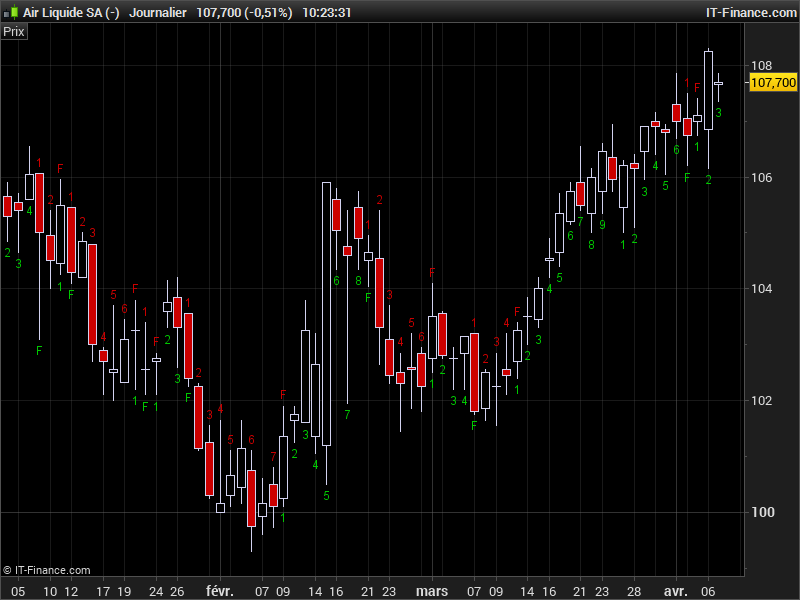
This indicator is a part of a swing strategy described as follows by users in the forum:
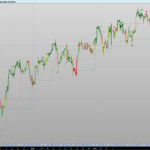
Swing +1 starts when a candle closes higher then the 3 candles before. And the swing -1 starts when the candle closes lower then 3 candles before. When a Fully swing has appeared (Swing 1 -> 9) it stops counting because the 10th candle is called the resting candle. If the 11th candle also closes higher then the 3 candles before the swing starts again at swing 1 (in green colour and red for -1). Also if a swing doesn’t succeed in reaching number 9, the swing has failed and an “F” letter appear above or below the candlestick.
The main purpose of this indicator is to signal a reversal. When a full swing +9 or -9 has appeared the chances of an upcoming bottom or a top increases a lot. A fully upswing +9 combined with a red 10th candle suggest to exit your long position. Its the same for a downswing -9 combined with a 10th green candle means exit your short position.
This swing counter indicator has been coded by request in the English forum. The 1 to 9 numbers distance form high or low of candlestick can be modified with the “CountDistance” setting.
The complete discussion can be found here: https://www.prorealcode.com/topic/rewrite-code-to-prorealtime-code/
//PRC_swing teller live count2 | indicator
//version with rounded numbers and below/above each candle
//07.04.2017
//Nicolas @ www.prorealcode.com
//Sharing ProRealTime knowledge
//https://www.prorealcode.com/topic/rewrite-code-to-prorealtime-code/

// --- settings
//CountDistance=20
// --- end of settings

Lb=4

//continue swing Up
if UpCount>0 and Close>Close[Lb] then
 DownCount=0
 UpCount=UpCount+1

 //draw count
 if UpCount=2 then
  drawtext("2",barindex,low-CountDistance*pointsize,Dialog,Standard,12) coloured(0,200,0)
 elsif UpCount=3 then
  drawtext("3",barindex,low-CountDistance*pointsize,Dialog,Standard,12) coloured(0,200,0)
 elsif UpCount=4 then
  drawtext("4",barindex,low-CountDistance*pointsize,Dialog,Standard,12) coloured(0,200,0)
 elsif UpCount=5 then
  drawtext("5",barindex,low-CountDistance*pointsize,Dialog,Standard,12) coloured(0,200,0)
 elsif UpCount=6 then
  drawtext("6",barindex,low-CountDistance*pointsize,Dialog,Standard,12) coloured(0,200,0)
 elsif UpCount=7 then
  drawtext("7",barindex,low-CountDistance*pointsize,Dialog,Standard,12) coloured(0,200,0)
 elsif UpCount=8 then
  drawtext("8",barindex,low-CountDistance*pointsize,Dialog,Standard,12) coloured(0,200,0)
 elsif UpCount=9 then
  drawtext("9",barindex,low-CountDistance*pointsize,Dialog,Standard,12) coloured(0,200,0)
  last9bar=barindex
 //reset count
  UpCount=0
 endif
//up swing fail
elsif UpCount>0 and Close<Close[Lb] then
 //draw fail count
 drawtext("F",barindex,low-CountDistance*pointsize,Dialog,Standard,12) coloured(0,200,0)
 //reset count
 UpCount=0
endif

//continue swing Down
if DownCount>0 and Close<Close[Lb] then
 UpCount=0
 DownCount=DownCount+1

 //draw count
 if DownCount=2 then
  drawtext("2",barindex,high+CountDistance*pointsize,Dialog,Standard,12) coloured(200,0,0)
 elsif DownCount=3 then
  drawtext("3",barindex,high+CountDistance*pointsize,Dialog,Standard,12) coloured(200,0,0)
 elsif DownCount=4 then
  drawtext("4",barindex,high+CountDistance*pointsize,Dialog,Standard,12) coloured(200,0,0)
 elsif DownCount=5 then
  drawtext("5",barindex,high+CountDistance*pointsize,Dialog,Standard,12) coloured(200,0,0)
 elsif DownCount=6 then
  drawtext("6",barindex,high+CountDistance*pointsize,Dialog,Standard,12) coloured(200,0,0)
 elsif DownCount=7 then
  drawtext("7",barindex,high+CountDistance*pointsize,Dialog,Standard,12) coloured(200,0,0)
 elsif DownCount=8 then
  drawtext("8",barindex,high+CountDistance*pointsize,Dialog,Standard,12) coloured(200,0,0)
 elsif DownCount=9 then
  drawtext("9",barindex,high+CountDistance*pointsize,Dialog,Standard,12) coloured(200,0,0)
  last9bar=barindex
  //reset count
  DownCount=0
 endif
 //down swing fail
elsif DownCount>0 and Close>Close[Lb] then
//draw fail count
 drawtext("F",barindex,high+CountDistance*pointsize,Dialog,Standard,12) coloured(200,0,0)
 //reset count
 DownCount=0
endif

//begin swing Up
if UpCount=0 and barindex-last9bar>1 then
 r = close[Lb]
 if close>r then
  UpCount=1
  DownCount=0
  //draw count
  drawtext("1",barindex,low-CountDistance*pointsize,Dialog,Standard,12) coloured(0,200,0)
 endif
endif

//begin swing Down
if DownCount=0 and barindex-last9bar>1 then
 r = close[Lb]
 if close<r then
  DownCount=1
  UpCount=0
  //draw count
  drawtext("1",barindex,high+CountDistance*pointsize,Dialog,Standard,12) coloured(200,0,0)
 endif
endif

return
Comments
You must be logged in to post a comment.



The F markers are nice but many seem to fail and not signal a reversal. But my main concern is the 9 limit seem to be fixed for the time frame used which can change the dynamic of price movement so whole that seems to me to be a lot of guess work. 9? why not 6 or 10 or 14. Your chart is a daily I see that ok perhaps 9 is good on a daily but what about an hourly or 30 min.

//PRC_swing teller live count2 | indicator //version with rounded numbers and below/above each candle //07.04.2017 //Nicolas @ www.prorealcode.com //Sharing ProRealTime knowledge //https://www.prorealcode.com/topic/rewrite-code-to-prorealtime-code/ // --- settings CountDistance=1.01 // --- end of settings Lb=4 //continue swing Up if UpCount>0 and Close>Close[Lb] then DownCount=0 UpCount=UpCount+1 //draw count if UpCount=2 then drawtext("2",barindex,low-(low*CountDistance-low),Dialog,Standard,12) coloured(0,200,0) elsif UpCount=3 then drawtext("3",barindex,low-(low*CountDistance-low),Dialog,Standard,12) coloured(0,200,0) elsif UpCount=4 then drawtext("4",barindex,low-(low*CountDistance-low),Dialog,Standard,12) coloured(0,200,0) elsif UpCount=5 then drawtext("5",barindex,low-(low*CountDistance-low),Dialog,Standard,12) coloured(0,200,0) elsif UpCount=6 then drawtext("6",barindex,low-(low*CountDistance-low),Dialog,Standard,12) coloured(0,200,0) elsif UpCount=7 then drawtext("7",barindex,low-(low*CountDistance-low),Dialog,Standard,12) coloured(0,200,0) elsif UpCount=8 then drawtext("8",barindex,low-(low*CountDistance-low),Dialog,Standard,12) coloured(0,200,0) elsif UpCount=9 then drawtext("9",barindex,low-(low*CountDistance-low),Dialog,Standard,12) coloured(0,200,0) last9bar=barindex //reset count UpCount=0 endif //up swing fail elsif UpCount>0 and Close0 and Close0 and Close>Close[Lb] then //draw fail count drawtext("F",barindex,high+(high*CountDistance-high),Dialog,Standard,12) coloured(200,0,0) //reset count DownCount=0 endif //begin swing Up if UpCount=0 and barindex-last9bar>1 then r = close[Lb] if close>r then UpCount=1 DownCount=0 //draw count drawtext("1",barindex,low-(low*CountDistance-low),Dialog,Standard,12) coloured(0,200,0) endif endif //begin swing Down if DownCount=0 and barindex-last9bar>1 then r = close[Lb] if close<r then DownCount=1 UpCount=0 //draw count drawtext("1",barindex,high+(high*CountDistance-high),Dialog,Standard,12) coloured(200,0,0) endif endif return
@JohnVS So how are things working out with this indicator 9 months later? Did it help you a lot? I just got familiar with the Swingteller by watching some great videos featuring Nico Bakker. I also just added the indicator to ProRealtime to check it out. I see a lot more 'F's compared to '9's, so I am really curious to know how exactly you use it. By the way, I managed to make CountDistance percentage based. Checkout the attached code.




okay thanks,
Hopefully u had a chance to check the other question too?
Since the stock have a wide range of price sometimes is quite far away or very close to the candlestick. Would it possible to change it a little to making it depending on the price the number comes under or above say 1% of the price. It will keep the number in a fixed place.
If you can make it a variable everyone can change it to ones liking.
regds
John
hi nicolas,
I have a a question regarding the countdistance.
Since the stock have a wide range of price sometimes is quite far away or very close to the candlestick. Would it possible to change it a little to making it depending on the price the number comes under or above say 1% of the price. It will keep the number in a fixed place.
If you can make it a variable everyone can change it to ones liking.
Hope you know what i mean
rgds
John
I have put the code on my pro realtime, and it is on the indicator, but it does not appear on my daily graph nor on 15 or 1 hour graph what am I doing wrong