zone de couleur

Viewing 3 posts - 1 through 3 (of 3 total)

  • Author
    Posts
  • #222493 quote
    MprorealcodeMprorealcode
    Participant
    Average

    Bonjour,

    Je ne parviens pas à trouver dans la documentation comment programmer une “zone de couleur”.

    l’intérieur d’un rectangle par exemple ou entre 2 moyennes mobile.

    #222494 quote
    NicolasNicolas
    Keymaster
    Legend

    Pour colorier entre 2 valeurs, on utilise COLORBETWEEN

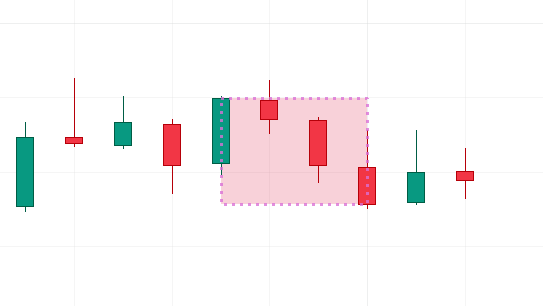
    Pour colorier un rectangle, voici un exemple v12 avec COLOURED et BORDERCOLOR:

    defparam DRAWONLASTBARONLY = true 
    
    if barindex>10 then 
     lowbar = max(1,lowestBars[10])
     highbar = max(1,highestBars[10])
    
     drawrectangle(barindex[lowbar] ,lowest[10] ,barindex[highbar],highest[10] ) coloured("crimson",50) bordercolor("orchid",200) style(dottedline4,3)
    endif 
    
    return
    
    drawrectangle-fill-color.png drawrectangle-fill-color.png
    #222498 quote
    MprorealcodeMprorealcode
    Participant
    Average

    Merci pour votre réactivité.

    Je n’ai pas eu le temps d’éditer mon message.
    votre ligne 1 est ce qu’il me manquait pour l’utilisation de colorbetween

Viewing 3 posts - 1 through 3 (of 3 total)
  • You must be logged in to reply to this topic.

ProRealAI ProRealAI New

Stuck on this ProBuilder code?

Describe what this topic is trying to build, in plain English, and ProRealAI writes the ProRealTime™ indicator, screener or system for you.

Available in 7 languages
Try ProRealAI

zone de couleur


ProBuilder : Indicateurs & Outils Personnalisés

New Reply
Author
Summary

This topic contains 2 replies,
has 2 voices, and was last updated by MprorealcodeMprorealcode
3 years ago.

Topic Details
Forum: ProBuilder : Indicateurs & Outils Personnalisés
Language: French
Started: 10/16/2023
Status: Active
Attachments: 1 files
ProRealCode ProRealCode
Loading...