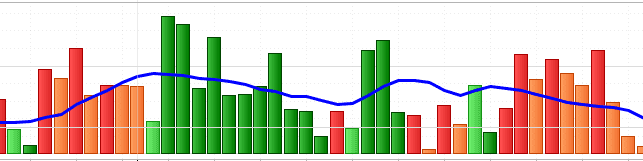
Indicateur Waddah Attar Explosion : bug couleur histogramme

Viewing 4 posts - 1 through 4 (of 4 total)
  • Author
    Posts
  • #259576 quote
    Deakkon
    Participant
    Junior

    Bonjour a tous,

    ci dessous je met a profit pour la communauté PRT l’indicateur WAE que j’ai trascrit il y a queques temps avec l’aide de @Nicolas (merci).

    Il fonctionne correctement mais je n’ai jamais pris le temps de terminer un petit détail :

    Lorqu’une barre d’histogramme rouge est plus grande que la precedente (également rouge), elle se met en rouge intense. Lorsque la barre suivante devient plus petite que la precedente (mais reste toujours rouge) ce rouge est atténué en orange pour symboliser un “esoufflement de tendance”. Jusque la tout va bien.

    Cependant, ce même principe ne s’applique pas avec les histogrammes vert : La premiere barre verte est vert clair et toutes les suivantes vert foncé … curieux …

    Y’a t’il une explication ?

    merci d’avance.

    Voici le script :


    // -- parameters
    sensitivity = 150 //"Sensitivity"
    fastLength = 20 //"FastEMA Length"
    slowLength = 40 //"SlowEMA Length"
    channelLength = 20 //"BB Channel Length"
    mult = 2.0 //"BB Stdev Multiplier")
    deadZone = 30 //"No trade zone threshold"
    
    // indis
    if barindex>slowLength then
    calcMACD = MACD[fastLength,slowLength,9](customclose)
    calcBBUpper = average[channelLength](customclose)+(mult*std[channelLength](customclose))
    calcBBLower = average[channelLength](customclose)-(mult*std[channelLength](customclose))
    
    t1 = (calcMACD-calcMACD[1])*sensitivity
    e1 = calcBBUpper - calcBBLower
    
    if t1>=0 then
    trendUP = t1
    trendDOWN = 0
    else
    trendUP = 0
    trendDOWN = -1*t1
    endif
    
    if trendUP<trendUP[1] then
    color = -1
    else
    color = 1
    endif
    
    if trendDOWN<trendDOWN[1] then
    color = -1
    else
    color = 1
    endif
    endif
    
    RETURN trendUP coloured by color style(histogram) as "UP", trendDOWN coloured by color style(histogram) as "DOWN", e1 as "Explosion line", deadzone*pipsize as "Dead Zone Line"
    
    WAE.png WAE.png
    #259587 quote
    Nicolas
    Keymaster
    Master

    Bonjour,

    Bonne observation ! Le comportement que tu décris vient d’un petit problème dans le script : la variable color est utilisée à la fois pour les barres UP et pour les barres DOWN, mais le second bloc if écrase toujours la valeur calculée par le premier.

    Concrètement, quand trendUP est positif, trendDOWN vaut 0. Or 0 n’est jamais inférieur à 0, donc le second bloc affecte systématiquement color = 1, ce qui explique que les barres vertes restent toujours de la même teinte, peu importe leur taille par rapport à la précédente.

    La solution est simple : il suffit d’utiliser deux variables de couleur séparées, une pour UP et une pour DOWN 🙂

    if trendUP < trendUP[1] then
      colorUP = -1
    else
      colorUP = 1
    endif
    
    
    if trendDOWN < trendDOWN[1] then
      colorDOWN = -1
    else
      colorDOWN = 1
    endif
    

    Et dans la ligne RETURN :

    RETURN trendUP coloured by colorUP style(histogram) as "UP", trendDOWN coloured by colorDOWN style(histogram) as "DOWN", e1 as "Explosion line", deadzone*pipsize as "Dead Zone Line"
    

    Avec ça, chaque histogramme gère sa propre logique de couleur de façon indépendante, et tu devrais retrouver le comportement attendu côté vert, identique à ce qui fonctionne déjà côté rouge.

    N’hésite pas si tu as d’autres sujets, ouvre un nouveau topic ! 😉

    Iván González thanked this post
    #259589 quote
    Iván González
    Moderator
    Master

    Je pense que le problème vient de la variable `color`. Elle est utilisée dans deux instructions conditionnelles, et la seconde écrase la première.

    // --- parameters
    sensitivity = 150
    fastLength = 20
    slowLength = 40
    channelLength = 20
    mult = 2.0
    deadZone = 30
    
    IF barindex > slowLength THEN
       calcMACD = MACD[fastLength,slowLength,9](customclose)
       calcBBUpper = average[channelLength](customclose) + (mult * std[channelLength](customclose))
       calcBBLower = average[channelLength](customclose) - (mult * std[channelLength](customclose))
       
       t1 = (calcMACD - calcMACD[1]) * sensitivity
       e1 = calcBBUpper - calcBBLower
       
       IF t1 >= 0 THEN
          trendUP = t1
          trendDOWN = 0
       ELSE
          trendUP = 0
          trendDOWN = -1 * t1
       ENDIF
       
       IF trendUP > 0 THEN
          IF trendUP  0 THEN
          IF trendDOWN < trendDOWN[1] THEN
             downR = 255
             downG = 165
             downB = 0
          ELSE
             downR = 255
             downG = 0
             downB = 0
          ENDIF
       ENDIF
    ENDIF
    
    RETURN trendUP COLOURED(upR, upG, upB) STYLE(histogram) AS "UP", trendDOWN COLOURED(downR, downG, downB) STYLE(histogram) AS "DOWN", e1 AS "Explosion line", deadZone * pipsize AS "Dead Zone Line"


    Nicolas thanked this post
    #259598 quote
    Deakkon
    Participant
    Junior

    C’est 👌

Viewing 4 posts - 1 through 4 (of 4 total)
  • You must be logged in to reply to this topic.

Indicateur Waddah Attar Explosion : bug couleur histogramme


ProBuilder : Indicateurs & Outils Personnalisés

New Reply
Author
author-avatar
Deakkon @deakkon Participant
Summary

This topic contains 3 replies,
has 3 voices, and was last updated by Deakkon
1 week, 6 days ago.

Topic Details
Forum: ProBuilder : Indicateurs & Outils Personnalisés
Language: French
Started: 03/27/2026
Status: Active
Attachments: 1 files
Logo Logo
Loading...