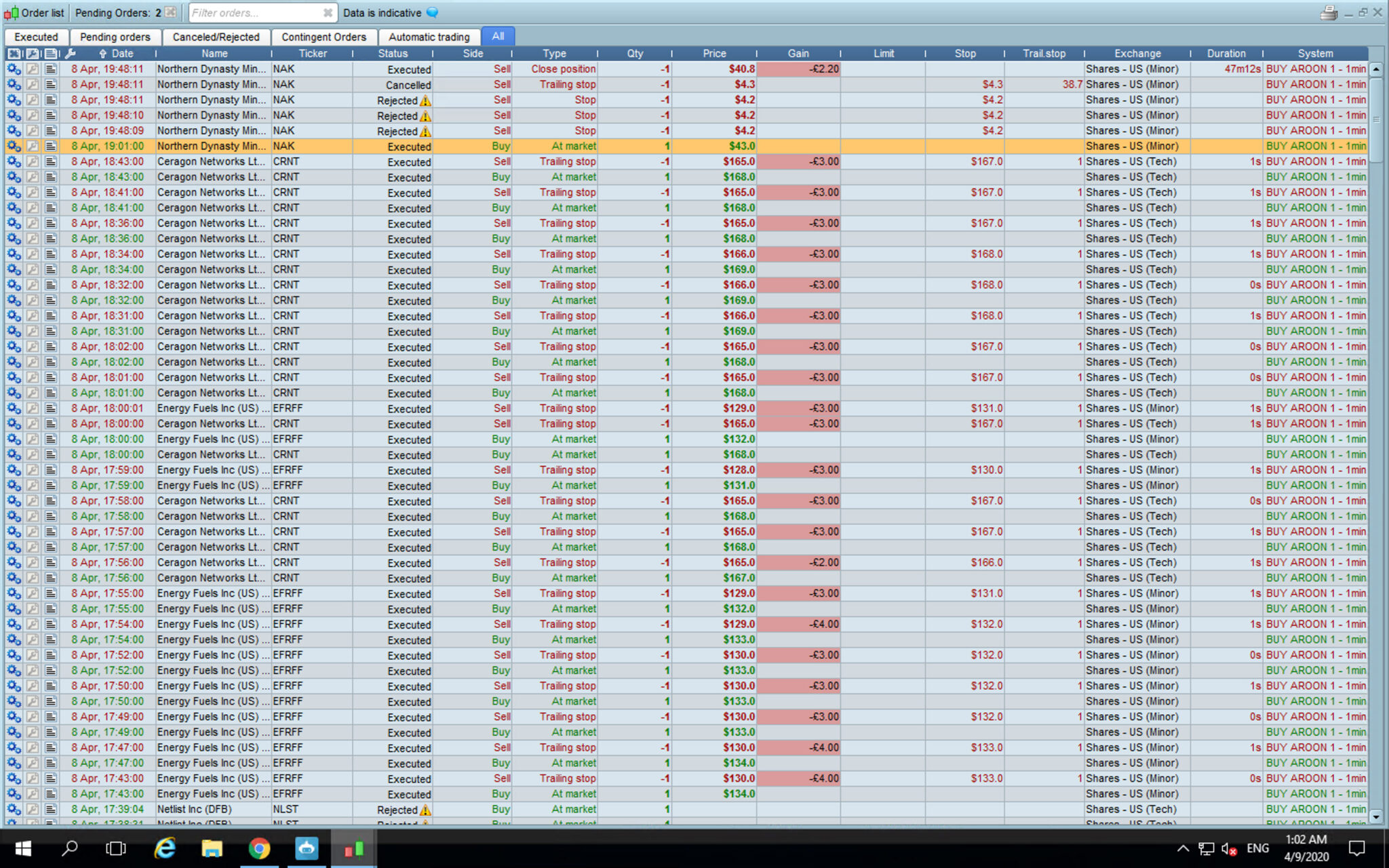
At the time of your exits, what was the minimum stop distance?
At certain times, IG make minimum stop as 100’s of points.
You need to test ALL Systems on Demo Live for at least 50 trades before going Real Live.
I loaded your code into my Demo Live and it does run … see attached
Thanks for the response. With the code it was set to SET STOP pTRAILING 100 but all of the trades was triggered with a trailing stop of only 1 point. I didn’t have any normal stop loss in place. Oh ok didn’t no IG did that. I was happy with the strategy because I used it on quantreex and just recoded it here so I just jumped in. You’re right I should have used the demo mode first.
Any particular reason or time why makes the minimum stop 100’s of points? So I can see it coming next time. An if the minimum is 100’s and I set my trailing stop to 100, hy does that work out to my stop being only 1? Did you mean 100’s as in plural or one hundredth as in 1/100? An in future i’ll definitely use the demo mode.
IG can set the min stop to something ridiculous like 1079 points … when they don’t want us to trade at times of high volatility.
But in instances as above your System should have been rejected and the System stopped anyway as that is IG intention … that we can’t place new trades.
What instrument were you trading on?
What is the normal min stop on the instrument on which you are trading??
EDIT / PS
Wow there’s the reason … the spread on NAK is 200 points so you your stop of 100 didn’t even cover the spread … have you got a death wish?? 🙂
Above can’t be right surely?
But what is the spread on the Instruments you are trading as a stop less than spread would account for entry and exit in milliseconds.
Or a very volatile Instrument with an ATR for 1 min TF way in excess of your stop value?
@tradetrade101
>> For clarity of messages on ProRealCode’s forums, please use the “insert code PRT” button to separate the text of the code part! Thank you! <<
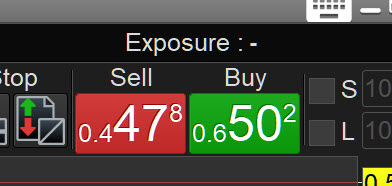
Lool yeah i think you’re spot on with that, the spreads can be really bad but I haven’t seen 200 bad unless it’s not the (DFB) version of the stock. I attached the DFB version of NAK and I think that’s a 2.5 spread currently unless i’m reading it wrong? I tried a few of my other strategies over the past hour or two (which is why i was gone) and they’re working fine with the 100 point trailing stop. So perhaps it was a problem with the strategy I included in my original post or maybe IG was doing the don’t trade it’s high volatility thing but it did do that for around 5 straight hours from 14:30 till around 19:00.
I thought the same thing about the ATR and went and checked the highs and lows of the one minute bars on entry/exit earlier on but the range didn’t get near the stop losses unless I’m reading it wrong. SO for example in the screenshot I attached i’d describe that as as a 2.5 spread that right?
At the moment i’m just focusing on the IG trend detection and some custom screeners I made targeting shares US minor, US tech and US wall street and shares UK int and shares UK. An the min stop was slightly different on each one but they ranged from 3-10 points from what I remember. 3 seemed to be the most common, yeah 3 to 4 points was the normal. Is there any more liquid stocks or markets you think would be better? Or do you think forex trading would juts be the best way to go with the auto trading?
Oh an thanks again for the help, it genuinely is much appreciated.
Most of us trade Indexes … DJI and DAX is popular.
Dax has very low spread, eur/usd has low spread also.
So you are all sorted now? Weird problem you had, hope it doesn’t recur.
PS you mentioned a screen shot but didn’t attach it. 🙂
Hi had a really up and down month with the trading which took all my attention. Funnily enough I naturally gravitated to the DAX myself there was points when it treated me really well. I don’t need to upload the screenshot anymore I understand the spreads fine at the moment. I have built a list of different questions over the month that I thought i’d ask in one go I hope there’s not too many:
- Is there anyway to pin any other tabs to always be visible on the screen like with the file/ display/ trading etc tab. So basically just is there any way to pin other tabs as well?
Is there anyway to see the MAE and MFE of the trades you’ve executed? You can see them really easily when back testing but for some reason I can only find the drawdown figures of the trades i’ve actually executed.
- How do you close all the previous back tests when you hit the back test limit. Even after I close everything it still doesn’t seem to load new backtests sometimes like I’ve hit the 10 back tests limit. Like is there a button or another automatic way to delete all of the currently open back tests?
- Also is there a way to stay out of a market only while it has a high spread. So basically a code or setting that says don’t enter the market unless the spread is 3 for instance?
- Is there a way to make bulk changes to strategies so for example categorising long and short strategies into two separate groups and giving them a weighting so like 60% of your strategies 60% have to be long and 40% short for example.
- There are some indicators that I have placed on the graph but I can’t seem to import into my strategies. So for example there’s an elastic volume weighted moving average indicator that I can display on charts but when I click add the indicator it won’t add it as a entry or exit trigger. Is there a way to add these indicators to your algorithms as entry/exit parameters?
- Also in pro order is there a way to edit the live strategies in pro order without deleting them and creating new ones? So for example at the moment just to adjust some stop losses I have to stop the strategies I want to adjust, make the edit, add the duplicate strategies to pro order and then add then start the new ones and with up to 100 strategies that would take forever. Alternatively is there a way to just pause the strategies and edit them in strategy coding section and then have the strategies I paused automatically be edited with the updated version?
- Also in pro back test even though I have a code that says only enter the market if the current open positions are under 2 it displays 6 positions on a one minute candle sometimes all with the same entry price and entry time. So does pro back test ignore the code and just present you with all the times your strategy would’ve triggered an entry or is there something wrong with my code so pro back test doesn’t know to limit the orders per entry to less then 2?
I’ve attached the code that I’m back testing with.
// Definition of code parameters
DEFPARAM CumulateOrders = True // Cumulating positions deactivated

//take profit
SET TARGET pPROFIT 50

//trailing stop function (make equal to absolute value when trailing stop and absolute value)
IF CountOfPosition < 2 AND ONMARKET THEN
TRSTART = 40 //trailing will start @trailinstart points profit
TRSTEP = 10 //trailing step to move the "stoploss"
ENDIF

//reset the stoploss value
IF NOT ONMARKET THEN
SPLOSS = 0
ENDIF

//manage long positions
IF LONGONMARKET THEN

//first move (breakeven)
IF SPLOSS = 0 AND close-TradePrice(1)>=TRSTART THEN
SPLOSS = TradePrice(1)+TRSTEP
ENDIF

//next moves
IF SPLOSS > 0 AND close-SPLOSS>TRSTEP THEN
SPLOSS = SPLOSS+TRSTEP
ENDIF
ENDIF

//manage short positions
IF SHORTONMARKET THEN
//first move (breakeven)
IF SPLOSS = 0 AND TradePrice(1)-close>=TRSTART THEN
SPLOSS = TradePrice(1)-TRSTEP
ENDIF

//next moves
IF SPLOSS> 0 AND SPLOSS-close>TRSTEP THEN
SPLOSS = SPLOSS-TRSTEP
ENDIF
ENDIF

//stop order to exit the positions
IF SPLOSS > 0 THEN
SELL AT SPLOSS STOP
EXITSHORT AT SPLOSS STOP
ENDIF

//put the first stoploss
IF ONMARKET AND SPLOSS = 0 THEN
SET STOP pTRAILING TRSTART
ENDIF

// Conditions to enter long positions
TIMEFRAME(15 minutes)
indicator1 = MACDline[14,3,3](close)
indicator2 = ExponentialAverage[3](MACDline[14,3,3](close))
c1 = (indicator1 > indicator2)
indicator3 = AroonUp[14]
indicator4 = AroonDown[14]
c2 = (indicator3 > indicator4)
indicator5 = AroonUp[14]
indicator6 = AroonDown[14]
c3 = (indicator5[1] > indicator6[1])
indicator7 = AroonUp[14]
indicator8 = AroonDown[14]
c4 = (indicator7[2] > indicator8[2])
indicator9 = AroonUp[14]
indicator10 = AroonDown[14]
c5 = (indicator9[3] > indicator10[3])
indicator11 = AroonUp[14]
indicator12 = AroonDown[14]
c6 = (indicator11[4] > indicator12[4])
indicator13 = AroonUp[14]
indicator14 = AroonDown[14]
c7 = (indicator13[5] > indicator14[5])
indicator15 = AroonUp[14]
indicator16 = AroonDown[14]
c8 = (indicator15[6] > indicator16[6])
indicator17 = AroonUp[14]
indicator18 = AroonDown[14]
c9 = (indicator17[7] > indicator18[7])
indicator19 = RSI[14](close)
c10 = (indicator19 > 30)
indicator20 = RSI[14](close)
c11 = (indicator20[1] > 30)
indicator21 = RSI[14](close)
c12 = (indicator21[2] > 30)
indicator22 = RSI[14](close)
c13 = (indicator22[3] > 30)

TIMEFRAME(1 minute)
indicator23 = MACDline[14,3,3](close)
indicator24 = ExponentialAverage[3](MACDline[14,3,3](close))
c14 = (indicator23 > indicator24)

TIMEFRAME(15 minutes)
IF c1 AND c2 AND c3 AND c4 AND c5 AND c6 AND c7 AND c8 AND c9 AND c10 AND c11 AND c12 AND c13 AND c14 THEN
BUY 1 PERPOINT AT MARKET
ENDIF

// Conditions to exit long positions
c15 = (open > open[1])
c16 = (open[1] > open[2])
c17 = (open[2] > open[3])
c18 = (open[3] > open[4])
c19 = (open[4] > open[5])
c20 = (open[5] > open[6])
indicator25 = AroonDown[14]
indicator26 = AroonUp[14]
c21 = (indicator25 > indicator26)
indicator27 = AroonDown[14]
indicator28 = AroonUp[14]
c22 = (indicator27[1] > indicator28[1])
TIMEFRAME(1 minute)
indicator29 = AroonDown[14]
indicator30 = AroonUp[14]
c23 = (indicator29 > indicator30)

TIMEFRAME(15 minutes)
IF c15 AND c16 AND c17 AND c18 AND c19 AND c20 AND c21 AND c22 AND c23 THEN
SELL AT MARKET
ENDIF
How do you close all the previous back tests when you hit the back test limit. Even after I close everything it still doesn’t seem to load new backtests sometimes like I’ve hit the 10 back tests limit. Like is there a button or another automatic way to delete all of the currently open back tests?
Wow 10 backtests at once?
I find that only one backtest runs at a time anyway (then when finished another starts) so is there any point starting 10 at once?
Maybe you set 10 going then go to bed?? 🙂
Re … it still doesn’t seem to load new backtests … I suggest you go File, Quit, say YES to Save and then log back in.
is there a way to just pause the strategies and edit them in strategy coding section and then have the strategies I paused automatically be edited with the updated version?
No very unfortunately … but please suggest it to PRT on the link below as we would all love to to have that facility! 🙂
https://www.prorealtime.com/en/contact?suggestion=1
with all the times your strategy would’ve triggered an entry
Try below and let us know if it worked
DEFPARAM CumulateOrders = False // you had it as True
Is there a way to add these indicators to your algorithms as entry/exit parameters?
You probably need to hard code them into your strategy as some are not allowed via the Simplified Creation Tool.