Hello,
would it be possible to create a screener that reproduces the so-called “Launching pad setup”?
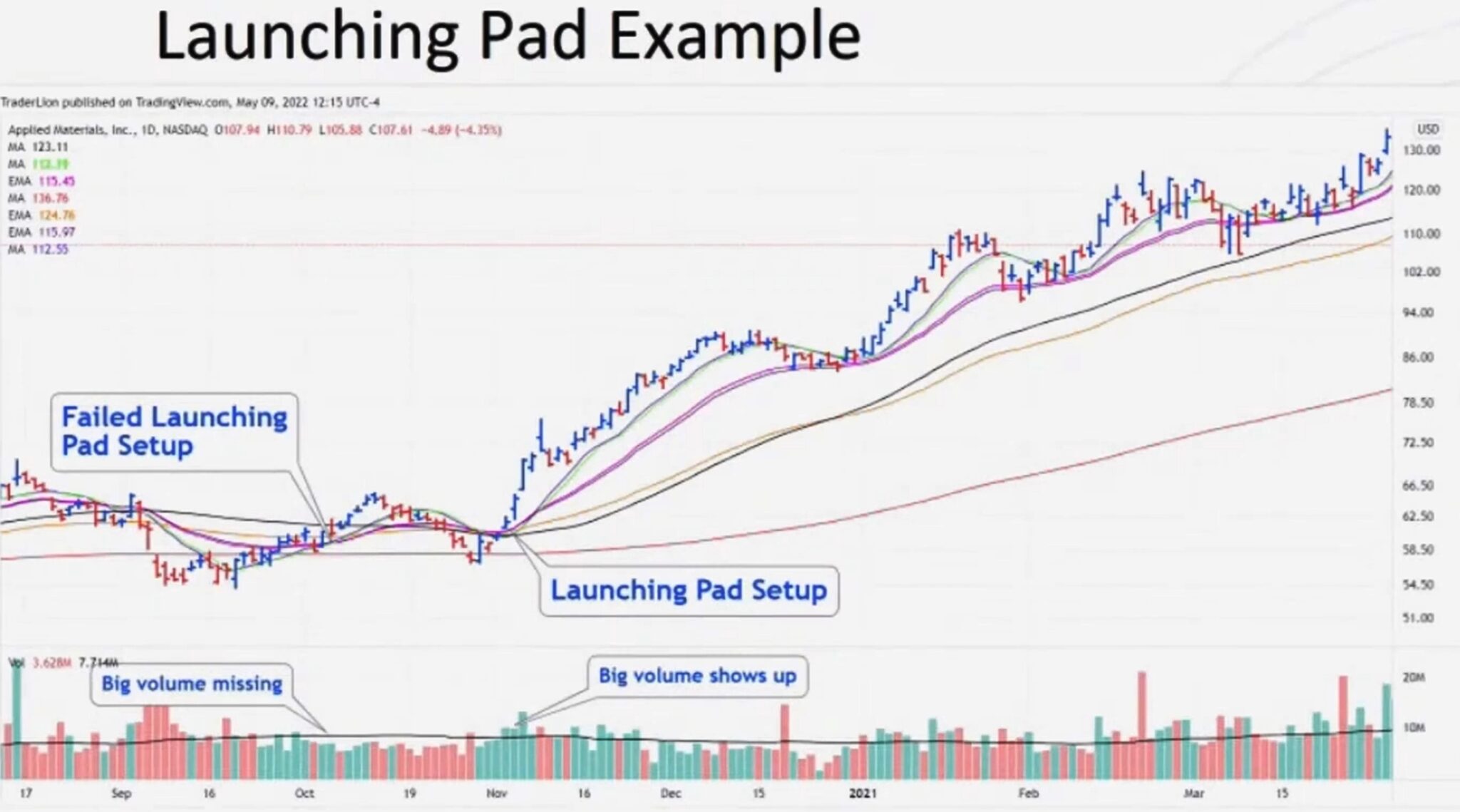
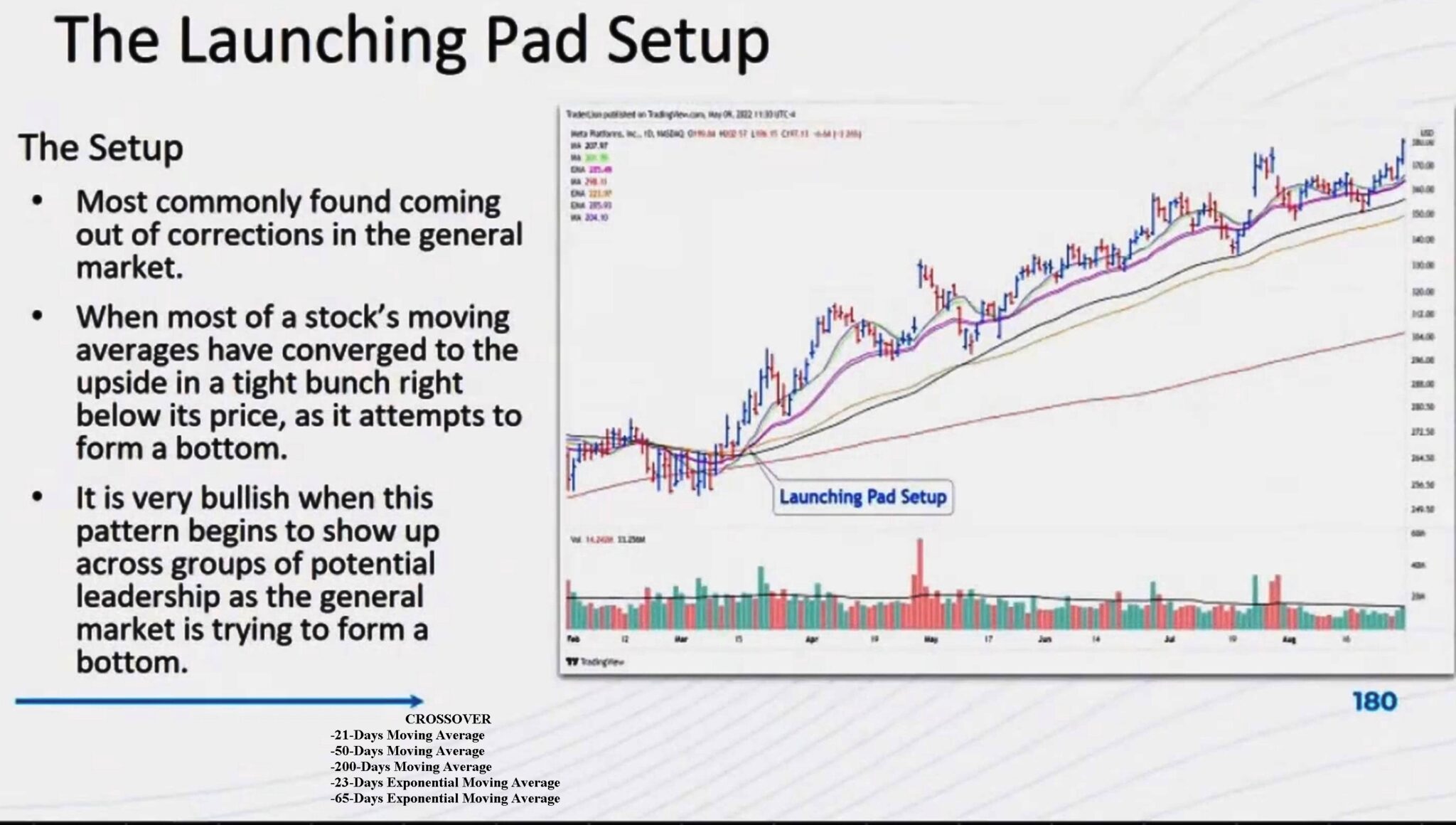
It is basically a crossover of a combination of EMA and Moving Averages followed by a significative increase in volume.
I enclose to pictures to illustrate what I mean.
I guess it’s not difficult to code this screener, but I need to make sure to get it right, so your help would be definitely appreciated. Thanks!
There you go, you can choose which way you prefer to spot a spike in volume, N times greter than the prior bar or N times greater than its X-period average (just swap comment slashes between line 15 and 17:
// Launching Pad screener
//
// https://www.prorealcode.com/topic/the-launching-pad-setup/
//
src     = CustomClose
Sma21   = average[21,0](src)
Sma50   = average[50,0](src)
Sma200  = average[200,0](src)
Ema23   = average[23,1](src)
Ema65   = average[65,1](src)
//
AlignS  = Sma21 > Sma50 AND Sma50 > Sma200        //SMAs must be aligned
AlignE  = Ema23 > Ema65                           //EMAs must be aligned
Aligned = AlignS AND AlignE
//MyVol = Volume > (average[10,0](Volume) * 1.05) //volume must be > 1.05 times the
//                                                  average volume of the last 10 bars
MyVol   = Volume > (Volume[1] * 2.00)             //volume must be > 2.00 times the
//                                                  volume of the prior bar
//Cond  = Aligned AND Not Aligned[1] AND MyVol    //only returns when Cond changes its
//                                                  status from 0 to 1
Cond    = Aligned AND MyVol                       //only returns when Cond changes its
SCREENER[Cond](close AS "Price")
If want to ONLY when the alignment of the averages changes its status from 0 to 1, swap comment slashes between lines 19 and 21.
Wow! Thank you very much Roberto.
Roberto @robertogozzi ,
I still have one more question for you. You might have noticed that in this setup the volume increase does not occur at the same time of the crossover, it happens slightly later.
Would it be possible to take this into account in your code? Thanks!
Try this one:
// Launching Pad screener
//
// https://www.prorealcode.com/topic/the-launching-pad-setup/
//
N       = 3                                       //the average alignment may
//                                                  have occurred in anyone
//                                                  of the last 3 bars or
//                                                  earlier
src     = CustomClose
Sma21   = average[21,0](src)
Sma50   = average[50,0](src)
Sma200  = average[200,0](src)
Ema23   = average[23,1](src)
Ema65   = average[65,1](src)
//
AlignS  = Sma21 > Sma50 AND Sma50 > Sma200        //SMAs must be aligned
AlignE  = Ema23 > Ema65                           //EMAs must be aligned
Aligned = AlignS AND AlignE
//MyVol = Volume > (average[10,0](Volume) * 1.05) //volume must be > 1.05 times the
//                                                  average volume of the last 10 bars
MyVol   = Volume > (Volume[1] * 2.00)             //volume must be > 2.00 times the
//                                                  volume of the prior bar
//Cond  = Aligned AND Not Aligned[1] AND MyVol    //only returns when Cond changes its
//                                                  status from 0 to 1
Cond    = (summation[N](Aligned) = N) AND MyVol   //only returns when Cond changes its
SCREENER[Cond](close AS "Price")
At the beginning you may change N = 3 to any other value that suits you best.
Hi @robertogozzi,
I’ve just tested your code, and I noticed this last part. Can you please explain the difference between the two options? Also, this doesn’t seem to find any average crossovers which is the base of the launching pad setup. Thanks
//Cond  = Aligned AND Not Aligned[1] AND MyVol    //only returns when Cond changes its
//                                                  status from 0 to 1
Cond    = (summation[N](Aligned) = N) AND MyVol   //only returns when Cond changes its
SCREENER[Cond](close AS "Price")
There is no precise conditions to know in which order and when the MA/EMA should cross, this is a very “visual” setup.
Try this version:
// Launching Pad screener
//
// https://www.prorealcode.com/topic/the-launching-pad-setup/
//
N       = 10                                       //the average alignment may
//                                                  have occurred in anyone
//                                                  of the last 3 bars or
//                                                  earlier
src     = CustomClose
Sma21   = average[21,0](src)
Sma50   = average[50,0](src)
Sma200  = average[200,0](src)
Ema23   = average[23,1](src)
Ema65   = average[65,1](src)
//
AlignS  = Sma21 crosses over Sma50 AND Sma50 > Sma200        //SMAs must be aligned
AlignE  = Ema23 > Ema65                           //EMAs must be aligned
//Aligned = AlignS AND AlignE
//MyVol = 1//Volume > (average[10,0](Volume) * 1.05) //volume must be > 1.05 times the
//                                                  average volume of the last 10 bars
MyVol   = Volume > (Volume[1] * 2.00)             //volume must be > 2.00 times the
//                                                  volume of the prior bar
//Cond  = Aligned AND Not Aligned[1] AND MyVol    //only returns when Cond changes its
//                                                  status from 0 to 1
Cond    = (summation[N](AlignS) >0 and summation[N](AlignE) >0) AND MyVol   //only returns when Cond changes its
SCREENER[Cond](close AS "Price")
Thank you very much @Nicolas
I just rewrote my last code to accomplish your request:
// Launching Pad screener
//
// https://www.prorealcode.com/topic/the-launching-pad-setup/
//
N       = 3                                           //the average alignment may
//                                                      have occurred in anyone
//                                                      of the last 3 bars or
//                                                      earlier
Sma21   = average[21,0](close)
Sma50   = average[50,0](close)
Sma200  = average[200,0](close)
Ema23   = average[23,1](close)
Ema65   = average[65,1](close)
//
AlignS  = Sma21 > Sma50 AND Sma50 > Sma200            //SMAs must be aligned
AlignE  = Ema23 > Ema65                               //EMAs must be aligned
Aligned = AlignS AND AlignE
//MyVol = Volume > (average[10,0](Volume) * 1.05)     //volume must be > 1.05 times the
//                                                      average volume of the last 10 bars
MyVol   = Volume > (Volume[1] * 3.00)                 //volume must be > 2.00 times the
//                                                      volume of the prior bar
Cross   = Aligned AND (Not Aligned[1])                //it's a CROSSOVER when MAs are alignedbut they were not the prior bar
Cond    = (summation[N](Cross)) AND Aligned AND MyVol //only returns when Cond changes its
//                                                      status from 0 to 1
SCREENER[Cond](close AS "Price")
It should work much similar to Nicolas’, but my version REQUIRES that (despite the crossover may occur in a prior bar), the MA’s are still aligned currently.
Thank you very much for your help! @robertogozzi