//Swing high:

c1=High < High[1]
c2=Close < Open
c3=High[1] > High[2]

//Swing low:

c4=Low > Low[1]
c5=Close > Open
c6=Low[1] < Low[2]

if c1 and c2 and c3 then
DRAWSEGMENT(barindex, high, barindex[200], high)
elsif c4 and c5 and c6 then
DRAWSEGMENT(barindex, low, barindex[200], low)
endif

return
Salve, vorrei chiedere un aiuto per modificare il codice riportato sopra, perchè le linee che vengono tirate vanno verso sinistra, mentre io le vorrei verso destra.
Inoltre vorrei chiedere se è possibile spostare la linea sul corpo della candela centrale dello swing.
Sperando che le modifiche possano essere fattibili, ringrazio e saluto.
Ecco il codice:
DEFPARAM CalculateOnLastBars = 2000
//defparam drawonlastbaronly   = true
ONCE SwingBarUp = 0
ONCE SwingBarDn = 0
ONCE SwingUp    = 0
ONCE SwingDn    = 0

//Swing high:
c1=High < High[1]
c2=Close < Open
c3=High[1] > High[2]

//Swing low:
c4=Low > Low[1]
c5=Close > Open
c6=Low[1] < Low[2]

if c1 and c2 and c3 then
   SwingBarUp = BarIndex[1]
   SwingUp    = high[1]
elsif c4 and c5 and c6 then
   SwingBarDn = BarIndex[1]
   SwingDn = low[1]
endif

DRAWSEGMENT(SwingBarUp, SwingUp, barindex, SwingUp) coloured(0,0,255,255)
DRAWSEGMENT(SwingBarDn, SwingDn, barindex, SwingDn) coloured(255,0,0,255)

return
La riga 1 l’ho messa per velocizzare l’inserimento ed il ricalcolo dell’indicatore.
La seconda riga l’ho messa commentata. Serve a visualizzare i segmenti solo sull’ultima barra. Così com’è li vedi tutti.
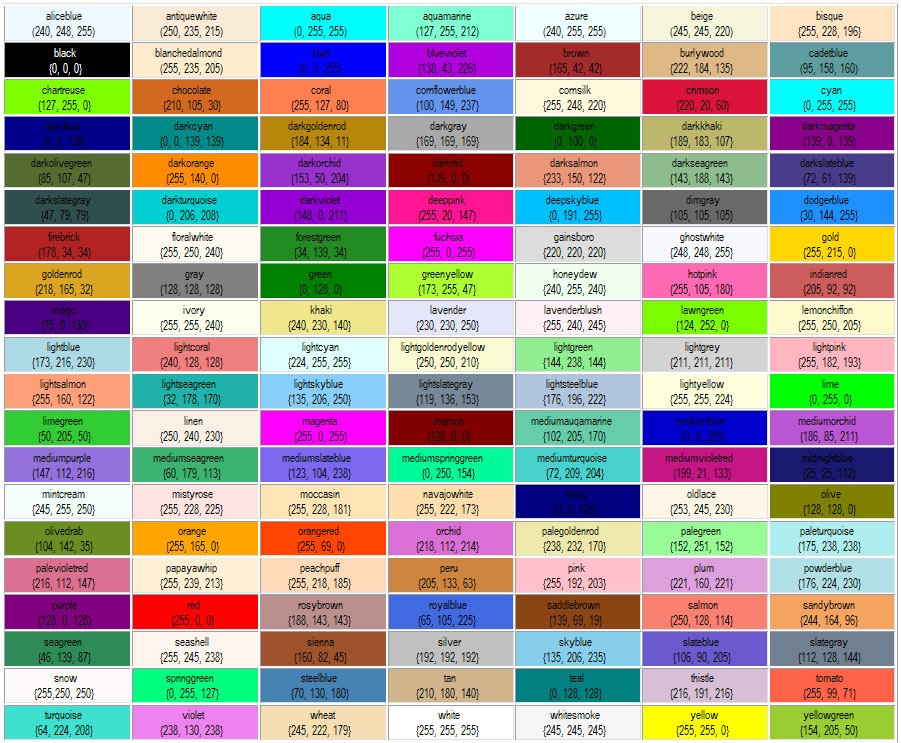
Ho anche colorato i segmenti in modo diverso, se non t’interessa togli l’istruzione COLOURED, oppure puoi modificarne i valori (https://www.prorealcode.com/wp-content/uploads/2015/09/P1jHlnG.jpg).
Ciao Roberto
ho trovato nella library questo codice di indicatore ma non ho capito il criterio con il quale compaione le frecce sul grafico
Mi puoi aiutare a capire ?
Grazie
//computation of the radius to draw ellipses
radius=average[200](range)/4

//formula to compute short term swing points
if (high>alto[1]) and not (high<high[1] and low>low[1]) then
alto=high
basso=low
markup=barindex
markhigh=high
endif
if (low<basso[1]) and not (high<high[1] and low>low[1]) then
alto=high
basso=low
markdown=barindex
marklow=low
endif

if alto<alto[1] and trend=1 then
trend=0
drawarrowdown(markup,markhigh)
mediummarkup=shortmarkup
shortmarkup=markup
longmarkhigh=mediummarkhigh
mediummarkhigh=shortmarkhigh
shortmarkhigh=markhigh
//intermediate high swing points
if longmarkhigh<mediummarkhigh and mediummarkhigh>shortmarkhigh then
DRAWELLIPSE(mediummarkup-1, mediummarkhigh-radius, mediummarkup+1, mediummarkhigh+radius)
endif
endif

if basso>basso[1] and trend=0 then
trend=1
drawarrowup(markdown,marklow)
mediummarkdown=shortmarkdown
shortmarkdown=markdown
longmarklow=mediummarklow
mediummarklow=shortmarklow
shortmarklow=marklow
//intermediate low swing points
if longmarklow>mediummarklow and mediummarklow<shortmarklow then
DRAWELLIPSE(mediummarkdown-1, mediummarklow-radius, mediummarkdown+1, mediummarklow+radius)
endif
endif

drawcandle(open,high,low,close)
return
Per scrivere il codice , utilizza il pulsante <> “insert PRT code”, in modo da rendere il codice più comprensibile. Grazie.
Puoi postare un link alla pagina dove l’hai trovato?
//computation of the radius to draw ellipses
radius=average[200](range)/4

//formula to compute short term swing points
if (high>alto[1]) and not (high<high[1] and low>low[1]) then
alto=high
basso=low
markup=barindex
markhigh=high
endif
if (low<basso[1]) and not (high<high[1] and low>low[1]) then
alto=high
basso=low
markdown=barindex
marklow=low
endif

if alto<alto[1] and trend=1 then
trend=0
drawarrowdown(markup,markhigh)
mediummarkup=shortmarkup
shortmarkup=markup
longmarkhigh=mediummarkhigh
mediummarkhigh=shortmarkhigh
shortmarkhigh=markhigh
//intermediate high swing points
if longmarkhigh<mediummarkhigh and mediummarkhigh>shortmarkhigh then
DRAWELLIPSE(mediummarkup-1, mediummarkhigh-radius, mediummarkup+1, mediummarkhigh+radius)
endif
endif

if basso>basso[1] and trend=0 then
trend=1
drawarrowup(markdown,marklow)
mediummarkdown=shortmarkdown
shortmarkdown=markdown
longmarklow=mediummarklow
mediummarklow=shortmarklow
shortmarklow=marklow
//intermediate low swing points
if longmarklow>mediummarklow and mediummarklow<shortmarklow then
DRAWELLIPSE(mediummarkdown-1, mediummarklow-radius, mediummarkdown+1, mediummarklow+radius)
endif
endif


drawcandle(open,high,low,close)
return
E’ l’indicatore che si trova qui https://www.prorealcode.com/prorealtime-indicators/williams-highs-lows/ (questo è il link).
Segnala, mi pare, dei punti di swing. Per saperlo dovresti leggere il libro che è segnalato insieme all’indicatore. Io non ne ho un’idea precisa.
Posso dirti, però, perché qualcuno lo ha chiesto mesi fa, che non è possibile usarlo in strategie automatizzate, in quanto disegna ellissi/frecce DOPO la candela dove appaiono, per cui al momento della chiusura della candela (quando la strategia viene eseguita) non è dato sapere ancora se quella candela sarà successivamente segnalata.
Si può usare benissimo per il trading manuale, dopo averne capito il funzionamento. Se fai una ricerca su internet magari trovi spiegazioni esaurienti anche senza leggere il libro.