Scalpers Dot Board

Viewing 14 posts - 1 through 14 (of 14 total)
  • Author
    Posts
  • #41742 quote
    AVT
    Participant
    Senior

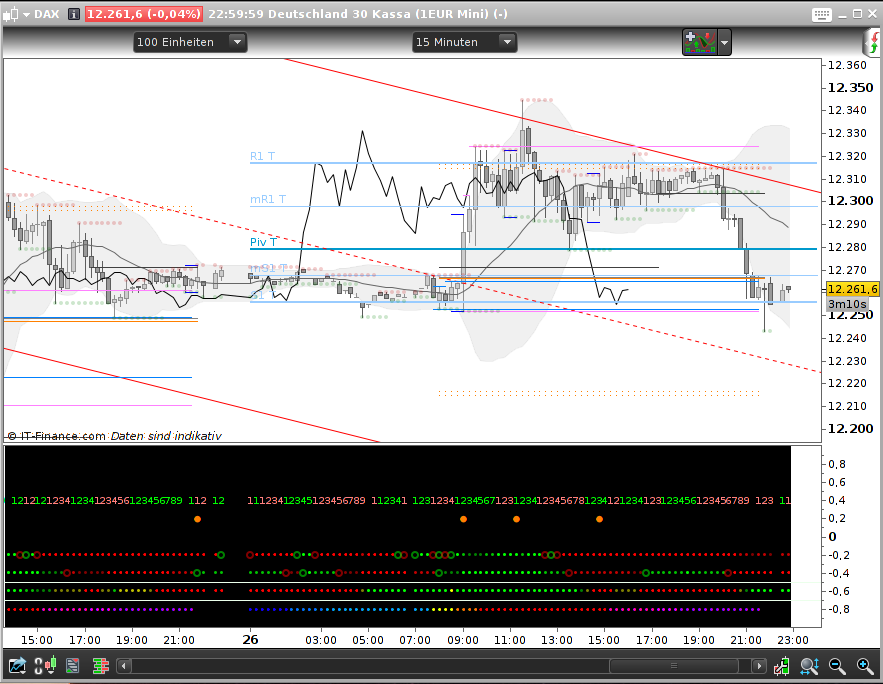
    As I do not robot and my bar chart is already covered with all kind of lines – and additionally my screen size is limited – I needed a way to get rid of all those extra windows below the chart. So here is my Dot Board solution. It is modularized, so one can simply add another module line for own needs (well, I myself want some more).

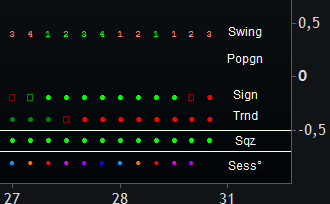
    On the picture you see how it is built up: we go from the most general information at the bottom up to the very special information for a single candle.

    1. market session times
    2. squeeze or not
    3. accumulated trend
    4. (one way of) trading signal
    5.  (this line is still unused)
    6. PopGun and candle marker – well I don’t use much candles
    7. swing teller

    Maybe you can make use of it and want to add your own module to it – or you just want a standalone module (that’s a version I use for testing before I integrate it into my Dot Board). For the main board the code is just too long with all the comments in it, that would bomb the site, therefore I attach that just for importing. The code below is for the standalone market session.

    Feel free to change and/or add what you like.

    // =========================== general section Begin ====================
    
    // =========================== Standalone test mark =====================
    // --- delete this when copied into the DotBoard                        =
    BGred = 0                                                            // =
    BGgreen = 0                                                          // =
    BGblue = 0                                                           // =
    // =========================== Standalone test mark =====================
    
    // --- add this to the general section
    //     create an extern variable type boolean
    // --- options to turn a line on/off
    ShowSessions=1         // for IndiNo=0 very bottom position
    
    
    // =========================== Standalone test mark =====================
    // --- delete this when copied into the DotBoard                        =
    LowLineOffset = -0.8                                                 // =
    IndiLineOffsetAdd = 0.2                                              // =
    BACKGROUNDCOLOR(BGred,BGgreen,BGblue)                                // =
    // =========================== Standalone test mark =====================
    
    
    // =========================== general section End ======================
    
    
    // =========================== indicator section Begin ==================
    // ============ Indicator 0 Begin
    // === mark market session periods
    // --- see also: @ Noobywan https://www.prorealcode.com/topic/market-session/#post-40397
    // --- refs: https://en.wikipedia.org/wiki/List_of_stock_exchange_opening_times
    //           https://en.wikipedia.org/wiki/List_of_stock_exchanges
    IndiNo=0
    
    IF ShowSessions THEN
    IndiLine = IndiLineOffsetAdd*IndiNo + LowLineOffset
    // --- conditions
    Session1 = (time>=080000 and time<090000 )   // 08:00-09:00 yellow EU pre
    Session2 = (time>=090000 and time<100000 )   // 09:00-10:00 orange EU
    Session3 = (time>=100000 and time<153000 )   // 10:00-15:30 red EU+GB
    Session4 = (time>=153000 and time<173000 )   // 15:30-17:30 magenta EU+GB+US
    Session5 = (time>=173000 and time<183000 )   // 17:30-18:30 darkmagenta GB+US
    Session6 = (time>=183000 and time<220000 )   // 18:30-22:00 violet US
    // --- note: this one paints overnight, so we need 22-00 and 00-2
    // 22:00-02:00 darkblue ---- nothing, just to make it complete
    Session7 = (time>=220000 and time<000000 ) OR (time>=000000 and time<020000 )
    Session8 = (time>=020000 and time<033000 )   // 02:00-03:30 blue JP/AU
    Session9 = (time>=033000 and time<080000 )   // 03:30-08:00 lightblue JP/AU+HK
    // --- painting
    // --- each if..endif on its own to make deleting easier
    IF Session1 THEN
    DRAWTEXT("▪",barindex,IndiLine) coloured(255,255,0) // 08:00-09:00 yellow EU pre
    ENDIF
    IF Session2 THEN
    Drawtext("▪",barindex,IndiLine) coloured(255,112,0) // 09:00-10:00 orange EU
    ENDIF
    IF Session3 THEN
    Drawtext("▪",barindex,IndiLine) coloured(255,0,0)   // 10:00-15:30 red EU+GB
    ENDIF
    IF Session4 THEN
    Drawtext("▪",barindex,IndiLine) coloured(255,0,192) // 15:30-17:30 magenta EU+GB+US
    ENDIF
    IF Session5 THEN
    Drawtext("▪",barindex,IndiLine) coloured(240,0,255) // 17:30-18:30 darkmagenta GB+US
    ENDIF
    IF Session6 THEN
    Drawtext("▪",barindex,IndiLine) coloured(176,0,255) // 18:30-22:00 violet US
    ENDIF
    IF Session7 THEN
    Drawtext("▪",barindex,IndiLine) coloured(16,0,255)  // 22:00-02:00 darkblue ----
    ENDIF
    IF Session8 THEN
    Drawtext("▪",barindex,IndiLine) coloured(0,112,255) // 02:00-03:30 blue JP/AU
    ENDIF
    IF Session9 THEN
    Drawtext("▪",barindex,IndiLine) coloured(0,160,255) // 03:30-08:00 lightblue JP/AU+HK
    ENDIF
    ENDIF
    // ============ Indicator 0 End
    // =========================== indicator section End ====================
    
    // =========================== Standalone test ending mark ==============
    // --- delete this when copied into the DotBoard                        =
    RETURN                                                                //=
    // =========================== Standalone test ending mark ==============
    

    Hope I forgot nothing.

    Nicolas, denmar and mmichael thanked this post
    #41751 quote
    Nicolas
    Keymaster
    Master

    Wow! Very impressive thanks for sharing, would definitely be featured in the Library for inspiration and as a nice example of what we can do with Probuilder graphics instructions. I’ll add it for you if you don’t mind, thanks again! 😉

    AVT thanked this post
    #41759 quote
    AVT
    Participant
    Senior

    No I don’t, all my code is open source. Thanks.

    #41778 quote
    Nicolas
    Keymaster
    Master

    Thank you, your trading dashboard is now in the library! 🙂

    #41991 quote
    mmichael
    Participant
    Average

    Hello AVT, hello all,

    Thx AVT for the great contribution!

    I have a small suggestion: May be it would be useful to add a small text at the extreme right to precise the indicator name, as you can see in the attached pic.

    I guess we could add something like:

    if barindex = currentbar then
    DRAWTEXT("●" & "Session"...)
    #41999 quote
    Nicolas
    Keymaster
    Master

    @mmichael

    Good point and good idea, but it is not possible to plot something at the right of price (in the future ..). Maybe adding the indicator name just above each dot line could be possible, I let AVT answer to this query 😉

    But, another idea would be to draw dots in the past and let sufficient space on the right of the chart to plot text. However there would be 2 problems : zooming/dezooming would affect the readability of the dashboard and current candlesticks dots information should be read at X periods ago (not so obvious).

    mmichael thanked this post
    #42015 quote
    mmichael
    Participant
    Average

    Hello,

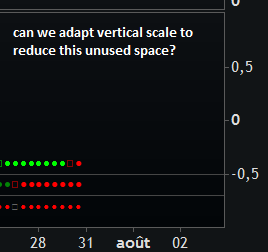
    another small remark, I do not know how to adapt the vertical scale to the number of indicators. In my case I kept 3 indicators and still have a lot un-used space… cf my screenshot.

    #42017 quote
    mmichael
    Participant
    Average

    I found a solution for adapting the vertical scale – not the most elegant solution, but it works:

    RETURN -0.8 coloured (255,255,255,0), 0 coloured (255,255,255,0)
    #42022 quote
    AVT
    Participant
    Senior

    @mmichael

    Sorry, I did not notice your posts in here. I had this “naming of lines” also in mind when I began, cause it’s simply easier to see what kind of line is currently activated. But DRAWTEXT can only go upto barindex and not to barindex+1, so I thought best solution would be from general to special, giving you at least an idea what kind of information a dot line holds. As Nicolas already said, if I put a dot not under the bar to which it belongs but just for example 3 bars before, I gain some space for a name, but this would make signal reading (and also the check of good signals) more difficult and things should be easier and not more complicated. I also thought of a way putting that stuff at the very beginning – but there we hopp already into the next problem: what IS the beginning? <- That depends on your loaded units and BarIndex. So that’s quite a bigger problem. As a result of all this I forgot about all this naming stuff for now. (Well I do have an idea, how we might solve it at least a bit, but that’s not yet “in production”).

    Now to the unwanted space. PRT is autoadjusting the window in the beginning around the “center line” which in your case would be the zero line (3 indis= one in the middle and one above and below). The easiest way, I call it “quick and dirty”,  is: delete all unwanted indis in the code, delete the Show… for them too.

    Now we have only 3 Indis and we center them around the zero line, means in the general section:

    LowLineOffset = 0     // the y-axis position for the lowest line

    and for each of the three indicators we change their number:

    IndiNo = -1  // the lowest lined indicator
    IndiNo = 0   // the center lined indicator
    IndiNo = 1   // the highest lined indicator

    The last one which needs adjustment is the offset adding. This one depends on how high your DotBoard Window is, so you should first adjust the hight of the window and then change this line:

    IndiLineOffsetAdd = 0.6  // how much to add for the next upper line

    This is not only the space between the lines but also the space which will be added to the top and the bottom when the window is autoadjusted.

    If you use an indicator which has a separation line in it (and you want to keep that line), the line adjustment is done here and should be half of the IndiLineOffsetAdd from above:

    DRAWHLINE(IndiLine+0.3) coloured(SepLineRed,SepLineGreen,SepLineBlue,Fade0)

    With your 3 indicators and standard 11 point size and a line offset adding of 0.6 the whole stuff measures on my screen 1 cm in hight (don’t know if one can give measurements like this).

    Hope that will do the job.

    Nicolas and mmichael thanked this post
    #42032 quote
    mmichael
    Participant
    Average

    hello AVT,

    your solution works but my idea was to have a scale 0 to 1 (instead of -1 to 1), so I tried the following but it is not ok. I guess prorealtime forces the vertical scale from -1 to 1…

    LowLineOffset = 0.2
    IndiLineOffsetAdd = 0.3
    // code
    IndiNo = 0
    // code
    DRAWHLINE(IndiLine+0.15) coloured(SepLineRed,SepLineGreen,SepLineBlue,Fade0)
    // code
    IndiNo = 1
    // code
    DRAWHLINE(IndiLine+0.15) coloured(SepLineRed,SepLineGreen,SepLineBlue,Fade0)
    // code
    IndiNo = 2
    // code
    #42039 quote
    AVT
    Participant
    Senior

    Hi mmichael,

    The window does not know that we do just some paintings in it. For this we must change the calculation of the position completely new, I see what I can do, might take a day or so, if that’s ok for you.

    #42040 quote
    mmichael
    Participant
    Average

    ok I am fine already with my 3 indicators using the solution you provided previously.

    the scale is only for better cosmetic / presentation, so no need to loose a lot of time on it.

    let me know anyway if you find a fix.

    By the way, we had a similar issue a while before cf. “bandeau dashboard” topic:

    3 Linear regression tapes indicator

    #42257 quote
    AVT
    Participant
    Senior

    @mmichael

    Today the last idea left failed too. So from now on I am without ideas and you without cosmetics – life can be hard 😉

    #42258 quote
    mmichael
    Participant
    Average

    thank you AVT for your answer. It is ok. your dashboard is the best one anyway.

Viewing 14 posts - 1 through 14 (of 14 total)
  • You must be logged in to reply to this topic.

Scalpers Dot Board


ProBuilder: Indicators & Custom Tools

New Reply
Author
author-avatar
AVT @avt Participant
Summary

This topic contains 13 replies,
has 3 voices, and was last updated by mmichael
8 years, 6 months ago.

Topic Details
Forum: ProBuilder: Indicators & Custom Tools
Language: English
Started: 07/26/2017
Status: Active
Attachments: 4 files
Logo Logo
Loading...