Support and resistance zones with variables arrays

Viewing 9 posts - 16 through 24 (of 24 total)
  • Author
    Posts
  • #126151 quote
    stefou102
    Participant
    Veteran

    I don’t really get your point 1. My array is not sorted, so if I want to compare one item with all items, I can’t do z=x, otherwise you compare only with smaller and smaller items.

    On the other hand, your second point seems indeed to solve the issue, thx I wouldn’t have found it!!!

    Now the point I would like to improve is around the fractal, to filter the reversal points and retain only the most relevant one… Would need your help on that too;)

    I’m noticing also that the most recent overlap is sometimes blinking with each new change of price, weird…

    DEFPARAM DRAWONLASTBARONLY =TRUE
    defparam calculateonlastbars=500
    barlimit = 400
    ATR=averagetruerange[20](close)
    cp=2
    ATRfactor=2
     
     index1=0
    index2=0
    
    if high[cp] >= highest[(cp)*2+1](high) and barindex-$TOPx2[max(0,lastset($TOPx2))]>1 then //new fractal high found
    $TOPy[lastset($TOPy)+1] = high[cp] //store fractal value
    $TOPx[lastset($TOPx)+1] = barindex[cp] //store fractal barindex
    //drawpoint(barindex[cp],high[cp],1) coloured(100,75,150) bordercolor (100,75,150)
    $TOPx2[lastset($TOPx2)+1] = barindex
    endif
     
    if low[cp] <= lowest[(cp)*2+1](low) and barindex-$BOTx2[max(0,lastset($BOTx2))]>1 then //new fractal low found
    $BOTy[lastset($BOTy)+1] = low[cp] //store fractal value
    $BOTx[lastset($BOTx)+1] = barindex[cp] //stire fractal barindex
    //drawpoint(barindex[cp],low[cp],1) coloured(100,75,150) bordercolor (100,75,150)
    $BOTx2[lastset($BOTx2)+1] = barindex
    endif
     
    if(islastbarupdate and isset($topy[0]) and isset($boty[0])) then
    //check points in a range of X percent
    for i = 0 to lastset($TOPy) do //loop through the tops
    for y = 0 to lastset($BOTy) do //check first top with other tops
    if y<>i then
    change=abs($BOTy[y]-$topy[i])//percent range between the 2 tops
    if change<=ATR/ATRfactor and barindex-$BOTx[y]<barlimit and $topx[i]<>$BOTx[y] then
     
    $overlap[index1]=($BOTy[y]+$TOPy[i])/2
    $overlapx1[index1]=min($BOTx[y],$TOPx[i])
    $overlapx2[index1]=max($BOTx[y],$TOPx[i])
    index1=index1+1
    endif
    endif
    next
     
    next
     
     
    endif
    //test=index1
    // drawtext(" #test#",barindex,high+50,SansSerif,standard,10)
     
    if islastbarupdate and isset($overlap[0]) then
    
    for x=index1 downto 1  do
    for z=index1 downto 1 do
    if x=index1 then
    count=0
    endif
    if x<>z then
    if abs($overlap[x]-$overlap[z])<ATR then
    count=count+1
    endif
    endif
    next
    
    if count=0 then
    $overlapfinal[index2]=$overlap[x]
    $overlapfinalx1[index2]=$overlapx1[x]
    $overlapfinalx2[index2]=$overlapx2[x]
    index2=index2+1
    else
    if index2=0 then
    $overlapfinal[index2]=$overlap[x]
    $overlapfinalx1[index2]=$overlapx1[x]
    $overlapfinalx2[index2]=$overlapx2[x]
    index2=index2+1
    endif
    for zz = 0 to index2 do
    if zz=0 then
    count=0
    endif
    if x<>zz then
    if abs($overlap[x]-$overlapfinal[zz])<ATR then
    count=count+1
    endif
    endif
    next
    if count=0 then
    $overlapfinal[index2]=$overlap[x]
    $overlapfinalx1[index2]=$overlapx1[x]
    $overlapfinalx2[index2]=$overlapx2[x]
    index2=index2+1
    endif
    
    
    endif
    next
    
    endif
     
     
    if islastbarupdate and isset($overlapfinal[0]) then
    for x=0 to index2 do
    if $overlapfinal[x] > close then
    if highest[barindex-$overlapfinalx2[x]-1](high)<$overlapfinal[x]+ATR/ATRfactor then
    drawsegment($overlapfinalx1[x],$overlapfinal[x],barindex,$overlapfinal[x]) coloured(0,75,150) STYLE (dottedline,3)
    drawpoint($overlapfinalx2[x],$overlapfinal[x],2) coloured(0,75,150) bordercolor (0,75,150)
    endif
    else
    if lowest[barindex-$overlapfinalx2[x]-1](low)>$overlapfinal[x]-ATR/ATRfactor then
    drawsegment($overlapfinalx1[x],$overlapfinal[x],barindex,$overlapfinal[x]) coloured(0,75,150) STYLE (dottedline,3)
    drawpoint($overlapfinalx2[x],$overlapfinal[x],2) coloured(0,75,150) bordercolor (0,75,150)
    endif
    endif
    //drawsegment($overlapfinalx1[x],$overlapfinal[x],barindex,$overlapfinal[x]) coloured(0,75,150) STYLE (dottedline,3)
    //drawpoint($overlapfinalx2[x],$overlapfinal[x],2) coloured(0,75,150) bordercolor (0,75,150)
    next
    endif
     
     
    //plot the zone


    return
    Guibourse thanked this post
    #126168 quote
    stefou102
    Participant
    Veteran
    lines 50
    for x=index1 downto 0  do
    for z=index1 downto 0 do


    instead of
    for x=index1 downto 1  do
    for z=index1 downto 1 do


    #126180 quote
    stefou102
    Participant
    Veteran

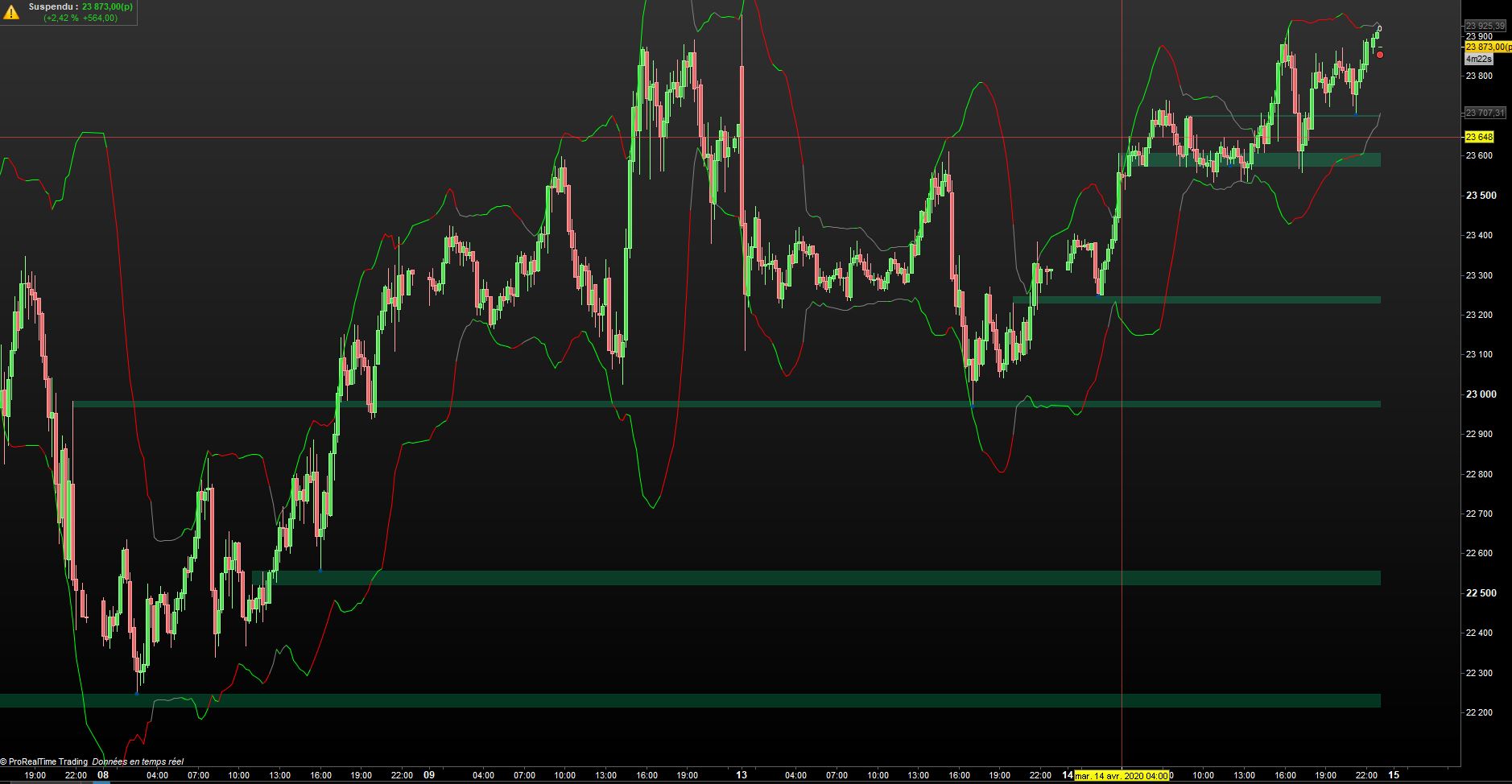
    To put things into perspective for those who not benefit yet from the V11, please find in attachment what the indicator is drawing automatically on the Dow Future 15min.

    Awesome! Still needs further work in my view however.

    Nicolas, I hope arrays are available for probacktest?

    Oliviertrader2020 and Guibourse thanked this post
    #126210 quote
    Nicolas
    Keymaster
    Master

    Very very nice stefou! Well done. This proves the efficiency and the necessity of data arrays to build stunning indicator!

    to filter the reversal points and retain only the most relevant one…

    Ok, but how do you consider a ‘relevant one’?

    You can use arrays in ProBacktest, but you’ll have to put your whole code into the strategy!

    #126324 quote
    stefou102
    Participant
    Veteran

    The relevant one =

    1. min distance between a high and low fractal to avoid extreme created during low volatility period
    2. if there are two consecutive lows without a high in between, only takes into account the lowest one, and disregard the other. Same for top

    I have tried somethings for point 2 but this isn’t working, code is very slow and doesn’t do what I want.


    defparam calculateonlastbars=4000
    once index1=0
    once index2=0
    once cp=2
    index3=0
    index4=0
    
    //fractal high, but only if the previous bar wasn't already a top
    if high[cp] >= highest[(cp)*2+1](high) and barindex-$TOPx2[max(0,index1)]>1 then 
    $TOPy1[index1] = high[cp] 
    $TOPx1[index1] = barindex[cp] 
    
    $TOPx2[index1] = barindex
    drawpoint($TOPx1[index1],$TOPy1[index1]+20,1) coloured(0,0,0) bordercolor (0,0,0)
    index1=index1+1
    endif
     
    if low[cp] <= lowest[(cp)*2+1](low) and barindex-$BOTx2[max(0,index2)]>1 then //new fractal low found
    $BOTy1[index2] = low[cp] 
    $BOTx1[index2] = barindex[cp] 
    
    $BOTx2[index2] = barindex
    drawpoint($BOTx1[index2],$BOTy1[index2]-20,1) coloured(0,0,0) bordercolor (0,0,0)
    index2=index2+1
    endif
    
    
    if index1>0 and index2>0 then
    
    for x=index2 downto 1  do
    for y=index1 downto 1 do
    //I'm looking for the barindex of the previous top
    if $TOPx1[y]>$BOTx1[x] and $TOPx1[y-1]<$BOTx1[x] then
    lasttopx=$TOPx1[y]
    break
    endif
    next
    if lasttopx<>0 then
    // if distance between two lows is bigger then between the last top and bottom, I save the bottom
    If $BOTx1[x]-$BOTx1[x-1]>lasttopx-$BOTx1[x-1] then
    $BOTy[index3] = $BOTy1[x]
    $BOTx[index3] = $BOTx1[x]
    index3=index3+1
    //otherwise I save again the previous bottom
    else
    $BOTy[index3] = $BOTy1[x-1]
    $BOTx[index3] = $BOTx1[x-1]
    endif
    endif
    next
    endif
    
    if index1>0 and index2>0 then
    
    for x=index1 downto 1  do
    for y=index2 downto 1 do
    if $BOTx1[y]>$TOPx1[x] and $BOTx1[y-1]<$TOPx1[x] then
    lastbottomx=$BOTx1[y]
    break
    endif
    next
    if lastbottomx<>0 then
    If $TOPx1[x]-$TOPx1[x-1]>lastbottomx-$TOPx1[x-1] then
    $TOPy[index4] = $TOPy1[x]
    $TOPx[index4] = $TOPx1[x]
    index4=index4+1
    else
    $TOPy[index4] = $TOPy1[x-1]
    $TOPx[index4] = $TOPx1[x-1]
    index4=index4+1
    endif
    endif
    next
    
    endif
    
    if(islastbarupdate and index3>0 and index4>0) then
    for xx=0 to index4 do
    drawpoint($TOPx[xx],$TOPy[xx],1) coloured(100,75,150) bordercolor (100,75,150)
    next
    
    for yy=0 to index3 do
    drawpoint($BOTx[yy],$BOTy[yy],1) coloured(100,75,150) bordercolor (100,75,150)
    next
    endif
    return
    
    Kovit thanked this post
    #167269 quote
    Francesco
    Participant
    Veteran

    Hi @stefou102, congrats for your work. Any updates on this interesting indicator?

    #196457 quote
    Khaled
    Participant
    Veteran

    Hi Stef, just tried this last version of the code on v11 (SP500) and it doesn’t show anything on the graph (price). Any clue how to make it work?

    Thanks

    #203403 quote
    SnorreDK
    Participant
    Junior

    Any News here to get it work for V11?

    #213801 quote
    Aragorna
    Participant
    New

    Hi Stefou, I was thinking about the possibility to compare tops and bottoms and the only idea I had was to put both Tops and bottoms in the same array. The problem of not having overlapping of too many lows and highs remain. I tried to reset the array with a counter, in order to keep the highs and lows only after a specific bars but for some reason it does not work. the variable Barlimit is useless. I put what I did here as it follows.

    // https://www.prorealcode.com/topic/array-variables-availability-in-prorealtime/
    // (please do not remove the link above for future reference)
    // Example #1: support and resistance example, based on fractals points

    // — settings
    fractalP = 10
    percent = 0.5
    barlimit = 500
    // — end of settings
    DLS =(Date >= 20220101)
    //fractals
    cp=fractalP
    if high[cp] >= highest[(cp)*2+1](high) then //new fractal high found
    $FRACTy[lastset($FRACTy)+1] = high[cp] //store fractal value
    $FRACTx[lastset($FRACTx)+1] = barindex[cp] //store fractal barindex
    ELSE
    if low[cp] <= lowest[(cp)*2+1](low) then //new fractal low found
    $FRACTy[lastset($FRACTy)+1] = low[cp] //store fractal value
    $FRACTx[lastset($FRACTx)+1] = barindex[cp] //stire fractal barindex
    endif

    if(islastbarupdate and isset($FRACTy[0])) then
    //check points in a range of X percent
    for i = 0 to lastset($FRACTy) do //loop through the tops
    for y = 0 to lastset($FRACTy) do //check first top with other tops
    change=abs(($FRACTy[y]-$FRACTy[i])/$FRACTy[i]) //percent range between the 2 tops
    if change<=percent/100 and barindex-$FRACTx[y]<barlimit and DLS and $FRACTx[i]<>$FRACTx[y] then
    if close>min($FRACTy[y],$FRACTy[i]) then //define the color
    r=0
    g=255
    else
    r=255
    g=0
    //if $FRACTx[y]>barlimit and $FRACTx[i]>barlimit then
    //$FRACTY[y]=0 and $FRACTY[i]=0
    //endif
    endif
    //plot points at each tops
    DRAWPOINT($FRACTx[i],$FRACTy[i],2) COLOURED (r,g,0) BORDERCOLOR (r,g,0)
    DRAWPOINT($FRACTx[y],$FRACTy[y],2) COLOURED (r,g,0) BORDERCOLOR (r,g,0)
    midlevel=($FRACTy[i]+$FRACTy[y])/2
    //display the mid level price
    DRAWTEXT(“#midlevel#”, barindex+8, midlevel, monospaced, standard, 14)
    //plot the zone
    drawrectangle(min($FRACTx[y],$FRACTx[i]),$FRACTy[y],barindex,$FRACTy[i]) coloured(r,g,50,50) bordercolor(r,g,0)
    endif
    next
    next
    endif
    endif
    return

Viewing 9 posts - 16 through 24 (of 24 total)
  • You must be logged in to reply to this topic.

Support and resistance zones with variables arrays

ProBuilder support

New Reply
Author
author-avatar
stefou102 @stefou102 Participant
Summary

This topic contains 23 replies,
has 4 voices, and was last updated by Aragorna

2 years, 9 months ago.

Topic Details
Forum: ProBuilder support
Language: English
Started: 04/08/2020
Status: Active
Attachments: 1 files
Logo Logo
Loading...