Request: Covert Flat Trend to candle background colours

Viewing 5 posts - 1 through 5 (of 5 total)
  • Author
    Posts
  • #204017 quote
    jonpt88jonpt88
    Participant
    New

    Hi,

    Could anyone convert this indicator into different candle colours instead?

    PRC_FlatTrend.

    Flat Trend

    Thank you.

    #204021 quote
    robertogozzirobertogozzi
    Moderator
    Legend

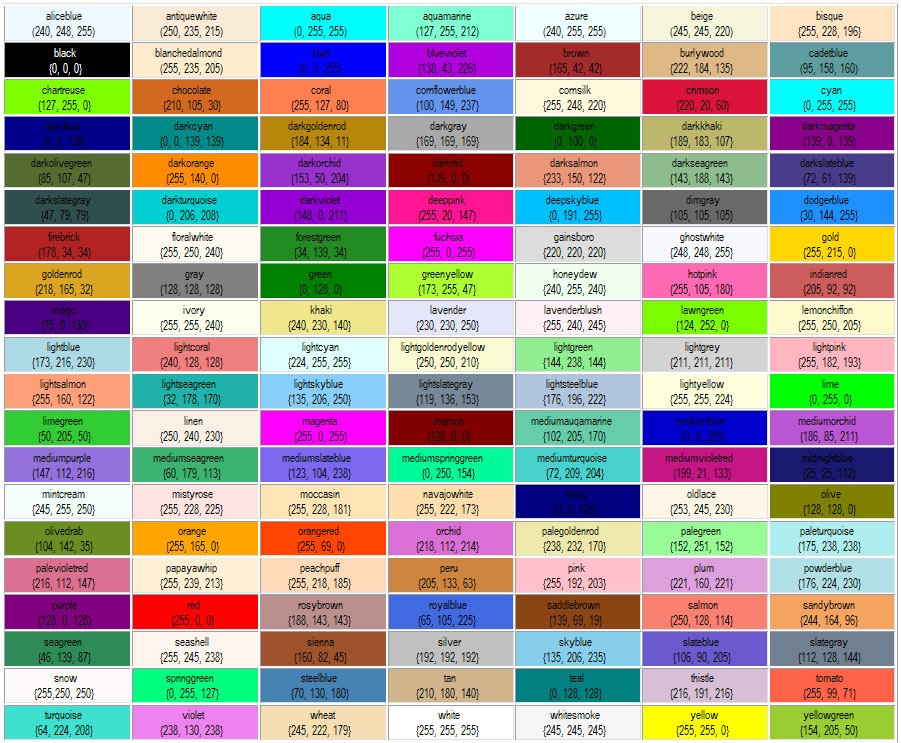
    You can replace the colours in the last line (the RETURN line) with the numbers of your choice (Red,Green,Blue) from the table https://www.prorealcode.com/wp-content/uploads/2015/09/P1jHlnG.jpg, or you can use names shown in the same table like

    coloured("LawnGreen")

    or you can simply rewrite the RETURN line like this one:

    return ExtMapBuffer1, ExtMapBuffer2, ExtMapBuffer3, ExtMapBuffer4

    so that you can choose colours ans styles from the setting panel of the indicator.

    #204022 quote
    jonpt88jonpt88
    Participant
    New

    thank you.


    What I meant to ask is that the indicator appears in the chart and paints the colour of the body of the japanese candle. 🙂

    #204023 quote
    JSJS
    Participant
    Master
    Hi @jonpt88

    Here is the indicator…  

    //PRC_FlatTrend | indicator
    //26.03.2018
    //Nicolas @ www.prorealcode.com
    //Sharing ProRealTime knowledge
    
    PADX=DIplus[14](close)
    NADX=DIminus[14](close)
    PSAR = SAR[0.02,0.02,0.2]
    
    ExtMapBuffer1=0
    ExtMapBuffer2=0
    ExtMapBuffer3=0
    ExtMapBuffer4=0
    
    if (Psar < Close AND PADX > NADX) then
    ExtMapBuffer2=1
    R=50
    G=205
    B=50
    DrawCandle(Open,High,Low,Close) Coloured(R,G,B)
    endif
    if (Psar < Close AND NADX > PADX) then
    ExtMapBuffer4=1
    R=144
    G=238
    B=144
    DrawCandle(Open,High,Low,Close) Coloured(R,G,B)
    endif
    if (Psar > Close AND NADX > PADX) then
    ExtMapBuffer1=1
    R=255
    G=0
    B=0
    DrawCandle(Open,High,Low,Close) Coloured(R,G,B)
    endif
    if (Psar > Close AND PADX > NADX) then
    ExtMapBuffer3=1
    R=250
    G=128
    B=114
    DrawCandle(Open,High,Low,Close) Coloured(R,G,B)
    endif
    
    return

    jonpt88 thanked this post
    Scherm­afbeelding-2022-11-12-om-16.03.19.png Scherm­afbeelding-2022-11-12-om-16.03.19.png
    #204040 quote
    jonpt88jonpt88
    Participant
    New
    wowowowow – thanks JS – you are alwysss so helpful! amazing!
    JS thanked this post
Viewing 5 posts - 1 through 5 (of 5 total)

  • You must be logged in to reply to this topic.

ProRealAI ProRealAI New

Stuck on this ProBuilder code?

Describe what this topic is trying to build, in plain English, and ProRealAI writes the ProRealTime™ indicator, screener or system for you.

Available in 7 languages
Try ProRealAI

Request: Covert Flat Trend to candle background colours


ProBuilder: Indicators & Custom Tools

New Reply
Author
author-avatar
jonpt88 @jonpt88 Participant
Summary

This topic contains 4 replies,
has 3 voices, and was last updated by jonpt88jonpt88

3 years, 10 months ago.

Topic Details
Forum: ProBuilder: Indicators & Custom Tools
Language: English
Started: 11/12/2022
Status: Active
Attachments: 1 files
ProRealCode ProRealCode
Loading...