


Change backgroundcolour of previous candles

Viewing 3 posts - 1 through 3 (of 3 total)
  • Author
    Posts
  • #202820 quote
    nils_knils_k
    Participant
    New

    Dear Members of the Forum,

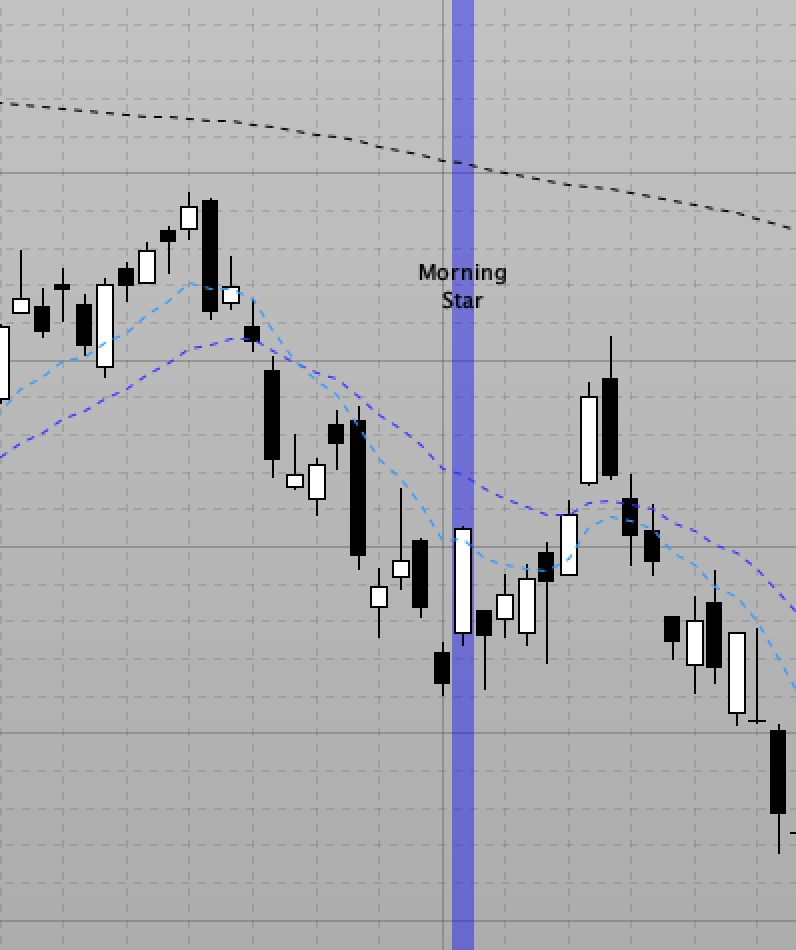
    I want to highlight Morning Star Patterns in my chart by changing the background behind the Morning Star Pattern to green. However, with the BACKGROUNDCOLOUR(r,g,b,<o>) command, I can only highlight the most recent candle’s background of the pattern that satisfies my conditions.
    What I want to do is to highlight also the 2 previous candles that belong to the pattern in the same colour.
    Do you have a solution for this problem.

    My Code so far: (I have attached a screenshort of the result of my code):

    REM MORNING STAR & MORNING DOJI STAR
    MorningS1 = OPEN[2] > CLOSE[2] REM C0 is black
    MorningS2 = OPEN < CLOSE REM C2 is white
    MorningS3 = CLOSE > CLOSE[2] REM close of C2 above close of C0
    MorningS4 = (CLOSE - CLOSE[2]) >= ((OPEN[2] - CLOSE[2]) / 2) REM C2 penetrates more than halfway into C0's real body
    MorningS5 = CLOSE[1] <= (((OPEN[2] - CLOSE[2]) / 5) + CLOSE[2]) REM C2 is not above 1/5 of the lower end of C0's real body
    MorningS7 = OPEN[1] = CLOSE[1] REM C1 is doji
    MorningS8 = (OPEN[2] - CLOSE[2]) > Average[20](RANGE[2]) * 0.5 REM black candle has significant real body
    
    IF MorningS1 AND MorningS2 AND MorningS3 AND MorningS4 AND MorningS5 AND MorningS8 THEN
    IF MorningS7 THEN
    BACKGROUNDCOLOR(0, 0, 255, 100)
    DRAWTEXT("Morning\nStar\nDoji", BARINDEX, (HIGH * 1.05))
    ELSE
    BACKGROUNDCOLOR(0, 0, 255, 100)
    DRAWTEXT("Morning\nStar", BARINDEX, (HIGH * 1.05))
    ENDIF
    ENDIF
    
    RETURN

    Thank you so much!

    PS: If your solution involves arrays, I would be very thankful if you could provide some sample code, because I am not yet the most comfortable with implementing arrays.

    Greetings,
    Nils

    Screenshot-2022-10-19-at-11.58.26.png Screenshot-2022-10-19-at-11.58.26.png
    #202822 quote
    NicolasNicolas
    Keymaster
    Legend

    To color the background in the history, a simple trick is to use an infinite rectangle, example:

    Couleur du background (fond d’ecran)

    use any barindex in the past to locate your background color where it is needed.

    nils_k thanked this post
    #202823 quote
    nils_knils_k
    Participant
    New

    Dear Nicolas,

    Thank you for the workaround!

Viewing 3 posts - 1 through 3 (of 3 total)

  • You must be logged in to reply to this topic.

ProRealAI ProRealAI New

Stuck on this ProBuilder code?

Describe what this topic is trying to build, in plain English, and ProRealAI writes the ProRealTime™ indicator, screener or system for you.

Available in 7 languages
Try ProRealAI

Change backgroundcolour of previous candles


ProBuilder: Indicators & Custom Tools

New Reply
Author
author-avatar
nils_k @nils_k Participant
Summary

This topic contains 2 replies,
has 2 voices, and was last updated by nils_knils_k

3 years, 11 months ago.

Topic Details
Forum: ProBuilder: Indicators & Custom Tools
Language: English
Started: 10/19/2022
Status: Active
Attachments: 1 files
ProRealCode ProRealCode
Loading...

