Remove inside bars from calculations

Viewing 6 posts - 1 through 6 (of 6 total)
  • Author
    Posts
  • #205130 quote
    blackwingblackwing
    Participant
    New

    Hi,

    Is there a way to remove all the inside bars, so that the code ignores them in its calculations? So for example I am looking for a directional bar down (Low> Low[1]) , (High < High[1]) ,relative to the previous bar that is not an  inside bar.

    I would still like to display all the bars as normal on the chart.


    Many thanks in advance.

    #205131 quote
    blackwingblackwing
    Participant
    New

    Sorry I meant (low<Low[1]) and (High<High[1]).

    #205133 quote
    robertogozzirobertogozzi
    Moderator
    Legend

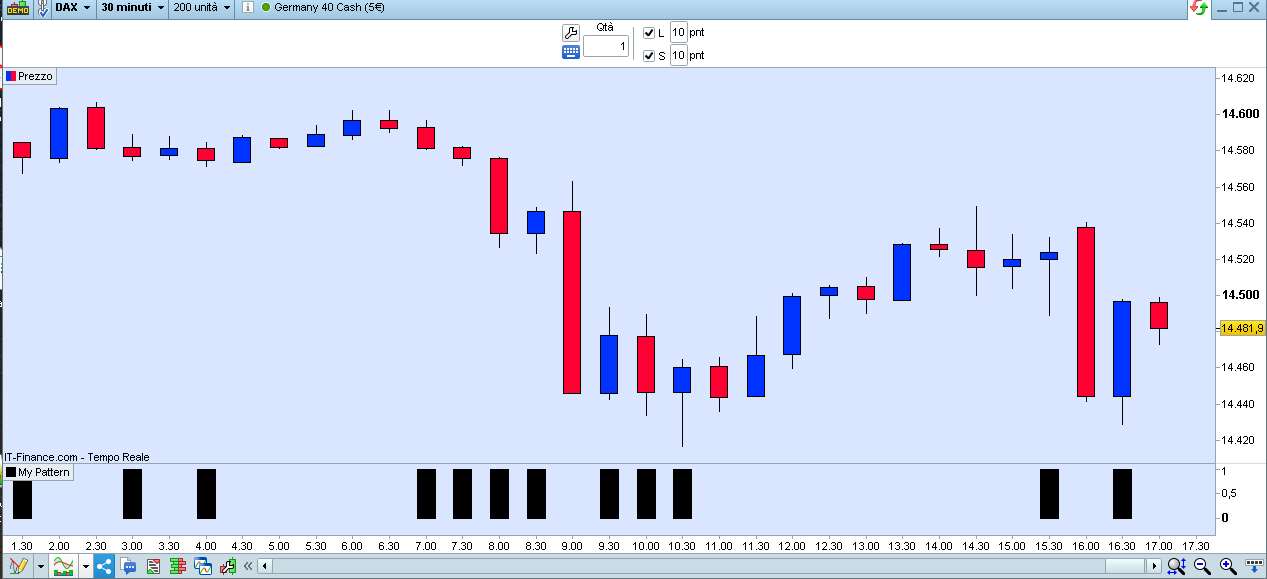
    Is this what you mean?

    InsideBAR = 0
    IF (high <= high[1]) AND (low >= low[1]) THEN
       InsideBAR = 1
    ENDIF
    Signal = 0
    IF Not InsideBAR THEN
       IF (low < low[1]) AND (high < high[1]) THEN
          Signal = 1
       ENDIF
    ENDIF
    RETURN Signal AS "My Pattern"
    blackwing thanked this post
    x.jpg x.jpg
    #205184 quote
    blackwingblackwing
    Participant
    New

    Not quite. Unless I have misunderstood how to use your code.

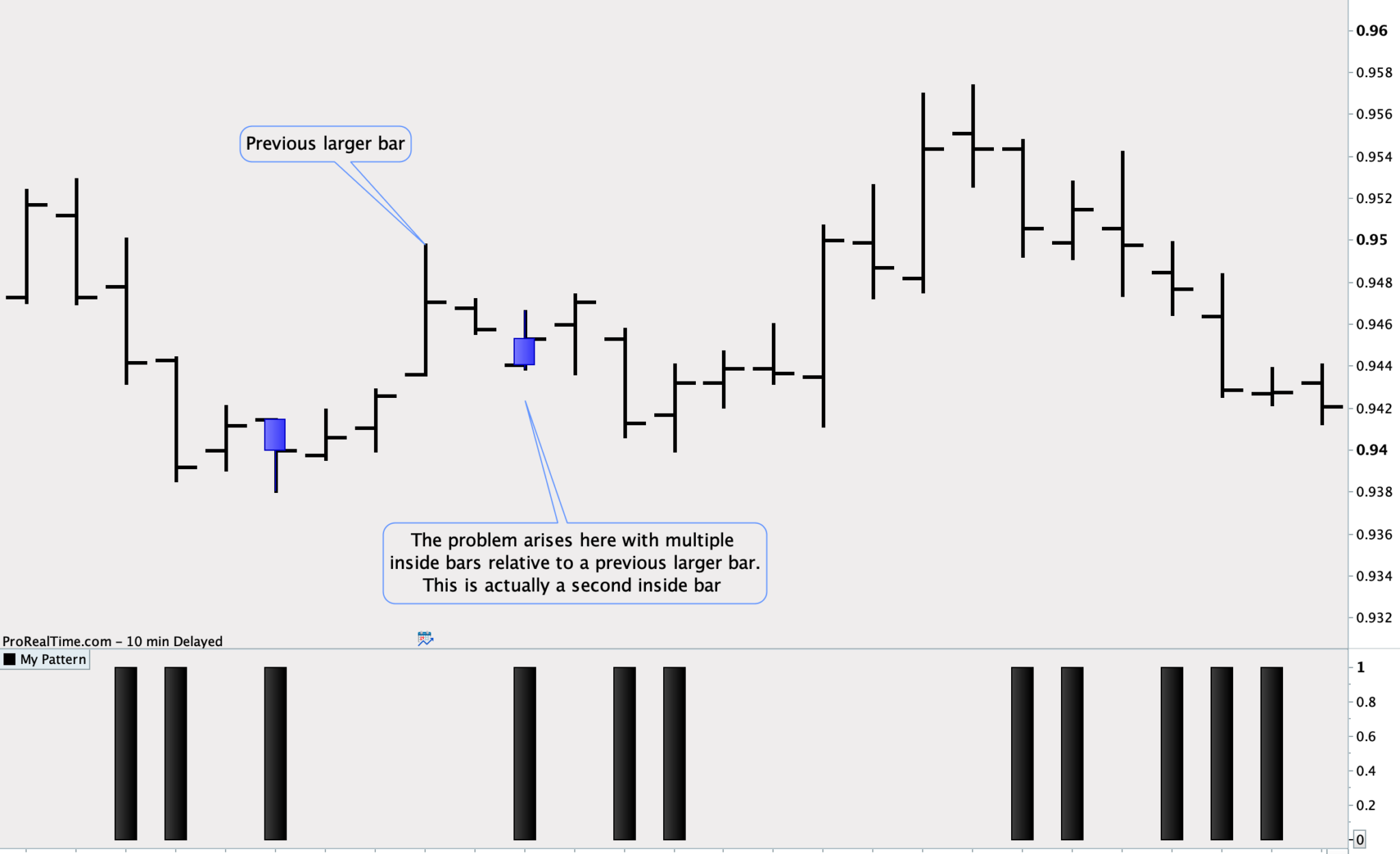
    I am working on an indicator that requires inside bars (or multiple inside bars) to be ignored completely. The problem comes when a bar down comes after an inside bar but itself is an inside bar to a previous larger bar.

    I am looking to find a low bar relative to the previous bar that is not an inside bar. I thought if I removed all inside bars from the calculations then the (Low<Low[1]) and (High< High[1]) would work correctly based on the remaining bars.

    Pic attached

    Screen-Shot-2022-12-02-at-13.48.17.png Screen-Shot-2022-12-02-at-13.48.17.png
    #205233 quote
    robertogozzirobertogozzi
    Moderator
    Legend

    This modified version tracks an InsideBAR until any of its limits are broken, thus preventing signals from being returned:

    ONCE InsideBAR = 0
    ONCE InsideHH  = 0
    ONCE InsideLL  = 0
    IF InsideBAR THEN
       IF (high > InsideHH) OR (low < InsideLL) THEN
          InsideBAR = 0
          InsideHH  = 0
          InsideLL  = 0
       ENDIF
    ENDIF
    IF ((high <= high[1]) AND (low >= low[1])) AND Not InsideBAR THEN
       InsideBAR = 1
       InsideHH  = high[1]
       InsideLL  = low[1]
    ENDIF
    Signal = 0
    IF Not InsideBAR THEN
       IF (low < low[1]) AND (high < high[1]) THEN
          Signal = 1
       ENDIF
    ENDIF
    RETURN Signal AS "My Pattern"
    blackwing thanked this post
    #205295 quote
    blackwingblackwing
    Participant
    New

    Yes that’s it.

    Thank you Roberto

Viewing 6 posts - 1 through 6 (of 6 total)
  • You must be logged in to reply to this topic.

ProRealAI ProRealAI New

Stuck on this ProBuilder code?

Describe what this topic is trying to build, in plain English, and ProRealAI writes the ProRealTime™ indicator, screener or system for you.

Available in 7 languages
Try ProRealAI

Remove inside bars from calculations


ProBuilder: Indicators & Custom Tools

New Reply
Author
author-avatar
blackwing @blackwing1 Participant
Summary

This topic contains 5 replies,
has 2 voices, and was last updated by blackwingblackwing
3 years, 9 months ago.

Topic Details
Forum: ProBuilder: Indicators & Custom Tools
Language: English
Started: 12/01/2022
Status: Active
Attachments: 2 files
ProRealCode ProRealCode
Loading...