


PRT Bands turning green

Viewing 6 posts - 1 through 6 (of 6 total)
  • Author
    Posts
  • #222194 quote
    benkunz
    Participant
    New

    Hi,
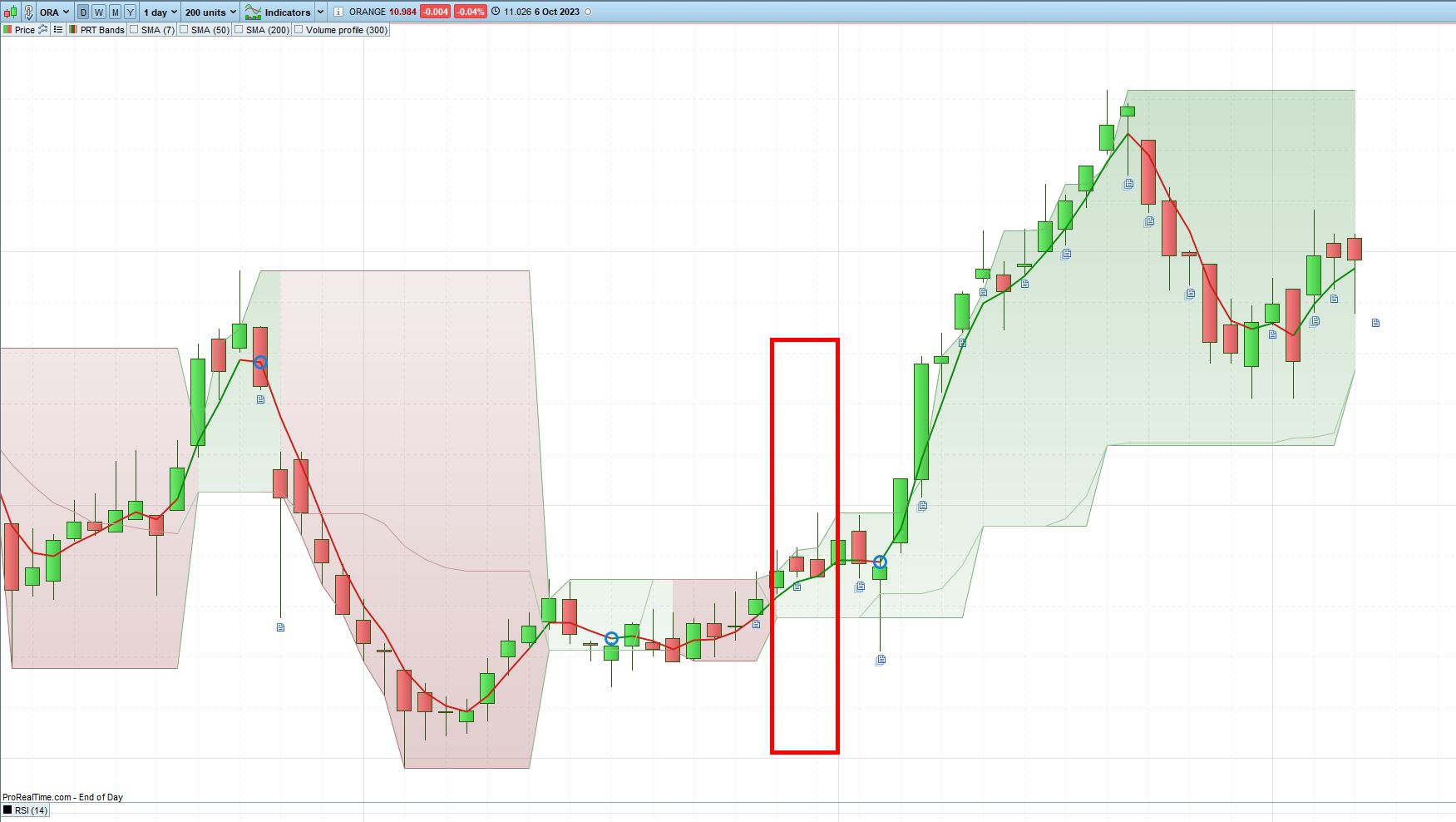
    I’m looking for a screener that would return stocks for which the background color for the PRT bands just turned green over the last 3 days.
    anyone would know how to code this one ?
    thanks

    2023-10-09-13_12_41-ORANGE-Daily-10.984-0.04-6-Oct-2023.jpg 2023-10-09-13_12_41-ORANGE-Daily-10.984-0.04-6-Oct-2023.jpg
    #222210 quote
    benkunz
    Participant
    New

    here is one way to do it :


    up = PRTBandsUp
    dn = PRTBandsDown
     
    if close crosses over up and trend<=0 then //le prix casse la bande supérieure
    trend=1 //tendance haussière
    elsif close crosses under dn and trend>=0 then //le prix casse la bande inférieure
    trend=-1 //tendance baissière
    endif
    
    screener[(trend=1 and trend[1]=-1) or (trend=1 and trend[1]=1 and trend[2]=-1) or (trend=1 and trend[1]=1 and trend[2]=1 and trend[3]=-1)] (Average[50](Volume))
    
    #222211 quote
    benkunz
    Participant
    New

    Hi,
    I managed to get my screener working for the PRT bands, but I’m struggling with filtering on volumes.
    here is the initial version :

    up = PRTBandsUp
    dn = PRTBandsDown
     
    if close crosses over up and trend<=0 then //le prix casse la bande supérieure
    trend=1 //tendance haussière
    elsif close crosses under dn and trend>=0 then //le prix casse la bande inférieure
    trend=-1 //tendance baissière
    endif
    
    screener[(trend=1 and trend[1]=-1) or (trend=1 and trend[1]=1 and trend[2]=-1) or (trend=1 and trend[1]=1 and trend[2]=1 and trend[3]=-1)] (Average[50](Volume))
    

    This does the job and returns 144 results on Nasdaq.
    Then I tried to add a filter on volumes to get rid of less liquid stocks by adding 2 conditions on average and lowest value:

    up = PRTBandsUp
    dn = PRTBandsDown
     
    if close crosses over up and trend<=0 then //le prix casse la bande supérieure
    trend=1 //tendance haussière
    elsif close crosses under dn and trend>=0 then //le prix casse la bande inférieure
    trend=-1 //tendance baissière
    endif
    
    // DEFAULT CONDITIONS
    v1 = Average[50](Volume) >= 50
    v2 = Lowest[256](Volume) >= 15
    defaultConditons = v1 AND v2
    // DEFAULT CONDITIONS
    
    screener[((trend=1 and trend[1]=-1) or (trend=1 and trend[1]=1 and trend[2]=-1) or (trend=1 and trend[1]=1 and trend[2]=1 and trend[3]=-1)) and defaultConditons] (Average[50](Volume))

    Now the screener will only return 8 results. Apple will an average of 60.2M is excluded by this filter. Makes no sense to me. What did I do wrong/misundertand ?
    thanks

    #222217 quote
    JS
    Participant
    Veteran

    Hi,

    C1=Summation[3](Trend=1)=2

    C2=Summation[3](Trend=1)=1

    Screener[C1 or C2]

    If you take the last three days, it is: Trend[0], Trend[1] and Trend[2]

    #222218 quote
    JS
    Participant
    Veteran

    Hi,

    When I use the “Default Conditions” in your screener, I get almost the same number of shares back as without the “Default Conditions”…

    Be careful with the spelling of “Default Conditions (Conditons)”

    I think you’re at the limit of your historical data usage…

    How much historical data can/may you use 256 or 1024?

    #222225 quote
    benkunz
    Participant
    New
    256 yeah, thanks, the issue is coming from that. Really annoyning that no warning is displayed…
Viewing 6 posts - 1 through 6 (of 6 total)

  • You must be logged in to reply to this topic.

PRT Bands turning green


ProScreener: Market Scanners & Detection

New Reply
Author
author-avatar
benkunz @benkunz Participant
Summary

This topic contains 5 replies,
has 2 voices, and was last updated by benkunz

2 years, 5 months ago.

Topic Details
Forum: ProScreener: Market Scanners & Detection
Language: English
Started: 10/09/2023
Status: Active
Attachments: 1 files
Logo Logo
Loading...
