

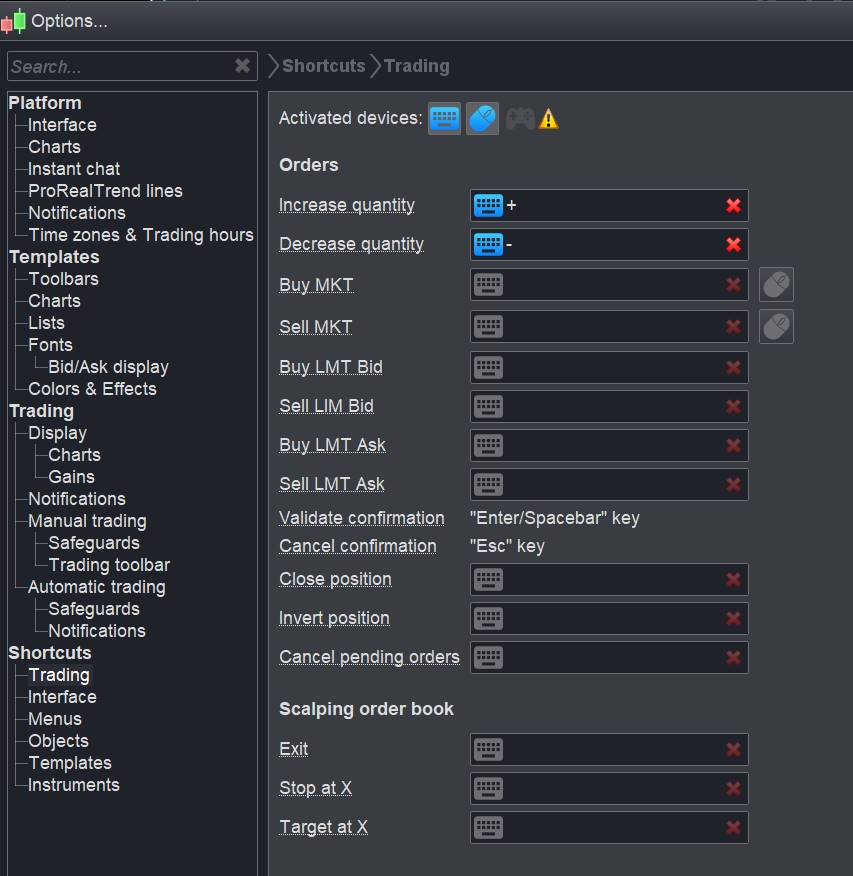


New shortcuts possibilities
Hi, Nicolas,
Thank you for summarizing. Do you already know if the new shortcuts will also affect trade management?
e.g. open position / StopLoss on entry-Price via shortcut?
Thank you.
These are the available shortcuts for trading:
Preset configuration for objects
You can now save several types of configurations for the same object (ex: red line and green line) and also enable toolbar icons and keyboard shortcuts for different types of lines.
[attachment file=”PRT V11 shortcuts.jpg”]
Bonjour Nicolas,
Tu penses que les sorties partielles sur Proorder arrivent enfin ?
Passe une bonne fin de journée
@zilliq
Don’ have any fresh news right now about partial closure in live trading environment. Please speak English in this topic 🙂
Thanks Nicolas,
Sorry I thought I was on the french forum ?
Have a nice day 😉
Customized watermark on charts
You can display/hide instrument information background of the chart. Displayable information includes: ticker, name, timeframe, market. The position of the watermark can be customized.
[attachment file=”PRT v11 watermark.jpg”]
AbzParticipant
Veteran
Hello
is there any update on mail notification when trades opens like there is on when a strategies stops?
Hollow candle
The “hollow candle” chart style has been added: – The border color is determined by an increase/decrease of close vs previous close. – The candlestick is hollow if the movement was bullish during the candle (close > open) and filled in if it was bearish.
[attachment file=”hollow candle prorealtime v11.jpg”]
Heat map
Lists in ProRealTime can now be displayed as a map. The map can be displayed either alongside a normal list or in an independent window.
[attachment file=”heatmap prorealtime v11.jpg”]
New objects
New objects are available such as head & shoulders and Elliott waves.
[attachment file=”elliott waves prorealtime.png”]
Indicators settings
You can now save several configurations for your indicators and price, and easily switch from one to another.
[attachment file=”indicators settings .jpg”]
Lists density
You can now choose between a fixed density for your lists (small, medium, large) or an automatically defined density based list size.
[attachment file=”lists density.jpg”]
Buy/Sell limit orders buttons
New optional buttons in the trading toolbar allow you to quickly place Buy/Sell limit orders at the best Bid/Ask price.
[attachment file=”quick trading buttons.jpg”]
Trading journal
The comments area below charts has been transformed into a trading journal. The trading journal provides a new way for you to take notes on your trades, impressions on the market trends etc…
Each entry in the trading journal may be associated with an instrument or related to any instrument. As an option, you can display your trading journal entries on charts, or display your trades in the trading journal directly.
The trading journal can be displayed as an independent window or on a chart (to the side or on the bottom