Position does not exist

Viewing 9 posts - 1 through 9 (of 9 total)
  • Author
    Posts
  • #221146 quote
    deleted23092025
    Participant
    New

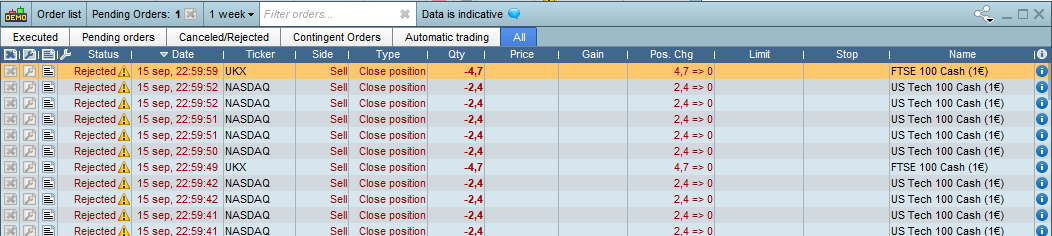
    I have got this error in PRT when some positions get rejected every second, and the message is “position does not exist”. The system is started in ProOrder and I have 25 systems started, but I can start even more in demo as it says the ones that are bugged is under “stopping”. So I think it is a visual bug somehow that the systems are stopped but they still appear on running in ProOrder.

    I attached a file how it looks in orderlist.

    Anyone else have this same issue?

    #221147 quote
    deleted23092025
    Participant
    New

    Apprently my photo did not get attached. But do anyone have this issue and how do i fix it?

    #221148 quote
    deleted23092025
    Participant
    New

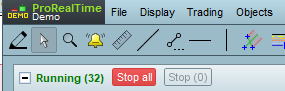
    So what I did now because I want the system still be running so I can track results is started them again as new. And Now I have 32 systems started in demo when max is 25.

    I hope they work on this problem already.

    Edit..: My photos are not getting attached, I dont know why.

    35cfac2dd172561cb9a999a317603bee.png 35cfac2dd172561cb9a999a317603bee.png
    #221149 quote
    deleted23092025
    Participant
    New

    And no I can not stop the systems myself as the red button is grayish and not clickable.

    a74665b9167f92169973da4b6bb279d2.png a74665b9167f92169973da4b6bb279d2.png
    #221152 quote
    deleted23092025
    Participant
    New

    Seems to work to attach photos now so I will do this message to show first photo. Error msg: position does not exist. And this has been going on for days.

    263b8a5042759111b7073dc787db7f19.png 263b8a5042759111b7073dc787db7f19.png
    #221157 quote
    GraHal
    Participant
    Master

    YesI have same as you and I have more than 25 running in Demo due to the Stopping  not forming part of the count to max of 25.

    #221165 quote
    deleted23092025
    Participant
    New

    Are PRT staff aware of the problem and working on it?

    #221209 quote
    RafaelN
    Moderator
    Senior

    Hello,

    I suggest you send a report following to technical support just in case:

    • Go to the “Help” menu on the ProRealTime toolbar.
    • Click on “Help center”, then on “I have a technical problem”
    • Choose the category
    • Select the concerned window in the drop-down menu.
    • Explain the issue in the text box.
    • Click “Send report”

    Have a nice day

    #221217 quote
    deleted23092025
    Participant
    New

    Seems fixed now 🙂

Viewing 9 posts - 1 through 9 (of 9 total)

  • You must be logged in to reply to this topic.

Position does not exist


Platform Support: Charts, Data & Broker Setup

New Reply
Author
Summary

This topic contains 8 replies,
has 3 voices, and was last updated by deleted23092025
2 years, 5 months ago.

Topic Details
Forum: Platform Support: Charts, Data & Broker Setup
Language: English
Started: 09/17/2023
Status: Active
Attachments: 3 files
Logo Logo
Loading...