Great thanks Manel, it was that quick I didn’t even realise I’d made it view only. I’ll sort that now.
Nobody need feel that have to complete ALL the columns ..Thanks. better to have to some data readily accessible than no data at all.
Better to feel relaxed and ‘bang a trade in the sheet’ than feel ‘put off’ that it has to be entered 100% complete.
GraHal
PS Sorted … anyone should be able to edit now. Please let me know if you have any problems.
@GraHal Thank you for your valuable contribution. Just to be clear we will have the opportunity to login trades which were filled on our systems using the supplied link?, for example on Friday had two trades executed on the FTSE 4H. So in such case I go on the spreadsheet and add my trades details?
Regards
Malek
@maleknf yes that is it … ‘bang em in on the Sheet’ please.
If we get a few trades listed by a few members and it all seems to work okay then I’ll ask a Moderator to put the Link on Post 1 of this Thread.
Anybody feel free to improve my layout / column headings etc by by changing them yourself.
It would be a good idea to show the columns we consider essential in Red then everybody knows they need to 100% complete the red columns?
GraHal
Thanks very much Grahal. I have kicked off the reporting and filled in the latest couple of days trades, and it also gives the rest of the guys viewing it an idea of how it’ll look as we go along. I have changed the columns and formatting slightly (hope you don’t mind :-)) and made the columns that need to be filled out highlighted in yellow (I left the red colour free for shorts and losses and to create a future “heat” map). I have also made some of the columns conditional formatted so that if you enter long/short etc the colour of the cell will automatically change. Keeps it simple for members.
All users need to do is go in and input a new trade with the trade info in a few cells – or add their name to the confirm column if that trade has already been inputted by someone else (please allow +/- 5 points difference in SB vs CFD position taking etc etc).
Hopefully this will serve as a useful guide for people who want to check the current status of trades especially as not everyone will be running all the strategies. And also more importantly, if you want to manually open/close Pathfinder trades for whatever reason then this gives you an easy tool to lookup the current direction and trade prices of the strategy.
Hope people find this useful !
https://docs.google.com/spreadsheets/d/1BkjhSK32r1MD0eMnWSHG3cJH7hETYIEl5mXtee2WMjE/edit?usp=sharing
@manel all you’ve done is so good … please do as you wish with the Trades Log, you’ve got very useful ideas!
Another one I thought is if we have a column ‘Country’ next to PRC Username and also a column ‘GMT ~ Time’. If members don’t know their Timezone then the GMT ~ Time would be computed anyway with an IF statement on their Country Flag?
The GMT ~ Time would be useful for direct comparison of Trade times? What you reckon?
You could put rows 20 to 23 at the top above the column headers then the Key & Instructions will always be visible to Users.
You do it if you want as you have already done far more than me … I was just the ‘initial ideas man’ 🙂
Getting Well Organised now … Reiner be proud of us! 🙂
GraHal
@Manel I didn’t mean Country Flag, just Country and then an If Statement against Country to give GMT ~ Time.
I’ll do a Daily Backup … just in case something horrible happens!
If you prefer the Trading Log on your Google Drive then just say … as you have more time invested in it now?
I can see the Trading Log being used as a template for other Auto-Systems on this Site?
Best
GraHal
Hi Grahal – Great, I think we’re good to go for now. I’m ok with it being on your drive, it’s no problem.
Your suggestions make sense, I’ll move the instructions to the top so that they are always visible. Yes, we need a common time format to compare so will look to add the automatic time zone conversion as you have suggested but in the meantime people can just input their own timezone (if they are not aware of the GMT times) and I can manually adjust for now as there won’t be many to do anyway.
I see a couple of people have already contributed to the sheet, thank you.
Yes – if this is an idea/format that people want to roll out across other systems/threads then that’s even better. The more info we share the better for all users. We can hopefully iron out a few wrinkles and make some tweaks over the next weeks as well.
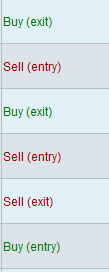
Manel we could make columns G and H simpler by replacing both columns with entries as attached? What you reckon?
Seems easier to follow somehow and is what is shown on PRT … see attached for the Dow Trades
GraHal
Yep, cool, anything to make it easier for people to follow. Have made the amendments. I’ve only coloured in the entry trades as otherwise the whole thing may start to look like a colour shade chart that you get from a DIY store when you’re looking to paint your rooms…..:-). The main thing is it should highlight the important cells at a quick glance which it hopefully should now do.
Morning guys!
I just logged in my trades. h#one thing came to my point, what do we do when more than one member has the same position and already someone else logged in the trade? I think we should have a column where we can see who else had/ve same position. Mybe it is already on here and did not see it.
Regards
Malek
I think it would be much better and more readable if we have one column with entry price and one column with exit price. Then it will be quite obvious which trades are closed and which are still open. The gain/loss column could be calculated by a formula.
Now it is hard to follow which entry and which exit belongs together.
We need one row for each Trade then the User who typed in the ‘Entry’ must also then complete the ‘Exit’ and the Gain / Loss can then easily be calculated from entry and exit values.
Thanks
GraHal
I made the proposed changes in the file!
One comment: Maybe we sould split live/demo into two columns. Otherwise we get it double!
Hey great thanks H_kan
How about if its the same trade, but in Demo (or vice versa) then under the confirmed column it is entered as below
Maleknf (DEMO)
I’ll make above change and see what we all think?
GraHal
Why is there a need for 10,000 preloadbars in the 4H V6 Systems anybody?
DEFPARAM PRELOADBARS = 10000
Thanks
GraHal