@verdi55
...AND 1=1
I just create a hard coded false or true for an if-statement. I use this function during development to activate or deactivate certain parts of the algorithm. So I don’t always have to comment or rewrite whole code parts from scratch. I also find it helpful for analysis. e. g. I would like to examine which results a certain trade trigger delivers, here the scenario l5.
// long position conditions
l1 = signalline CROSSES OVER monthlyHigh AND 1=0
l2 = signalline CROSSES OVER weeklyHigh AND 1=0
l3 = signalline CROSSES OVER dailyHigh AND 1=0
l4 = signalline CROSSES OVER monthlyLow AND 1=0
l5 = signalline > monthlyHigh and dailyHigh > weeklyHigh and 1=1 // acumulate positions in strong bullish trend

// short position conditions
s1 = signalline CROSSES UNDER monthlyHigh AND 1=0
s2 = signalline CROSSES UNDER dailyLow AND 1=0
s3 = signalline CROSSES UNDER previousDailyHigh AND 1=0
s4 = signalline < signalline[1] AND signalline[1] < signalline[2] AND signalline < dailyLow and dailyLow < monthlyHigh AND 1=0 // trade the correction in a long trend
Maybe you can show me an other way how to create a Boolean expression true or false in PRT?
Well, actually this is not a bad idea to switch off single conditions.
To simplify it and to improve readability, you could say elsewhere
on = 1=1
off = 1=0
and then add “and on” or “and off” to every line you want to switch, but this is a mere formality.
Hi Reiner!
Thanks for your feedback and suggestions. 2017 was ok but last months not very active with my trading due to lack of time. Goal is to be more active and I, as many others, need to learn to be patient, adjust risk and don’t judge a robot too soon when trading automatic in PRT. Going to test DAX V8 on demo for a while with your suggested settings.
@Reiner do you have any tips what to alter for the 4h algos to double all positions for those instruments that do not have a 2€ alternative?
Best regards,
David
Hi David,
you can introduce a position multiplier (variable positionMultiplier), which scales the chance/risk profile linearly up. This would have the advantage that you keep the default settings and simply set your risk via the variable. In your example positionMultiplier = 2 (or 1.5 or 3 and so on).
//...
ONCE positionMultiplier = 2 // multiply the position size with unchanged chance/risk profil
//...
// long entry with order cumulation
IF ( l1 OR l4 OR l2 OR (l3 AND f2) ) AND NOT alreadyReducedLongPosition THEN

// check saisonal booster setup and max position size
IF saisonalPatternMultiplier > 0 THEN
numberContracts = MIN(maxPositionSizePerTrade, positionSize * saisonalPatternMultiplier) * positionMultiplier
IF (COUNTOFPOSITION + numberContracts) <= maxPositionSizeLong * positionMultiplier THEN
IF SHORTONMARKET THEN
EXITSHORT AT MARKET
ENDIF
BUY numberContracts CONTRACT AT MARKET
ENDIF
ELSIF saisonalPatternMultiplier <> 0 THEN
numberContracts = MIN(maxPositionSizePerTrade, positionSize) * positionMultiplier
IF (COUNTOFPOSITION + numberContracts) <= maxPositionSizeLong * positionMultiplier THEN
IF SHORTONMARKET THEN
EXITSHORT AT MARKET
ENDIF
BUY numberContracts CONTRACT AT MARKET
ENDIF
ENDIF
I can add this to the default robot if you need it.
Thank you very much Reiner for your quick respons!
Best regards, David
I applied Reiner’s positionsmultiplier to other algos as well:
Hi guys,
all pathfinder 4H systems are optimised by default for a 10k Euro account. There are always requests to deliver robots for smaller or larger accounts.
I have added a simple mechanism to the current versions to improve this situation. I have extended the code so that the chance/risk profile can be scaled linearly up and down!!! In order to control this logic as much as possible, 4 new variables have been introduced. Here is the setting for possible scenarios:
- The robot should start with the lowest chance/risk ratio and increase the risk as soon as profit is available.
// dynamic scaling of the chance/risk profile depending on account size
ONCE startRisk                     = 0.25  // start risk level e.g 0.25 - 25%, 0.5 - 50%, 0.75 - 75%, 1 - 100% and so on
ONCE maxRisk                       = 1.5   // max risk level e.g  1.5 - 150%
ONCE increaseRiskLevel             = 1000  // amount of profit from which the risk is to be increased
ONCE increaseRiskStep              = 0.25  // step by which the risk should be increased
In the above example, the robot starts with only 25% of the chance/risk ratio of the default settings for an 10k account. After 1.000 Euros profit (or another currency) each, the chance/risk profile is increased by a further 25% up to a maximum risk of 150%.
2. the robot should always run with the smallest chance/risk ratio (25%)
ONCE startRisk                     = 0.25  // start risk level e.g 0.25 - 25%, 0.5 - 50%, 0.75 - 75%, 1 - 100% and so on
ONCE maxRisk                       = 0.25  // max risk level e.g  1.5 - 150%
ONCE increaseRiskLevel             = 1     // amount of profit from which the risk is to be increased
ONCE increaseRiskStep              = 1     // step by which the risk should be increased
3. the robot should always run with the double chance/risk ratio (200%)
ONCE startRisk                     = 2  // start risk level e.g 0.25 - 25%, 0.5 - 50%, 0.75 - 75%, 1 - 100% and so on
ONCE maxRisk                       = 2  // max risk level e.g  1.5 - 150%
ONCE increaseRiskLevel             = 1  // amount of profit from which the risk is to be increased
ONCE increaseRiskStep              = 1  // step by which the risk should be increased
Please find attached the version for DAX, DOW and HS.
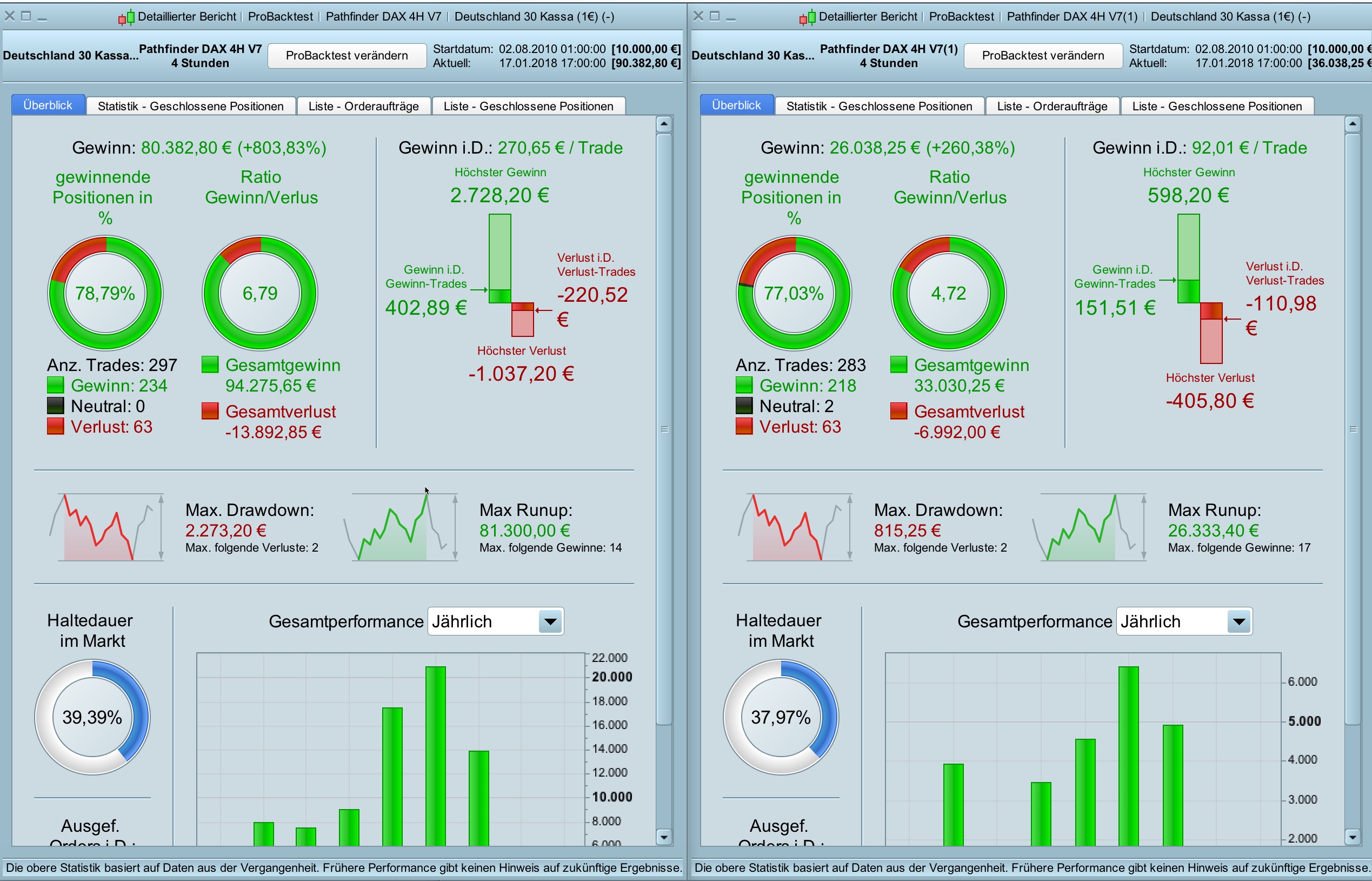
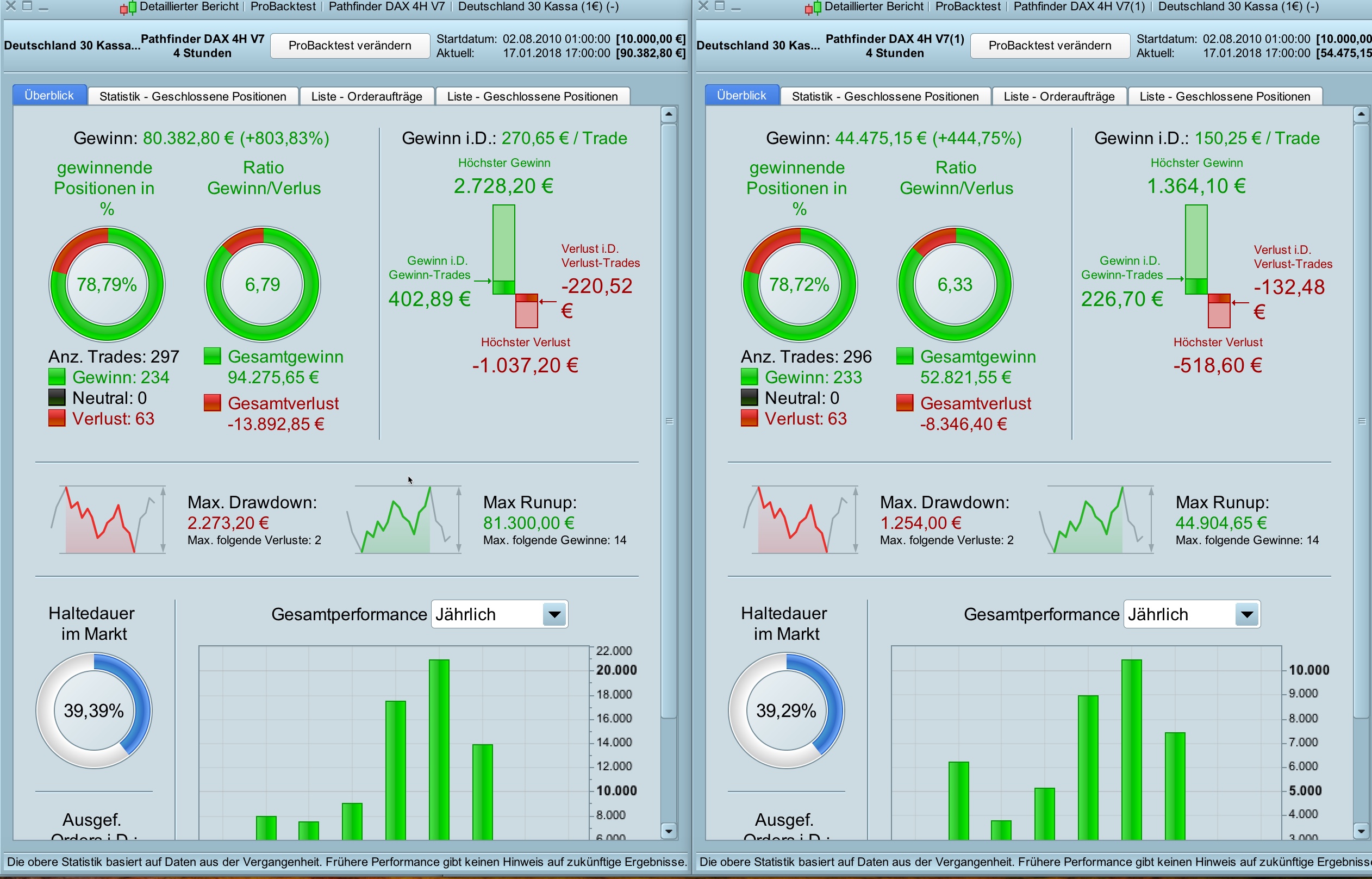
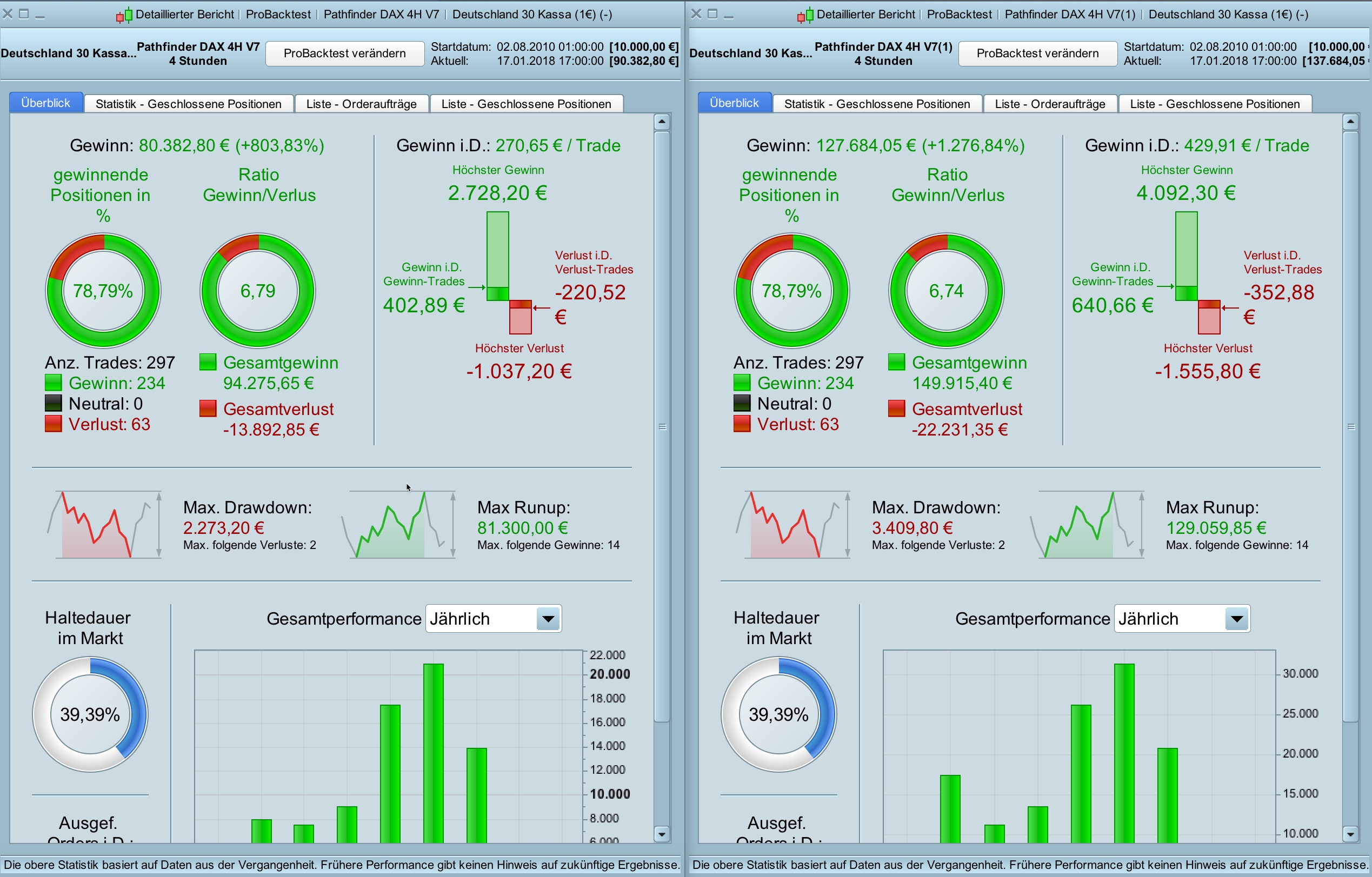
Attached are three Pathfinder DAX 4H V7 backtests with 25%, 50% and 150% chance/risk ratio compared to the original version.
Please note that scaling down is not quite linear due to the minimum contract size of 1.
Hello Guys
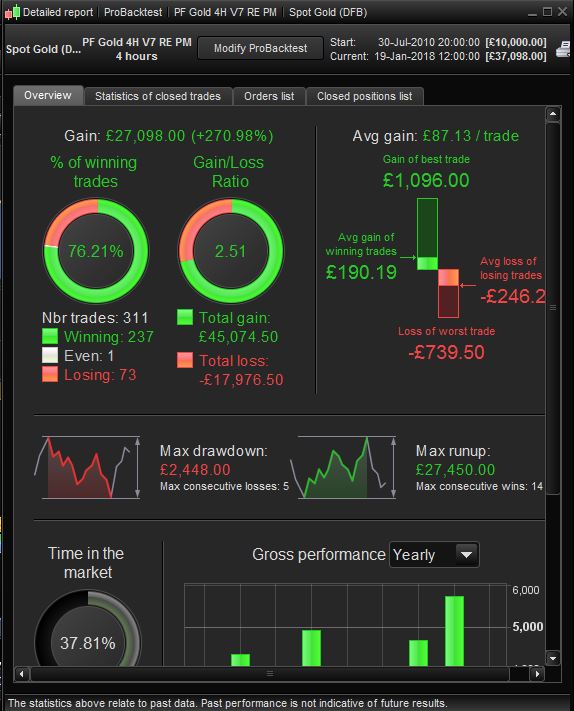
I tried myself on Gold with the Version 7 and Reiners position multiplier.
Oh, thank you! i was just working on it!
I’ve also worked on Eur/Usd, but previus version without multiplier.
Here it is.
Hi guys,
For new Pathfinder versions I recommend to use my last version with the risk controller logic. In my eyes this is a very powerful feature and it’s a pity that I didn’t come to it sooner.
Set startRisk and maxRisk to 1 (100%) and try to find a profitable parameter setup for an 10k account (max drawdown <= 30% and profit/loss ratio > 70%).
ONCE startRisk                     = 1     // start risk level e.g 0.25 - 25%, 0.5 - 50%, 0.75 - 75%, 1 - 100% and so on
ONCE maxRisk                       = 1     // max risk level e.g  1.5 - 150%
ONCE increaseRiskLevel             = 1000  // amount of profit from which the risk is to be increased
ONCE increaseRiskStep              = 0.25  // step by which the risk should be increased
The big advantage of the risk controller feature is that anyone can decide how much risk to trade with Pathfinder systems. We all don’t want to lose money but earn as much as possible: -). It is advisable to start with a good risk/chance ratio (25% in the example below) and then increase the risk (to 100%) with increasing profits (every 1.000 Euros by 25%).
ONCE startRisk                     = 0.25  // start risk level e.g 0.25 - 25%, 0.5 - 50%, 0.75 - 75%, 1 - 100% and so on
ONCE maxRisk                       = 1     // max risk level e.g  1.5 - 150%
ONCE increaseRiskLevel             = 1000  // amount of profit from which the risk is to be increased
ONCE increaseRiskStep              = 0.25  // step by which the risk should be increased
Sorry, last Eur/Usd worked well only from 2012, i’ve fixed it from 2010.
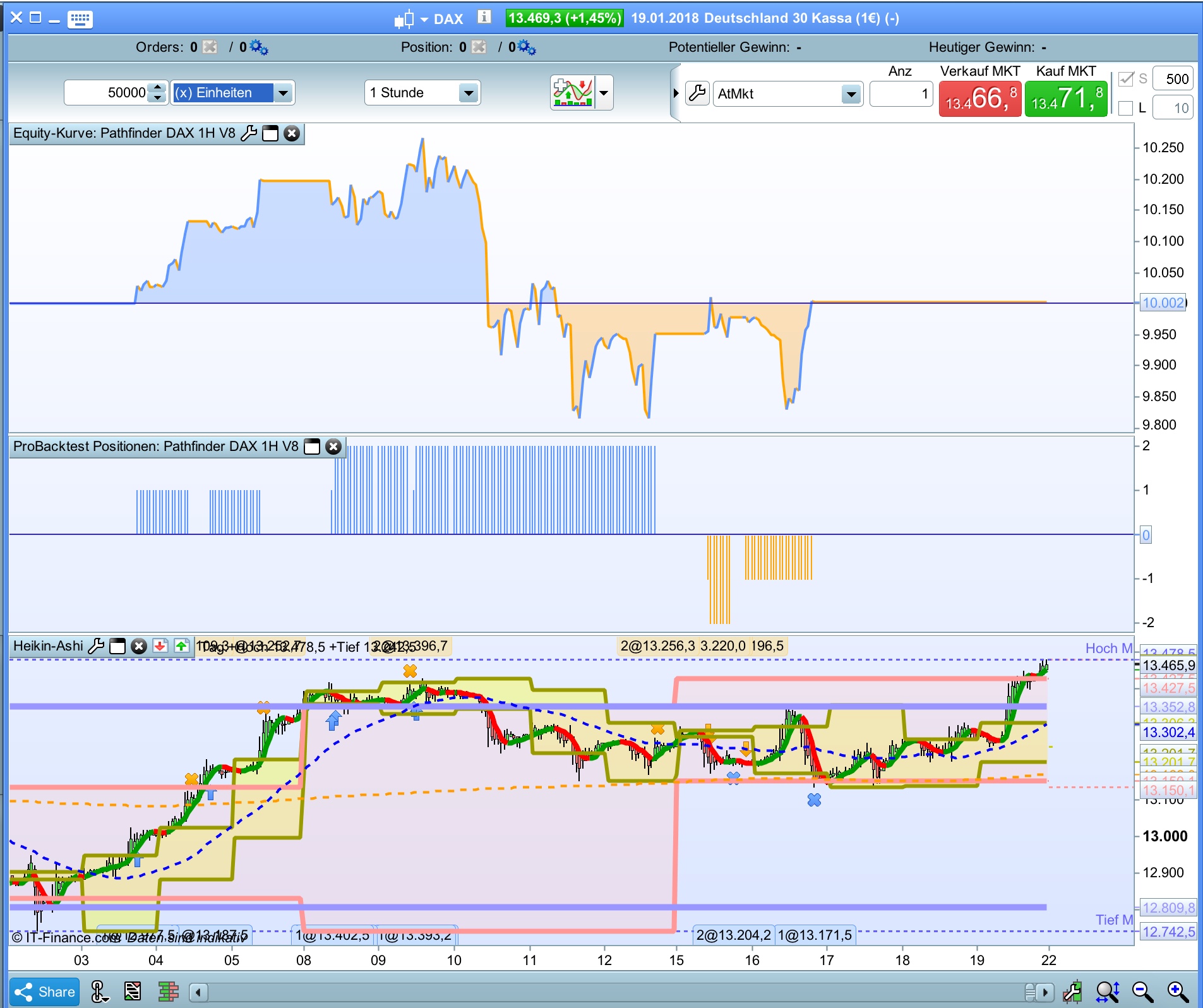
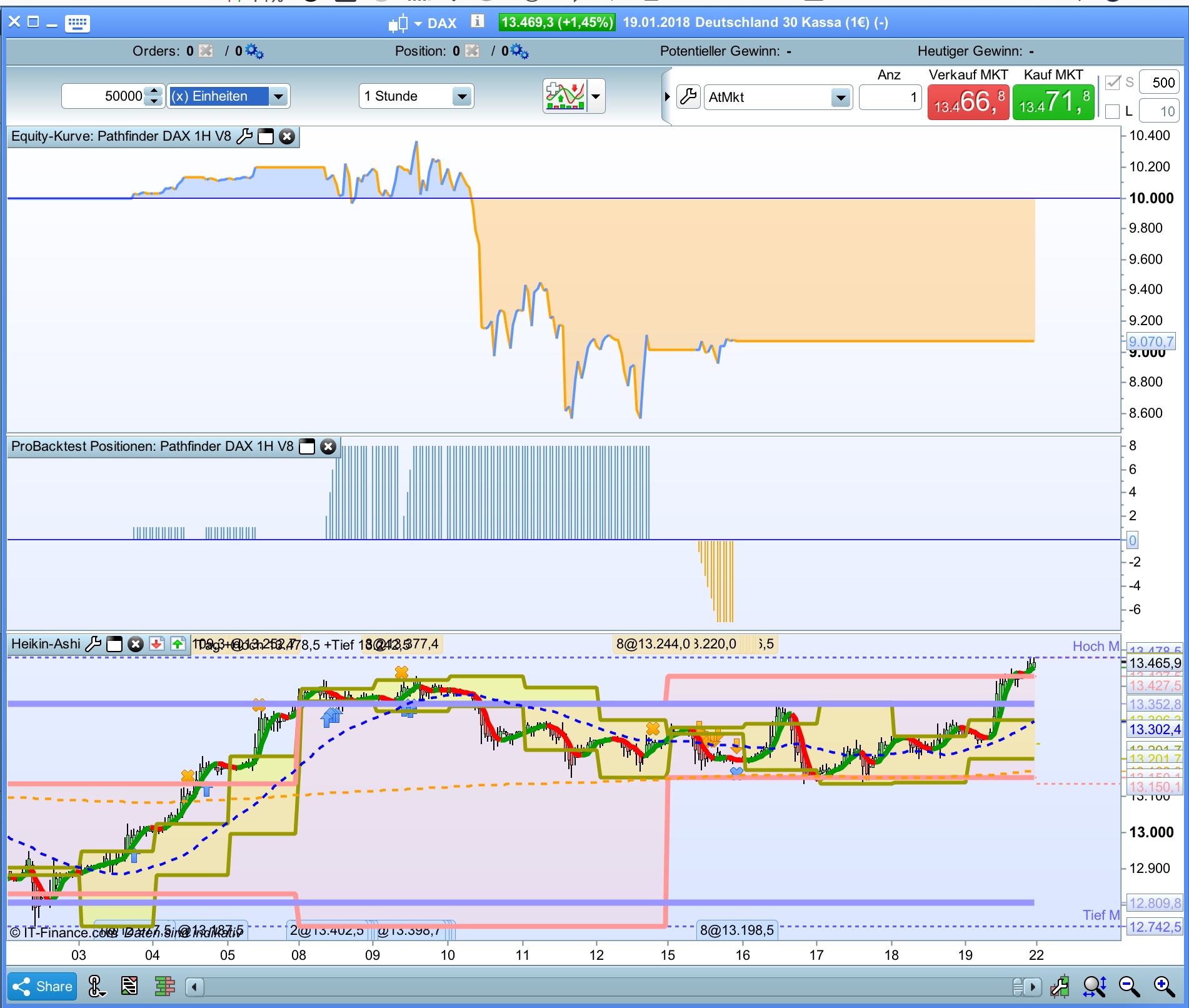
I have extended the Pathfinder DAX 1H V8 with the new risk controller feature to show the advantage of this function.
Pathfinder DAX 1H V8 is trading very aggressively in very bullish scenarios this is the reason for the outstanding backtest! performance. But this behavior is a medal with two sides.
After a good start there was a big loss with the default settings.
Especially at the beginning it is important for the head not to make a big loss and it is one thing to lose 272 Euro (25% risk – first picture) or 1.190 Euro (100% risk – second picture).
Caution: the system is still being tested!