Multiple Timeframes support available?

Viewing 15 posts - 1 through 15 (of 30 total)
  • Author
    Posts
  • #60959 quote
    martinmc666
    Participant
    New

    Can anyone tell me if 10.3 now supports multiple timeframes so i can a signal from a 15minute chart can allow me to sell a share on an hourly chart.

    Many thanks

    #60972 quote
    Nicolas
    Keymaster
    Master

    Still not available right now, but this feature will be added this year for IG/PRT-CFD customers, just right after the new engine (which is already available with a prorealtime trading with IB or prorealtime software account).

    Elsborgtrading thanked this post
    #69123 quote
    ginko
    Participant
    Average

    Hi Nicolas,


    I use PRT with IB. Could you guide me on some doc I could use to write my trading systems and indicators, based on multiple timeframes ?


    Thanks a lot

    #109598 quote
    ginko
    Participant
    Average

    I have seen this first implementation on auto-trading (that is not available on every broker using PRT) : https://www.prorealcode.com/blog/learning/approach-multi-timeframe-trading-prorealtime/

    Any insights to create indicators using mutiple timeframes on the same chart ?

    #109604 quote
    robertogozzi
    Moderator
    Master

    ProBuilder does not support MTF at present, thus making it impossible to build MTF indicators/oscillators.

    MTF Indicators can be simulated by running a piece of code as a strategy in ProBackTest and using GRAPHONPRICE to plot it on the chart. You’ll have to keep your backtest window open at all time, though.

    Example: https://www.prorealcode.com/documentation/graphonprice/

    #109605 quote
    Vonasi
    Moderator
    Master

    Any insights to create indicators using mutiple timeframes on the same chart ?

    MTF is not available for indicators yet. It is only available for ProOrder strategies and ProScreener.

    You can however create some MTF indicators by coding a dummy strategy and using GRAPH or GRAPHONPRICE. Something like this:

    timeframe(weekly, updateonclose)
    a = average[52]
    
    timeframe(daily, default)
    b = average[200]
    
    buy at -close limit
    
    graphonprice a
    graphonprice b
    #109606 quote
    Vonasi
    Moderator
    Master

    Roberto and I were obviously typing at the same time!

    #109717 quote
    ginko
    Participant
    Average

    Thanks for the ansewer that looks great in general.

    In my case, I tried, but my timeframe is in ticks in the indcator, it seems like I cannot combine it with a time view, like 1 hour.

    I would like to get values at specific times, let’s say each 15 minutes on a 200 ticks chatr on dow

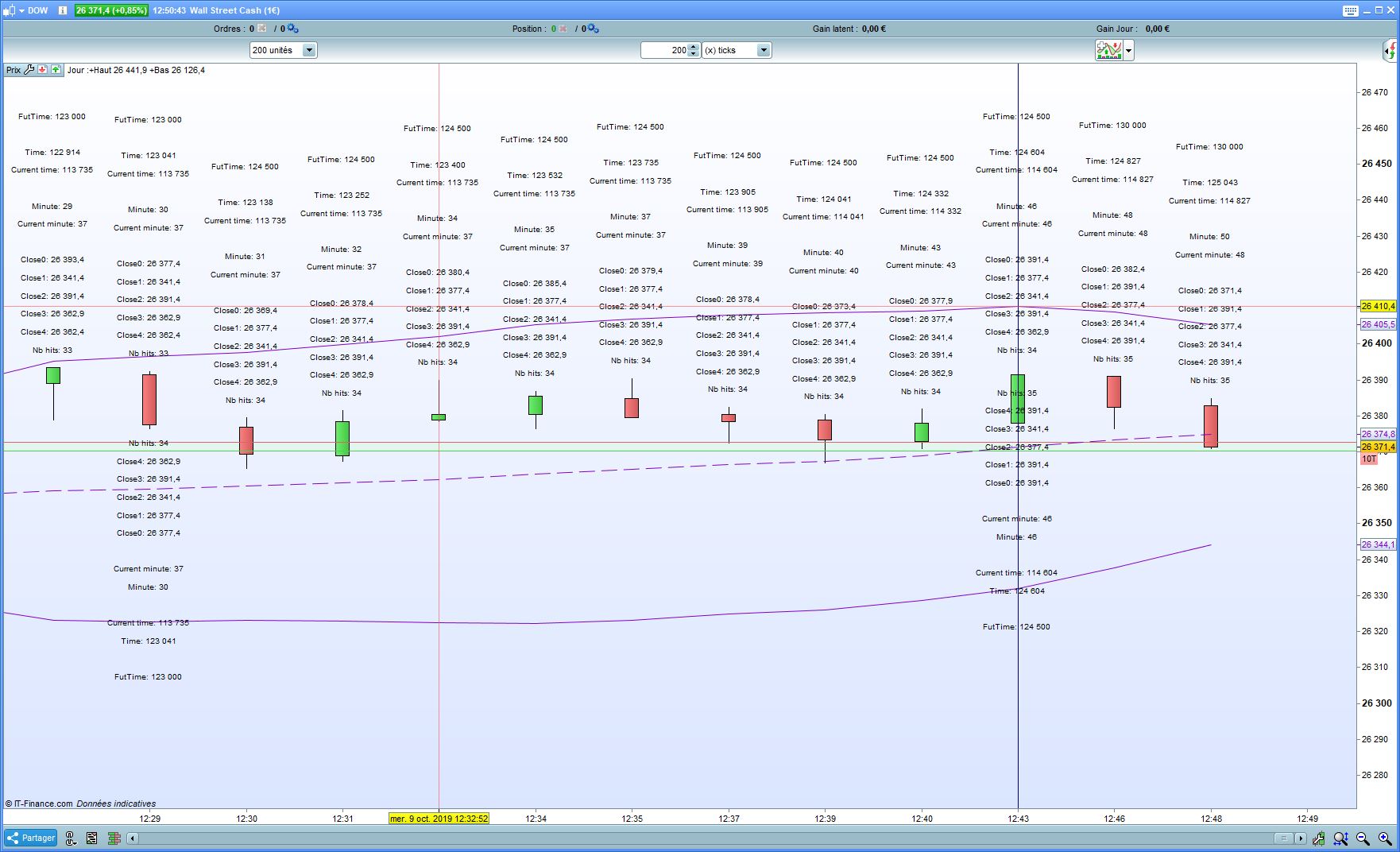
    I used the folloing code to retrieve Close by hand, but I was wondering wheter

    Q1/ There would be a better way to build the (closeTime0 to closeTime4) simulated array,  like using a real array, I may need more values and I would like to use indicators on those. I can go from scratch, but it would be really tedious without arrays (no for, while, and so on)

    Q2/ I see it works only with Time and CurrentTime is never updated (i.e:  if I use “IF CTM >= FutTime AND CT<220000 Then” in the code below instead of “IF CT >= FutTime AND CT<220000 Then”), is this or documented somewhere or a defect  ?

    Sample code I made to debug the issue:

    ONCE FutTime=40000
    ONCE s=5*pipsize
    CH=Hour
    CM=Minute
    CMC=CurrentMinute
    CloseTime0=Close
    CT=Time
    CTC=CurrentTime
    BI=barindex
    Y=high
    DRAWTEXT(“FutTime: #FutTime#” , BI, Y+14*s)
    DRAWTEXT(“Time: #CT#” , BI, Y+12*s)
    DRAWTEXT(“Current time: #CTC#” , BI, Y+11*s)
    DRAWTEXT(“Minute: #CM#” , BI, Y+9*s)
    DRAWTEXT(“Current minute: #CMC#” , BI, Y+8*s)
    DRAWTEXT(“Close0: #closeTime0#” , BI, Y+6*s)
    DRAWTEXT(“Close1: #closeTime1#” , BI, Y+5*s)
    DRAWTEXT(“Close2: #closeTime2#” , BI, Y+4*s)
    DRAWTEXT(“Close3: #closeTime3#” , BI, Y+3*s)
    DRAWTEXT(“Close4: #closeTime4#” , BI, Y+2*s)
    DRAWTEXT(“Nb hits: #CountMM5M15#” , BI, Y+1*s)
    
    IF CT >= FutTime AND CT<220000 Then
    closetime4=closeTime3
    closeTime3=closeTime2
    closeTime2=closeTime1
    closeTime1=closeTime0
    CountMM5M15=CountMM5M15+1
    Y=close
    s=-s
    DRAWTEXT(“FutTime: #FutTime#” , BI, Y+14*s)
    DRAWTEXT(“Time: #CT#” , BI, Y+12*s)
    DRAWTEXT(“Current time: #CTC#” , BI, Y+11*s)
    DRAWTEXT(“Minute: #CM#” , BI, Y+9*s)
    DRAWTEXT(“Current minute: #CMC#” , BI, Y+8*s)
    DRAWTEXT(“Close0: #closeTime0#” , BI, Y+6*s)
    DRAWTEXT(“Close1: #closeTime1#” , BI, Y+5*s)
    DRAWTEXT(“Close2: #closeTime2#” , BI, Y+4*s)
    DRAWTEXT(“Close3: #closeTime3#” , BI, Y+3*s)
    DRAWTEXT(“Close4: #closeTime4#” , BI, Y+2*s)
    DRAWTEXT(“Nb hits: #CountMM5M15#” , BI, Y+1*s)
    s=-s
    IF CM < 45 then
    FutTime=CH*10000+(ROUND(CM/15)+1)*1500
    ELSE
    FutTime=(CH+1)*10000
    DRAWVLINE(barindex) coloured (0,0,128) // test to see whether the test works: should draw a vertical line each hour
    IF FutTime > 210000 then
    FutTime= 040000 // make sure we do not collect value between 21:00:00 and 4:00:00 (fixed timings depending on local TZ)
    CountMM5M15=0
    ENDIF
    ENDIF
    ENDIF
    Return

    Any suggestions or insights for Q1 and Q2 ?

    Thanks for your help

    Capture.jpg Capture.jpg
    #109742 quote
    robertogozzi
    Moderator
    Master

    >> For clarity of messages on ProRealCode’s forums, please use the “insert code PRT” button to separate the text of the code part! Thank you! <<

    #109745 quote
    ginko
    Participant
    Average

    This is the code showing the issue for Q1 above (in my previous post)

    ONCE FutTime=40000
    ONCE s=5*pipsize
    CH=Hour
    CM=Minute
    CMC=CurrentMinute
    CloseTime0=Close
    CT=Time
    CTC=CurrentTime
    BI=barindex
    Y=high
    DRAWTEXT(“FutTime: #FutTime#” , BI, Y+14*s)
    DRAWTEXT(“Time: #CT#” , BI, Y+12*s)
    DRAWTEXT(“Current time: #CTC#” , BI, Y+11*s)
    DRAWTEXT(“Minute: #CM#” , BI, Y+9*s)
    DRAWTEXT(“Current minute: #CMC#” , BI, Y+8*s)
    DRAWTEXT(“Close0: #closeTime0#” , BI, Y+6*s)
    DRAWTEXT(“Close1: #closeTime1#” , BI, Y+5*s)
    DRAWTEXT(“Close2: #closeTime2#” , BI, Y+4*s)
    DRAWTEXT(“Close3: #closeTime3#” , BI, Y+3*s)
    DRAWTEXT(“Close4: #closeTime4#” , BI, Y+2*s)
    DRAWTEXT(“Nb hits: #CountMM5M15#” , BI, Y+1*s)
     
    IF CT >= FutTime AND CT<220000 Then
    closetime4=closeTime3
    closeTime3=closeTime2
    closeTime2=closeTime1
    closeTime1=closeTime0
    CountMM5M15=CountMM5M15+1
    Y=close
    s=-s
    DRAWTEXT(“FutTime: #FutTime#” , BI, Y+14*s)
    DRAWTEXT(“Time: #CT#” , BI, Y+12*s)
    DRAWTEXT(“Current time: #CTC#” , BI, Y+11*s)
    DRAWTEXT(“Minute: #CM#” , BI, Y+9*s)
    DRAWTEXT(“Current minute: #CMC#” , BI, Y+8*s)
    DRAWTEXT(“Close0: #closeTime0#” , BI, Y+6*s)
    DRAWTEXT(“Close1: #closeTime1#” , BI, Y+5*s)
    DRAWTEXT(“Close2: #closeTime2#” , BI, Y+4*s)
    DRAWTEXT(“Close3: #closeTime3#” , BI, Y+3*s)
    DRAWTEXT(“Close4: #closeTime4#” , BI, Y+2*s)
    DRAWTEXT(“Nb hits: #CountMM5M15#” , BI, Y+1*s)
    s=-s
    IF CM < 45 then
    FutTime=CH*10000+(ROUND(CM/15)+1)*1500
    ELSE
    FutTime=(CH+1)*10000
    DRAWVLINE(barindex) coloured (0,0,128) // test to see whether the test works: should draw a vertical line each hour
    IF FutTime > 210000 then
    FutTime= 040000 // make sure we do not collect value between 21:00:00 and 4:00:00 (fixed timings depending on local TZ)
    CountMM5M15=0
    ENDIF
    ENDIF
    ENDIF
    Return

    Additionally a very simple case showing the issue for Q2 on a tick graph (let’s say 100 ticks on Dow)

    //To be run on a 100 unit & 100 Tick Dow graph
    DEFPARAM DRAWONLASTBARONLY = TRUE
    ONCE s=5*pipsize
    CTC=CurrentTime
    CT=Time
    BI=barindex
    Y=high
    DRAWTEXT("Time: #CT#" , BI, Y+2*s)
    DRAWTEXT("Current time: #CTC#" , BI, Y+1*s)
     
    Return
    #109772 quote
    robertogozzi
    Moderator
    Master

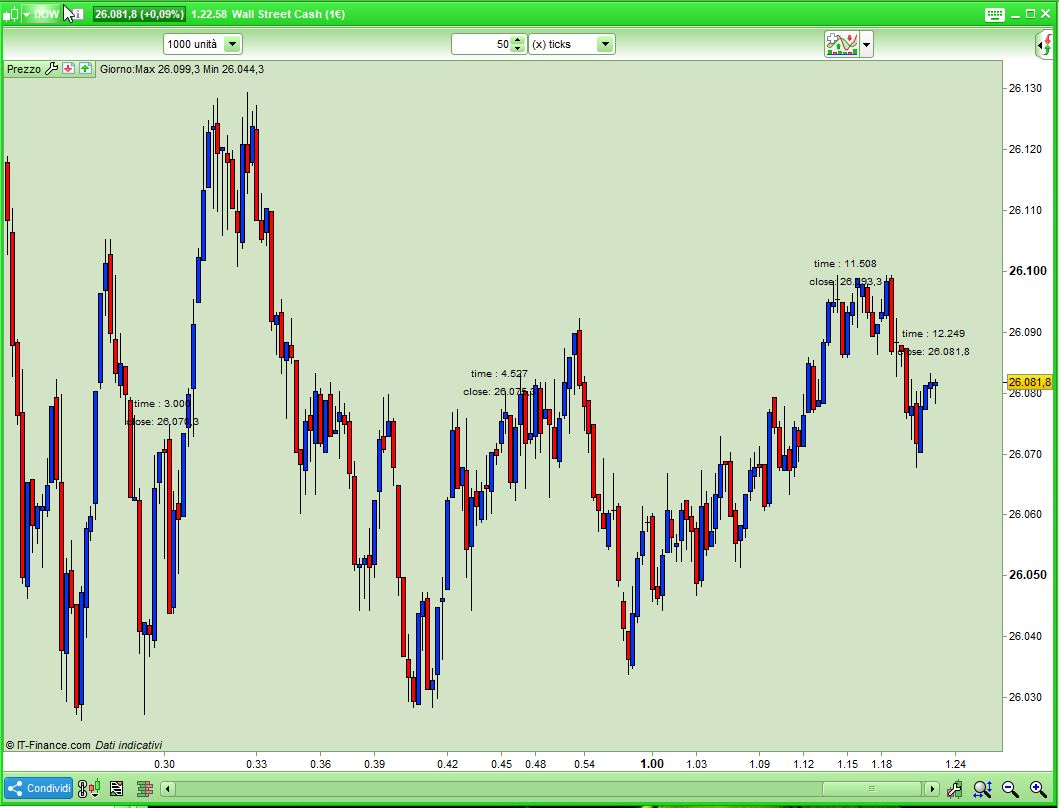
    This will plot TIME & PRICE each 15 minute-chunk (roughly). I tested it on DOW 50 ticks to have more separation between text:

    DEFPARAM DrawOnLastBarOnly = true
    Distanza1 = 5 * pipsize
    Distanza2 = round(Distanza1 * 1.5)
    IF barindex = 0 THEN
       q1 = 0
       q2 = 0
       q3 = 0
       q4 = 0
    ENDIF
    IF OpenMinute >= 15 AND OpenMinute[1] < 15 THEN
       q1 = close
       b1 = barindex
       t1 = OpenTime
    ELSIF OpenMinute >= 30 AND OpenMinute[1] < 30 THEN
       q2 = close
       b2 = barindex
       t2 = OpenTime
    ELSIF OpenMinute >= 45 AND OpenMinute[1] < 45 THEN
       q3 = close
       b3 = barindex
       t3 = OpenTime
    ELSIF OpenMinute >= 0 AND OpenMinute[1] > OpenMinute THEN
       q4 = close
       b4 = barindex
       t4 = OpenTime
    ENDIF
    IF q1 > 0 THEN
       DRAWTEXT("time : #t1#",b1,q1 + Distanza2)
       DRAWTEXT("close: #q1#",b1,q1 + Distanza1)
    ENDIF
    IF q2 > 0 THEN
       DRAWTEXT("time : #t2#",b2,q2 + Distanza2)
       DRAWTEXT("close: #q2#",b2,q2 + Distanza1)
    ENDIF
    IF q3 > 0 THEN
       DRAWTEXT("time : #t3#",b3,q3 + Distanza2)
       DRAWTEXT("close: #q3#",b3,q3 + Distanza1)
    ENDIF
    IF q4 > 0 THEN
       DRAWTEXT("time : #t4#",b4,q4 + Distanza2)
       DRAWTEXT("close: #q4#",b4,q4 + Distanza1)
    ENDIF
    RETURN
    ginko thanked this post
    x-4.jpg x-4.jpg
    #109784 quote
    ginko
    Participant
    Average

    Thanks for your Help Roberto for Q2/,

    The algotrithm you use is very similar, based on minute instead on Time in the example I posted.

    Basically the data are biased the exact same way depending on the number of ticks I use in the chart .

    With your algorithm, it will be based on the opentime, with mine on the close time.

    On 200 ticks, I have the exact same issue. So I should use a very small number of Ticks to reduce the delay (data biased time);

    I would still need it to be used on a larger tick display, typically 200 to 10000.  And I believe there is no way in PRT to pass data from an indicator in a given timeframe to another graph in another timeframe (global variables, queue pipes, even files)?

    #109792 quote
    robertogozzi
    Moderator
    Master

    No, there’s no support for local/global variables and no MTF is supported by ProBuilder.

    To make more room between text with a higher number of ticks you could add some further distance one time, then subtract it next time so that you get some vertical separation.

    #109824 quote
    ginko
    Participant
    Average

    Thanks Roberto

    What I need is the close value at a precise time on a tick chart using ticksnb with (200<ticksnb<10000).

    Vertical bars and all my sample code is a subset I did to focus on the issue I have.

    The target code would be way more complex.

    Understanding that when an IF-THEN based on time is true in tick mode, it remains true till the bar ends (and that looks clearly a limit/defect to me), I used a WHILE instruction.

    Unfortunately, this does not work in PRT neither, the WHILE seems to be executed, but only at the close of the candle.

    This is another issue in PRT code execution strategy in ticks.

    ONCE FutTime=40000
    ONCE s=2*pipsize
    CH=Hour
    CM=Minute
    //CMC=Minute
    CloseTime=Close
    CT=Time
    CTC=Time
    BI=barindex
    Y=high
    v=volume
    DRAWTEXT("Time: #CT#" , BI, Y+10*s)
    DRAWTEXT("Current time: #CTC#" , BI, Y+9*s)
    DRAWTEXT("FutTime: #FutTime#" , BI, Y+8*s)
    DRAWTEXT("Volume: #v#" , BI, Y+7*s)
    DRAWTEXT("Close0: #closeTime0#" , BI, Y+6*s)
    DRAWTEXT("Close1: #closeTime1#" , BI, Y+5*s)
    DRAWTEXT("Close2: #closeTime2#" , BI, Y+4*s)
    DRAWTEXT("Close3: #closeTime3#" , BI, Y+3*s)
    DRAWTEXT("Close4: #closeTime4#" , BI, Y+2*s)
    DRAWTEXT("Nb hits: #CountMM5M15#" , BI, Y+1*s)
    
    IF CT > FutTime AND CT<220000 Then
    while yabug=CountMM5M15 do // and add a while as the kludge is the basic kludge
    closetime4=closeTime3
    closeTime3=closeTime2
    closeTime2=closeTime1
    closeTime1=closeTime0
    closeTime0=closetime
    CountMM5M15=CountMM5M15+1 // This is the basic kludge while end
    Y=close
    s=-s
    DRAWTEXT("Time: #CT#" , BI, Y+10*s)
    DRAWTEXT("Current time: #CTC#" , BI, Y+9*s)
    DRAWTEXT("FutTime: #FutTime#" , BI, Y+8*s)
    DRAWTEXT("Volume: #v#" , BI, Y+7*s)
    DRAWTEXT("Close0: #closeTime0#" , BI, Y+6*s)
    DRAWTEXT("Close1: #closeTime1#" , BI, Y+5*s)
    DRAWTEXT("Close2: #closeTime2#" , BI, Y+4*s)
    DRAWTEXT("Close3: #closeTime3#" , BI, Y+3*s)
    DRAWTEXT("Close4: #closeTime4#" , BI, Y+2*s)
    DRAWTEXT("Nb hits: #CountMM5M15#" , BI, Y+1*s)
    DRAWTEXT("Yarg: #yarg#" , BI, Y+1*s)
    s=-s
    y=y+1
    IF CM < 58 then
    FutTime=CH*10000+(ROUND(CM/2)+1)*200
    ELSE
    FutTime=(CH+1)*10000
    DRAWVLINE(barindex) coloured (0,0,128) // test to see whether the test works: should draw a vertical line each hour
    IF FutTime > 210000 then
    FutTime= 040000 // make sure we do not collect value between 21:00:00 and 4:00:00 (fixed timings depending on local TZ)
    CountMM5M15=0
    ENDIF
    ENDIF
    WEND
    ELSE
    yabug=CountMM5M15 // This is the basic kludge, Invert IF condition and use a while to kludge
    ENDIF
    Return
    #109827 quote
    Nicolas
    Keymaster
    Master

    Variables are reset to 0 /NULL on each new tick received, while you are in the same bar. So variables do have fixed values only at Close of the period/candlestick.

Viewing 15 posts - 1 through 15 (of 30 total)
  • You must be logged in to reply to this topic.

Multiple Timeframes support available?


Platform Support: Charts, Data & Broker Setup

New Reply
Author
Summary

This topic contains 29 replies,
has 6 voices, and was last updated by ginko

6 years, 4 months ago.

Topic Details
Forum: Platform Support: Charts, Data & Broker Setup
Language: English
Started: 01/30/2018
Status: Active
Attachments: 6 files
Logo Logo
Loading...